From SimplyBook.me
No edit summary |
No edit summary |
||
| (One intermediate revision by the same user not shown) | |||
| Line 1: | Line 1: | ||
{{#seo: | {{#seo: | ||
|title=API Custom Feature - SimplyBook.me | |title=API Custom Feature - SimplyBook.me | ||
|description=Connect SimplyBook.me to your tools with the API. Create tailored workflows and integrations. Start using this feature today! | |||
|titlemode=append | |titlemode=append | ||
|keywords=faq, frequently asked questions, booking software, appointment system questions, appointments online, calendar software, booking system, booking calendar, scheduling software, online appointment scheduling, online scheduling, setup, setup help, support, help content, API, for developers, | |keywords=faq, frequently asked questions, booking software, appointment system questions, appointments online, calendar software, booking system, booking calendar, scheduling software, online appointment scheduling, online scheduling, setup, setup help, support, help content, API, for developers, | ||
| Line 23: | Line 24: | ||
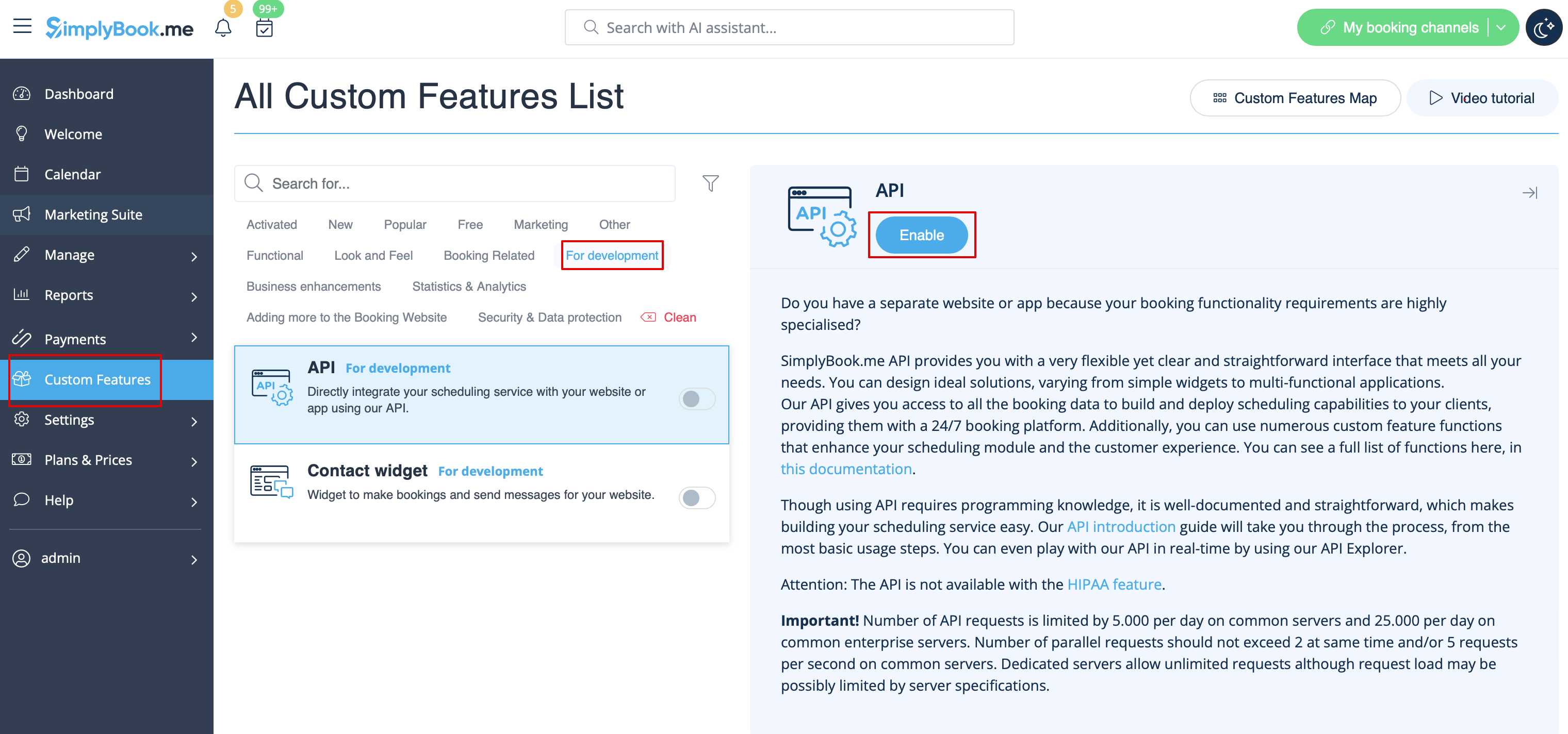
:1. Navigate to <span style="background-color:#d4f8e5; padding:5px; border-radius:5px;">Custom features</span> section using the left-side menu of your admin interface,<br> | :1. Navigate to <span style="background-color:#d4f8e5; padding:5px; border-radius:5px;">Custom features</span> section using the left-side menu of your admin interface,<br> | ||
:find the corresponding feature and enable it. | :find the corresponding feature and enable it. | ||
[[File:Api enable path | [[File:Api enable path redesigned.png|1200px | center|link=https://help.simplybook.me/images/c/ce/Api_enable_path_redesigned.png]] | ||
<br><br> | <br><br> | ||
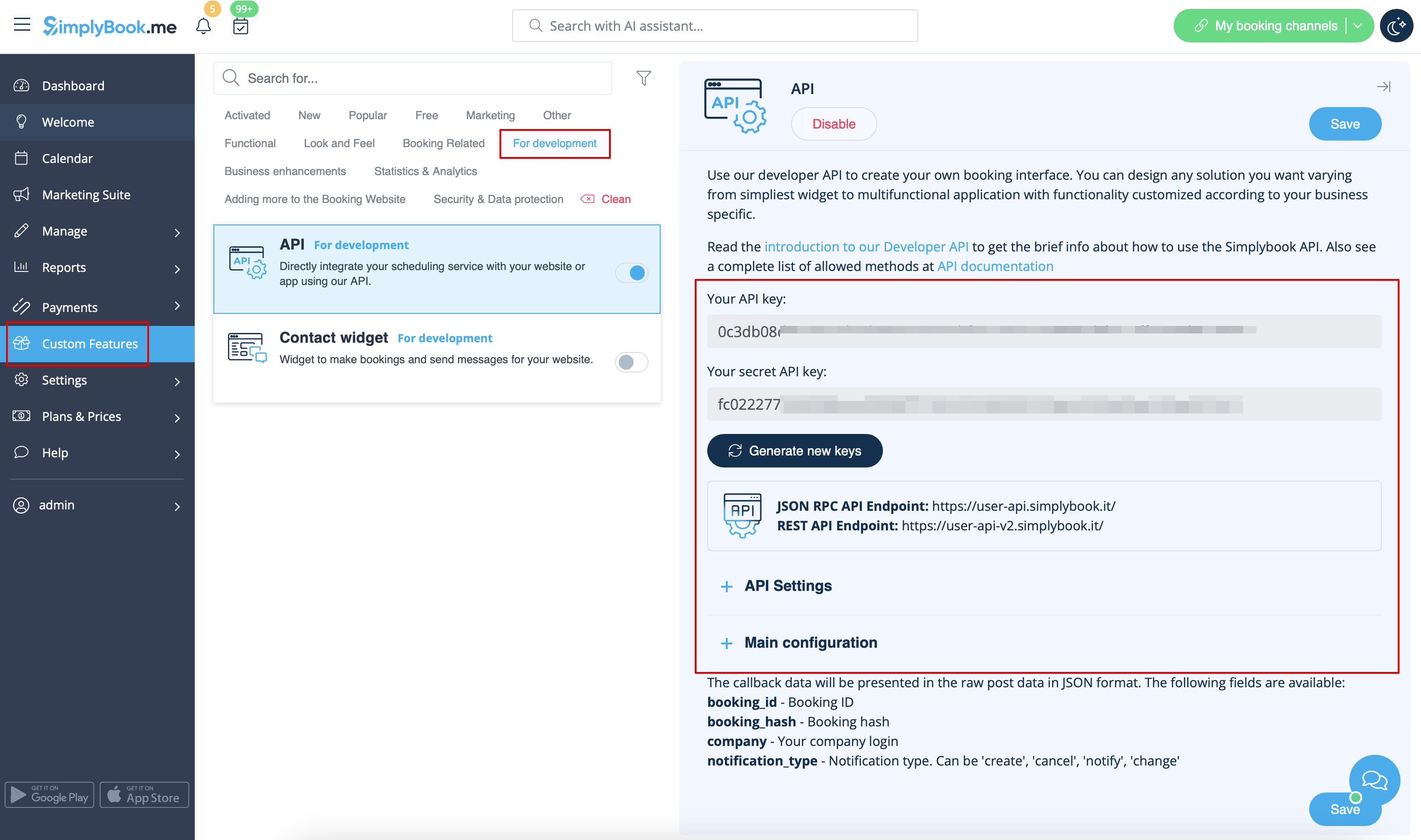
:2. Go to <span style="background-color:#d4f8e5; padding:5px; border-radius:5px;">Settings</span> on the right to access the <span style="background-color:#d4f8e5; padding:5px; border-radius:5px;">API keys.</span> | :2. Go to <span style="background-color:#d4f8e5; padding:5px; border-radius:5px;">Settings</span> on the right to access the <span style="background-color:#d4f8e5; padding:5px; border-radius:5px;">API keys.</span> | ||
[[File:Api settings path | [[File:Api settings path redesigned.png|1200px | center|link=https://help.simplybook.me/images/d/d6/Api_settings_path_redesigned.png]] | ||
<br><br> | <br><br> | ||
:3. (optional) Use <span style="background-color:#d4f8e5; padding:5px; border-radius:5px;">Callback URL</span> and other available options for your own development. | :3. (optional) Use <span style="background-color:#d4f8e5; padding:5px; border-radius:5px;">Callback URL</span> and other available options for your own development. | ||
<br><br> | <br><br> | ||
Revision as of 15:20, 6 December 2024

With the help of this custom feature you can design your own solutions varying from simple widgets to multi-functional applications.
Use it to authorize in Simplybook API with API key.
- How to use
- 1. Navigate to Custom features section using the left-side menu of your admin interface,
- find the corresponding feature and enable it.
- 2. Go to Settings on the right to access the API keys.
- 3. (optional) Use Callback URL and other available options for your own development.
