Translations:Where to change my info/10/en: Difference between revisions

From SimplyBook.me
FuzzyBot (talk | contribs)
Importing a new version from external source
 
(No difference)

Latest revision as of 16:13, 14 May 2025

Information about message (contribute)
This message has no documentation. If you know where or how this message is used, you can help other translators by adding documentation to this message.
Message definition (Where to change my info)
=SEO Settings=
By default the <span style="background-color:#d4f8e5; padding:5px; border-radius:5px;">Title tag</span> is represented by your company name that you have inserted in <span style="background-color:#d4f8e5; padding:5px; border-radius:5px;">Settings</span> -> <span style="background-color:#d4f8e5; padding:5px; border-radius:5px;">Company information</span> -> <span style="background-color:#d4f8e5; padding:5px; border-radius:5px;">Name</span> and automatic addition of <span style="background-color:#d4f8e5; padding:5px; border-radius:5px;">Scheduling and Booking Website</span> text.<br>
<span style="background-color:#d4f8e5; padding:5px; border-radius:5px;">Meta description</span> is taken from the text that you have added in <span style="background-color:#d4f8e5; padding:5px; border-radius:5px;">Settings</span> -> <span style="background-color:#d4f8e5; padding:5px; border-radius:5px;">Design settings</span> -> <span style="background-color:#d4f8e5; padding:5px; border-radius:5px;">Home page</span> -> description text for <span style="background-color:#d4f8e5; padding:5px; border-radius:5px;">About Us</span> booking website block.
<br><br>
If you need you can set these two options to contain different data and thus influence your booking website SEO.<br>
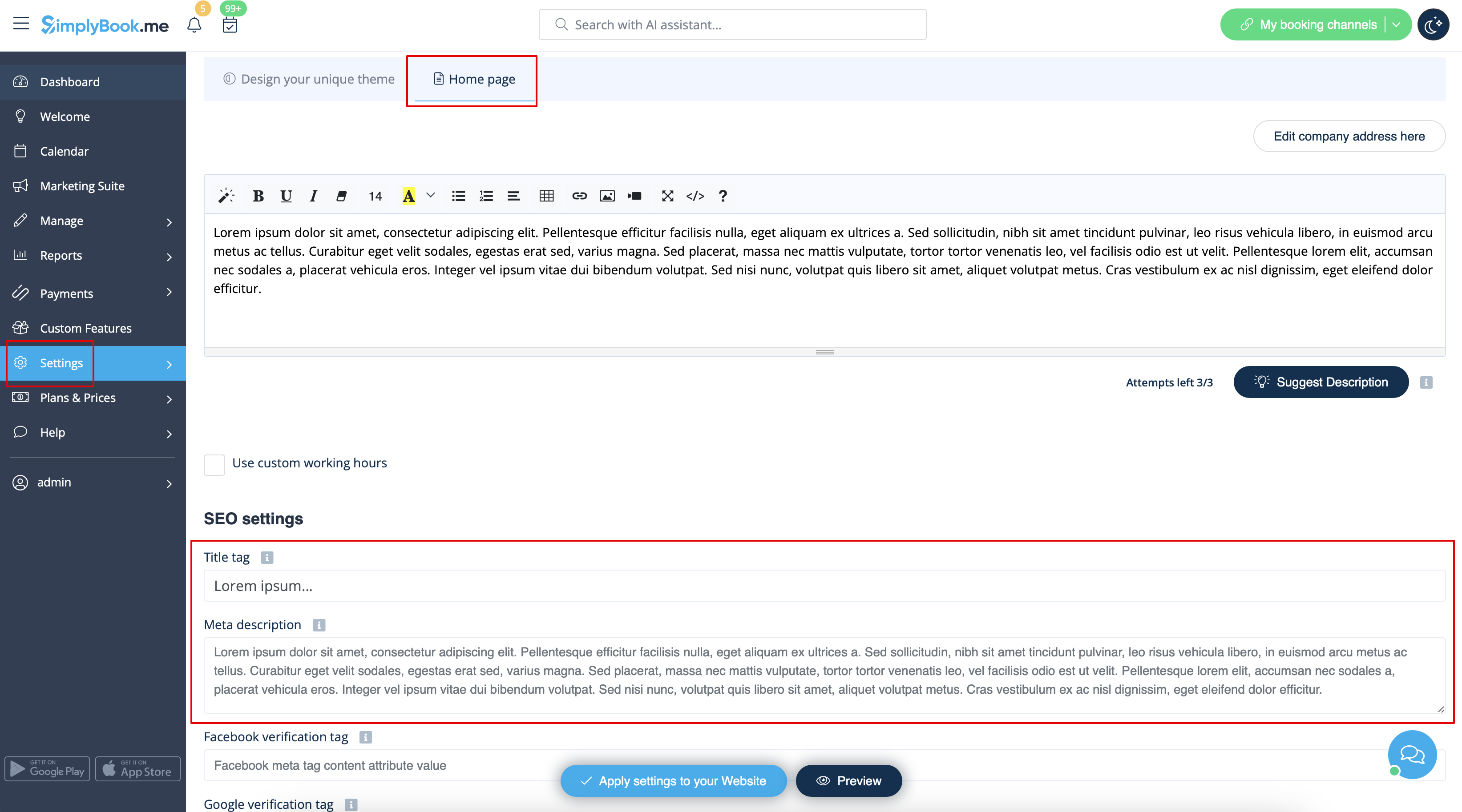
To set own <span style="background-color:#d4f8e5; padding:5px; border-radius:5px;">Title tag</span> and <span style="background-color:#d4f8e5; padding:5px; border-radius:5px;">Meta description</span> please navigate to <span style="background-color:#d4f8e5; padding:5px; border-radius:5px;">Settings</span> -> <span style="background-color:#d4f8e5; padding:5px; border-radius:5px;">Design settings</span> -> <span style="background-color:#d4f8e5; padding:5px; border-radius:5px;">Home page</span> and add the desired texts to the corresponding fields there.<br>
[[File:Seo settings path redesigned.png|1200px|border|center|link=https://help.simplybook.me/images/f/fd/Seo_settings_path_redesigned.png]]
<br><br>
'''<span style="background-color:#ffe9e9; padding:5px; border-radius:5px;">Please note!'''<span style="background-color:#ffe9e9; padding:5px; border-radius:5px;">We recommend using no more than 60 symbols for Title tag.</span></span><br>
<span style="background-color:#ffe9e9; padding:5px; border-radius:5px;">Meta description is limited to 400 characters and if you try to add a longer abstract it will be automatically cut when saving the settings.</span>
<br><br>

SEO Settings

By default the Title tag is represented by your company name that you have inserted in Settings -> Company information -> Name and automatic addition of Scheduling and Booking Website text.
Meta description is taken from the text that you have added in Settings -> Design settings -> Home page -> description text for About Us booking website block.

If you need you can set these two options to contain different data and thus influence your booking website SEO.
To set own Title tag and Meta description please navigate to Settings -> Design settings -> Home page and add the desired texts to the corresponding fields there.


Please note!We recommend using no more than 60 symbols for Title tag.
Meta description is limited to 400 characters and if you try to add a longer abstract it will be automatically cut when saving the settings.