Translations:Where to change my info/17/uk: Difference between revisions

From SimplyBook.me
Created page with "=Макет календаря= Ви можете змінити макет календаря в Налаштуваннях // Налаштування дизайну // Налаштування календаря // Випадаюче меню Макет календаря<br/> 1200px | center|link=https://help.simplybook.me/images/b/bf/Calendar_layout_options_redesigned2.png <br/> Існує 9 типів календа..."
(No difference)

Revision as of 16:14, 14 May 2025

Information about message (contribute)
This message has no documentation. If you know where or how this message is used, you can help other translators by adding documentation to this message.
Message definition (Where to change my info)
=Calendar Layout=
You can change calendar layout in Settings // Design settings // Calendar Layout settings // Calendar Layout drop-down<br/>
[[File:Calendar layout options redesigned2.png|1200px | center|link=https://help.simplybook.me/images/b/bf/Calendar_layout_options_redesigned2.png ]]<br/>
There are 9 types of calendar layout:<br/>
:'''Slots weekly''' - shows available time in the intervals equal to your service duration for a week. Starts counting from the first available time.
:'''Modern''' - shows available time in the intervals equal to your service duration for a day. Starts counting from the first available time.
:'''Flexible weekly''' - shows available time in the intervals equal to your [[Need_to_change_interval_(timeframe)| timeframe]] duration for a week. Starts counting from the first available time.
:'''Flexible''' - shows available time in the intervals equal to your [[Need_to_change_interval_(timeframe)| timeframe]] duration for a day. Starts counting from the first available time.
:'''Modern provider''' -  shows available time for providers for chosen date. Starts counting from the first available time of all providers.
:'''Flexible provider'''- shows available times for providers in the intervals equal to your [[Need_to_change_interval_(timeframe)| timeframe]] duration. Starts counting from the first available time on selected date.
:'''Daily Classes'''- shows available times for classes in the intervals equal to class duration. Starts counting from the first available time.
:::'''''Please note!''''' [[Custom_Features#Multiple_Bookings | Multiple Bookings]] custom feature currently does not work with Classes layout.
:'''Weekly Classes''' shows available times for classes in the intervals equal to class duration with weekly options. Starts counting from the first available time for a date. Only available times are displayed, unavailable slots are hidden.
If you have services that have fixed start times, you can try using [[Custom_Features#Appointment_at_Fixed_Time| Appointment at fixed time]] Custom Feature.
<br/><br/>

Макет календаря

Ви можете змінити макет календаря в Налаштуваннях // Налаштування дизайну // Налаштування календаря // Випадаюче меню Макет календаря
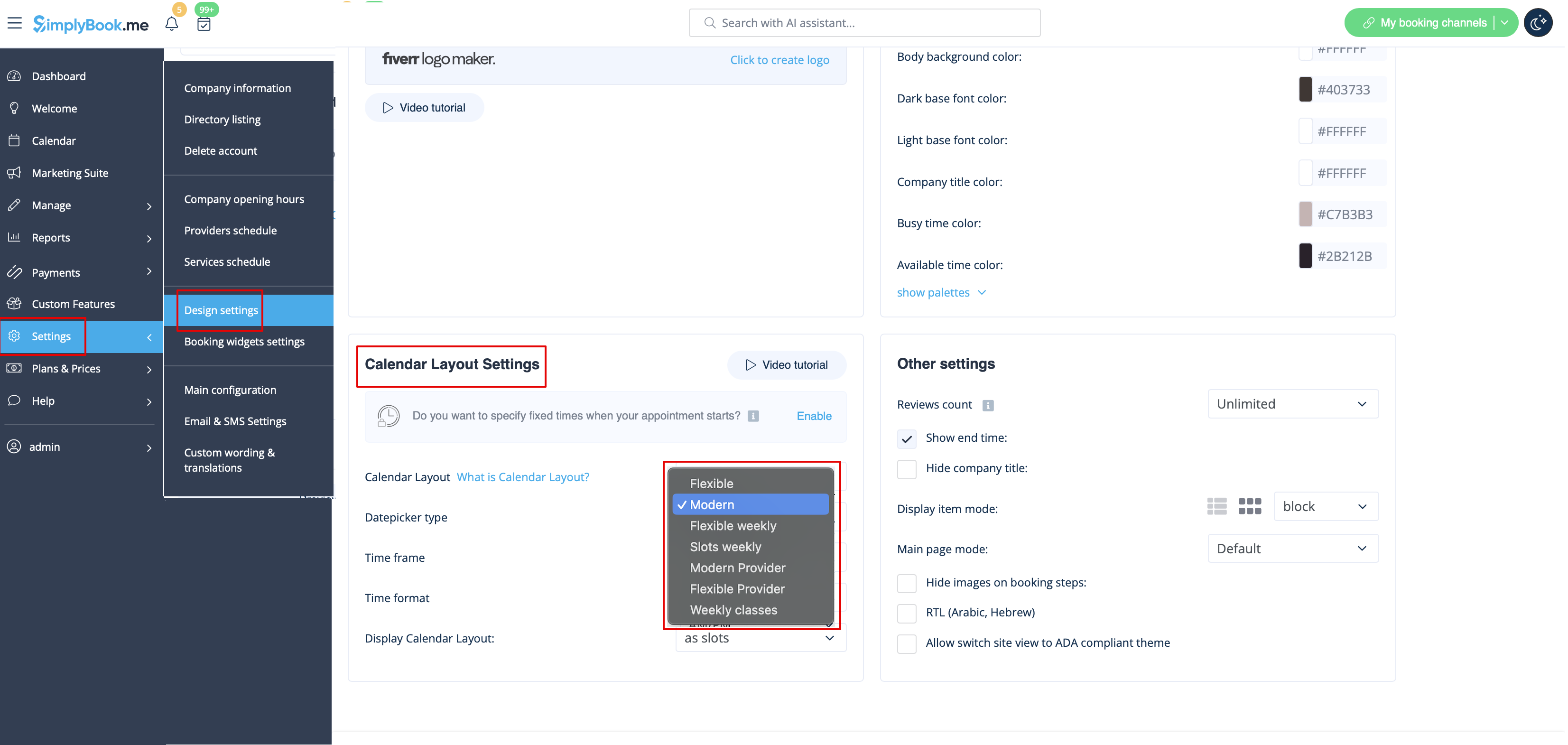

Існує 9 типів календаря:
:Slots weekly - показує доступний час з інтервалами, рівними тривалості вашого сервісу протягом тижня. Починає відлік з першого вільного часу. :Сучасний - показує вільний час з інтервалами, що дорівнюють тривалості вашого обслуговування протягом дня. Починає відлік з першого доступного часу. :Гнучкий щотижневий - показує доступний час з інтервалами, рівними тривалості вашого таймфрейму на тиждень. Починає відлік з першого доступного часу. :Гнучкий - показує доступний час з інтервалами, рівними тривалості вашого таймфрейму на день. Починає відлік з першого доступного часу. :Сучасний провайдер - показує доступний час для провайдерів на обрану дату. Починає відлік з першого доступного часу всіх провайдерів. :Гнучкий провайдер - показує доступний час для провайдерів з інтервалами, що дорівнюють тривалості вашого таймфрейму на день. Починає відлік з першого вільного часу у вибрану дату. :Щоденні заняття - показує вільний час для занять з інтервалами, що дорівнюють тривалості заняття. Відлік починається з першого вільного часу.

Зверніть увагу! Наразі користувацька функція Multiple Bookings не працює з макетом Classes.

:Weekly Classes - показує вільний час для занять з інтервалами, що дорівнюють тривалості занять, з тижневими опціями. Відлік починається з першого доступного часу для дати. Відображається лише доступний час, недоступні слоти приховуються. Якщо у вас є послуги з фіксованим часом початку, ви можете спробувати скористатися користувацькою функцією " Призначення на фіксований час ".