Created page with "=Paramètres SEO= Par défaut, la <span style="background-color:#d4f8e5; padding:5px; border-radius:5px;">balise Title</span> est représentée par le nom de votre entreprise que vous avez inséré dans <span style="background-color:#d4f8e5; padding:5px; border-radius:5px;">Paramètres</span> -> <span style="background-color:#d4f8e5; padding:5px; border-radius:5px;">Informations sur l'entreprise</span> -> <span style="background-color:#d4f8e5; padding:5px; border-r..." |
No edit summary |
||
| (2 intermediate revisions by the same user not shown) | |||
| Line 1: | Line 1: | ||
=Paramètres SEO= | = Paramètres SEO = | ||
Par défaut, la <span style="background-color:#d4f8e5; padding:5px; border-radius:5px;">balise Title</span> est représentée par le nom de votre entreprise que vous avez inséré dans <span style="background-color:#d4f8e5; padding:5px; border-radius:5px;">Paramètres</span> -> <span style="background-color:#d4f8e5; padding:5px; border-radius:5px;">Informations sur l'entreprise</span> -> <span style="background-color:#d4f8e5; padding:5px; border-radius:5px;">Nom</span> et ajout automatique du texte <span style="background-color:#d4f8e5; padding:5px; border-radius:5px;"> | Par défaut, la <span style="background-color:#d4f8e5; padding:5px; border-radius:5px;">balise Title</span> est représentée par le nom de votre entreprise que vous avez inséré dans <span style="background-color:#d4f8e5; padding:5px; border-radius:5px;">Paramètres</span> -> <span style="background-color:#d4f8e5; padding:5px; border-radius:5px;">Informations sur l'entreprise</span> -> <span style="background-color:#d4f8e5; padding:5px; border-radius:5px;">Nom</span> et ajout automatique du texte <span style="background-color:#d4f8e5; padding:5px; border-radius:5px;">du site de programmation et de réservation</span>.<br> | ||
La <span style="background-color:#d4f8e5; padding:5px; border-radius:5px;">méta description</span> est tirée du texte que vous avez ajouté dans <span style="background-color:#d4f8e5; padding:5px; border-radius:5px;">Paramètres</span> -> <span style="background-color:#d4f8e5; padding:5px; border-radius:5px;">Paramètres de conception</span> -> <span style="background-color:#d4f8e5; padding:5px; border-radius:5px;">Page d'accueil</span> -> texte de description pour le bloc " <span style="background-color:#d4f8e5; padding:5px; border-radius:5px;">A propos de nous"</span> du site de réservation. | La <span style="background-color:#d4f8e5; padding:5px; border-radius:5px;">méta description</span> est tirée du texte que vous avez ajouté dans <span style="background-color:#d4f8e5; padding:5px; border-radius:5px;">Paramètres</span> -> <span style="background-color:#d4f8e5; padding:5px; border-radius:5px;">Paramètres de conception</span> -> <span style="background-color:#d4f8e5; padding:5px; border-radius:5px;">Page d'accueil</span> -> texte de description pour le bloc " <span style="background-color:#d4f8e5; padding:5px; border-radius:5px;">A propos de nous"</span> du site de réservation. | ||
<br><br> | <br><br> | ||
Si vous le souhaitez, vous pouvez configurer ces deux options pour qu'elles contiennent des données différentes et influencent ainsi le référencement de votre site de réservation.<br> | Si vous le souhaitez, vous pouvez configurer ces deux options pour qu'elles contiennent des données différentes et influencent ainsi le référencement de votre site de réservation.<br> | ||
Pour définir votre propre <span style="background-color:#d4f8e5; padding:5px; border-radius:5px;">balise Title</span> et <span style="background-color:#d4f8e5; padding:5px; border-radius:5px;">Meta description</span>, veuillez naviguer dans <span style="background-color:#d4f8e5; padding:5px; border-radius:5px;">Paramètres</span> -> <span style="background-color:#d4f8e5; padding:5px; border-radius:5px;">Paramètres de conception</span> -> <span style="background-color:#d4f8e5; padding:5px; border-radius:5px;">Page d'accueil</span> et | Pour définir votre propre <span style="background-color:#d4f8e5; padding:5px; border-radius:5px;">balise Title</span> et <span style="background-color:#d4f8e5; padding:5px; border-radius:5px;">Meta description</span>, veuillez naviguer dans <span style="background-color:#d4f8e5; padding:5px; border-radius:5px;">Paramètres</span> -> <span style="background-color:#d4f8e5; padding:5px; border-radius:5px;">Paramètres de conception</span> -> <span style="background-color:#d4f8e5; padding:5px; border-radius:5px;">Page d'accueil</span> et ajouter les textes souhaités dans les champs correspondants.<br> | ||
[[File:Seo settings path redesigned.png|1200px|border|center|link=https://help.simplybook.me/images/f/fd/Seo_settings_path_redesigned.png]] | [[File:Seo settings path redesigned.png|1200px|border|center|link=https://help.simplybook.me/images/f/fd/Seo_settings_path_redesigned.png]] | ||
<br><br> | <br><br> | ||
Latest revision as of 07:29, 15 May 2025
Paramètres SEO
Par défaut, la balise Title est représentée par le nom de votre entreprise que vous avez inséré dans Paramètres -> Informations sur l'entreprise -> Nom et ajout automatique du texte du site de programmation et de réservation.
La méta description est tirée du texte que vous avez ajouté dans Paramètres -> Paramètres de conception -> Page d'accueil -> texte de description pour le bloc " A propos de nous" du site de réservation.
Si vous le souhaitez, vous pouvez configurer ces deux options pour qu'elles contiennent des données différentes et influencent ainsi le référencement de votre site de réservation.
Pour définir votre propre balise Title et Meta description, veuillez naviguer dans Paramètres -> Paramètres de conception -> Page d'accueil et ajouter les textes souhaités dans les champs correspondants.
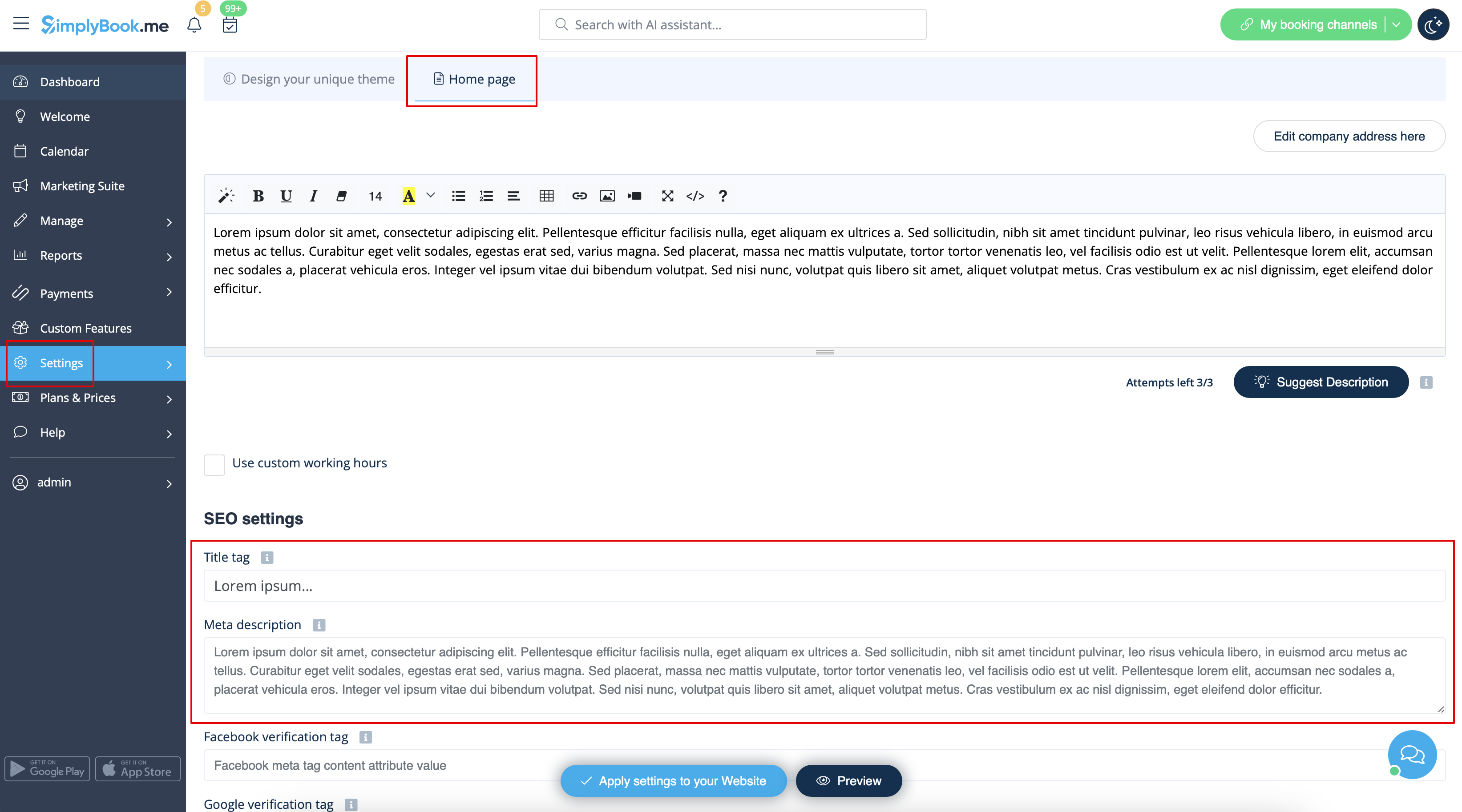
Veuillez noter quenous recommandons de ne pas utiliser plus de 60 symboles pour la balise Titre.
La méta description est limitée à 400 caractères et si vous essayez d'ajouter un résumé plus long, il sera automatiquement coupé lors de l'enregistrement des paramètres.
