Translations:Remove Elements from booking page/14/da: Difference between revisions

From SimplyBook.me
Created page with "= Deaktiver bookingside (kun tilgængelig for betalte konti) = For ikke at vise nogen oplysninger på din bookingside (gøre den tom), kan du sætte et tomt tema på din bookingside i <span style="background-color:#d4f8e5; padding:5px; border-radius:5px;">Indstillinger</span> -> <span style="background-color:#d4f8e5; padding:5px; border-radius:5px;">Designindstillinger</span>. <br><br> Vælg at vise alle temaer, og vælg det sidste uden billede, tilføj linket til den..."
 
(No difference)

Latest revision as of 10:07, 15 May 2025

Information about message (contribute)
This message has no documentation. If you know where or how this message is used, you can help other translators by adding documentation to this message.
Message definition (Remove Elements from booking page)
=Disable booking page(available for paid accounts only)=
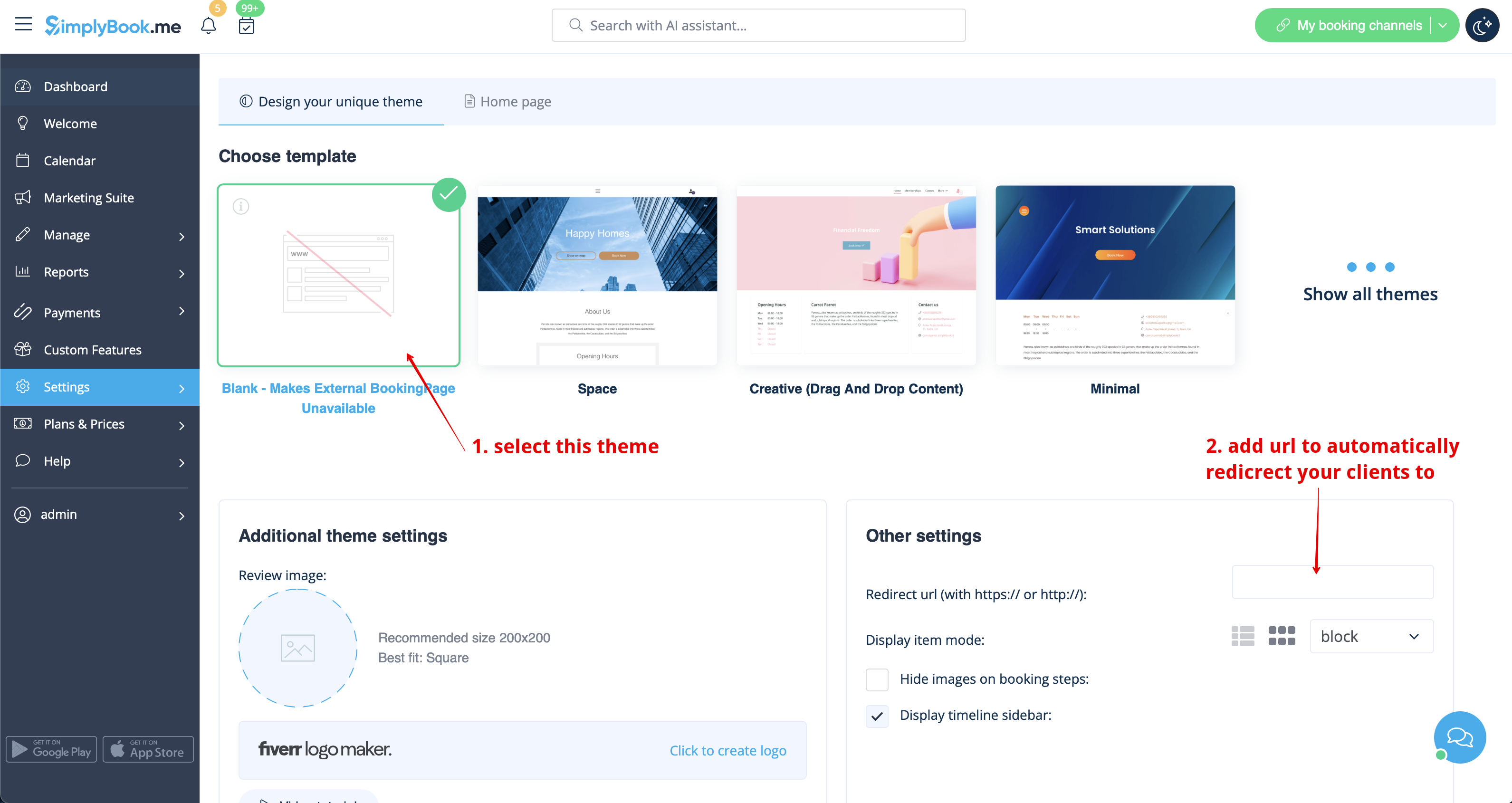
In order not to show any info on your booking page (make it blank), you can put blank theme on your booking page in <span style="background-color:#d4f8e5; padding:5px; border-radius:5px;">Settings</span> -> <span style="background-color:#d4f8e5; padding:5px; border-radius:5px;">Design settings.</span>
<br><br>
Please select to show all themes and choose the last one without image, add the link to the page your clients should be redirected to in case they open your booking page and save settings.
[[File:Set blank theme redesigned.png|1200px| center|link=https://help.simplybook.me/images/7/74/Set_blank_theme_redesigned.png]]
<br><br>

Deaktiver bookingside (kun tilgængelig for betalte konti)

For ikke at vise nogen oplysninger på din bookingside (gøre den tom), kan du sætte et tomt tema på din bookingside i Indstillinger -> Designindstillinger.

Vælg at vise alle temaer, og vælg det sidste uden billede, tilføj linket til den side, dine kunder skal omdirigeres til, hvis de åbner din bookingside, og gem indstillingerne.