Translations:Add elements to booking page/7/da: Difference between revisions

From SimplyBook.me
Created page with "= Galleri = <br><br> Gør din bookingside mere attraktiv ved at vise billeder af dine tjenester med den brugerdefinerede funktion <span style="background-color:#cdeffc; padding:5px; border-radius:5px;"> Fotogalleri</span>. For at aktivere den skal du gå til <span style="background-color:#d4f8e5; padding:5px; border-radius:5px;">Brugerdefinerede funktioner</span> -> <span style="background-color:#d4f8e5; padding:5px; border-radius:5px..."
 
(No difference)

Latest revision as of 10:15, 15 May 2025

Information about message (contribute)
This message has no documentation. If you know where or how this message is used, you can help other translators by adding documentation to this message.
Message definition (Add elements to booking page)
=Gallery=
<br><br>
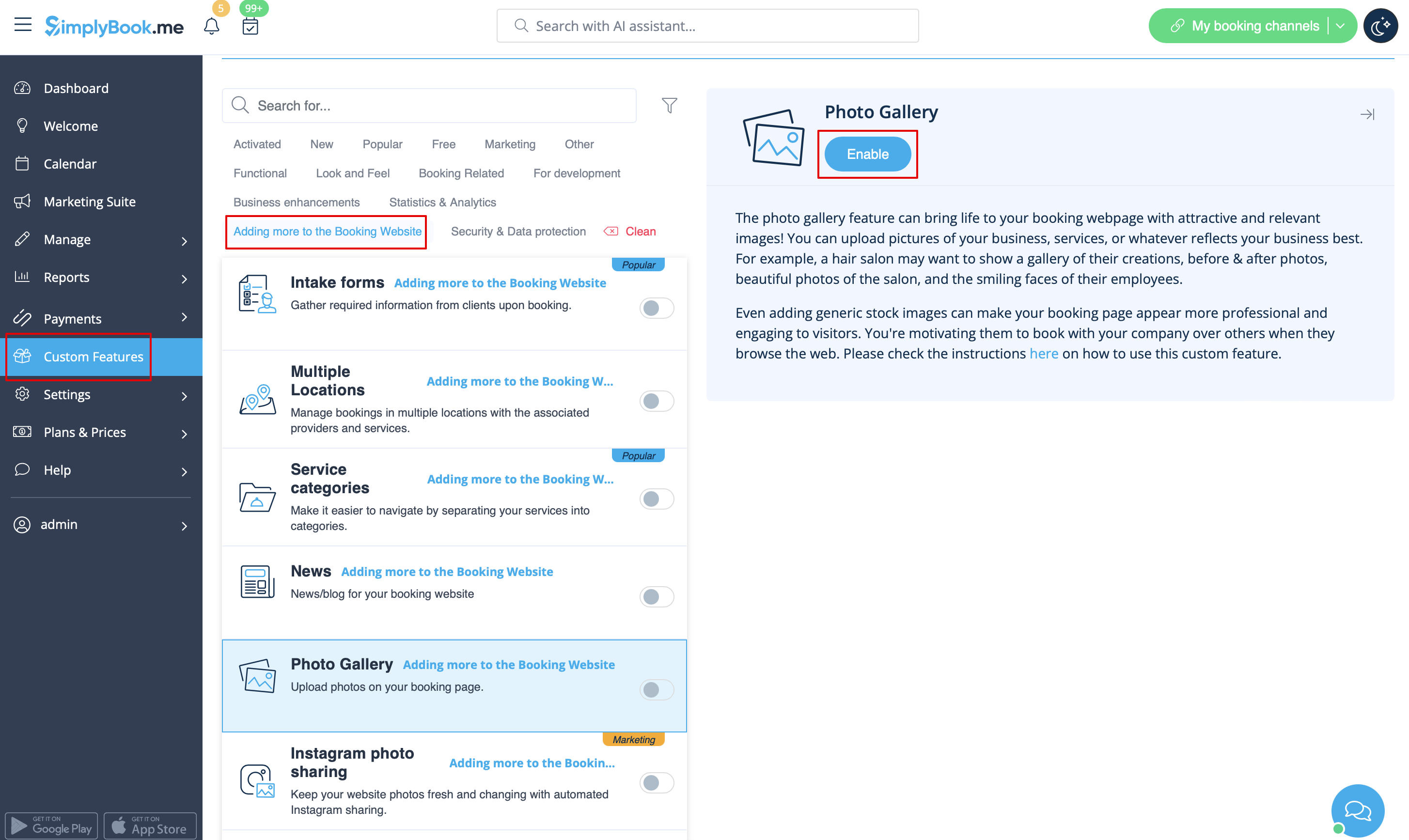
Make your booking page more attractive showing the photos of your services with <span style="background-color:#cdeffc; padding:5px; border-radius:5px;">[[Custom_Features#Photo_Gallery| Photo Gallery]]</span> custom feature.
To enable it please go to <span style="background-color:#d4f8e5; padding:5px; border-radius:5px;">Custom Features</span> -> <span style="background-color:#d4f8e5; padding:5px; border-radius:5px;">Adding more to the booking website</span> -> <span style="background-color:#cdeffc; padding:5px; border-radius:5px;">[[Custom_Features#Photo_Gallery| Photo Gallery]]</span> -> <span style="background-color:#d4f8e5; padding:5px; border-radius:5px;">Enable</span>
[[File:Photo gallery enable path redesigned.png|1200px | border|center|link=https://help.simplybook.me/images/7/79/Photo_gallery_enable_path_redesigned.png]]
<br><br>

Galleri


Gør din bookingside mere attraktiv ved at vise billeder af dine tjenester med den brugerdefinerede funktion Fotogalleri. For at aktivere den skal du gå til Brugerdefinerede funktioner -> Tilføj mere til bookingwebstedet -> Fotogalleri -> Aktivér