Translations:Add elements to booking page/11/nl: Difference between revisions

From SimplyBook.me
Created page with "= Html-opmaak voor beschrijvingsvelden = <br><br> Met deze functie kunt u beschrijvingen opvallender maken met behulp van HTML-opmaak. Ga naar <span style="background-color:#d4f8e5; padding:5px; border-radius:5px;">Aangepaste functies</span> -> <span style="background-color:#d4f8e5; padding:5px; border-radius:5px;">Look and Feel</span> -> <span style="background-color:#cdeffc; padding:5px; border-radius:5px;">Custom_Features#HTML_Description_Field_for_Events| HTM..."
(No difference)

Revision as of 10:16, 15 May 2025

Information about message (contribute)
This message has no documentation. If you know where or how this message is used, you can help other translators by adding documentation to this message.
Message definition (Add elements to booking page)
=Html formatting for description fields=
<br><br>
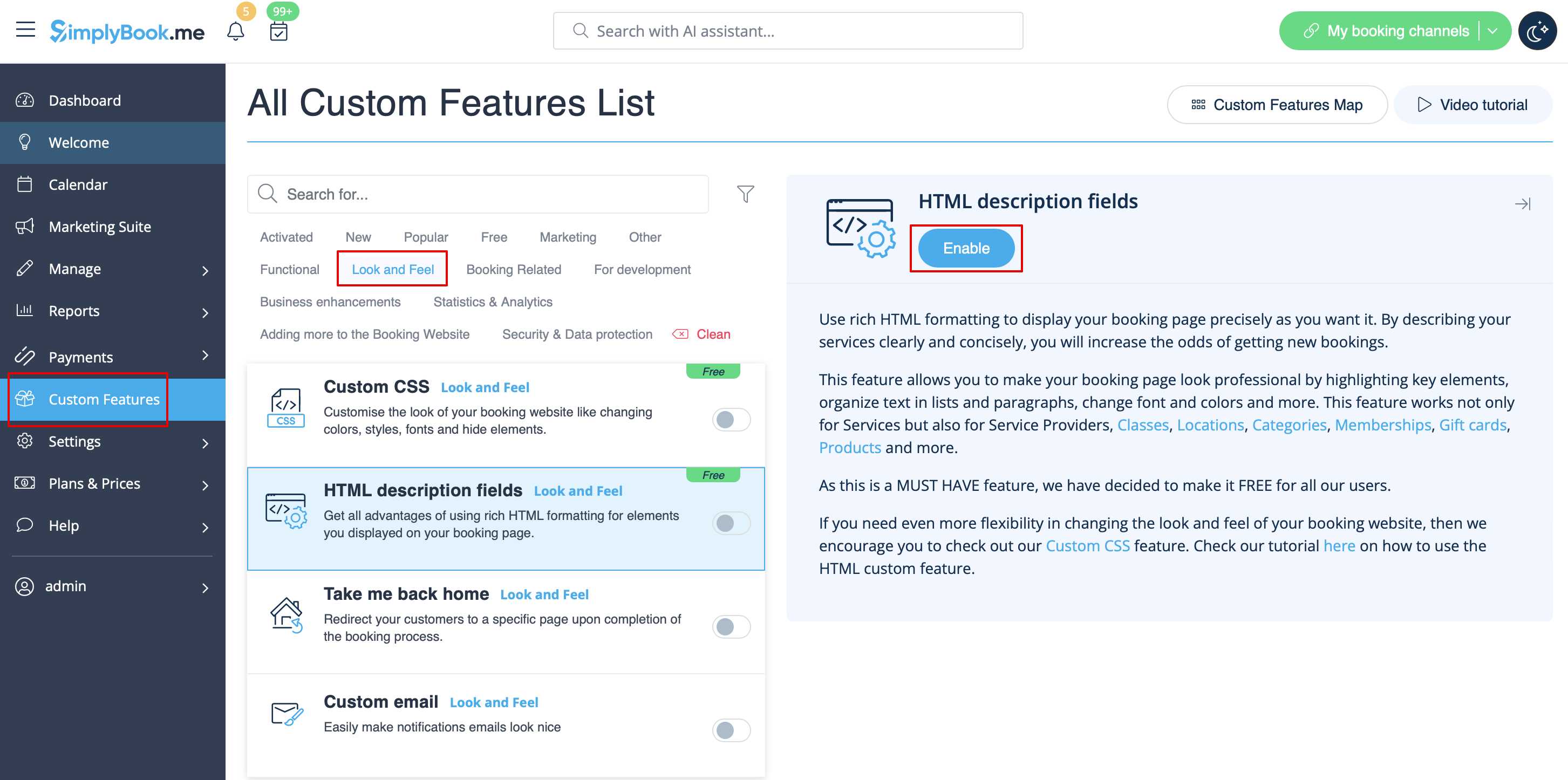
This feature allows making descriptions more eye-catching with the use of HTML formatting.
Please go to <span style="background-color:#d4f8e5; padding:5px; border-radius:5px;">Custom Features</span> -> <span style="background-color:#d4f8e5; padding:5px; border-radius:5px;">Look and Feel</span> -> <span style="background-color:#cdeffc; padding:5px; border-radius:5px;">[[Custom_Features#HTML_Description_Field_for_Events| HTML description fields]]</span> -> <span style="background-color:#d4f8e5; padding:5px; border-radius:5px;">Enable</span> and edit descriptions for services, providers, locations and categories in the corresponding <span style="background-color:#d4f8e5; padding:5px; border-radius:5px;">Manage</span> section.
[[File:Html description enable path redesigned.png|1200px| border|center|link=https://help.simplybook.me/images/1/1f/Html_description_enable_path_redesigned.png]]

Html-opmaak voor beschrijvingsvelden


Met deze functie kunt u beschrijvingen opvallender maken met behulp van HTML-opmaak.

Ga naar Aangepaste functies -> Look and Feel -> HTML-beschrijvingsvelden -> Beschrijvingen voor diensten, aanbieders, locaties en categorieën inschakelen en bewerken in de betreffende sectie Beheren
<a href="index.php?SHRtbCBkZXNjcmlwdGlvbiBlbmFibGUgcGF0aCByZWRlc2lnbmVkLnBuZ3wxMjAwcHh8IGJvcmRlcnxjZW50ZXJ8bGluaz1odHRwczovL2hlbHAuc2ltcGx5Ym9vay5tZS9pbWFnZXMvMS8xZi9IdG1sX2Rlc2NyaXB0aW9uX2VuYWJsZV9wYXRoX3JlZGVzaWduZWQucG5n" file></a> Html