Translations:Adjusting client invoices/8/da: Difference between revisions

From SimplyBook.me
Created page with "4. '''<span style="background-color:#cdeffc; padding:5px; border-radius:5px;">Indtastningsformularer</span> og <span style="background-color:#cdeffc; padding:5px; border-radius:5px;">klientfelter</span>'''<br> Du kan tilføje bestemte formularer, der skal vises i klientinformationsblokken.<br> Hvis det er en indtastningsformular, skal du gå til <span style="background-color:#d4f8e5; padding:5px; border-rad..."
 
(No difference)

Latest revision as of 15:00, 15 May 2025

Information about message (contribute)
This message has no documentation. If you know where or how this message is used, you can help other translators by adding documentation to this message.
Message definition (Adjusting client invoices)
4. '''<span style="background-color:#cdeffc; padding:5px; border-radius:5px;">[[Intake_Forms_custom_feature|Intake forms]]</span> and <span style="background-color:#cdeffc; padding:5px; border-radius:5px;">[[Client_Fields_Custom_Feature|Client Fields]]</span>'''<br>
You can add certain forms to be displayed in the client information block.<br>
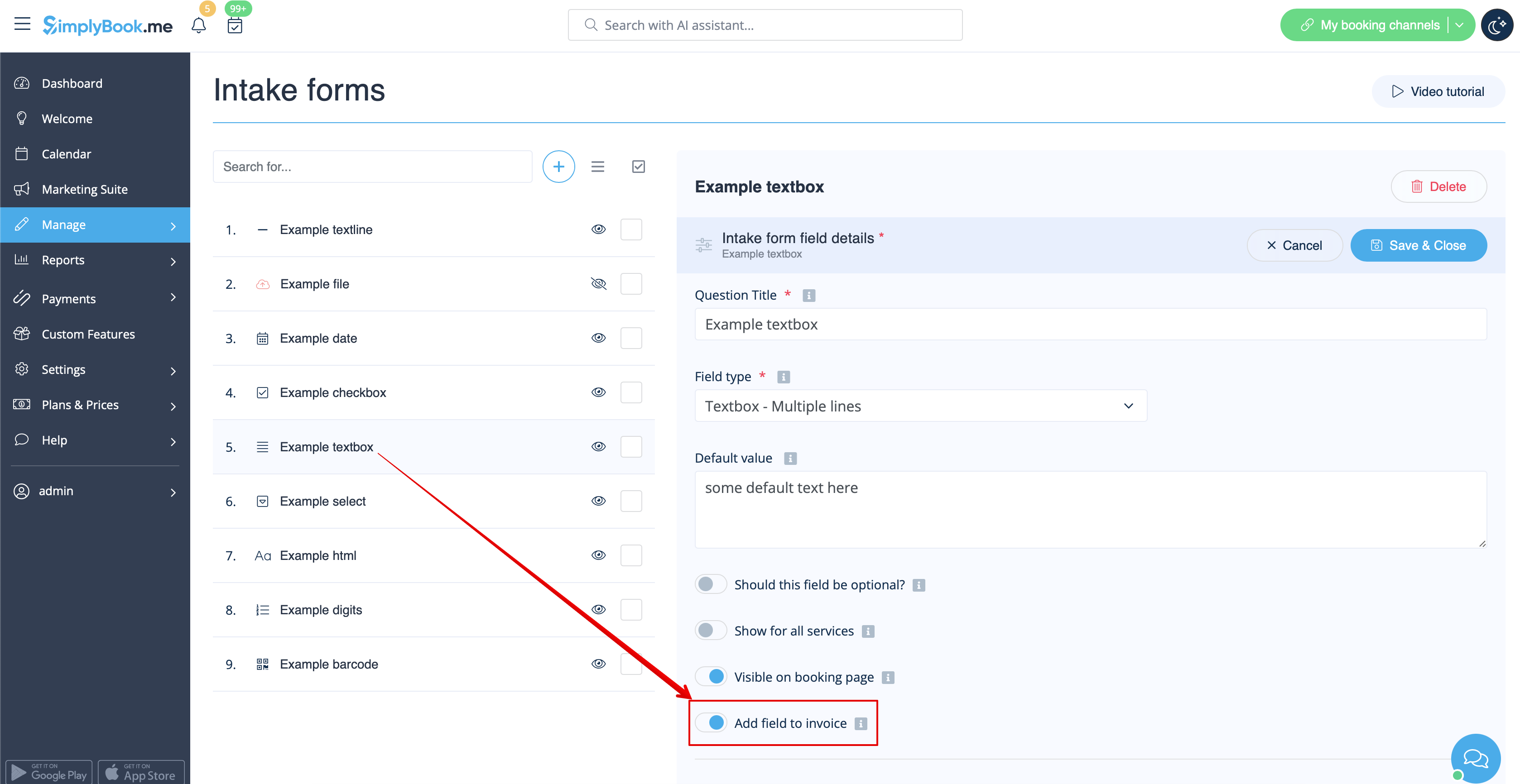
If it is an intake form please go to <span style="background-color:#d4f8e5; padding:5px; border-radius:5px;">Manage</span> -> <span style="background-color:#d4f8e5; padding:5px; border-radius:5px;">Intake forms</span> -> click on the necessary form to select -> enable <span style="background-color:#d4f8e5; padding:5px; border-radius:5px;">Add field to invoice,</span> save settings.<br>
[[File:Add intake form to invoice redesigned.png|1200px|border|center|link=https://help.simplybook.me/images/1/16/Add_intake_form_to_invoice_redesigned.png]]
<br><br>

4. Indtastningsformularer og klientfelter
Du kan tilføje bestemte formularer, der skal vises i klientinformationsblokken.
Hvis det er en indtastningsformular, skal du gå til Administrer -> Indtastningsformularer -> klikke på den ønskede formular for at vælge den -> aktivere Tilføj felt til faktura, gem indstillinger.