Translations:Adjusting client invoices/9/fr: Difference between revisions

From SimplyBook.me
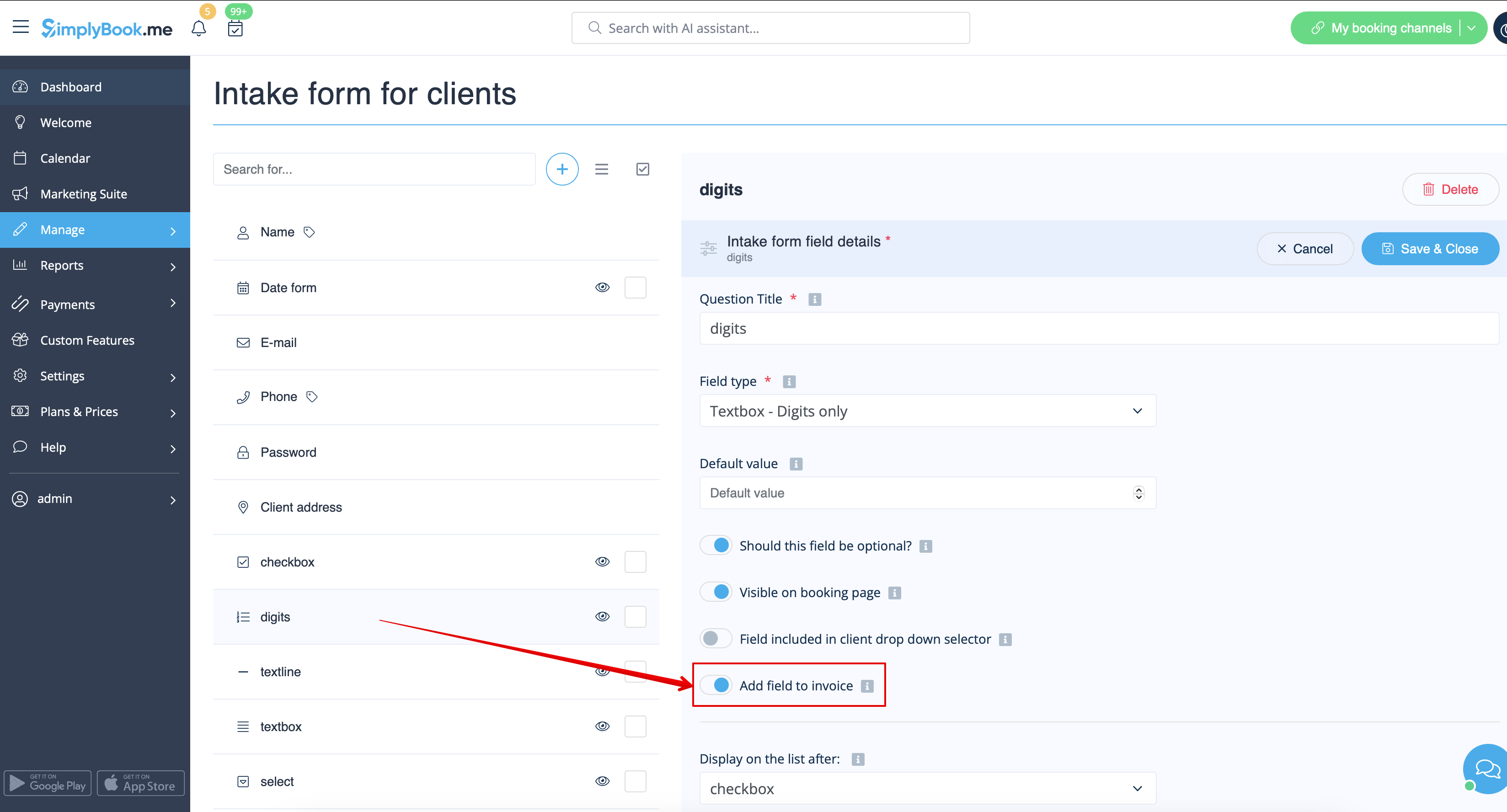
Created page with "Si vous souhaitez ajouter un formulaire client, accédez à <span style="background-color:#d4f8e5; padding:5px; border-radius:5px;">Gérer</span> -> <span style="background-color:#d4f8e5; padding:5px; border-radius:5px;">Champs client</span> -> cliquez sur le champ souhaité pour le modifier -> activez <span style="background-color:#d4f8e5; padding:5px; border-radius:5px;">Ajouter un champ à la facture,</span> puis enregistrez.<br> File:Add client form to inv..."
 
(No difference)

Latest revision as of 15:01, 15 May 2025

Information about message (contribute)
This message has no documentation. If you know where or how this message is used, you can help other translators by adding documentation to this message.
Message definition (Adjusting client invoices)
Or if you wish to add a client form then navigate to <span style="background-color:#d4f8e5; padding:5px; border-radius:5px;">Manage</span> -> <span style="background-color:#d4f8e5; padding:5px; border-radius:5px;">Client fields</span> -> click on the desired field to edit it -> enable <span style="background-color:#d4f8e5; padding:5px; border-radius:5px;">Add field to invoice,</span> save.<br>
[[File:Add client form to invoice redesigned.png|1200px|border|center|link=https://help.simplybook.me/images/2/2f/Add_client_form_to_invoice_redesigned.png]]
<br><br>

Si vous souhaitez ajouter un formulaire client, accédez à Gérer -> Champs client -> cliquez sur le champ souhaité pour le modifier -> activez Ajouter un champ à la facture, puis enregistrez.