Translations:How to set my availability/4/nl: Difference between revisions

From SimplyBook.me
Created page with "= Ik heb schema's voor services = <br><br> Ga naar Beheer//Services//Tabblad Serviceschema en verplaats de schuifregelaars om de openingstijden voor deze service in te stellen als deze afwijken van het gebruikelijke bedrijfsschema. <br><br> 1200px| center|link=https://help.simplybook.me/images/e/ec/Service_schedule_path_redesigned.png <br><br> Als de dienst hetzelfde schema heeft als het bedrijf, hoeft u daar niets te wijzig..."
(No difference)

Revision as of 15:05, 15 May 2025

Information about message (contribute)
This message has no documentation. If you know where or how this message is used, you can help other translators by adding documentation to this message.
Message definition (How to set my availability)
=I have schedules for services=
<br><br>
In Manage//Services//Service schedule tab move the sliders to set open times for this service if it differs from usual company schedule.
<br><br>
[[File:Service schedule path redesigned.png|1200px| center|link=https://help.simplybook.me/images/e/ec/Service_schedule_path_redesigned.png]] 
<br><br>
If the service has the same schedule as company you do not have to change anything there, it will be applied automatically.
<br><br>
If you need to set some exceptions in service schedule for holidays or other needs please choose "Show advanced settings" and then “Special days schedule” tab.
<br><br>
[[File:Service special days path redesigned.png|1200px | center|link=File:Service special days path redesigned.png]]  
<br><br>
;You may also need:
*[[Special:MyLanguage/Need_to_change_interval_(timeframe)| Other interval than 60 minutes]]
*[[Special:MyLanguage/How_to_change_the_way_time_slots_are_shown| Change the way time slots are shown on the booking page]]
<br><br>

Ik heb schema's voor services


Ga naar Beheer//Services//Tabblad Serviceschema en verplaats de schuifregelaars om de openingstijden voor deze service in te stellen als deze afwijken van het gebruikelijke bedrijfsschema.
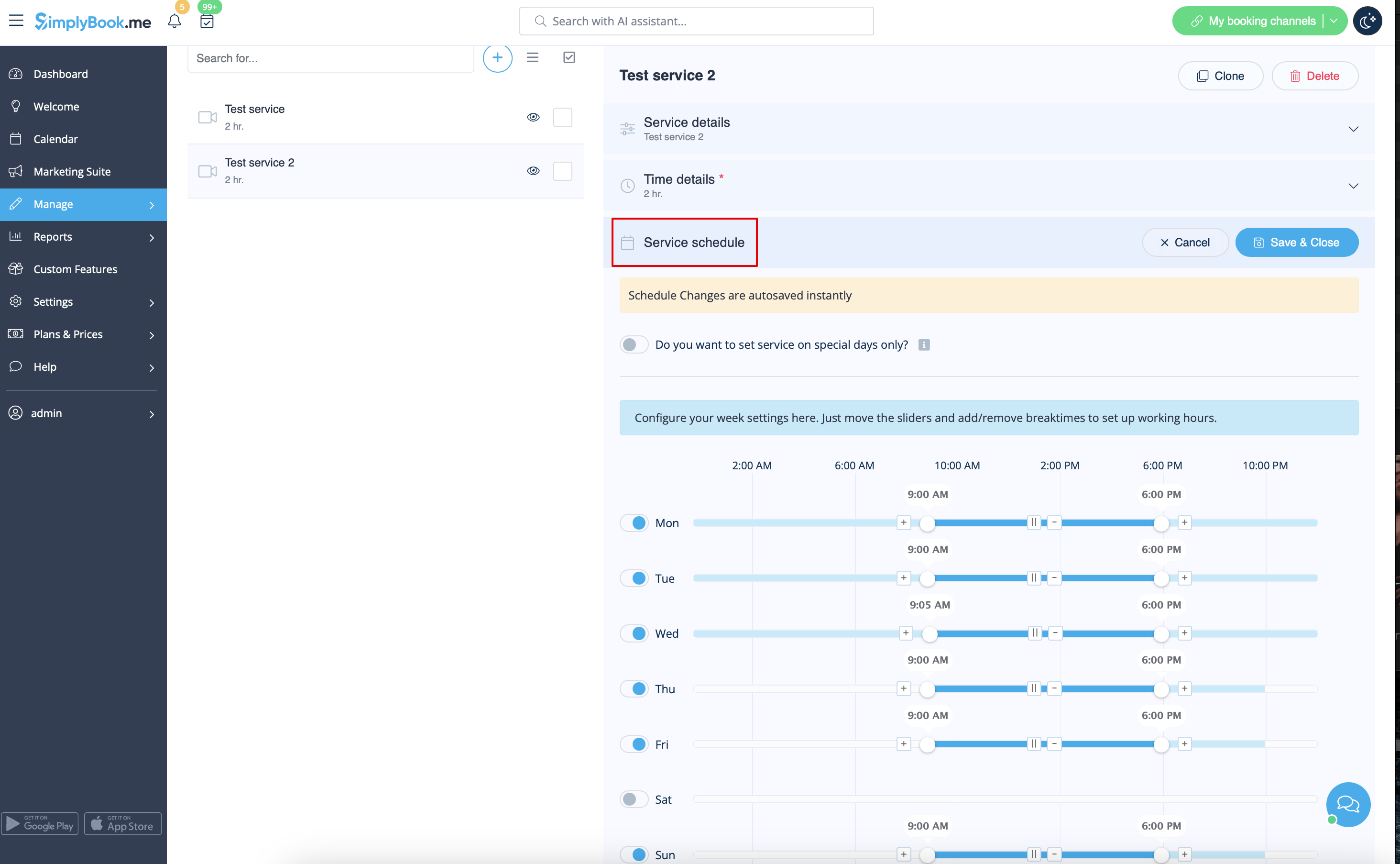


Als de dienst hetzelfde schema heeft als het bedrijf, hoeft u daar niets te wijzigen, dit wordt automatisch toegepast.

Als u uitzonderingen in het dienstschema moet instellen voor feestdagen of andere behoeften, kies dan "Geavanceerde instellingen weergeven" en vervolgens het tabblad "Schema voor speciale dagen".


;Mogelijk hebt u ook nodig: