Translations:Adding services, providers and availability(new interface)/13/fr: Difference between revisions

From SimplyBook.me
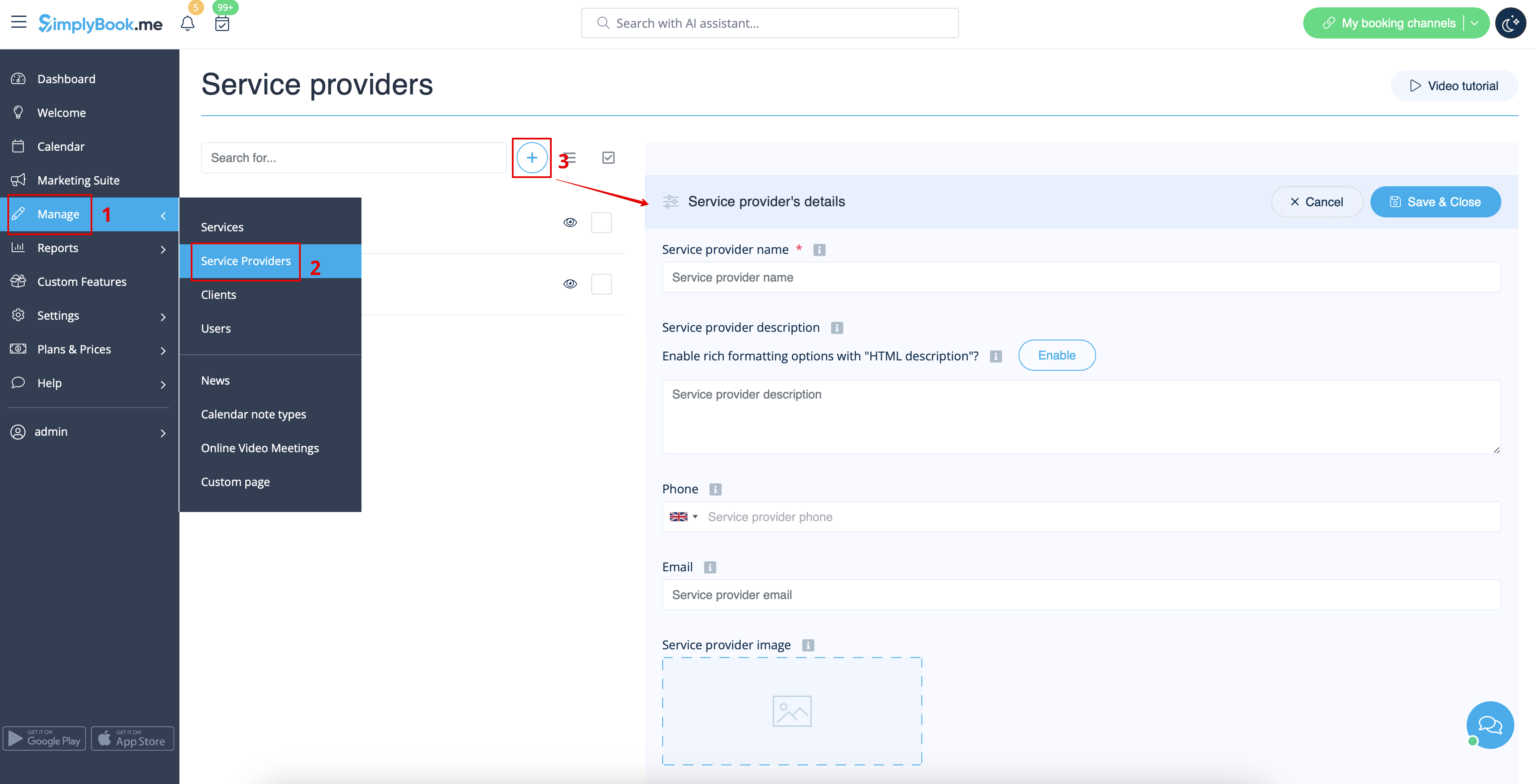
Created page with "Dans <span style="background-color:#d4f8e5; padding:5px; border-radius:5px;">Gérer</span> -> <span style="background-color:#d4f8e5; padding:5px; border-radius:5px;">Prestataires de services</span>, appuyez sur le bouton <span style="background-color:#d4f8e5; padding:5px; border-radius:5px;">+</span>. <br><br> 1200px | center|link=https://help.simplybook.me/images/2/2f/Add_new_provider_path_redesigned.png <br><br> Sur <spa..."
 
(No difference)

Latest revision as of 09:38, 16 May 2025

Information about message (contribute)
This message has no documentation. If you know where or how this message is used, you can help other translators by adding documentation to this message.
Message definition (Adding services, providers and availability(new interface))
In <span style="background-color:#d4f8e5; padding:5px; border-radius:5px;">Manage</span> -> <span style="background-color:#d4f8e5; padding:5px; border-radius:5px;">Service Providers</span> press <span style="background-color:#d4f8e5; padding:5px; border-radius:5px;">+</span> button.
<br><br>
[[File:Add new provider path redesigned.png|1200px | center|link=https://help.simplybook.me/images/2/2f/Add_new_provider_path_redesigned.png]]
<br><br>
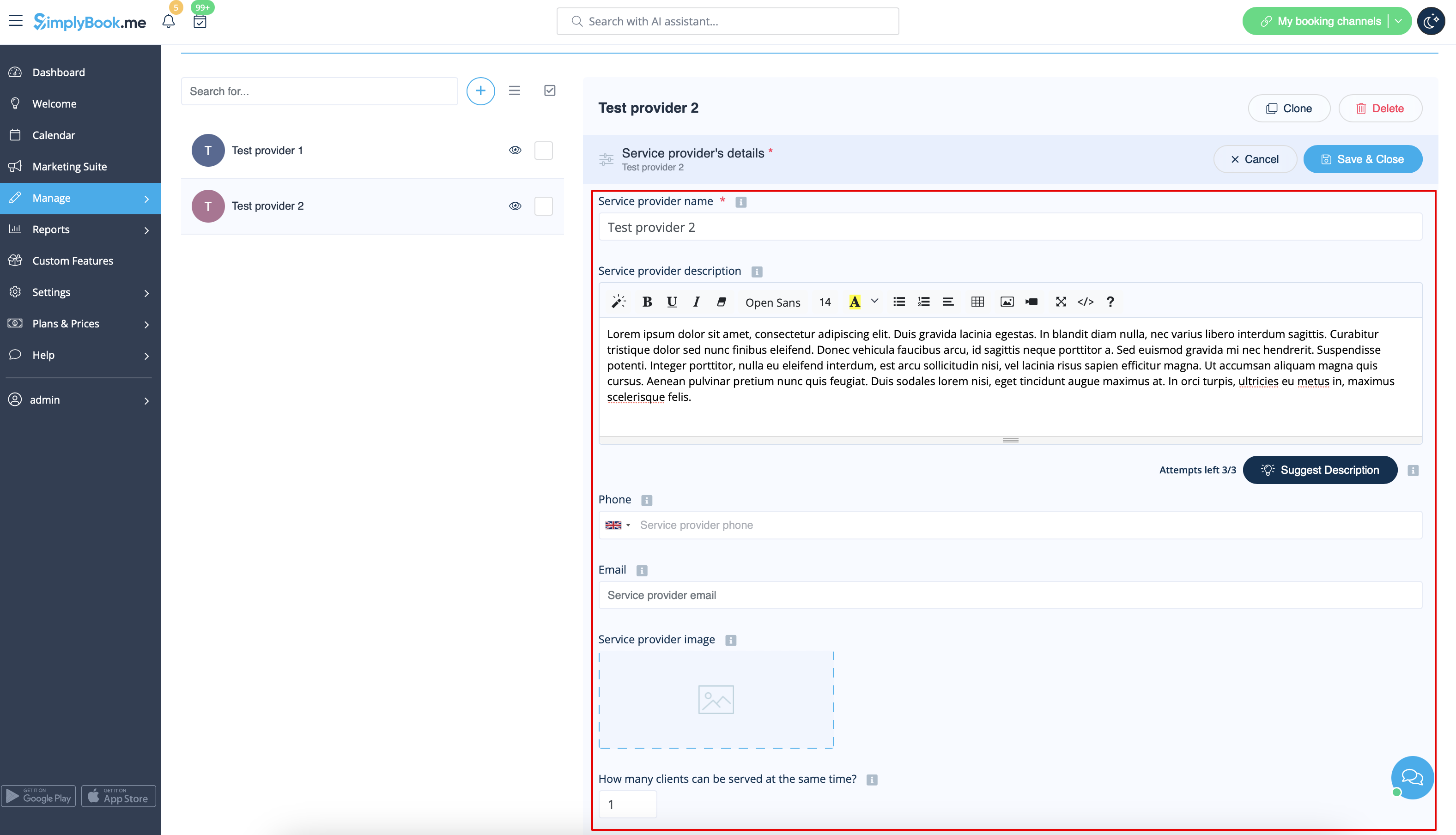
On <span style="background-color:#d4f8e5; padding:5px; border-radius:5px;">the right side</span> of the page insert the <span style="background-color:#d4f8e5; padding:5px; border-radius:5px;">name</span> of your service provider, set <span style="background-color:#d4f8e5; padding:5px; border-radius:5px;">number of clients</span> he/she can serve at a time and write service provider <span style="background-color:#d4f8e5; padding:5px; border-radius:5px;">description.</span><br>You can also upload <span style="background-color:#d4f8e5; padding:5px; border-radius:5px;">picture</span> and set his/her <span style="background-color:#d4f8e5; padding:5px; border-radius:5px;">phone number and email address</span> if necessary. <br>Save settings.<br>
<span style="background-color:#ffe9e9; padding:5px; border-radius:5px;">'''Please note!''' Phone number should be added in international format for SMS notifications to be sent correctly.</span>
<br><br>
[[File:Service provider details redesigned.png|1200px | center|link=https://help.simplybook.me/images/2/22/Service_provider_details_redesigned.png]]
<br><br>

Dans Gérer -> Prestataires de services, appuyez sur le bouton +.


Sur le côté droit de la page, insérez le nom de votre prestataire de services, définissez le nombre de clients qu'il peut servir à la fois et rédigez une description du prestataire de services .
Vous pouvez également télécharger une photo et indiquer son numéro de téléphone et son adresse e-mail si nécessaire.
Enregistrez les paramètres.
Remarque : le numéro de téléphone doit être ajouté au format international pour que les notifications par SMS puissent être envoyées correctement.