Latest revision as of 09:47, 16 May 2025
Information about message (contribute ) This message has no documentation.
If you know where or how this message is used, you can help other translators by adding documentation to this message.
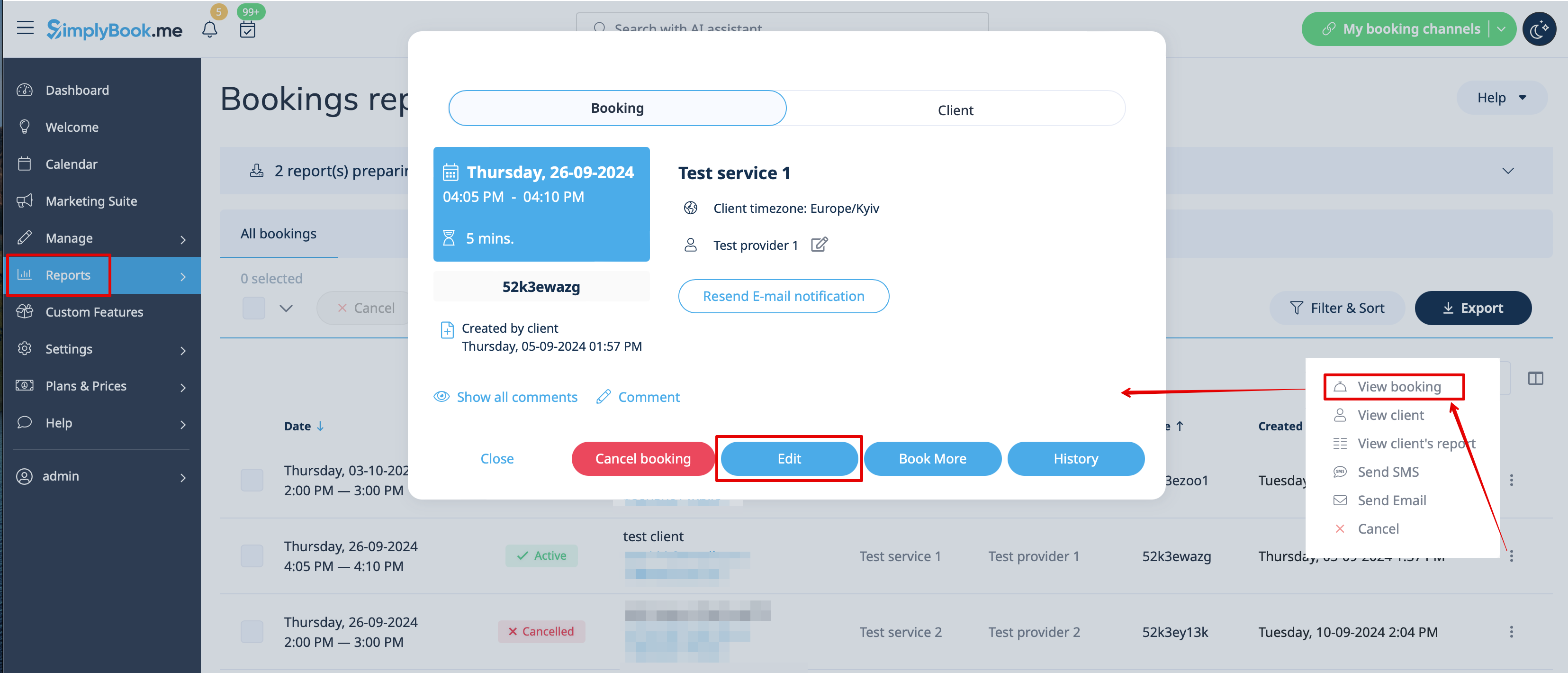
Message definition (How to manage bookings ) 2. In <span style="background-color:#d4f8e5; padding:5px; border-radius:5px;">Reports</span> -> <span style="background-color:#d4f8e5; padding:5px; border-radius:5px;">Booking details.</span> Click on <span style="background-color:#d4f8e5; padding:5px; border-radius:5px;">View</span> button for the necessary booking to open details and then press <span style="background-color:#d4f8e5; padding:5px; border-radius:5px;">Edit</span> to change any information about the booking.
2. In Reports -> Booking details. Click on View button for the necessary booking to open details and then press Edit to change any information about the booking.
You can use filters to easily find your bookings for specific service, provider, client or date range.