Translations:How to manage bookings/7/da: Difference between revisions

From SimplyBook.me
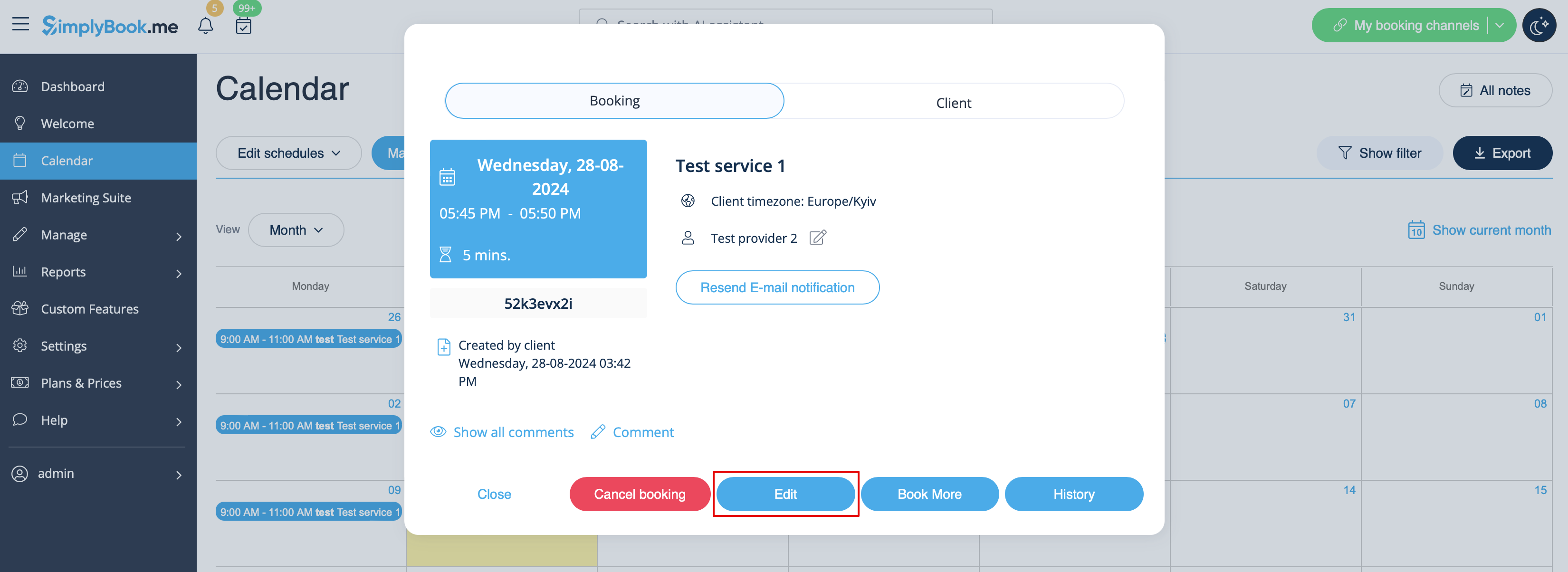
Created page with "1. I <span style="background-color:#d4f8e5; padding:5px; border-radius:5px;">Kalender</span> (punkt i menuen til venstre) skal du klikke på bookingen for at åbne detaljerne og derefter trykke <span style="background-color:#d4f8e5; padding:5px; border-radius:5px;">på Rediger</span> for at ændre oplysninger om bookingen. For at ændre tidspunktet for aftalen skal du blot trække og slippe bookingen til det ønskede tidspunkt. Du kan nemt tilføje <span style="backgroun..."
 
(No difference)

Latest revision as of 09:48, 16 May 2025

Information about message (contribute)
This message has no documentation. If you know where or how this message is used, you can help other translators by adding documentation to this message.
Message definition (How to manage bookings)
1. In <span style="background-color:#d4f8e5; padding:5px; border-radius:5px;">Calendar</span> (item in the left-side menu) click on the booking to open details and then press <span style="background-color:#d4f8e5; padding:5px; border-radius:5px;">Edit</span> to change any information about the booking. To change the time of the appointment, simply drag and drop booking to the available time you need. You can easily add <span style="background-color:#d4f8e5; padding:5px; border-radius:5px;">Comment</span> to the appointment or view other bookings of this client by pressing <span style="background-color:#d4f8e5; padding:5px; border-radius:5px;">Clients</span> button<br/>
[[File:Edit booking path redesigned.png|1200px | center|link=https://help.simplybook.me/images/7/7b/Edit_booking_path_redesigned.png ]]
<br/><br/>

1. I Kalender (punkt i menuen til venstre) skal du klikke på bookingen for at åbne detaljerne og derefter trykke på Rediger for at ændre oplysninger om bookingen. For at ændre tidspunktet for aftalen skal du blot trække og slippe bookingen til det ønskede tidspunkt. Du kan nemt tilføje en kommentar til aftalen eller se andre bookinger for denne klient ved at trykke på knappen