Translations:Adjusting notifications/11/nl: Difference between revisions

From SimplyBook.me
Created page with "== Book Soon-meldingssysteem == Hiermee kunt u herinneringen sturen naar klanten die eerder hebben geboekt om terug te komen.<br> De sjablonen kunnen worden ingesteld in <span style="background-color:#d4f8e5; padding:5px; border-radius:5px;">Aangepaste functies</span> -> Book Soon-meldingssysteem -> <span style="background-color:#d4f8e5; padding:5px; border-radius:5px;..."
(No difference)

Revision as of 10:00, 16 May 2025

Information about message (contribute)
This message has no documentation. If you know where or how this message is used, you can help other translators by adding documentation to this message.
Message definition (Adjusting notifications)
==[[Special:MyLanguage/Book Soon Notification System custom feature|Book Soon notification system]]==
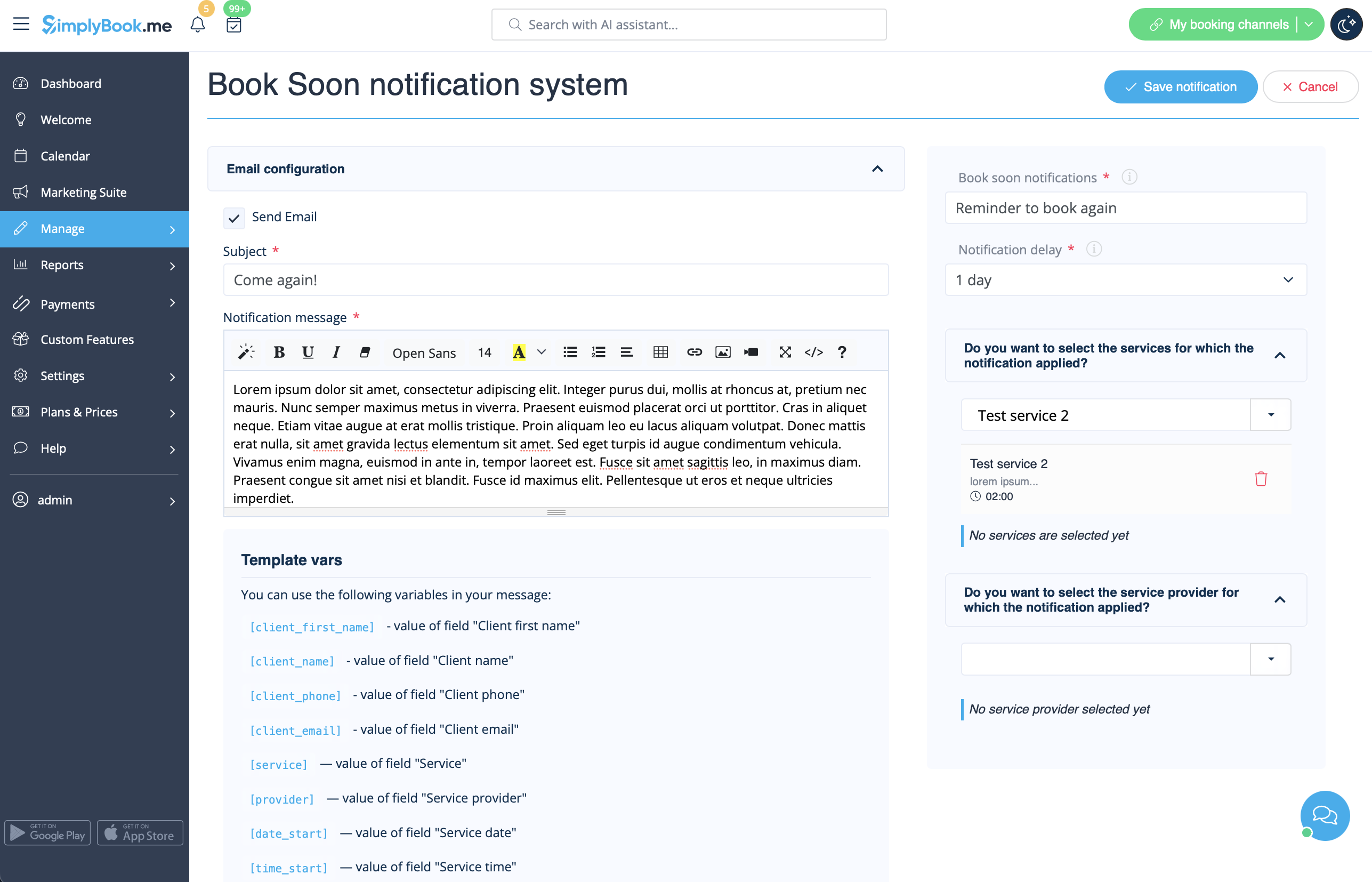
Allows to send reminders to come again to the clients who have booked before.<br>
The templates can be set in <span style="background-color:#d4f8e5; padding:5px; border-radius:5px;">Custom features</span> -> [[Special:MyLanguage/Book Soon Notification System custom feature|Book Soon notification system]] -> <span style="background-color:#d4f8e5; padding:5px; border-radius:5px;">Settings</span> -> <span style="background-color:#d4f8e5; padding:5px; border-radius:5px;">Add new</span> to create a new template(Email and SMS).
You can create numerous specific templates for certain service(s)/provider(s) and they will be sent when the indicated time has passed from the client appointment.
[[File:Book soon template redesigned.png|1200px|border|center|link=https://help.simplybook.me/images/3/36/Book_soon_template_redesigned.png]]
<br><br>
:''[[Special:MyLanguage/Book Soon Notification System custom feature|Read more]] about his custom feature use.''
--------

Book Soon-meldingssysteem

Hiermee kunt u herinneringen sturen naar klanten die eerder hebben geboekt om terug te komen.
De sjablonen kunnen worden ingesteld in Aangepaste functies -> Book Soon-meldingssysteem -> Instellingen -> Nieuw toevoegen om een nieuw sjabloon (e-mail en sms) aan te maken. U kunt tal van specifieke sjablonen voor bepaalde diensten/aanbieders aanmaken, die worden verzonden wanneer de aangegeven tijd sinds de afspraak van de klant is verstreken.


Lees meer over het gebruik van deze aangepaste functie.