Translations:Adjusting notifications/26/nl: Difference between revisions

From SimplyBook.me
Created page with "Variabelen zijn elementen die kunnen worden ingevoegd in e-mail- en sms-sjablonen (<span style="background-color:#d4f8e5; padding:5px; border-radius:5px;">Instellingen</span> -> <span style="background-color:#d4f8e5; padding:5px; border-radius:5px;">E-mail- en sms-instellingen</span>). Deze variabelen geven het gekozen item aan nadat de boeking is gemaakt. U hebt bijvoorbeeld 2 aanbieders: Mary en John. In de e-mailsjabloon voegt u de tekst "U hebt een dienst geboekt..."
 
(No difference)

Latest revision as of 10:01, 16 May 2025

Information about message (contribute)
This message has no documentation. If you know where or how this message is used, you can help other translators by adding documentation to this message.
Message definition (Adjusting notifications)
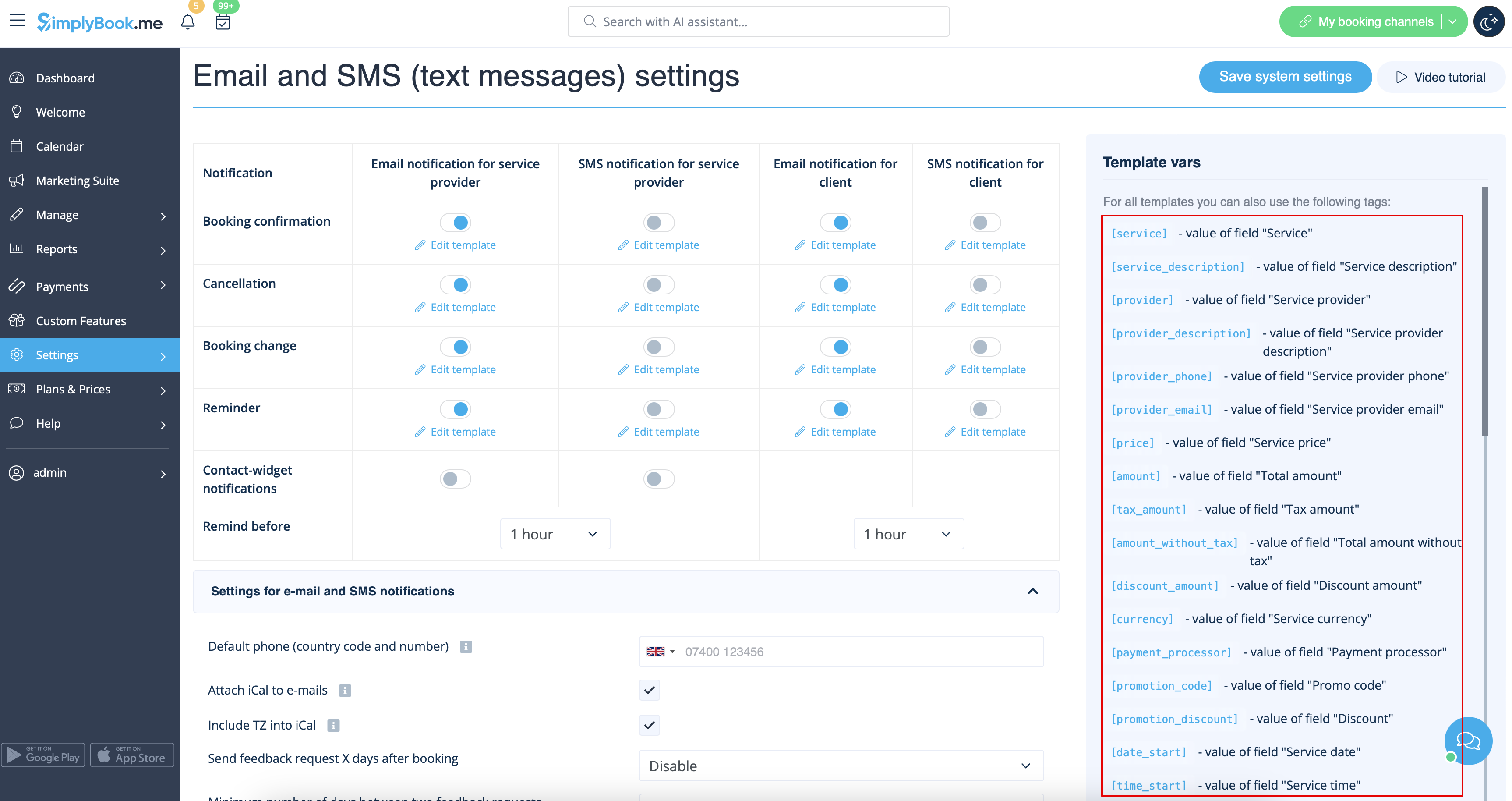
Variables are elements that can be inserted in email and sms templates (<span style="background-color:#d4f8e5; padding:5px; border-radius:5px;">Settings</span> -> <span style="background-color:#d4f8e5; padding:5px; border-radius:5px;">Email and SMS settings</span>). These variables will denote the chosen item after the booking is made. For example you have 2 providers: Mary and John. In email template you insert text "You have booked a service with [provider]". If the client chose on the booking page provider Mary, they would receive the following text "You have booked a service with Mary", if they chose John, they would receive the text "You have booked a service with John."<br>
You can always find the variables that can be used with the certain notification type near the template either on the right side of the page or in the popup that can be access by click on "Variables" button.
[[File:Variables overview redesigned.png|1200px|border|center|link=https://help.simplybook.me/images/d/d3/Variables_overview_redesigned.png]]
<br><br>

Variabelen zijn elementen die kunnen worden ingevoegd in e-mail- en sms-sjablonen (Instellingen -> E-mail- en sms-instellingen). Deze variabelen geven het gekozen item aan nadat de boeking is gemaakt. U hebt bijvoorbeeld 2 aanbieders: Mary en John. In de e-mailsjabloon voegt u de tekst "U hebt een dienst geboekt bij [aanbieder]" in. Als de klant op de boekingspagina voor aanbieder Mary heeft gekozen, ontvangt hij de volgende tekst: "U hebt een dienst geboekt bij Mary". Als hij voor John heeft gekozen, ontvangt hij de tekst "U hebt een dienst geboekt bij John"
U kunt de variabelen die bij het betreffende type melding kunnen worden gebruikt altijd vinden naast de sjabloon, aan de rechterkant van de pagina of in het pop-upvenster dat u kunt openen door op de knop "Variabelen" te klikken.