Translations:Adjusting notifications/11/fr: Difference between revisions

From SimplyBook.me
Created page with "== Système de notification « Réservez bientôt » == Permet d'envoyer des rappels aux clients qui ont déjà réservé afin qu'ils reviennent.<br> Les modèles peuvent être définis dans <span style="background-color:#d4f8e5; padding:5px; border-radius:5px;">Fonctionnalités personnalisées</span> -> Système de notification « Book_Soon_Notification_System_custom_f..."
(No difference)

Revision as of 10:02, 16 May 2025

Information about message (contribute)
This message has no documentation. If you know where or how this message is used, you can help other translators by adding documentation to this message.
Message definition (Adjusting notifications)
==[[Special:MyLanguage/Book Soon Notification System custom feature|Book Soon notification system]]==
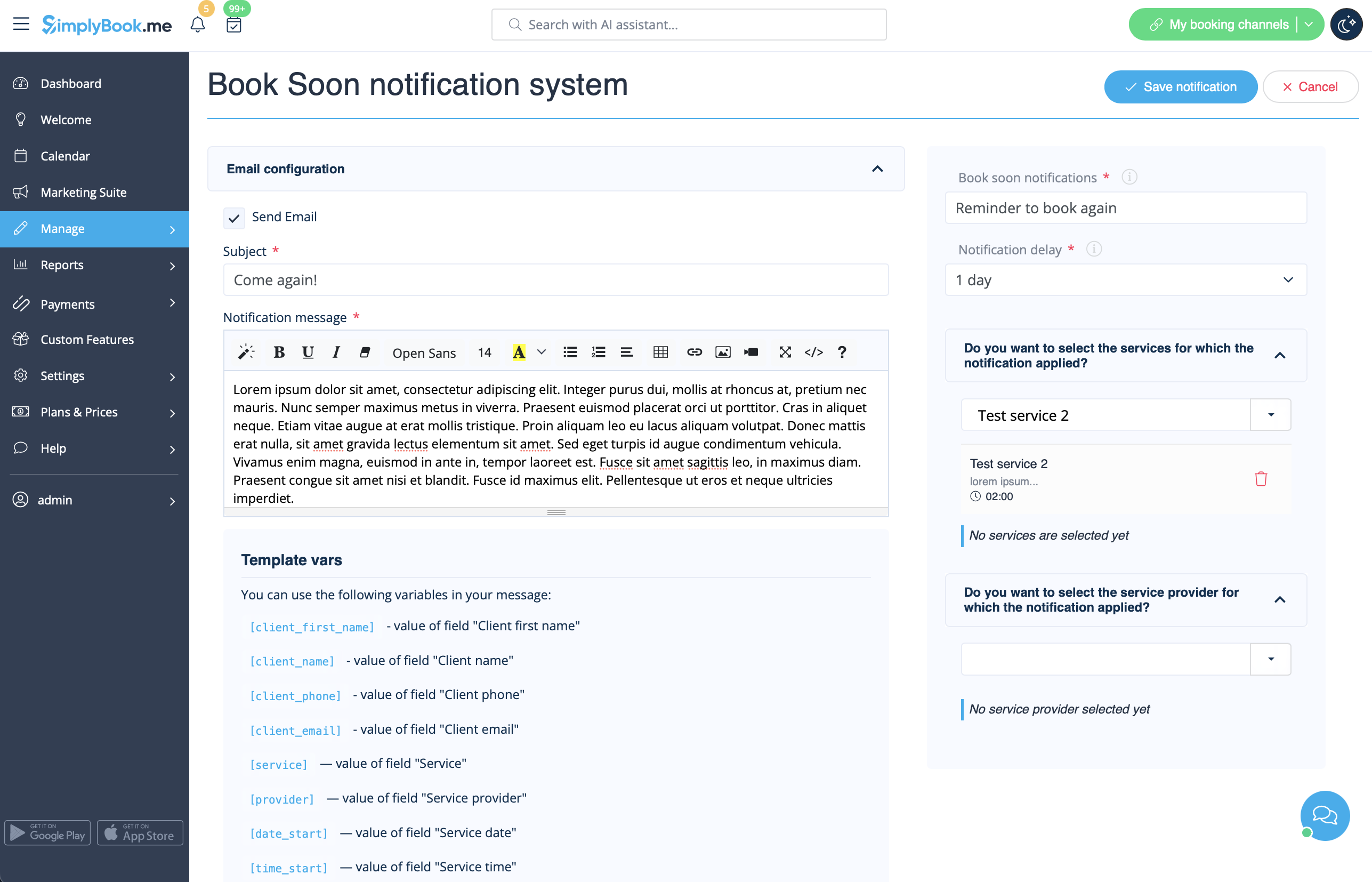
Allows to send reminders to come again to the clients who have booked before.<br>
The templates can be set in <span style="background-color:#d4f8e5; padding:5px; border-radius:5px;">Custom features</span> -> [[Special:MyLanguage/Book Soon Notification System custom feature|Book Soon notification system]] -> <span style="background-color:#d4f8e5; padding:5px; border-radius:5px;">Settings</span> -> <span style="background-color:#d4f8e5; padding:5px; border-radius:5px;">Add new</span> to create a new template(Email and SMS).
You can create numerous specific templates for certain service(s)/provider(s) and they will be sent when the indicated time has passed from the client appointment.
[[File:Book soon template redesigned.png|1200px|border|center|link=https://help.simplybook.me/images/3/36/Book_soon_template_redesigned.png]]
<br><br>
:''[[Special:MyLanguage/Book Soon Notification System custom feature|Read more]] about his custom feature use.''
--------

Système de notification « Réservez bientôt »

Permet d'envoyer des rappels aux clients qui ont déjà réservé afin qu'ils reviennent.
Les modèles peuvent être définis dans Fonctionnalités personnalisées -> Système de notification « Réservez rapidement » -> Paramètres -> Ajouter nouveau pour créer un nouveau modèle (e-mail et SMS). Vous pouvez créer de nombreux modèles spécifiques pour certains services/prestataires. Ils seront envoyés lorsque le délai indiqué depuis le rendez-vous du client aura expiré.


En savoir plus sur l'utilisation de cette fonctionnalité personnalisée.