Translations:Adjusting notifications/21/fr: Difference between revisions

From SimplyBook.me
Created page with "== Rapport quotidien == Lorsque vous activez et configurez cette fonctionnalité personnalisée, un rapport par e-mail concernant les rendez-vous nouveaux, à venir et annulés est automatiquement envoyé à l'adresse e-mail de votre entreprise.<br> Il n'y a pas de modèle à modifier en tant que tel, mais vous pouvez ajuster les éléments inclus dans <span style="background-color:#d4f8e5; padding:5px; border-radius:5px;">Fonctionnalités..."
(No difference)

Revision as of 10:02, 16 May 2025

Information about message (contribute)
This message has no documentation. If you know where or how this message is used, you can help other translators by adding documentation to this message.
Message definition (Adjusting notifications)
==[[Special:MyLanguage/Daily Report custom feature|Daily report]]==
When you enable and set this custom feature it will automatically send the email report about new, upcoming and cancelled appointments to your company email address.<br>
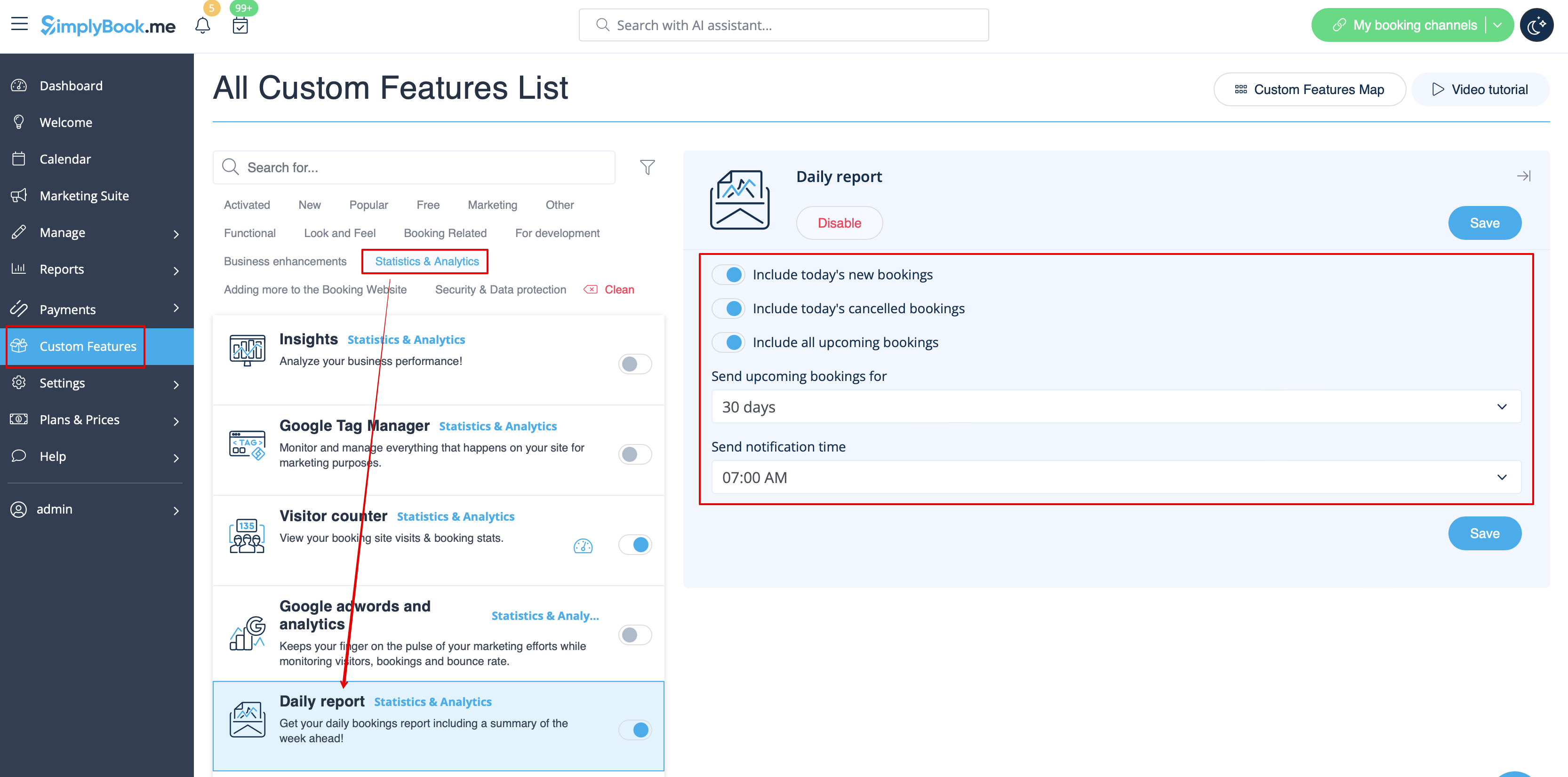
There is not template to edit as such, but you can adjust the items included in <span style="background-color:#d4f8e5; padding:5px; border-radius:5px;">Custom features</span> -> [[Special:MyLanguage/Daily Report custom feature|Daily report]] -> on the <span style="background-color:#d4f8e5; padding:5px; border-radius:5px;">right side</span> of the page.
[[File:Daily report settings path redesigned.png|1200px|border|center|link=https://help.simplybook.me/images/e/e2/Daily_report_settings_path_redesigned.png]]
<br><br>
:''[[Special:MyLanguage/Daily Report custom feature|Read more]] about his custom feature use.''
--------

Rapport quotidien

Lorsque vous activez et configurez cette fonctionnalité personnalisée, un rapport par e-mail concernant les rendez-vous nouveaux, à venir et annulés est automatiquement envoyé à l'adresse e-mail de votre entreprise.
Il n'y a pas de modèle à modifier en tant que tel, mais vous pouvez ajuster les éléments inclus dans Fonctionnalités personnalisées -> Rapport quotidien -> sur le côté droit de la page.


En savoir plus sur l'utilisation de cette fonctionnalité personnalisée.