Created page with "<span style="background-color:#ffe9e9; padding:5px; border-radius:5px;">'''Bemærk!''' For at beskytte dit system mod fejl tillader vi ikke, at standardadministratoren slettes. Hvis han/hun ikke længere skal have administratorrettigheder, skal du ændre hans/hendes e-mailadresse og adgangskode for at begrænse adgangen. Den anden og efterfølgende administratorer kan fjernes.</span> <br><br> Du kan knytte hver bruger til en eller flere udbydere (medarbejdere), så de ka..." |
Created page with "<span style="background-color:#ffe9e9; padding:5px; border-radius:5px;">'''Bemærk!''' Hvis en <span style="background-color:#d4f8e5; padding:5px; border-radius:5px;">junior medarbejder</span> ikke er tildelt en tjenesteudbyder, nedgraderes hans adgangsniveau automatisk til <span style="background-color:#d4f8e5; padding:5px; border-radius:5px;">visningsniveau</span>.</span> <br><br>" Tags: Mobile edit Mobile web edit |
||
| Line 64: | Line 64: | ||
<span style="background-color:#ffe9e9; padding:5px; border-radius:5px;">'''Bemærk!''' Hvis en <span style="background-color:#d4f8e5; padding:5px; border-radius:5px;">junior medarbejder</span> ikke er tildelt en tjenesteudbyder, nedgraderes hans adgangsniveau automatisk til <span style="background-color:#d4f8e5; padding:5px; border-radius:5px;">visningsniveau</span>.</span> | <span style="background-color:#ffe9e9; padding:5px; border-radius:5px;">'''Bemærk!''' Hvis en <span style="background-color:#d4f8e5; padding:5px; border-radius:5px;">junior medarbejder</span> ikke er tildelt en tjenesteudbyder, nedgraderes hans adgangsniveau automatisk til <span style="background-color:#d4f8e5; padding:5px; border-radius:5px;">visningsniveau</span>.</span> | ||
<br><br> | <br><br> | ||
;'''Viewer''' | ;'''Viewer''' | ||
I nogle tilfælde vil du måske give en person mulighed for at se, hvad der foregår med virksomhedens bookinger, men uden at kunne foretage ændringer. Denne bruger skal indstilles som <span style="background-color:#d4f8e5; padding:5px; border-radius:5px;">Viewer.</span> <span style="background-color:#d4f8e5; padding:5px; border-radius:5px;">Viewers</span> kan ikke ændre noget, og de kan ikke tilføje bookinger.<br> | |||
Følgende funktioner er tilgængelige for denne adgangsgruppe: | |||
* | *Kalender (kun visning) | ||
* | *Tjenester (kun visning) | ||
''(for | ''(se tabellen nedenfor for flere detaljer)''<br><br> | ||
*''På virksomhedsniveau er det muligt at skjule klientkontaktoplysninger for visningsbrugere.'' | |||
<br><br> | <br><br> | ||
;'''Operator POS-''' | |||
Dette niveau er primært oprettet til administration <span style="background-color:#cdeffc; padding:5px; border-radius:5px;">[[Point_of_Sale_custom_feature|af POS-grænsefladen]]</span> og salg af tjenester, <span style="background-color:#cdeffc; padding:5px; border-radius:5px;">[[Classes_custom_feature|klasser]],</span> <span style="background-color:#cdeffc; padding:5px; border-radius:5px;">[[Packages_custom_feature|pakker]],</span> <span style="background-color:#cdeffc; padding:5px; border-radius:5px;">[[Membership_custom_feature|medlemskaber]],</span> <span style="background-color:#cdeffc; padding:5px; border-radius:5px;">[[Products_for_Sale_custom_feature|produkter]]</span> og <span style="background-color:#cdeffc; padding:5px; border-radius:5px;">[[Service_Add-Ons_custom_feature|tilføjelser]],</span><br> | |||
;'''Operator POS''' | men har også adgang til kalender, kunder, nogle rapporter og skrivebeskyttet adgang til <span style="background-color:#cdeffc; padding:5px; border-radius:5px;">[[Membership_custom_feature|medlemskaber]],</span> <span style="background-color:#cdeffc; padding:5px; border-radius:5px;">[[Coupons_and_Gift_Cards_custom_feature|kuponer og gavekort]],</span><span style="background-color:#cdeffc; padding:5px; border-radius:5px;">[[Classes_custom_feature|tjenester/klasser]]</span> og udbydere. | ||
<br><br> | <br><br> | ||
;'''Doorman''' | ;'''Doorman''' | ||
Har kun mulighed for at validere <span style="background-color:#cdeffc; padding:5px; border-radius:5px;">[[Tickets_custom_feature|billetter]].</span> | |||
<br><br> | <br><br> | ||
;'''Lab tester''' | ;'''Lab tester''' | ||
Dette adgangsniveau er primært oprettet til arbejde med den tilpassede funktion <span style="background-color:#cdeffc; padding:5px; border-radius:5px;">[[Medical_test_custom_feature|Medical Test]]</span> og til at validere <span style="background-color:#cdeffc; padding:5px; border-radius:5px;">[[Tickets_custom_feature|billetter]],</span> udskrive etiketter til reagensglas, opdatere testresultater og udskrive resultater. | |||
<br><br> | <br><br> | ||
{| style="width:100%; border: 2px solid black; background-color: rgb(255,255,255); border-collapse: collapse;" | {| style="width:100%; border: 2px solid black; background-color: rgb(255,255,255); border-collapse: collapse;" | ||
|- style="background-color: rgb(6,173,239);" | |- style="background-color: rgb(6,173,239);" | ||
| Line 102: | Line 93: | ||
! style="text-align: center; font-weight: bold; border-bottom: 2px solid black; text-transform: uppercase; color: white;" | Junior Employee | ! style="text-align: center; font-weight: bold; border-bottom: 2px solid black; text-transform: uppercase; color: white;" | Junior Employee | ||
! style="text-align: center; font-weight: bold; border-bottom: 2px solid black; text-transform: uppercase; color: white;" | Viewer | ! style="text-align: center; font-weight: bold; border-bottom: 2px solid black; text-transform: uppercase; color: white;" | Viewer | ||
|- | |- | ||
| colspan="5" style="border-bottom: 1px solid black; border-top: 1px solid black; background-color: rgb(232, 248, 255); font-weight: bold; padding: 10px; padding-left:30px;" | Dashboard | | colspan="5" style="border-bottom: 1px solid black; border-top: 1px solid black; background-color: rgb(232, 248, 255); font-weight: bold; padding: 10px; padding-left:30px;" | Dashboard | ||
|- | |- | ||
| style="width: 20%;" | | | style="width: 20%;" | | ||
| style="border-bottom: 1px solid black;" | | | style="border-bottom: 1px solid black;" | Se diagrammer / Aktivér tilpassede funktioner | ||
| style="border-bottom: 1px solid black; text-align: center; height: 60px;" | | | style="border-bottom: 1px solid black; text-align: center; height: 60px;" | − <br> | ||
| style="border-bottom: 1px solid black; text-align: center; " | | | style="border-bottom: 1px solid black; text-align: center; " | − <br> | ||
| style="border-bottom: 1px solid black; text-align: center;" | | | style="border-bottom: 1px solid black; text-align: center;" | − <br> | ||
|- | |- | ||
| colspan="5" style="border-bottom: 1px solid black; border-top: 1px solid black; background-color: rgb(232, 248, 255); font-weight: bold; padding: 10px; padding-left:30px;" | | | colspan="5" style="border-bottom: 1px solid black; border-top: 1px solid black; background-color: rgb(232, 248, 255); font-weight: bold; padding: 10px; padding-left:30px;" | Velkomst | ||
|- | |- | ||
| style="width: 20%;" | | | style="width: 20%;" | | ||
| style="border-bottom: 1px solid black;" | | | style="border-bottom: 1px solid black;" | Se side / Skift egen adgangskode / Opret forbindelse til [[Google Authenticator custom feature|Google Authenticator*]] | ||
| style="border-bottom: 1px solid black; text-align: center; height: 60px;" | | | style="border-bottom: 1px solid black; text-align: center; height: 60px;" | ✔ <br> | ||
| style="border-bottom: 1px solid black; text-align: center; " | | | style="border-bottom: 1px solid black; text-align: center; " | ✔ <br> | ||
| style="border-bottom: 1px solid black; text-align: center;" | | | style="border-bottom: 1px solid black; text-align: center;" | ✔ <br> | ||
|- | |- | ||
| style="width: 20%;" | | | style="width: 20%;" | | ||
| style="border-bottom: 1px solid black;" | | | style="border-bottom: 1px solid black;" | Skift egen e-mail-adresse | ||
| style="border-bottom: 1px solid black; text-align: center; height: 60px;" | | | style="border-bottom: 1px solid black; text-align: center; height: 60px;" | − <br> | ||
| style="border-bottom: 1px solid black; text-align: center; " | | | style="border-bottom: 1px solid black; text-align: center; " | − <br> | ||
| style="border-bottom: 1px solid black; text-align: center;" | | | style="border-bottom: 1px solid black; text-align: center;" | − <br> | ||
|- | |- | ||
| style="width: 20%;" | | | style="width: 20%;" | | ||
| style="border-bottom: 1px solid black;" | | | style="border-bottom: 1px solid black;" | Opret reservation fra dashboardet | ||
| style="border-bottom: 1px solid black; text-align: center; height: 60px;" | | | style="border-bottom: 1px solid black; text-align: center; height: 60px;" | ✔ <br> | ||
| style="border-bottom: 1px solid black; text-align: center; " | | | style="border-bottom: 1px solid black; text-align: center; " | ✔ <br> | ||
| style="border-bottom: 1px solid black; text-align: center;" | | | style="border-bottom: 1px solid black; text-align: center;" | − <br> | ||
|- | |- | ||
| style="width: 20%;" | | | style="width: 20%;" | | ||
| style="border-bottom: 1px solid black;" | | | style="border-bottom: 1px solid black;" | Få link til rapport med personlige data | ||
| style="border-bottom: 1px solid black; text-align: center; height: 60px;" | | | style="border-bottom: 1px solid black; text-align: center; height: 60px;" | ✔ <br> | ||
| style="border-bottom: 1px solid black; text-align: center; " | | | style="border-bottom: 1px solid black; text-align: center; " | ✔ <br> | ||
| style="border-bottom: 1px solid black; text-align: center;" | | | style="border-bottom: 1px solid black; text-align: center;" | ✔ <br> | ||
|- | |- | ||
| colspan="5" style="border-bottom: 1px solid black; border-top: 1px solid black; background-color: rgb(232, 248, 255); font-weight: bold; padding: 10px; padding-left:30px;" | | | colspan="5" style="border-bottom: 1px solid black; border-top: 1px solid black; background-color: rgb(232, 248, 255); font-weight: bold; padding: 10px; padding-left:30px;" | Kalender | ||
|- | |- | ||
| style="width: 20%;" | | | style="width: 20%;" | | ||
| style="border-bottom: 1px solid black;" | | | style="border-bottom: 1px solid black;" | Forskellige visningsmuligheder | ||
| style="border-bottom: 1px solid black; text-align: center; height: 60px;" | | | style="border-bottom: 1px solid black; text-align: center; height: 60px;" | ✔ <br> | ||
| style="border-bottom: 1px solid black; text-align: center; " | | | style="border-bottom: 1px solid black; text-align: center; " | ✔ <br> | ||
| style="border-bottom: 1px solid black; text-align: center;" | | | style="border-bottom: 1px solid black; text-align: center;" | ✔ <br> | ||
|- | |- | ||
| style="width: 20%;" | | | style="width: 20%;" | | ||
| style="border-bottom: 1px solid black;" | | | style="border-bottom: 1px solid black;" | Eksport til Excel/PDF | ||
| style="border-bottom: 1px solid black; text-align: center; height: 60px;" | | | style="border-bottom: 1px solid black; text-align: center; height: 60px;" | ✔ <br> | ||
| style="border-bottom: 1px solid black; text-align: center; " | | | style="border-bottom: 1px solid black; text-align: center; " | − <br> | ||
| style="border-bottom: 1px solid black; text-align: center;" | | | style="border-bottom: 1px solid black; text-align: center;" | − <br> | ||
|- | |- | ||
| style="width: 20%;" | | | style="width: 20%;" | | ||
| style="border-bottom: 1px solid black;" | | | style="border-bottom: 1px solid black;" | Vis og administrer bookinger <br> Vis og administrer kalendernoter | ||
| style="border-bottom: 1px solid black; text-align: center; height: 60px;" | | | style="border-bottom: 1px solid black; text-align: center; height: 60px;" | ✔ <br> | ||
| style="border-bottom: 1px solid black; text-align: center; " | | | style="border-bottom: 1px solid black; text-align: center; " | kun egen<br> | ||
| style="border-bottom: 1px solid black; text-align: center;" | | | style="border-bottom: 1px solid black; text-align: center;" | kun visning<br> | ||
|- | |- | ||
| style="width: 20%;" | | | style="width: 20%;" | | ||
| style="border-bottom: 1px solid black;" | | | style="border-bottom: 1px solid black;" | F[[Custom_Features#Accept_Payments|å]] adgang til transaktioner* <br>Adgang [[Custom_Features#Approve_Bookings|til ventende bookinger*]] | ||
| style="border-bottom: 1px solid black; text-align: center; height: 60px;" | | | style="border-bottom: 1px solid black; text-align: center; height: 60px;" | ✔ <br> | ||
| style="border-bottom: 1px solid black; text-align: center; " | | | style="border-bottom: 1px solid black; text-align: center; " | − <br> | ||
| style="border-bottom: 1px solid black; text-align: center;" | | | style="border-bottom: 1px solid black; text-align: center;" | − <br> | ||
|- | |- | ||
| style="width: 20%;" | | | style="width: 20%;" | | ||
| style="border-bottom: 1px solid black;" | | | style="border-bottom: 1px solid black;" | Rediger bookingkommentarer | ||
| style="border-bottom: 1px solid black; text-align: center; height: 60px;" | | | style="border-bottom: 1px solid black; text-align: center; height: 60px;" | ✔ <br> | ||
| style="border-bottom: 1px solid black; text-align: center; " | | | style="border-bottom: 1px solid black; text-align: center; " | ✔ <br>i egne bookinger | ||
| style="border-bottom: 1px solid black; text-align: center;" | | | style="border-bottom: 1px solid black; text-align: center;" | − <br> | ||
|- | |- | ||
| style="width: 20%;" | | | style="width: 20%;" | | ||
| style="border-bottom: 1px solid black;" | | | style="border-bottom: 1px solid black;" | Rediger kundeoplysninger fra bookingen | ||
| style="border-bottom: 1px solid black; text-align: center; height: 60px;" | | | style="border-bottom: 1px solid black; text-align: center; height: 60px;" | ✔ <br> | ||
| style="border-bottom: 1px solid black; text-align: center; " | | | style="border-bottom: 1px solid black; text-align: center; " | ✔<br>i egne bookinger | ||
| style="border-bottom: 1px solid black; text-align: center;" | | | style="border-bottom: 1px solid black; text-align: center;" | kun visning<br> | ||
|- | |- | ||
| style="width: 20%;" | | | style="width: 20%;" | | ||
| style="border-bottom: 1px solid black;" | | | style="border-bottom: 1px solid black;" | Tilføj/rediger [[Custom_Features#SOAP_with_Encryption|SOAP-noter*]] | ||
| style="border-bottom: 1px solid black; text-align: center; height: 60px;" | | | style="border-bottom: 1px solid black; text-align: center; height: 60px;" | med korrekt nøgle<br> | ||
| style="border-bottom: 1px solid black; text-align: center; " | | | style="border-bottom: 1px solid black; text-align: center; " | med korrekt nøgle<br>kun egne | ||
| style="border-bottom: 1px solid black; text-align: center;" | | | style="border-bottom: 1px solid black; text-align: center;" | med korrekt nøgle<br>kun vis | ||
|- | |- | ||
| style="width: 20%;" | | | style="width: 20%;" | | ||
| style="border-bottom: 1px solid black;" | | | style="border-bottom: 1px solid black;" | Opdater [[Custom_Features#Status|reservationsstatus*]] | ||
| style="border-bottom: 1px solid black; text-align: center; height: 60px;" | | | style="border-bottom: 1px solid black; text-align: center; height: 60px;" | ✔ <br> | ||
| style="border-bottom: 1px solid black; text-align: center; " | | | style="border-bottom: 1px solid black; text-align: center; " | kun egen <br> | ||
| style="border-bottom: 1px solid black; text-align: center;" | | | style="border-bottom: 1px solid black; text-align: center;" | − <br> | ||
|- | |- | ||
| style="width: 20%;" | | | style="width: 20%;" | | ||
| style="border-bottom: 1px solid black;" | | | style="border-bottom: 1px solid black;" | Rediger [[Custom_Features#Intake_Forms|indtastningsformularer*]] i bookingerne<br> Rediger [[Products_for_Sale_custom_feature|produkter til salg*]] i bookingerne<br> Rediger [[Service_Add-Ons_custom_feature|service-tilvalg*]] i bookingerne | ||
| style="border-bottom: 1px solid black; text-align: center; height: 60px;" | | | style="border-bottom: 1px solid black; text-align: center; height: 60px;" | ✔ <br> | ||
| style="border-bottom: 1px solid black; text-align: center; " | | | style="border-bottom: 1px solid black; text-align: center; " | kun egen <br> | ||
| style="border-bottom: 1px solid black; text-align: center;" | | | style="border-bottom: 1px solid black; text-align: center;" | kun visning <br> | ||
|- | |- | ||
| colspan="5" style="border-bottom: 1px solid black; border-top: 1px solid black; background-color: rgb(232, 248, 255); font-weight: bold; padding: 10px; padding-left:30px;" | Marketing Suite | | colspan="5" style="border-bottom: 1px solid black; border-top: 1px solid black; background-color: rgb(232, 248, 255); font-weight: bold; padding: 10px; padding-left:30px;" | Marketing Suite | ||
|- | |- | ||
| style="width: 20%;" | | | style="width: 20%;" | | ||
| style="border-bottom: 1px solid black;" | | | style="border-bottom: 1px solid black;" | Se side og aktiver [[Custom Features|tilpassede funktioner]] | ||
| style="border-bottom: 1px solid black; text-align: center; height: 60px;" | | | style="border-bottom: 1px solid black; text-align: center; height: 60px;" | − <br> | ||
| style="border-bottom: 1px solid black; text-align: center; " | | | style="border-bottom: 1px solid black; text-align: center; " | − <br> | ||
| style="border-bottom: 1px solid black; text-align: center;" | | | style="border-bottom: 1px solid black; text-align: center;" | − <br> | ||
|- | |- | ||
| colspan="5" style="border-bottom: 1px solid black; border-top: 1px solid black; background-color: rgb(232, 248, 255); font-weight: bold; padding: 10px; padding-left:30px;" | | | colspan="5" style="border-bottom: 1px solid black; border-top: 1px solid black; background-color: rgb(232, 248, 255); font-weight: bold; padding: 10px; padding-left:30px;" | Administrer | ||
|- | |- | ||
| style="width: 20%;" | | | style="width: 20%;" | | ||
| style="border-bottom: 1px solid black;" | | | style="border-bottom: 1px solid black;" | Se/tilføj/rediger/ændr tidsplan/slet tjenester | ||
| style="border-bottom: 1px solid black; text-align: center; height: 60px;" | | | style="border-bottom: 1px solid black; text-align: center; height: 60px;" | ✔ <br> | ||
| style="border-bottom: 1px solid black; text-align: center; " | | | style="border-bottom: 1px solid black; text-align: center; " | − <br> | ||
| style="border-bottom: 1px solid black; text-align: center;" | | | style="border-bottom: 1px solid black; text-align: center;" | − <br> | ||
|- | |- | ||
| style="width: 20%;" | | | style="width: 20%;" | | ||
| style="border-bottom: 1px solid black;" | | | style="border-bottom: 1px solid black;" | Vis/tilføj/rediger/ændr tidsplan/slet udbydere | ||
| style="border-bottom: 1px solid black; text-align: center; height: 60px;" | | | style="border-bottom: 1px solid black; text-align: center; height: 60px;" | ✔ <br> | ||
| style="border-bottom: 1px solid black; text-align: center; " | | | style="border-bottom: 1px solid black; text-align: center; " | kun egne og eksisterende <br> | ||
| style="border-bottom: 1px solid black; text-align: center;" | | | style="border-bottom: 1px solid black; text-align: center;" | − <br> | ||
|- | |- | ||
| style="width: 20%;" | | | style="width: 20%;" | | ||
| style="border-bottom: 1px solid black;" | | | style="border-bottom: 1px solid black;" | [[Custom_Features#Client_Login|Vis/tilføj/rediger/flet*/slet]] kunder | ||
| style="border-bottom: 1px solid black; text-align: center; height: 60px;" | | | style="border-bottom: 1px solid black; text-align: center; height: 60px;" | ✔ <br> | ||
| style="border-bottom: 1px solid black; text-align: center; " | | | style="border-bottom: 1px solid black; text-align: center; " | − <br> | ||
| style="border-bottom: 1px solid black; text-align: center;" | | | style="border-bottom: 1px solid black; text-align: center;" | − <br> | ||
|- | |- | ||
| style="width: 20%;" | | | style="width: 20%;" | | ||
| style="border-bottom: 1px solid black;" | | | style="border-bottom: 1px solid black;" | Vis/tilføj/rediger/slet brugere | ||
| style="border-bottom: 1px solid black; text-align: center; height: 60px;" | | | style="border-bottom: 1px solid black; text-align: center; height: 60px;" | − <br> | ||
| style="border-bottom: 1px solid black; text-align: center; " | | | style="border-bottom: 1px solid black; text-align: center; " | − <br> | ||
| style="border-bottom: 1px solid black; text-align: center;" | | | style="border-bottom: 1px solid black; text-align: center;" | − <br> | ||
|- | |- | ||
| style="width: 20%;" | | | style="width: 20%;" | | ||
| style="border-bottom: 1px solid black;" | | | style="border-bottom: 1px solid black;" | Vis/tilføj/rediger/ændr tidsplan/slet [[Custom_Features#Classes|klasser*]] | ||
| style="border-bottom: 1px solid black; text-align: center; height: 60px;" | | | style="border-bottom: 1px solid black; text-align: center; height: 60px;" | ✔ <br> | ||
| style="border-bottom: 1px solid black; text-align: center; " | | | style="border-bottom: 1px solid black; text-align: center; " | − <br> | ||
| style="border-bottom: 1px solid black; text-align: center;" | | | style="border-bottom: 1px solid black; text-align: center;" | − <br> | ||
|- | |- | ||
| style="width: 20%;" | | | style="width: 20%;" | | ||
| style="border-bottom: 1px solid black;" | | | style="border-bottom: 1px solid black;" | [[Packages_custom_feature|Vis]]/tilføj/rediger/slet pakker* <br> Vis/tilføj/rediger/slet medlem [[Custom_Features#Membership |sk]]aber* <br> Se/tilføj/rediger/slet [[Custom_Features#Coupons_.26_Gift_Cards |kuponer og gavekort*]] | ||
| style="border-bottom: 1px solid black; text-align: center; height: 60px;" | | | style="border-bottom: 1px solid black; text-align: center; height: 60px;" | ✔ <br> | ||
| style="border-bottom: 1px solid black; text-align: center; " | | | style="border-bottom: 1px solid black; text-align: center; " | − <br> | ||
| style="border-bottom: 1px solid black; text-align: center;" | | | style="border-bottom: 1px solid black; text-align: center;" | − <br> | ||
|- | |- | ||
| style="width: 20%;" | | | style="width: 20%;" | | ||
| style="border-bottom: 1px solid black;" | | | style="border-bottom: 1px solid black;" | Vis/tilføj/rediger/slet [[Custom_Features#Service_Add-ons |service]]-tilføjelser* <br> Vis/tilføj/rediger/slet [[Custom_Features#Products_for_Sale |produkter til salg*]]<br>Se/tilføj/rediger/slet [[Related_Resources_custom_feature|relaterede ressourcer*]] | ||
| style="border-bottom: 1px solid black; text-align: center; height: 60px;" | ✔ <br> | |||
| style="border-bottom: 1px solid black; text-align: center; " | − <br> | |||
| style="border-bottom: 1px solid black; text-align: center; height: 60px;" | | | style="border-bottom: 1px solid black; text-align: center;" | − <br> | ||
| style="border-bottom: 1px solid black; text-align: center; " | | |||
| style="border-bottom: 1px solid black; text-align: center;" | | |||
|- | |- | ||
| style="width: 20%;" | | | style="width: 20%;" | | ||
| style="border-bottom: 1px solid black;" | | | style="border-bottom: 1px solid black;" | Vis/tilføj/rediger/slet [[Custom_Features#Intake_Forms |indtastningsformularer*]]<br>Vis/tilføj/rediger/slet [[Client_Fields_Custom_Feature|klientfelter*]] | ||
| style="border-bottom: 1px solid black; text-align: center; height: 60px;" | | | style="border-bottom: 1px solid black; text-align: center; height: 60px;" | ✔ <br> | ||
| style="border-bottom: 1px solid black; text-align: center; " | | | style="border-bottom: 1px solid black; text-align: center; " | − <br> | ||
| style="border-bottom: 1px solid black; text-align: center;" | | | style="border-bottom: 1px solid black; text-align: center;" | − <br> | ||
|- | |- | ||
| style="width: 20%;" | | | style="width: 20%;" | | ||
| style="border-bottom: 1px solid black;" | | | style="border-bottom: 1px solid black;" | Vis/tilføj/rediger/slet [[News_custom_feature|nyheder*]]<br>Vis/tilføj/rediger/slet [[Custom_Page_custom_feature|brugerdefinerede sider*]] | ||
| style="border-bottom: 1px solid black; text-align: center; height: 60px;" | | | style="border-bottom: 1px solid black; text-align: center; height: 60px;" | − <br> | ||
| style="border-bottom: 1px solid black; text-align: center; " | | | style="border-bottom: 1px solid black; text-align: center; " | − <br> | ||
| style="border-bottom: 1px solid black; text-align: center;" | | | style="border-bottom: 1px solid black; text-align: center;" | − <br> | ||
|- | |- | ||
| style="width: 20%;" | | | style="width: 20%;" | | ||
| style="border-bottom: 1px solid black;" | | | style="border-bottom: 1px solid black;" | Vis/tilføj/rediger/slet [[Status_custom_feature|statusser*]] | ||
| style="border-bottom: 1px solid black; text-align: center; height: 60px;" | | | style="border-bottom: 1px solid black; text-align: center; height: 60px;" | ✔ <br> | ||
| style="border-bottom: 1px solid black; text-align: center; " | | | style="border-bottom: 1px solid black; text-align: center; " | − <br> | ||
| style="border-bottom: 1px solid black; text-align: center;" | | | style="border-bottom: 1px solid black; text-align: center;" | − <br> | ||
|- | |- | ||
| style="width: 20%;" | | | style="width: 20%;" | | ||
| style="border-bottom: 1px solid black;" | | | style="border-bottom: 1px solid black;" | Vis/tilføj/rediger/slet [[Flexible_Notifications_custom_feature|fleksible]] meddelelser* <br> Vis/tilføj/rediger/slet [[Book_Soon_Notification_System_custom_feature|påmindelser om at booke snart*]] | ||
| style="border-bottom: 1px solid black; text-align: center; height: 60px;" | | | style="border-bottom: 1px solid black; text-align: center; height: 60px;" | ✔ <br> | ||
| style="border-bottom: 1px solid black; text-align: center; " | | | style="border-bottom: 1px solid black; text-align: center; " | − <br> | ||
| style="border-bottom: 1px solid black; text-align: center;" | | | style="border-bottom: 1px solid black; text-align: center;" | − <br> | ||
|- | |- | ||
| style="width: 20%;" | | | style="width: 20%;" | | ||
| style="border-bottom: 1px solid black;" | | | style="border-bottom: 1px solid black;" | Se/tilføj/rediger/slet [[Calendar_Notes|kalendernotatstyper]] | ||
| style="border-bottom: 1px solid black; text-align: center; height: 60px;" | | | style="border-bottom: 1px solid black; text-align: center; height: 60px;" | ✔ <br> | ||
| style="border-bottom: 1px solid black; text-align: center; " | | | style="border-bottom: 1px solid black; text-align: center; " | kun vis <br> | ||
| style="border-bottom: 1px solid black; text-align: center;" | | | style="border-bottom: 1px solid black; text-align: center;" | kun vis <br> | ||
|- | |- | ||
| style="width: 20%;" | | | style="width: 20%;" | | ||
| style="border-bottom: 1px solid black;" | | | style="border-bottom: 1px solid black;" | Vis/opdater [[Calendar_Sync_custom_feature|kalendersynkronisering*]] | ||
| style="border-bottom: 1px solid black; text-align: center; height: 60px;" | | | style="border-bottom: 1px solid black; text-align: center; height: 60px;" | <br> | ||
| style="border-bottom: 1px solid black; text-align: center; " | | | style="border-bottom: 1px solid black; text-align: center; " | kun egne <br> | ||
| style="border-bottom: 1px solid black; text-align: center;" | | | style="border-bottom: 1px solid black; text-align: center;" | − <br> | ||
|- | |- | ||
| style="width: 20%;" | | | style="width: 20%;" | | ||
| style="border-bottom: 1px solid black;" | | | style="border-bottom: 1px solid black;" | Tilslut eget værktøj til [[Online_Video_Meetings_Custom_Feature|online videomøder*]] | ||
| style="border-bottom: 1px solid black; text-align: center; height: 60px;" | | | style="border-bottom: 1px solid black; text-align: center; height: 60px;" | <br> | ||
| style="border-bottom: 1px solid black; text-align: center; " | | | style="border-bottom: 1px solid black; text-align: center; " | ✔ <br> | ||
| style="border-bottom: 1px solid black; text-align: center;" | | | style="border-bottom: 1px solid black; text-align: center;" | − <br> | ||
|- | |- | ||
| style="width: 20%;" | | | style="width: 20%;" | | ||
| style="border-bottom: 1px solid black;" | | | style="border-bottom: 1px solid black;" | Se/tilføj/rediger/slet [[Accept_payments_custom_feature#How_to_add_tax_to_services|skatter*]] | ||
| style="border-bottom: 1px solid black; text-align: center; height: 60px;" | | | style="border-bottom: 1px solid black; text-align: center; height: 60px;" | − <br> | ||
| style="border-bottom: 1px solid black; text-align: center; " | | | style="border-bottom: 1px solid black; text-align: center; " | − <br> | ||
| style="border-bottom: 1px solid black; text-align: center;" | | | style="border-bottom: 1px solid black; text-align: center;" | − <br> | ||
|- | |- | ||
| colspan="5" style="border-bottom: 1px solid black; border-top: 1px solid black; background-color: rgb(232, 248, 255); font-weight: bold; padding: 10px; padding-left:30px;" | | | colspan="5" style="border-bottom: 1px solid black; border-top: 1px solid black; background-color: rgb(232, 248, 255); font-weight: bold; padding: 10px; padding-left:30px;" | Rapporter | ||
|- | |- | ||
| style="width: 20%;" | | | style="width: 20%;" | | ||
| style="border-bottom: 1px solid black;" | | | style="border-bottom: 1px solid black;" | Vis [[Accept_payments_custom_feature|salgsrapport*]] | ||
| style="border-bottom: 1px solid black; text-align: center; height: 60px;" | | | style="border-bottom: 1px solid black; text-align: center; height: 60px;" | − <br> | ||
| style="border-bottom: 1px solid black; text-align: center; " | | | style="border-bottom: 1px solid black; text-align: center; " | − <br> | ||
| style="border-bottom: 1px solid black; text-align: center;" | | | style="border-bottom: 1px solid black; text-align: center;" | − <br> | ||
|- | |- | ||
| style="width: 20%;" | | | style="width: 20%;" | | ||
| style="border-bottom: 1px solid black;" | | | style="border-bottom: 1px solid black;" | Vis/Eksporter/Send e-mail/Masseannullering i rapporten med bookingdetaljer | ||
| style="border-bottom: 1px solid black; text-align: center; height: 60px;" | | | style="border-bottom: 1px solid black; text-align: center; height: 60px;" | ✔ <br> | ||
| style="border-bottom: 1px solid black; text-align: center; " | | | style="border-bottom: 1px solid black; text-align: center; " | − <br> | ||
| style="border-bottom: 1px solid black; text-align: center;" | | | style="border-bottom: 1px solid black; text-align: center;" | − <br> | ||
|- | |- | ||
| style="width: 20%;" | | | style="width: 20%;" | | ||
| style="border-bottom: 1px solid black;" | | | style="border-bottom: 1px solid black;" | Vis/Accepter/Slet [[Custom_Features#Accept_Payments |betalingstransaktioner*]]<br> Vis/godkend/afvis [[Approve_Bookings_custom_feature|ventende*]] bookinger | ||
<div lang="en" dir="ltr" class="mw-content-ltr"> | <div lang="en" dir="ltr" class="mw-content-ltr"> | ||
| style="border-bottom: 1px solid black; text-align: center; height: 60px;" | ✔ <br> | | style="border-bottom: 1px solid black; text-align: center; height: 60px;" | ✔ <br> | ||
Revision as of 11:11, 16 May 2025
Sådan oprettes en ny systembruger
Du kan oprette en separat bruger til den person, der skal have adgang til din administrationsside under Administrer -> Brugere, og tildele den pågældende bruger de relevante rettigheder.
Se listen over tilgængelige brugerroller nedenfor.
- For at oprette en ny bruger skal du klikke på knappen + øverst:
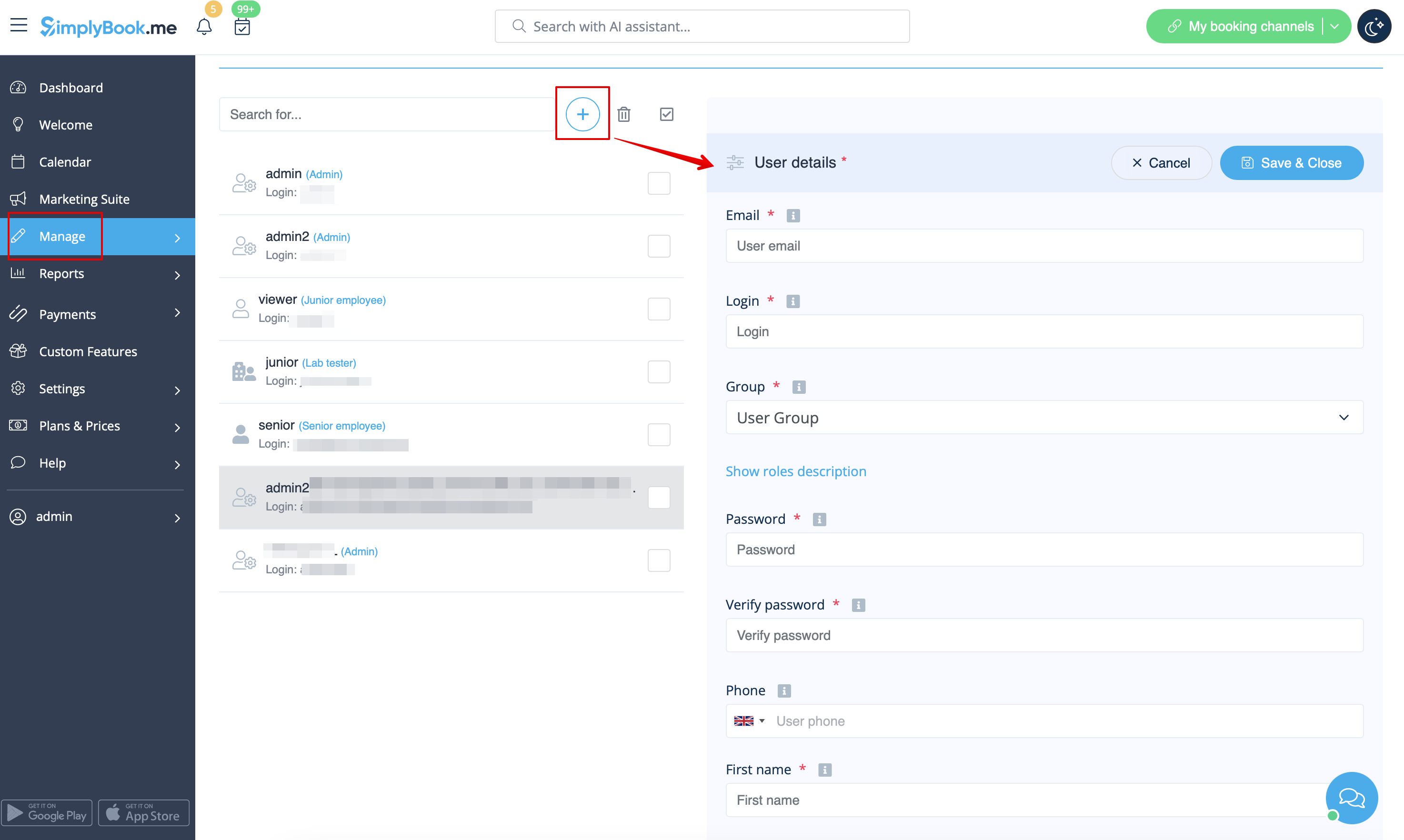
- Udfyld login, e-mailadresse, vælg brugergruppens niveau, indstil første adgangskode, knyt til en leverandør, hvis nødvendigt, tilføj fornavn og efternavn, telefonnummer.
- Bemærk! Login er unikt for hver bruger. Hvis du sletter en bruger, er det ikke muligt at genbruge det samme login til en anden bruger.
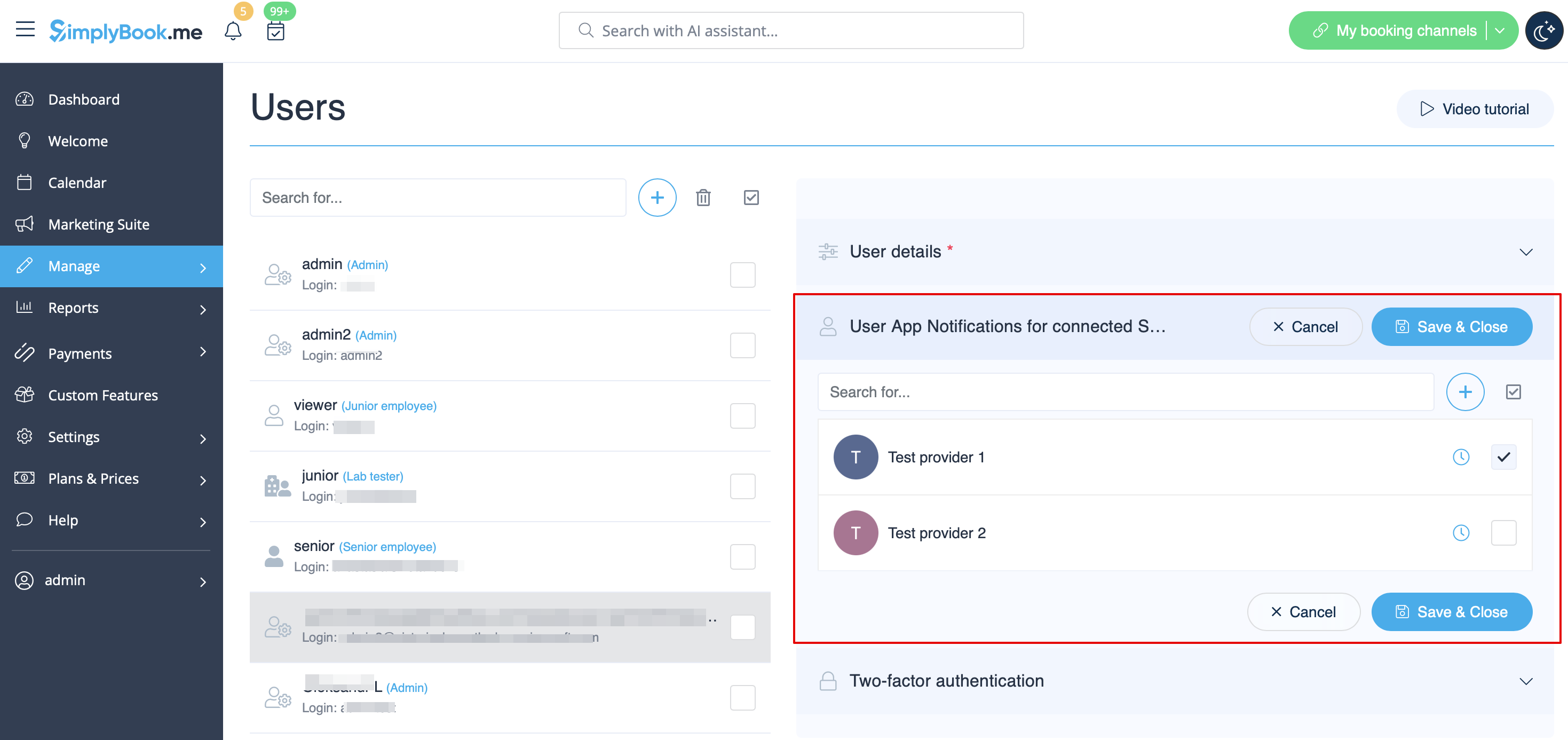
Herefter skal du blot aktivere knappen Send loginoplysninger til bruger og gemme brugeroplysningerne.
Systemet sender automatisk en e-mail med loginoplysningerne i henhold til den skabelon, du har indstillet i Indstillinger -> E-mail- og SMS-indstillinger -> Notifikation om ny brugerlogin.
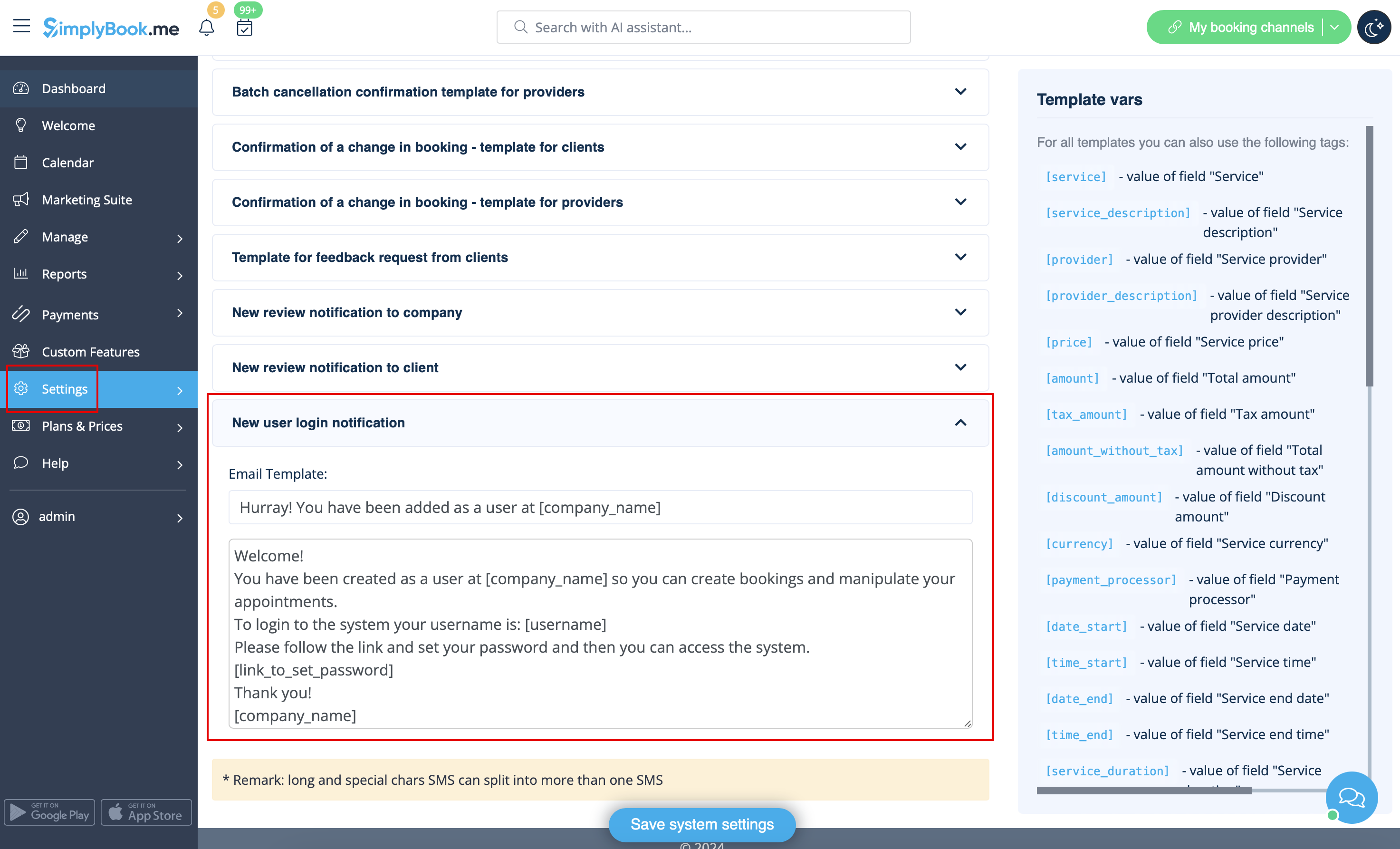
Du kan også manuelt sende login og adgangskode til dine brugere sammen med linket til din administrationsside, når du har gemt brugeren.
Brugerroller
- Admin-
Hvis du har oprettet systemet til din virksomhed på SimplyBook.me, har du som standard administratorrettigheder. Det betyder, at du har den højeste adgangsniveau blandt alle brugere, og at du kan oprette andre administratorer med samme adgangsniveau.
Bemærk! For at beskytte dit system mod fejl tillader vi ikke, at standardadministratoren slettes. Hvis han/hun ikke længere skal have administratorrettigheder, skal du ændre hans/hendes e-mailadresse og adgangskode for at begrænse adgangen. Den anden og efterfølgende administratorer kan fjernes.
Du kan knytte hver bruger til en eller flere udbydere (medarbejdere), så de kan se og/eller administrere bookinger, tidsplaner osv. afhængigt af deres adgangsniveau.
- Senior medarbejder
Senior medarbejderniveauet giver brugerne mulighed for at se andres arbejdsbyrde, men de kan kun foretage ændringer i indstillinger, der vedrører udbydere. Disse brugere har ikke adgang til virksomhedens konfigurationsindstillinger. Senior medarbejdere er ikke knyttet til bestemte tjenesteudbydere. De har fuld adgang til alle tjenesteudbydere, der er tilføjet til systemet, hvilket giver dem mulighed for at se, tilføje, redigere, ændre tidsplaner og slette udbydere.
Dette er en liste over funktioner, som de ikke har adgang til:
- Dashboard
- Brugeradministration
- Tariffer og betalinger
- Indblik
- Indstillinger
- Administration af virksomhedens arbejdstid
- Grundlæggende oplysninger om virksomheden og adresse
- Administration af hjemmesidens indhold
- Designindstillinger
- Brugerdefineret CSS
- Indstillinger for markedsplads
- Generering af widgets
(se tabellen nedenfor for flere detaljer)
af juniormedarbejdere I tilfælde hvor virksomheden har mange medarbejdere, hvis roller primært er fokuseret på deres egne opgaver, kan der oprettes en juniormedarbejderbruger. Dette brugerniveau giver medarbejderne mulighed for at se deres egen arbejdsbyrde og foretage ændringer i deres egen tidsplan og bookinger. Når der oprettes en juniormedarbejder, er det muligt at vælge den eller de tilknyttede tjenesteudbydere. Det er især muligt at knytte mere end én tjenesteudbyder til en juniormedarbejderbruger, hvilket øger fleksibiliteten og kontrollen i forskellige opsætningsscenarier.
Funktionen til at vælge flere tjenesteudbydere til en junior medarbejder er især fordelagtig i situationer, hvor et teammedlem har brug for adgang til bestemte udbyderes tidsplaner eller flere udbydere, der er tilknyttet flere lokationer.
Junior medarbejdere har adgang til følgende funktioner:
- Kalender (kan kun administrere egne bookinger og noter)
- Arbejdstid (kan kun ændre egne tidsplaner)
- Tjenesteudbydere (kan kun se tilknyttede tjenesteudbydere)
(se tabellen nedenfor for flere detaljer)
- På virksomhedsniveau er det muligt at skjule kundekontaktoplysninger for juniormedarbejdere samt forhindre redigering og annullering af bookinger og statusopdateringer.
Bemærk! Hvis en junior medarbejder ikke er tildelt en tjenesteudbyder, nedgraderes hans adgangsniveau automatisk til visningsniveau.
- Viewer
I nogle tilfælde vil du måske give en person mulighed for at se, hvad der foregår med virksomhedens bookinger, men uden at kunne foretage ændringer. Denne bruger skal indstilles som Viewer. Viewers kan ikke ændre noget, og de kan ikke tilføje bookinger.
Følgende funktioner er tilgængelige for denne adgangsgruppe:
- Kalender (kun visning)
- Tjenester (kun visning)
(se tabellen nedenfor for flere detaljer)
- På virksomhedsniveau er det muligt at skjule klientkontaktoplysninger for visningsbrugere.
- Operator POS-
Dette niveau er primært oprettet til administration af POS-grænsefladen og salg af tjenester, klasser, pakker, medlemskaber, produkter og tilføjelser,
men har også adgang til kalender, kunder, nogle rapporter og skrivebeskyttet adgang til medlemskaber, kuponer og gavekort,tjenester/klasser og udbydere.
- Doorman
Har kun mulighed for at validere billetter.
- Lab tester
Dette adgangsniveau er primært oprettet til arbejde med den tilpassede funktion Medical Test og til at validere billetter, udskrive etiketter til reagensglas, opdatere testresultater og udskrive resultater.
| Options list | Senior Employee | Junior Employee | Viewer | |
|---|---|---|---|---|
| Dashboard | ||||
| Se diagrammer / Aktivér tilpassede funktioner | − |
− |
− | |
| Velkomst | ||||
| Se side / Skift egen adgangskode / Opret forbindelse til Google Authenticator* | ✔ |
✔ |
✔ | |
| Skift egen e-mail-adresse | − |
− |
− | |
| Opret reservation fra dashboardet | ✔ |
✔ |
− | |
| Få link til rapport med personlige data | ✔ |
✔ |
✔ | |
| Kalender | ||||
| Forskellige visningsmuligheder | ✔ |
✔ |
✔ | |
| Eksport til Excel/PDF | ✔ |
− |
− | |
| Vis og administrer bookinger Vis og administrer kalendernoter |
✔ |
kun egen |
kun visning | |
| Få adgang til transaktioner* Adgang til ventende bookinger* |
✔ |
− |
− | |
| Rediger bookingkommentarer | ✔ |
✔ i egne bookinger |
− | |
| Rediger kundeoplysninger fra bookingen | ✔ |
✔ i egne bookinger |
kun visning | |
| Tilføj/rediger SOAP-noter* | med korrekt nøgle |
med korrekt nøgle kun egne |
med korrekt nøgle kun vis | |
| Opdater reservationsstatus* | ✔ |
kun egen |
− | |
| Rediger indtastningsformularer* i bookingerne Rediger produkter til salg* i bookingerne Rediger service-tilvalg* i bookingerne |
✔ |
kun egen |
kun visning | |
| Marketing Suite | ||||
| Se side og aktiver tilpassede funktioner | − |
− |
− | |
| Administrer | ||||
| Se/tilføj/rediger/ændr tidsplan/slet tjenester | ✔ |
− |
− | |
| Vis/tilføj/rediger/ændr tidsplan/slet udbydere | ✔ |
kun egne og eksisterende |
− | |
| Vis/tilføj/rediger/flet*/slet kunder | ✔ |
− |
− | |
| Vis/tilføj/rediger/slet brugere | − |
− |
− | |
| Vis/tilføj/rediger/ændr tidsplan/slet klasser* | ✔ |
− |
− | |
| Vis/tilføj/rediger/slet pakker* Vis/tilføj/rediger/slet medlem skaber* Se/tilføj/rediger/slet kuponer og gavekort* |
✔ |
− |
− | |
| Vis/tilføj/rediger/slet service-tilføjelser* Vis/tilføj/rediger/slet produkter til salg* Se/tilføj/rediger/slet relaterede ressourcer* |
✔ |
− |
− | |
| Vis/tilføj/rediger/slet indtastningsformularer* Vis/tilføj/rediger/slet klientfelter* |
✔ |
− |
− | |
| Vis/tilføj/rediger/slet nyheder* Vis/tilføj/rediger/slet brugerdefinerede sider* |
− |
− |
− | |
| Vis/tilføj/rediger/slet statusser* | ✔ |
− |
− | |
| Vis/tilføj/rediger/slet fleksible meddelelser* Vis/tilføj/rediger/slet påmindelser om at booke snart* |
✔ |
− |
− | |
| Se/tilføj/rediger/slet kalendernotatstyper | ✔ |
kun vis |
kun vis | |
| Vis/opdater kalendersynkronisering* | kun egne |
− | ||
| Tilslut eget værktøj til online videomøder* | ✔ |
− | ||
| Se/tilføj/rediger/slet skatter* | − |
− |
− | |
| Rapporter | ||||
| Vis salgsrapport* | − |
− |
− | |
| Vis/Eksporter/Send e-mail/Masseannullering i rapporten med bookingdetaljer | ✔ |
− |
− | |
| Vis/Accepter/Slet betalingstransaktioner* Vis/godkend/afvis ventende* bookinger |
✔ |
− |
− | |
| View sales & tax report* | ✔ |
− |
− | |
| View/Export online video meetings* report | ✔ |
− |
− | |
| View/Export/Send email from client report | ✔ |
− |
− | |
| View/Export classes* bookings | ✔ |
− |
− | |
| View/Export membership payments* View/Export issued packages* View/Export issued coupons* |
✔ |
− |
− | |
| View/Export/Print tickets* report | ✔ |
− |
− | |
| View calendar notes report | ✔ |
view only |
view only | |
| View/Export SMS report View/Export/Reply to contact messages* |
✔ |
− |
− | |
| View/Export/Delete reviews & add/edit answers | ✔ |
− |
− | |
| View/Export client app* reports | ✔ |
− |
− | |
| View vaccination* report | ✔ |
− |
− | |
| View personal data reports | own only |
own only |
own only | |
| Custom Features
| ||||
| View page/Enable/Disable custom features | − |
− |
− | |
| Edit Accept payments* settings | − |
− |
− | |
| Change Intake forms* export settings | − |
− |
− | |
| Set color for provider with Provider color coding* | ✔ |
− |
− | |
| Set bookings limits for services* | ✔ |
− |
− | |
| View/Add/Edit/Delete service categories* | ✔ |
− |
− | |
| View/Add/Edit/Delete locations* | ✔ |
view the list only | − | |
| Edit Daily report* settings Edit Google Adwords&Analytics* settings |
− |
− |
− | |
| Add/delete images in Photo gallery* Connect account in Instagram gallery* |
− |
− |
− | |
| Edit SMTP* settings Edit SMS Gateway* settings |
− |
− |
− | |
| Edit Terms and Conditions* Edit Cancellation policy* settings |
− |
− |
− | |
| Edit Coupons and Gift Cards* notifications settings
|
− |
− |
− | |
| Edit Appointment at fixed time* settings | ✔ |
− |
− | |
| Edit Custom Domain* settings | − |
− |
− | |
| Edit API* settings | − |
− |
− | |
| Edit Multiple bookings* settings Edit Group bookings* settings |
− |
− |
− | |
| Edit Clean history* settings | − |
− |
− | |
| Edit Client login* settings Edit Strict password* settings* |
− |
− |
− | |
| Edit Any employee settings* | − | − |
− | |
| Edit Google translate settings* | − |
− |
− | |
| Edit HIPAA* settings Edit Google authenticator* settings |
− |
− |
− | |
| Settings | ||||
| Company information Directory listing Delete account |
− |
− |
− | |
| Company opening hours | − |
− |
− | |
| Providers schedule | ✔ |
own only |
− | |
| Services schedule Classes* schedule |
✔ |
− |
− | |
| Design settings Booking widgets settings Custom CSS* |
− |
− |
− | |
| Main configuration Email & SMS settings Custom wording & translations |
− |
− |
− | |
| Plans&Prices | ||||
| View & Buy subscriptions View & Buy additional items See payment history |
− |
− |
− | |
- * - corresponding custom feature should be already enabled by admin.
