Translations:Importing the list of clients/4/uk: Difference between revisions

From SimplyBook.me
Created page with ":2. Підготуйте файл Excel. :- Над списком клієнтів не повинно бути тексту. :- Переконайтеся, що всі комірки відображаються правильно. :- Збережіть файл у форматі .csv з розділенням комами. <br><br> :3. Перейдіть до «Управління»//«Клієнти»//«Імпортувати з CSV» або просто натис..."
 
(No difference)

Latest revision as of 12:14, 16 May 2025

Information about message (contribute)
This message has no documentation. If you know where or how this message is used, you can help other translators by adding documentation to this message.
Message definition (Importing the list of clients)
:2. Prepare your Excel file. 
:- No text above the list of clients should be written
:- Make sure all cells are correctly displayed
:- Save file in .csv format with comma separation.
<br><br>
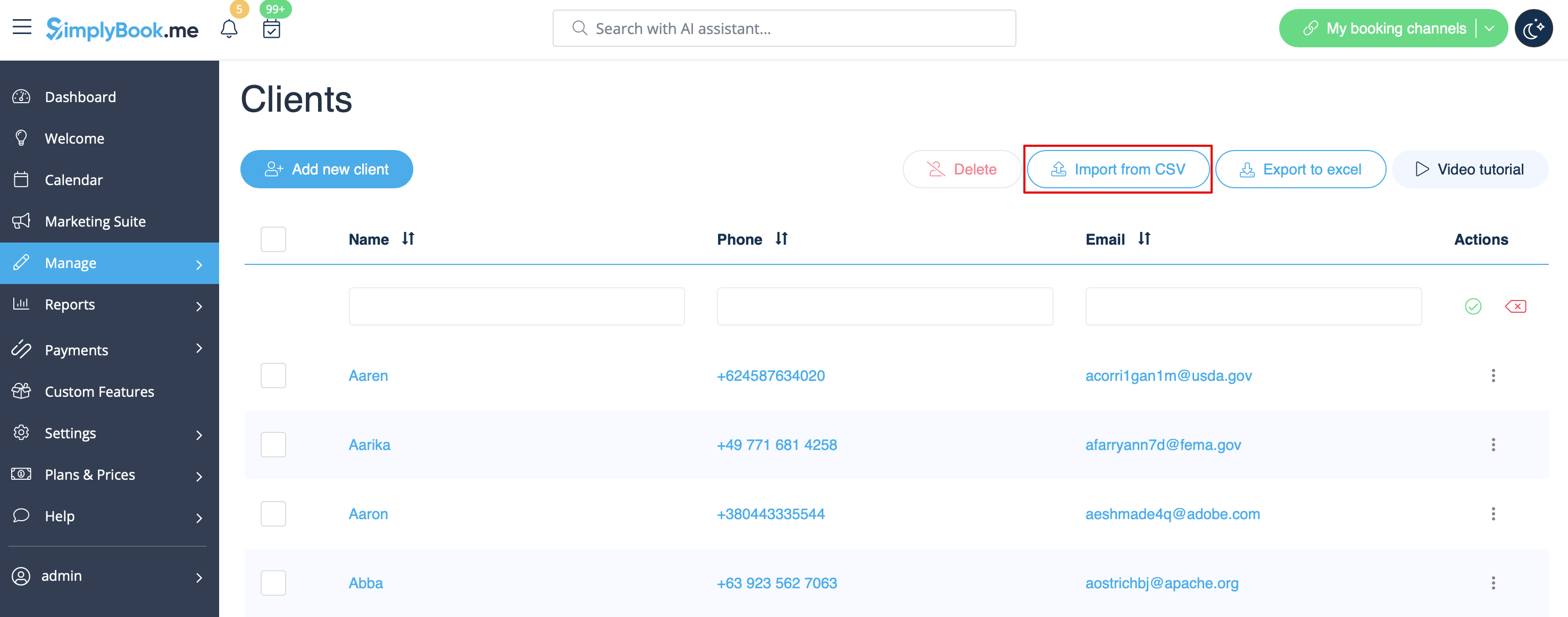
:3. Go to Manage//Clients//Import from CSV or simply click on "Settings" near this custom feature. 
[[ File:Import csv file path redesigned.png|1200px | center|link=https://help.simplybook.me/images/c/cb/Import_csv_file_path_redesigned.png]]
<br><br>
2. Підготуйте файл Excel.
- Над списком клієнтів не повинно бути тексту.
- Переконайтеся, що всі комірки відображаються правильно.
- Збережіть файл у форматі .csv з розділенням комами.


3. Перейдіть до «Управління»//«Клієнти»//«Імпортувати з CSV» або просто натисніть «Налаштування» поруч із цією налаштованою функцією.