From SimplyBook.me
No edit summary |
Marked this version for translation |
||
| (3 intermediate revisions by the same user not shown) | |||
| Line 1: | Line 1: | ||
<languages/> | |||
<translate> | |||
<!--T:1--> | |||
{{#seo: | |||
|title=How to delete your SimplyBook.me account - SimplyBook.me | |||
|description=Find out how to delete your SimplyBook.me account securely. Follow the steps for account removal here. | |||
|titlemode=append | |||
|keywords=faq, frequently asked questions, booking software, appointment system questions, appointments online, calendar software, booking system, booking calendar, scheduling software, online appointment scheduling, online scheduling, plugins, custom features, custom booking page link, domain name, custom domain name, custom url | |||
}} | |||
</translate> | |||
<translate> | |||
<!--T:2--> | |||
<br><br><br><br> | <br><br><br><br> | ||
You can delete your account in <span style="background-color:#d4f8e5; padding:5px; border-radius:5px;">Settings</span> -> <span style="background-color:#d4f8e5; padding:5px; border-radius:5px;">Delete account.</span><br> | You can delete your account in <span style="background-color:#d4f8e5; padding:5px; border-radius:5px;">Settings</span> -> <span style="background-color:#d4f8e5; padding:5px; border-radius:5px;">Delete account.</span><br> | ||
Please indicate the reason why you have decided to delete your company and keep in mind that it can't be restored. If you register a new company in the future, your old company name in url can't be used. | Please indicate the reason why you have decided to delete your company and keep in mind that it can't be restored. If you register a new company in the future, your old company name in url can't be used. | ||
</translate> | |||
<translate> | |||
[[File:Delete account path | <!--T:3--> | ||
[[File:Delete account path redesigned.png|1200px|1200px| center|link=https://help.simplybook.me/images/f/f7/Delete_account_path_redesigned.png]] | |||
<br><br> | <br><br> | ||
If you need to restore the account that you have previously deleted please follow [[How_to_unblock_account|this tutorial]]. | If you need to restore the account that you have previously deleted please follow [[How_to_unblock_account|this tutorial]]. | ||
<br><br><br><br> | <br><br><br><br> | ||
</translate> | |||
Latest revision as of 12:17, 16 May 2025
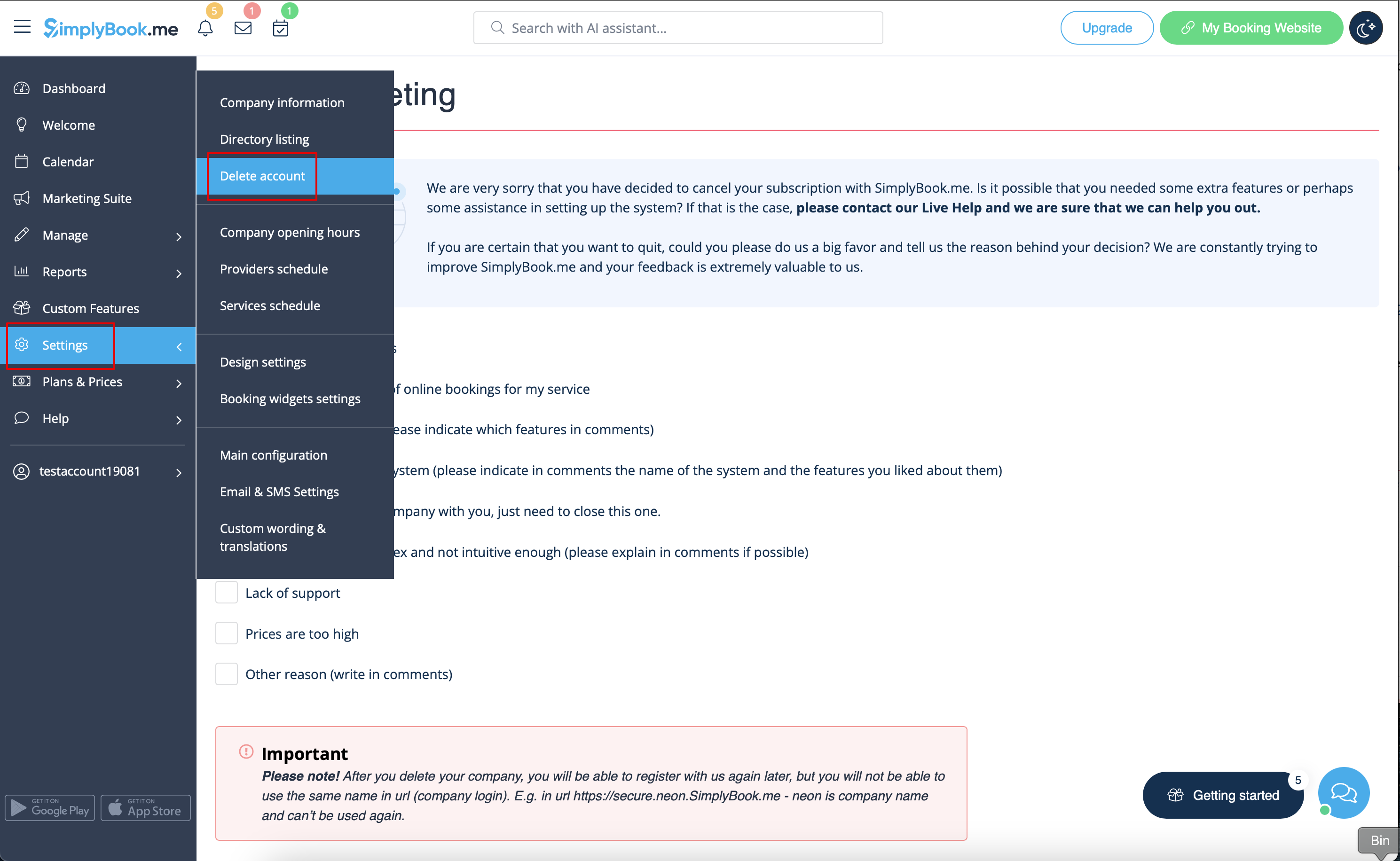
You can delete your account in Settings -> Delete account.
Please indicate the reason why you have decided to delete your company and keep in mind that it can't be restored. If you register a new company in the future, your old company name in url can't be used.
If you need to restore the account that you have previously deleted please follow this tutorial.
