Translations:Calendar Notes/5/sv: Difference between revisions

From SimplyBook.me
Created page with ":4. Klicka på det <span style="background-color:#d4f8e5; padding:5px; border-radius:5px;">fria utrymmet</span> i <span style="background-color:#d4f8e5; padding:5px; border-radius:5px;">kalendertabellen</span> där du vill infoga informationen eller blockera tiden för att få <span style="background-color:#d4f8e5; padding:5px; border-radius:5px;">fram popup-formuläret för anteckningar.</span> <br><br> :5. Markera alternativet <span style="background-color:#d4f8e5; pad..."
 
(No difference)

Latest revision as of 09:16, 19 May 2025

Information about message (contribute)
This message has no documentation. If you know where or how this message is used, you can help other translators by adding documentation to this message.
Message definition (Calendar Notes)
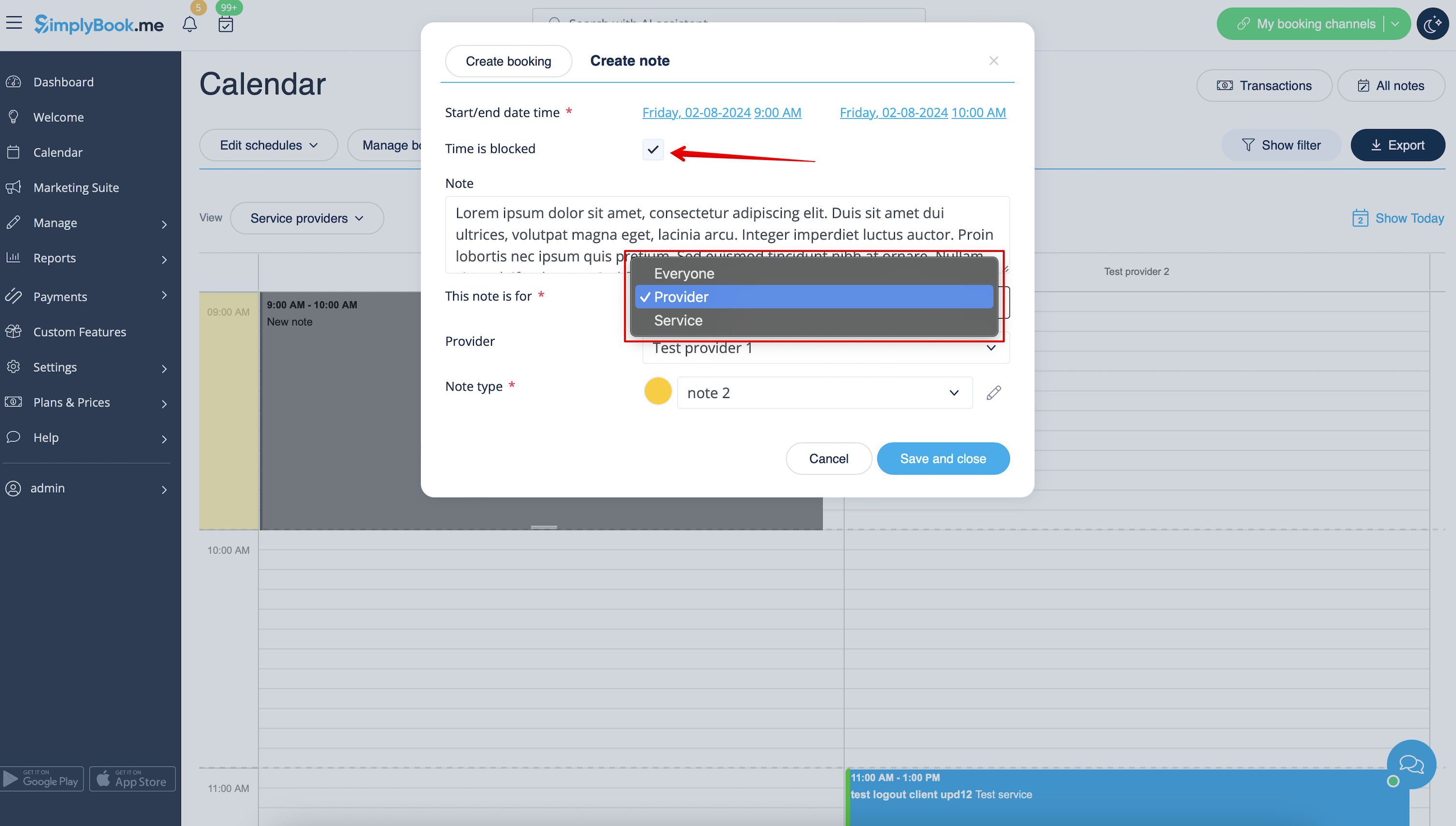
:4. Click on the <span style="background-color:#d4f8e5; padding:5px; border-radius:5px;">free space</span> in the <span style="background-color:#d4f8e5; padding:5px; border-radius:5px;">Calendar table</span> where you would like to insert the information or block time to get <span style="background-color:#d4f8e5; padding:5px; border-radius:5px;">note popup form.</span>
<br><br>
:5. Check <span style="background-color:#d4f8e5; padding:5px; border-radius:5px;">Time is blocked</span> option to close the availability if needed, add the details to the <span style="background-color:#d4f8e5; padding:5px; border-radius:5px;">textbox</span> and select the assignee: you can add a note or close time per <span style="background-color:#d4f8e5; padding:5px; border-radius:5px;">specific provider,</span> <span style="background-color:#d4f8e5; padding:5px; border-radius:5px;">service</span> or <span style="background-color:#d4f8e5; padding:5px; border-radius:5px;">everyone.</span>
[[File:Adding note to block time redesigned.png|1200px|border|center|link=https://help.simplybook.me/images/4/43/Adding_note_to_block_time_redesigned.png]]
<br><br>
4. Klicka på det fria utrymmet i kalendertabellen där du vill infoga informationen eller blockera tiden för att få fram popup-formuläret för anteckningar.


5. Markera alternativet Tiden är blockerad för att stänga tillgängligheten om det behövs, lägg till detaljerna i textrutan och välj den ansvarige: du kan lägga till en anteckning eller stänga tiden för en specifik leverantör, tjänst eller alla.