From SimplyBook.me
Created page with "{{#seo: |title=Kalendernoteringar – SimplyBook.me |description=Lägg till privata anteckningar i din kalender för bättre organisation. Spåra viktiga detaljer utan ansträngning. Lär dig hur du använder den här funktionen! |titlemode=lägg till |keywords=faq, vanliga frågor, bokningsprogramvara, frågor om bokningssystem, onlinebokningar, kalenderprogramvara, bokningssystem, bokningskalender, schemaläggningsprogramvara, onlinebokning, onlinebokning, installation..." |
Created page with ":2. När alla typer är klara för användning navigerar du till sidan <span style="background-color:#d4f8e5; padding:5px; border-radius:5px;">Kalender</span> med hjälp av <span style="background-color:#d4f8e5; padding:5px; border-radius:5px;">menyn till vänster.</span> <br><br> :3. Växla till läget <span style="background-color:#d4f8e5; padding:5px; border-radius:5px;">Lägg till anteckning/Blockera tid</span> <span style="background-color:#d4f8e5; padding:5px; bord..." Tags: Mobile edit Mobile web edit |
||
| (One intermediate revision by the same user not shown) | |||
| Line 15: | Line 15: | ||
[[File:Note mode calendar redesigned.png|1200px|border|center|link=https://help.simplybook.me/images/b/b7/Note_mode_calendar_redesigned.png]] | [[File:Note mode calendar redesigned.png|1200px|border|center|link=https://help.simplybook.me/images/b/b7/Note_mode_calendar_redesigned.png]] | ||
<br><br> | <br><br> | ||
:4. Klicka på det <span style="background-color:#d4f8e5; padding:5px; border-radius:5px;">fria utrymmet</span> i <span style="background-color:#d4f8e5; padding:5px; border-radius:5px;">kalendertabellen</span> där du vill infoga informationen eller blockera tiden för att få <span style="background-color:#d4f8e5; padding:5px; border-radius:5px;">fram popup-formuläret för anteckningar.</span> | |||
:4. | |||
<br><br> | <br><br> | ||
:5. | :5. Markera alternativet <span style="background-color:#d4f8e5; padding:5px; border-radius:5px;">Tiden är blockerad</span> för att stänga tillgängligheten om det behövs, lägg till detaljerna i <span style="background-color:#d4f8e5; padding:5px; border-radius:5px;">textrutan</span> och välj den ansvarige: du kan lägga till en anteckning eller stänga tiden för <span style="background-color:#d4f8e5; padding:5px; border-radius:5px;">en specifik leverantör,</span> <span style="background-color:#d4f8e5; padding:5px; border-radius:5px;">tjänst</span> eller <span style="background-color:#d4f8e5; padding:5px; border-radius:5px;">alla.</span> | ||
[[File:Adding note to block time redesigned.png|1200px|border|center|link=https://help.simplybook.me/images/4/43/Adding_note_to_block_time_redesigned.png]] | [[File:Adding note to block time redesigned.png|1200px|border|center|link=https://help.simplybook.me/images/4/43/Adding_note_to_block_time_redesigned.png]] | ||
<br><br> | <br><br> | ||
:6. För att redigera eller ta bort en tidigare tillagd anteckning, <span style="background-color:#d4f8e5; padding:5px; border-radius:5px;">klicka på den</span> för att öppna popup-fönstret och använd önskad funktion där. | |||
:6. | |||
[[File:Click on note to update redesigned.png|1200px|border|center|link=https://help.simplybook.me/images/e/e0/Click_on_note_to_update_redesigned.png]] | [[File:Click on note to update redesigned.png|1200px|border|center|link=https://help.simplybook.me/images/e/e0/Click_on_note_to_update_redesigned.png]] | ||
<br><br> | <br><br> | ||
<br><br> | <br><br> | ||
; | ;Alternativ för översikt över anteckningar: | ||
: | :Om du har markerat <span style="background-color:#d4f8e5; padding:5px; border-radius:5px;">Tiden är blockerad</span> kommer sådana anteckningar att ha en något ljusare färg jämfört med enkla textanteckningar. | ||
[[File:Blocked vs not blocked note redesigned.png|1200px|border|center|link=https://help.simplybook.me/images/d/d5/Blocked_vs_not_blocked_note_redesigned.png]] | [[File:Blocked vs not blocked note redesigned.png|1200px|border|center|link=https://help.simplybook.me/images/d/d5/Blocked_vs_not_blocked_note_redesigned.png]] | ||
<br><br> | <br><br> | ||
: | :Om du har lagt till en anteckning <span style="background-color:#d4f8e5; padding:5px; border-radius:5px;">per leverantör</span> visas den i vyerna <span style="background-color:#d4f8e5; padding:5px; border-radius:5px;">Tjänsteleverantör,</span> <span style="background-color:#d4f8e5; padding:5px; border-radius:5px;">Tidslinje,</span> <span style="background-color:#d4f8e5; padding:5px; border-radius:5px;">Dag,</span> <span style="background-color:#d4f8e5; padding:5px; border-radius:5px;">Vecka</span> och <span style="background-color:#d4f8e5; padding:5px; border-radius:5px;">Månad</span>. | ||
[[File:Providers notes view redesigned.png|1200px|border|center|link=https://help.simplybook.me/images/9/95/Providers_notes_view_redesigned.png]] | [[File:Providers notes view redesigned.png|1200px|border|center|link=https://help.simplybook.me/images/9/95/Providers_notes_view_redesigned.png]] | ||
<br><br> | <br><br> | ||
:Om du har lagt till en anteckning <span style="background-color:#d4f8e5; padding:5px; border-radius:5px;">per tjänst</span> kan du se den i vyerna <span style="background-color:#d4f8e5; padding:5px; border-radius:5px;">Tjänst,</span> <span style="background-color:#d4f8e5; padding:5px; border-radius:5px;">Dag,</span> <span style="background-color:#d4f8e5; padding:5px; border-radius:5px;">Vecka</span> och <span style="background-color:#d4f8e5; padding:5px; border-radius:5px;">Månad</span>. | |||
[[File:Services notes view redesigned.png|1200px|border|center|link=https://help.simplybook.me/images/0/0b/Services_notes_view_redesigned.png]] | [[File:Services notes view redesigned.png|1200px|border|center|link=https://help.simplybook.me/images/0/0b/Services_notes_view_redesigned.png]] | ||
<br><br> | <br><br> | ||
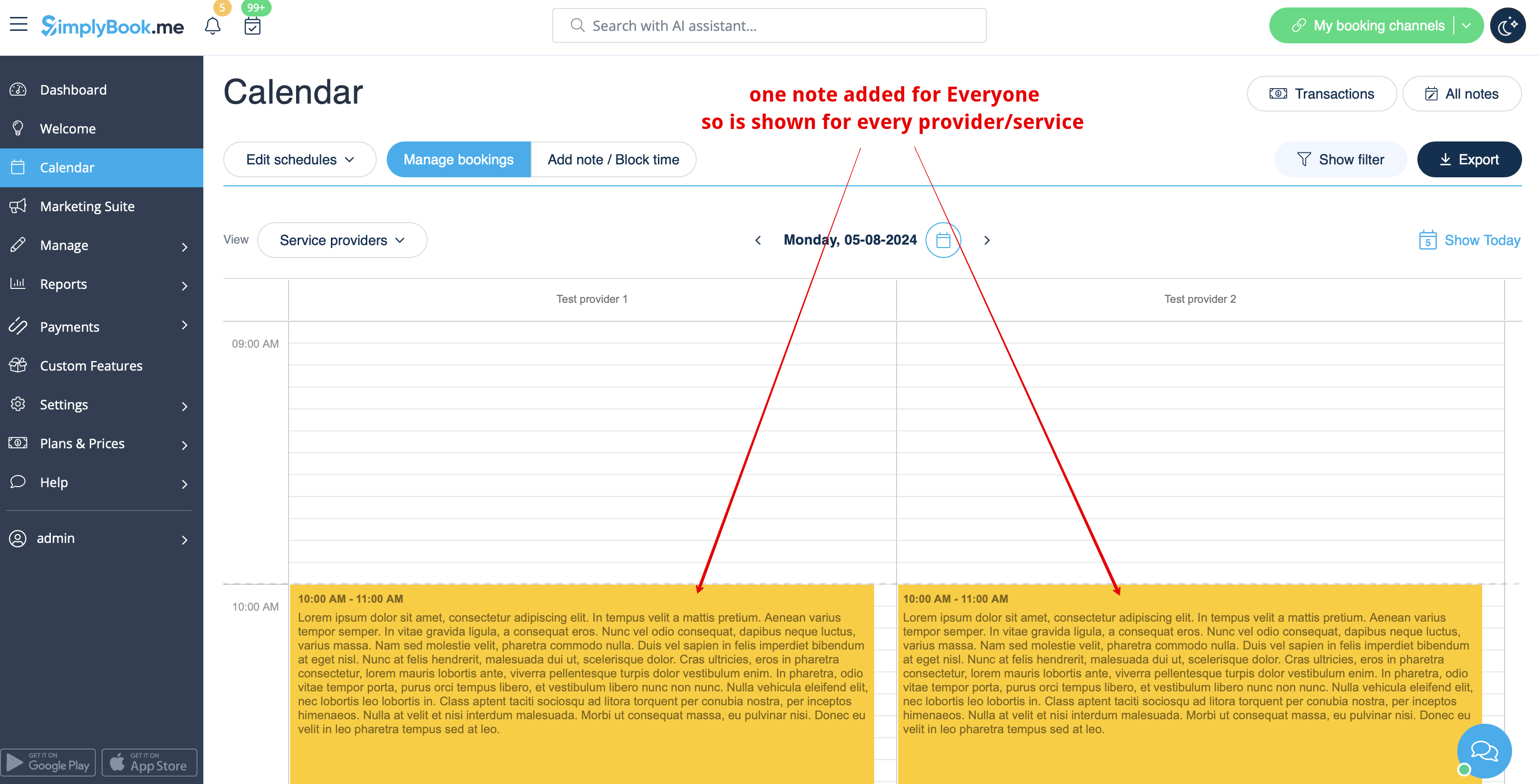
: | :Anteckningarna för <span style="background-color:#d4f8e5; padding:5px; border-radius:5px;">Alla</span> visas i <span style="background-color:#d4f8e5; padding:5px; border-radius:5px;">alla kalendervyer.</span> | ||
[[File:Note for everyone view redesigned.png|1200px|border|center|link=https://help.simplybook.me/images/a/ad/Note_for_everyone_view_redesigned.png]] | [[File:Note for everyone view redesigned.png|1200px|border|center|link=https://help.simplybook.me/images/a/ad/Note_for_everyone_view_redesigned.png]] | ||
<br><br> | <br><br> | ||
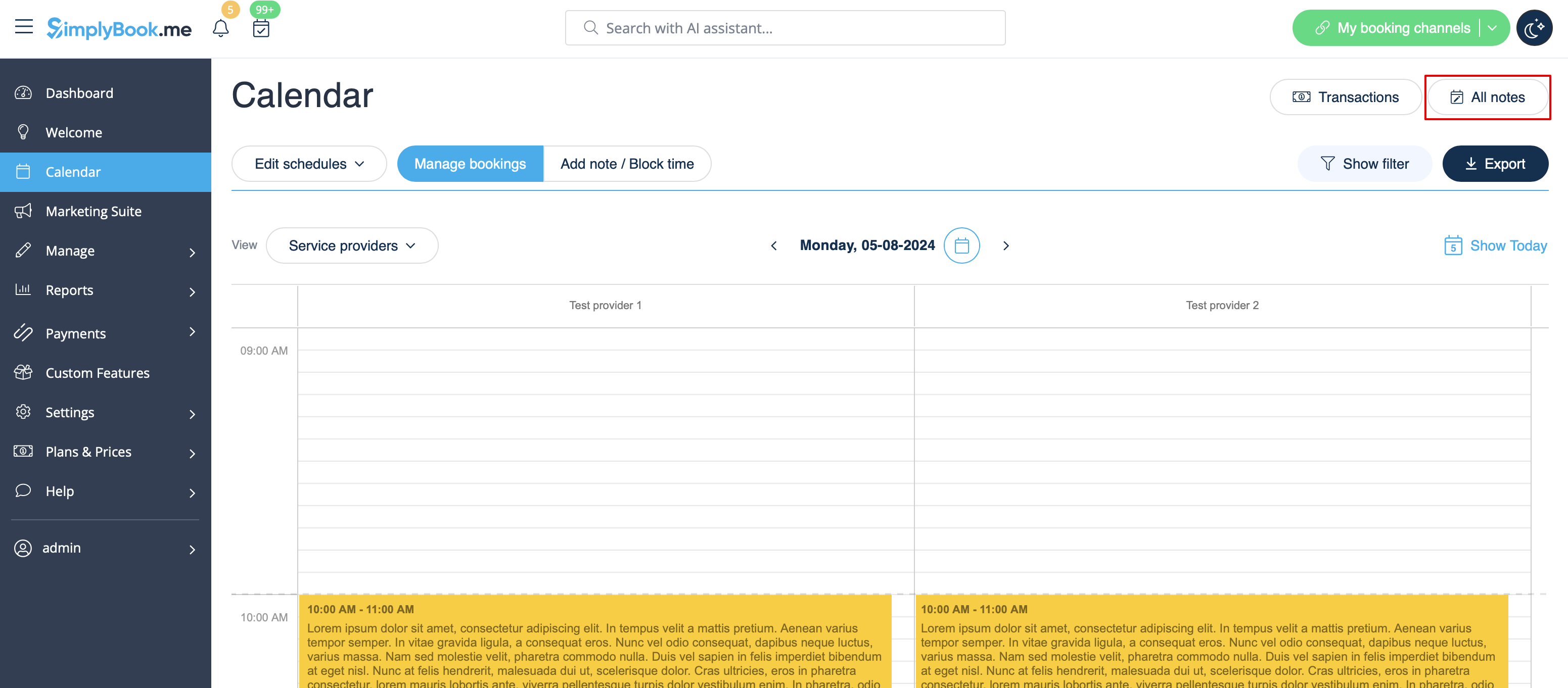
: | :Du kan också komma åt <span style="background-color:#d4f8e5; padding:5px; border-radius:5px;">listan över alla anteckningar som</span> har lagts till, använda filter och exportera anteckningar till Excel i kalendernotrapporter genom att navigera direkt från <span style="background-color:#d4f8e5; padding:5px; border-radius:5px;">kalendersidan</span> eller från avsnittet <span style="background-color:#d4f8e5; padding:5px; border-radius:5px;">Rapporter</span> i <span style="background-color:#d4f8e5; padding:5px; border-radius:5px;">menyn till vänster.</span> | ||
[[File:All notes list path redesigned.png|1200px |border|center|link=https://help.simplybook.me/images/d/d9/All_notes_list_path_redesigned.png]] | [[File:All notes list path redesigned.png|1200px |border|center|link=https://help.simplybook.me/images/d/d9/All_notes_list_path_redesigned.png]] | ||
<br><br> | <br><br> | ||
[[File:Notes report with filter redesigned.png|1200px|border|center|link=https://help.simplybook.me/images/d/d8/Notes_report_with_filter_redesigned.png]] | [[File:Notes report with filter redesigned.png|1200px|border|center|link=https://help.simplybook.me/images/d/d8/Notes_report_with_filter_redesigned.png]] | ||
<br><br><br><br> | <br><br><br><br> | ||
Revision as of 09:16, 19 May 2025
Det kan vara nödvändigt att lägga till viktig information på kalendersidan som visas tillsammans med bokningar, eller att snabbt blockera en viss tidsperiod och ange orsaken.
Därför har vi lanserat en ny funktion, Kalendernoteringar, med tidsblockeringsfunktion som gör detta möjligt, så att du nu kan ha allt du behöver till hands.
hur man använder:
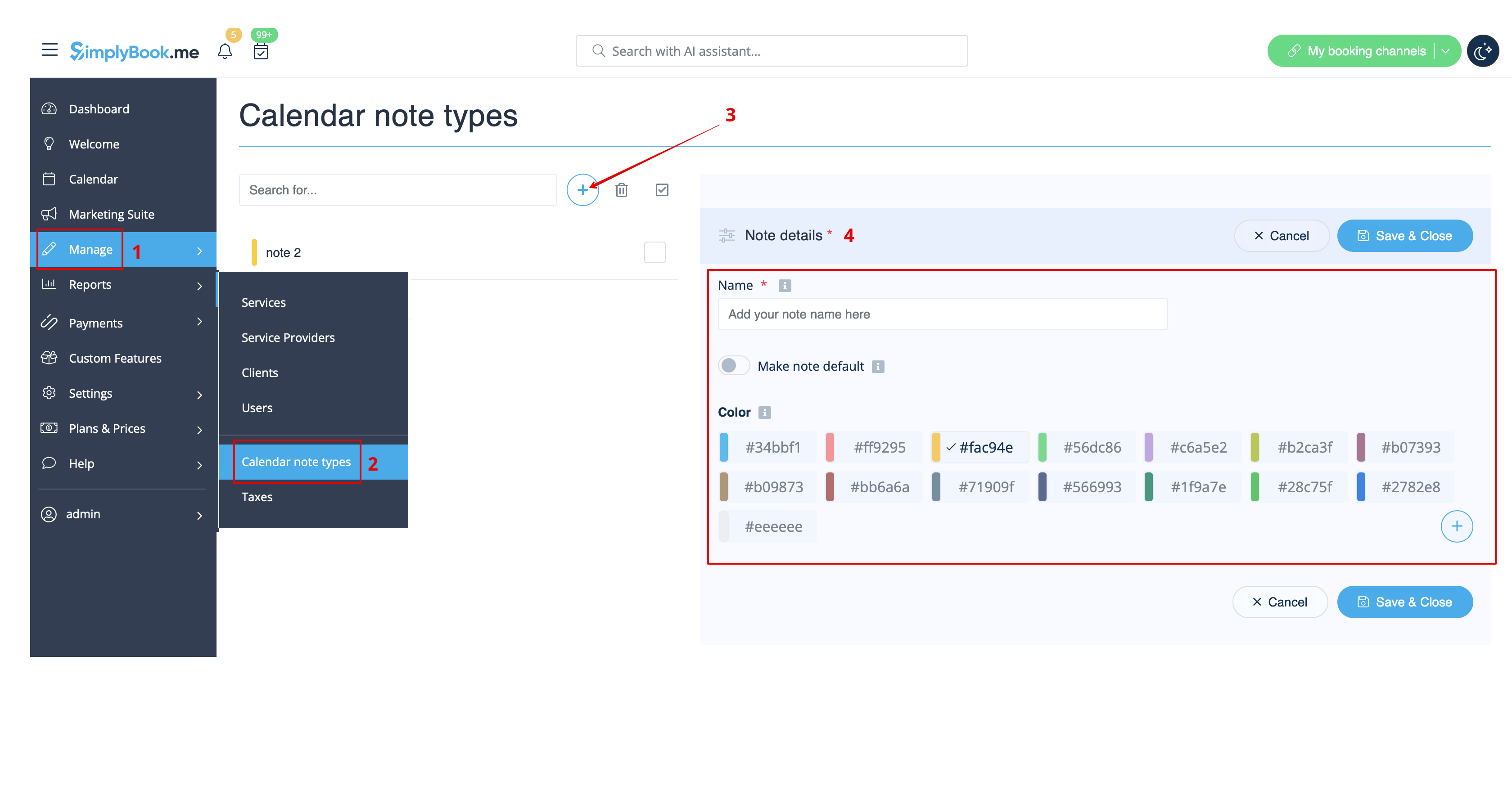
- 1. Som standard finns det en anteckningstyp tillagd i systemet, men du kan gå till Hantera -> Kalendernoteringstyper för att lägga till nya anteckningstyper och ställa in önskade färger för dem.
- 2. När alla typer är klara för användning navigerar du till sidan Kalender med hjälp av menyn till vänster.
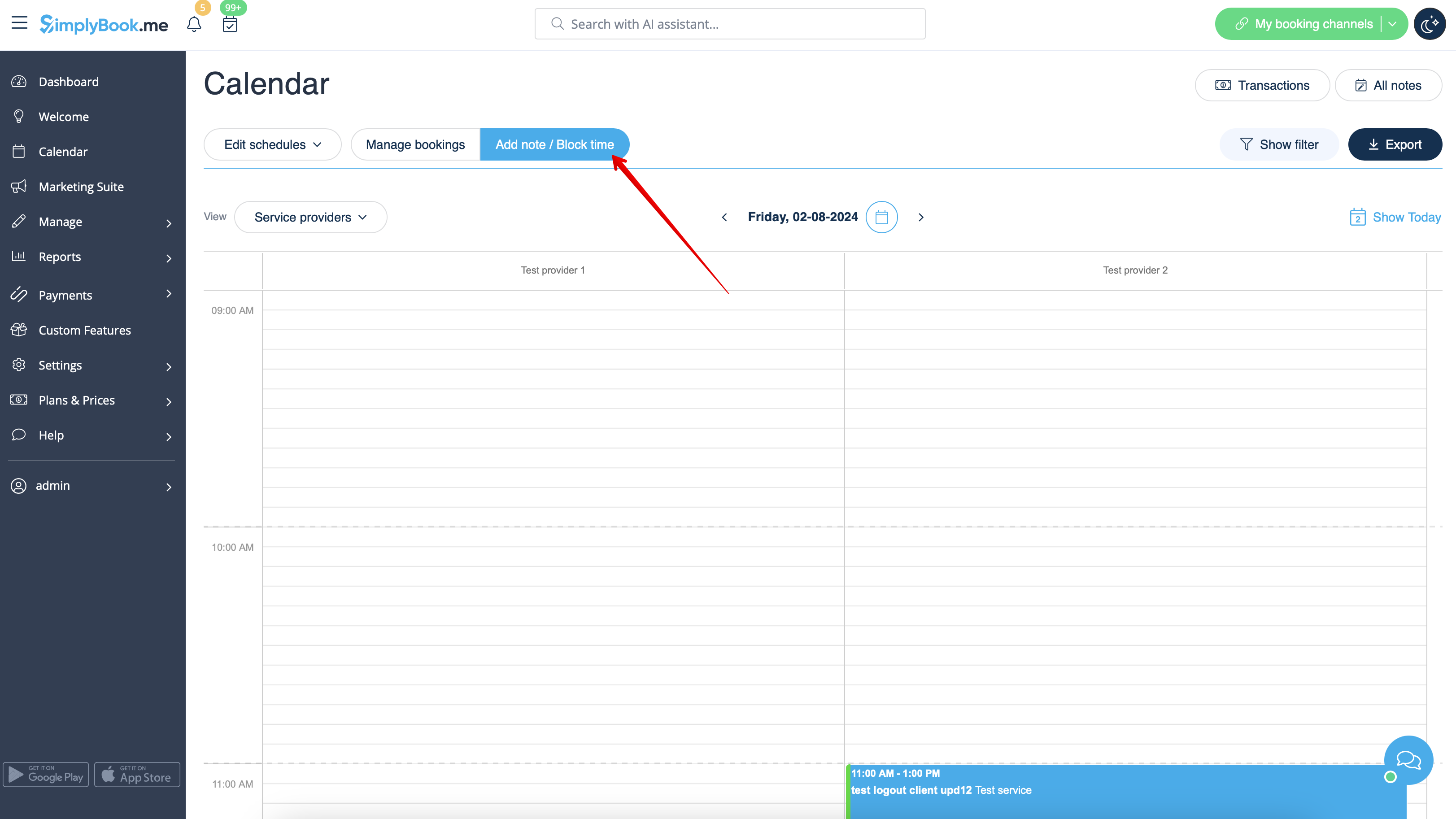
- 3. Växla till läget Lägg till anteckning/Blockera tid ovanför kalendern.
- 4. Klicka på det fria utrymmet i kalendertabellen där du vill infoga informationen eller blockera tiden för att få fram popup-formuläret för anteckningar.
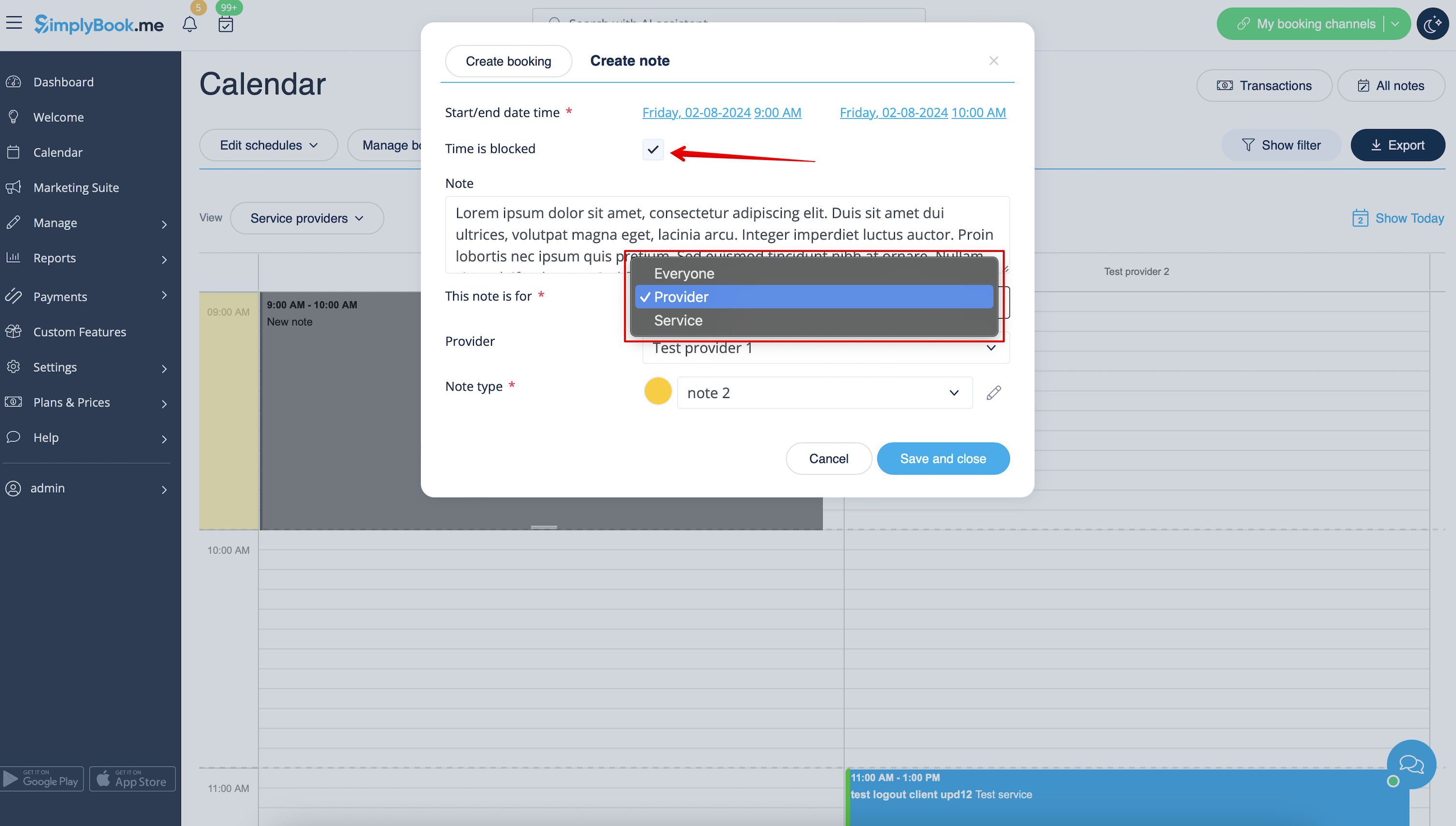
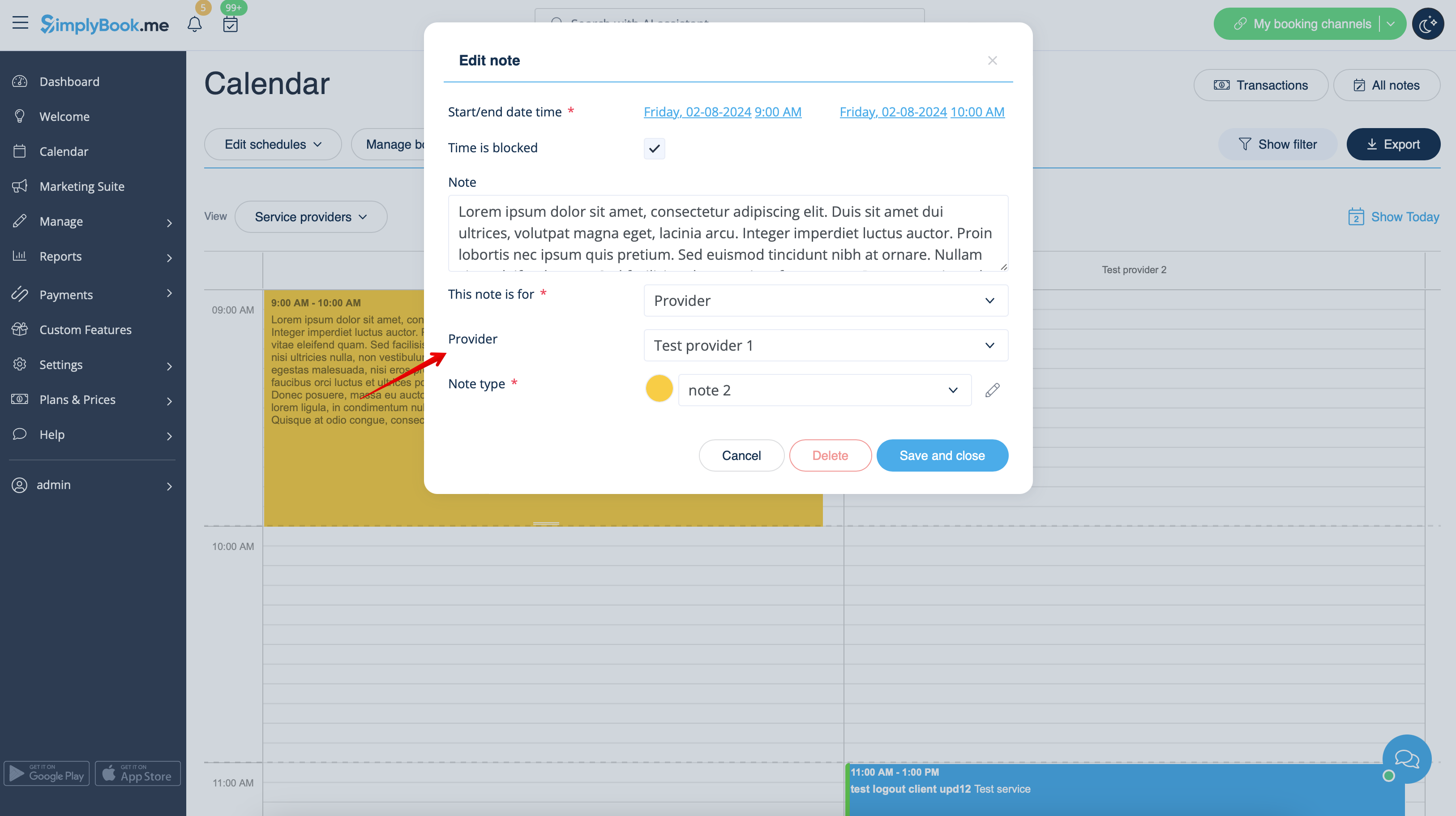
- 5. Markera alternativet Tiden är blockerad för att stänga tillgängligheten om det behövs, lägg till detaljerna i textrutan och välj den ansvarige: du kan lägga till en anteckning eller stänga tiden för en specifik leverantör, tjänst eller alla.
- 6. För att redigera eller ta bort en tidigare tillagd anteckning, klicka på den för att öppna popup-fönstret och använd önskad funktion där.
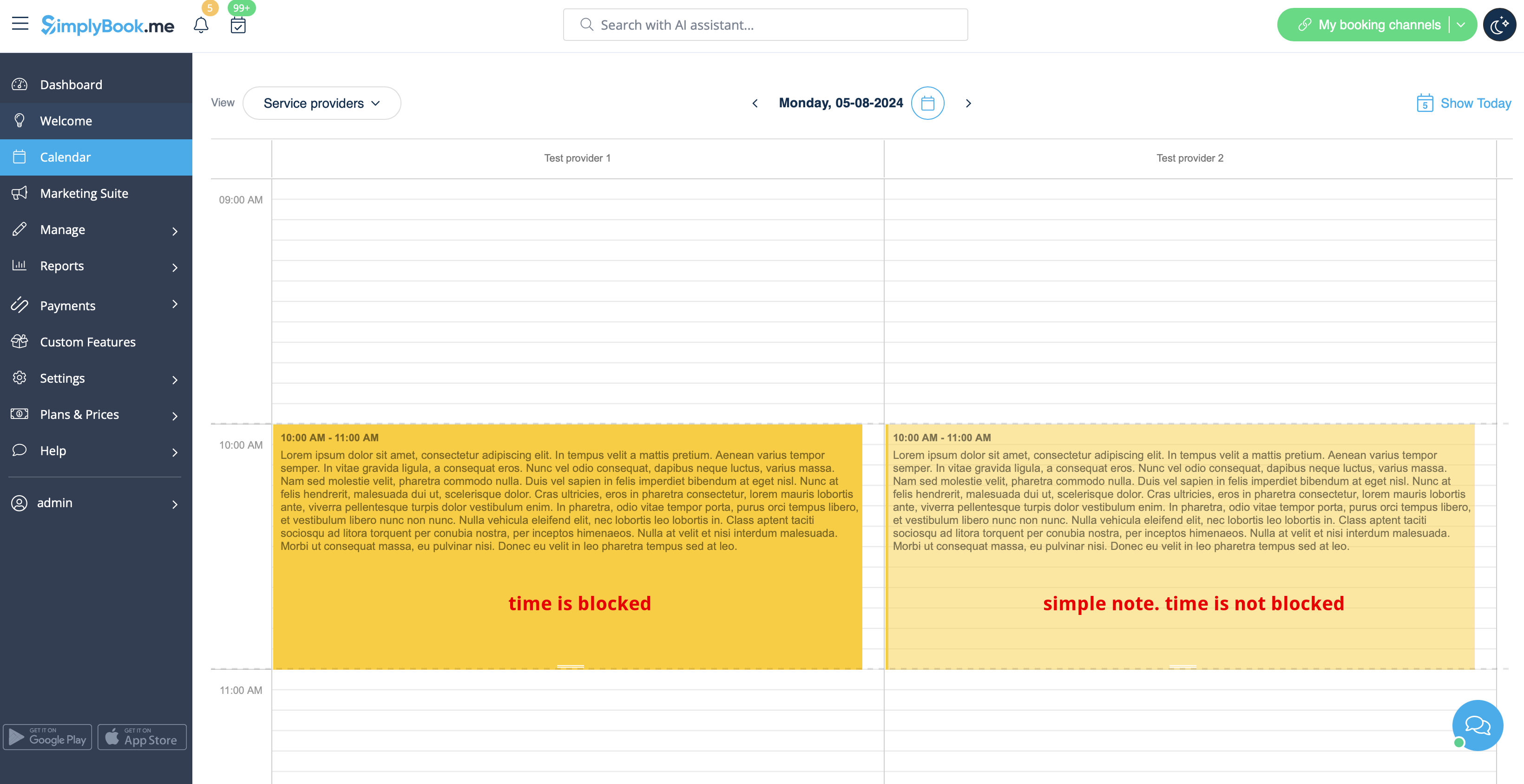
- Alternativ för översikt över anteckningar
- Om du har markerat Tiden är blockerad kommer sådana anteckningar att ha en något ljusare färg jämfört med enkla textanteckningar.
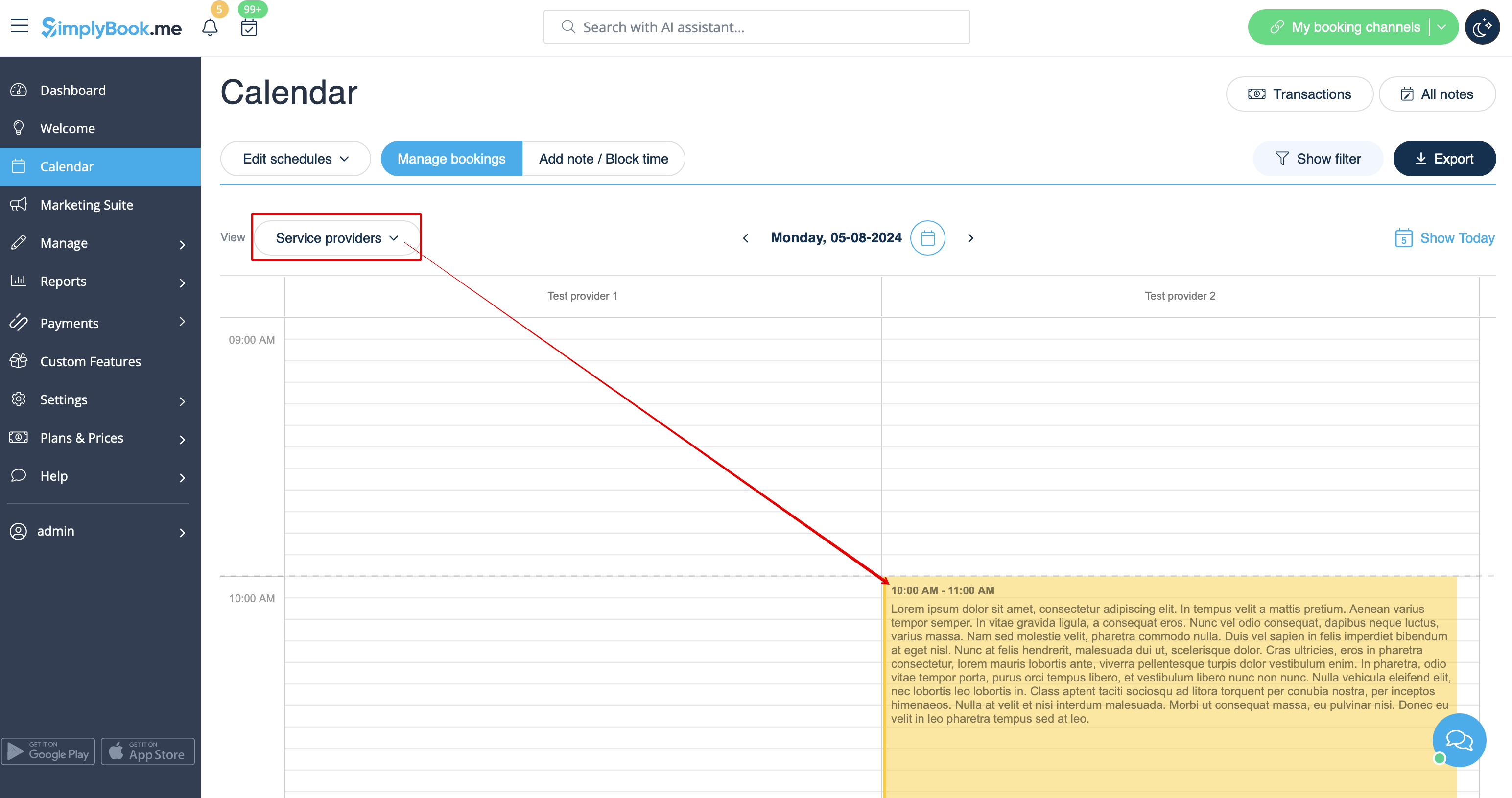
- Om du har lagt till en anteckning per leverantör visas den i vyerna Tjänsteleverantör, Tidslinje, Dag, Vecka och Månad.
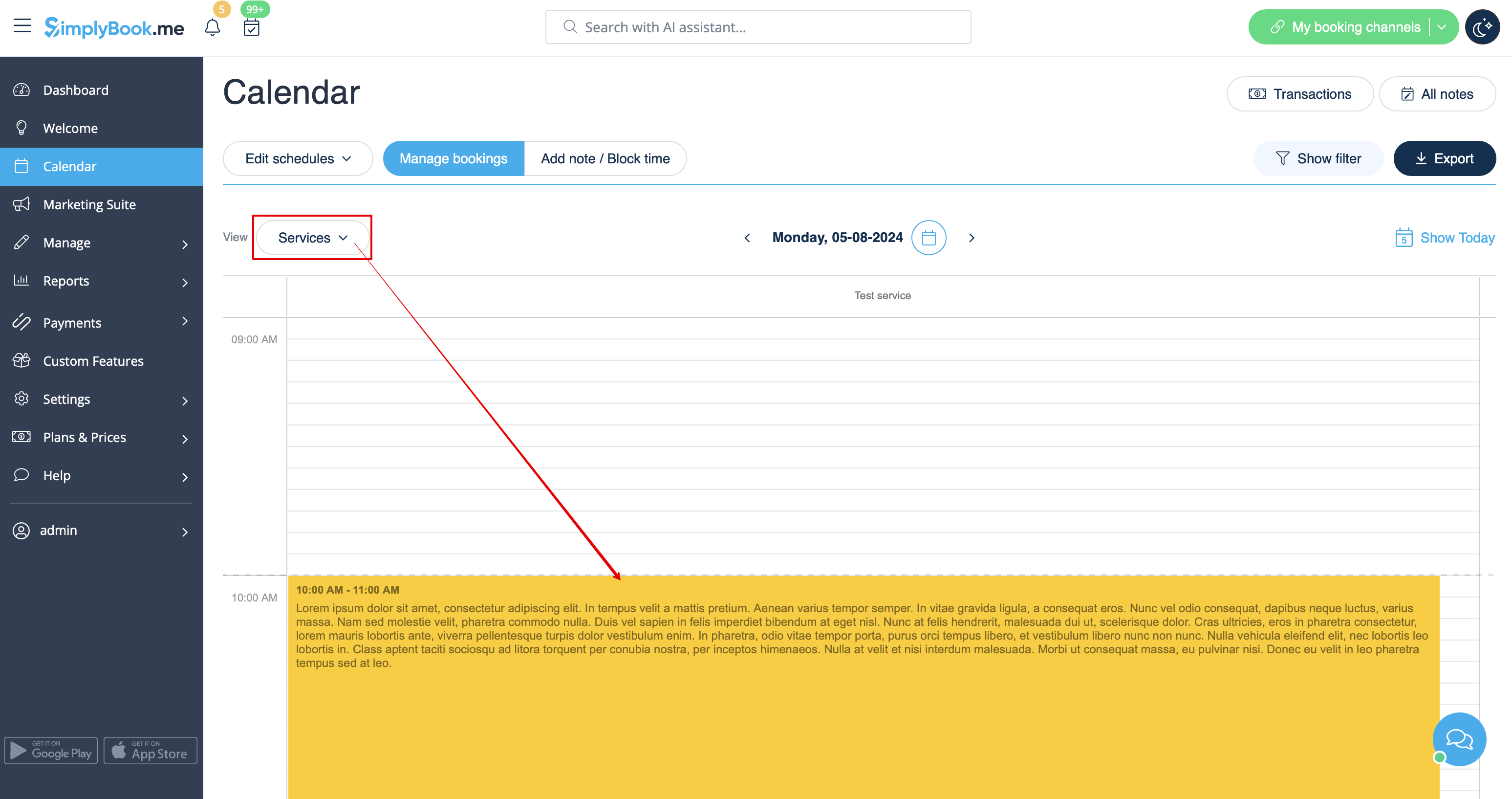
- Om du har lagt till en anteckning per tjänst kan du se den i vyerna Tjänst, Dag, Vecka och Månad.
- Anteckningarna för Alla visas i alla kalendervyer.
- Du kan också komma åt listan över alla anteckningar som har lagts till, använda filter och exportera anteckningar till Excel i kalendernotrapporter genom att navigera direkt från kalendersidan eller från avsnittet Rapporter i menyn till vänster.