SimplyBook.me
Not logged in
English
Log in
Search
Navigation
Help Center
Getting started
Booking website
Time settings
Prices and purchases
Custom Features
Calendar and bookings
Tips for specific businesses
Integration
For developers
Video tutorials
Tools
What links here
Related changes
Special pages
Printable version
Permanent link
Page information
In other languages
Page history
Refresh page
Translations:How to add Google Meet links to appointments/2/en: Difference between revisions
Help
Namespaces
Translation unit
Discussion
Views
Read
View source
From SimplyBook.me
Newer edit →
Visual
Wikitext
Revision as of 10:21, 19 May 2025
view source
FuzzyBot
(
talk
|
contribs
)
5,030
edits
Importing a new version from external source
Tags
:
Mobile edit
Mobile web edit
Newer edit →
(No difference)
Revision as of 10:21, 19 May 2025
Information about message (
contribute
)
This message has no documentation. If you know where or how this message is used, you can help other translators by adding documentation to this message.
Message definition (
How to add Google Meet links to appointments
)
<br><br>
:Now we have the option for you to handle online meetings via Google Meet.<br>
:Just three simple steps and you are ready.
<br>
;How to set
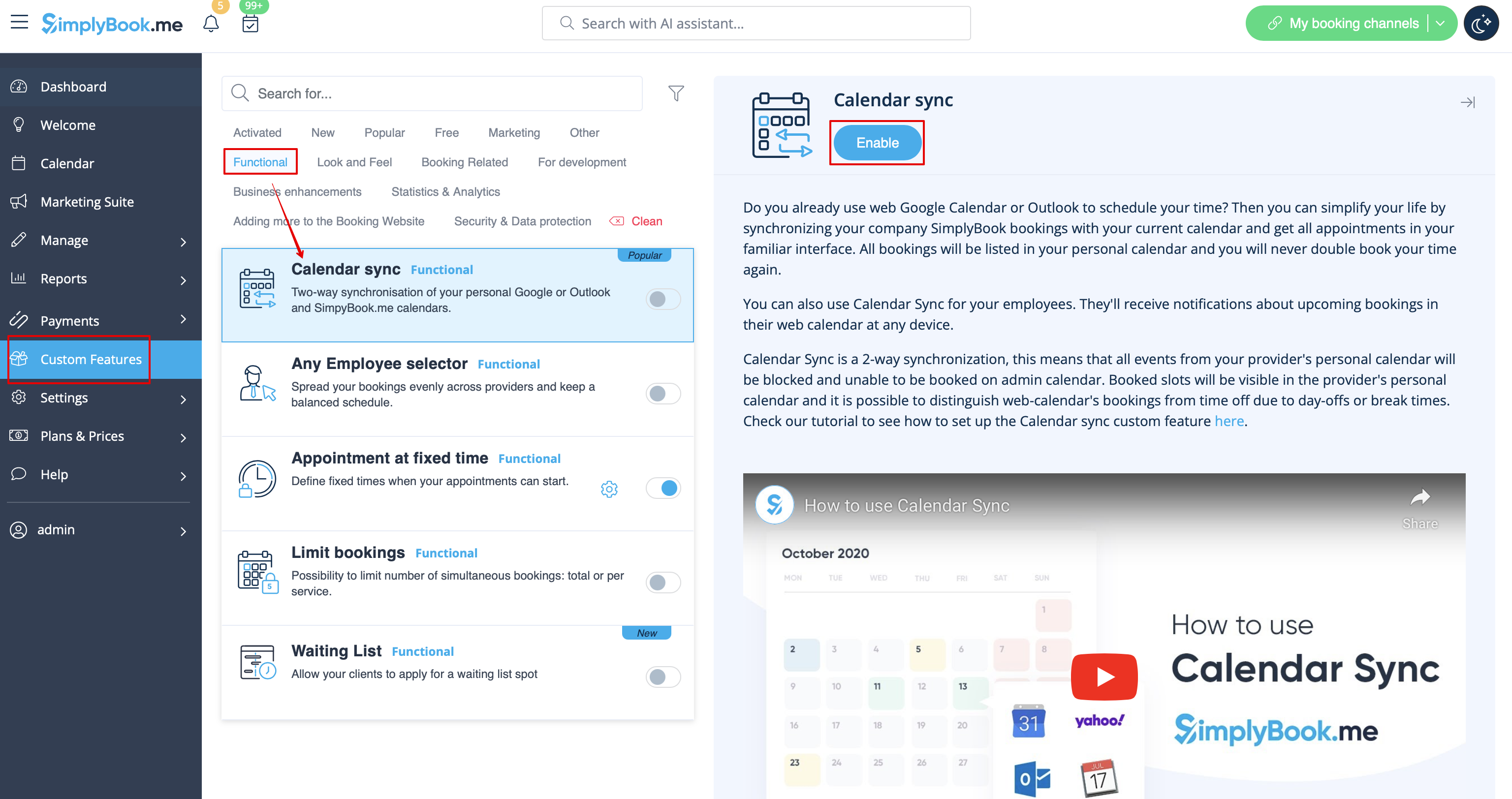
:1. Enable <span style="background-color:#d4f8e5; padding:5px; border-radius:5px;">[[Special:MyLanguage/Calendar_Sync_custom_feature|Calendar sync]]</span> custom feature on your <span style="background-color:#d4f8e5; padding:5px; border-radius:5px;">Custom Features</span> page, <span style="background-color:#d4f8e5; padding:5px; border-radius:5px;">Functional</span> section.
[[File:Calendar sync enable path redesigned.png|1200px|border|center|link=https://help.simplybook.me/images/8/8a/Calendar_sync_enable_path_redesigned.png]]
<br><br>
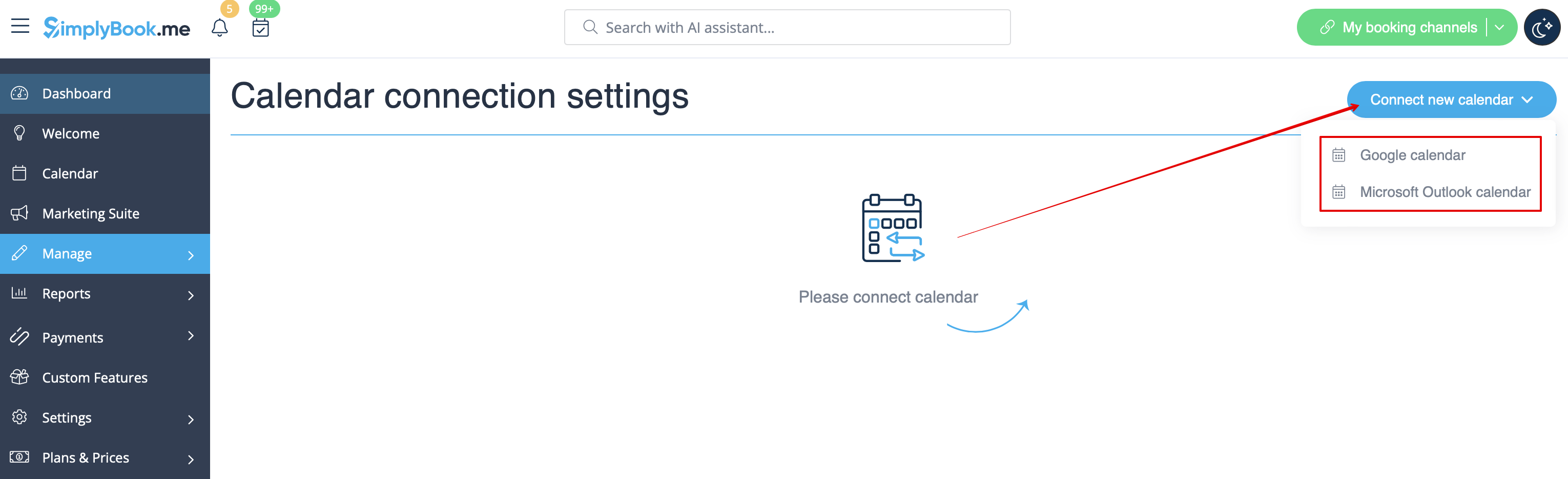
:2. Connect <span style="background-color:#d4f8e5; padding:5px; border-radius:5px;">Google calendar,</span> and then <span style="background-color:#d4f8e5; padding:5px; border-radius:5px;">attach the desired provider(s)</span> to it in this feature settings.
[[File:Connect external calendar path redesigned.png|1200px|border|center|link=https://help.simplybook.me/images/5/57/Connect_external_calendar_path_redesigned.png]]
<br><br>
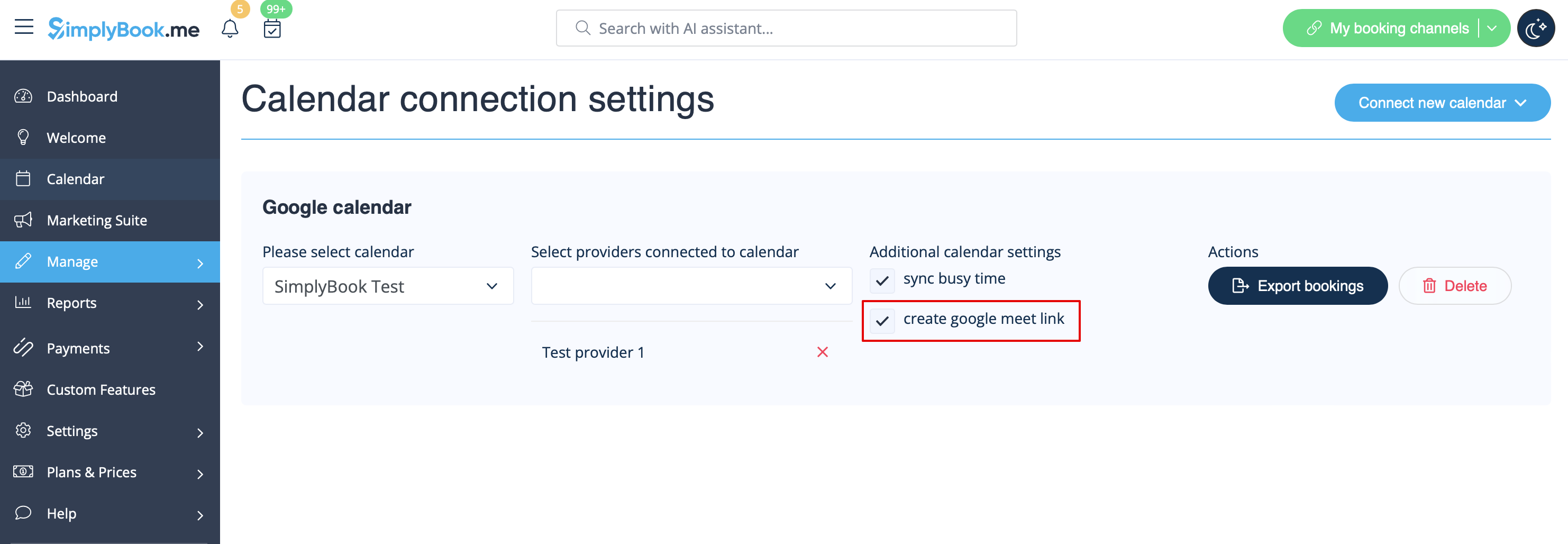
:3. Check the box <span style="background-color:#d4f8e5; padding:5px; border-radius:5px;">create google meet link</span> and <span style="background-color:#d4f8e5; padding:5px; border-radius:5px;">save</span> settings.
[[File:Create google meet link redesigned.png|1200px|border|center|link=https://help.simplybook.me/images/a/a7/Create_google_meet_link_redesigned.png]]
Now we have the option for you to handle online meetings via Google Meet.
Just three simple steps and you are ready.
How to set
1. Enable
Calendar sync
custom feature on your
Custom Features
page,
Functional
section.
2. Connect
Google calendar,
and then
attach the desired provider(s)
to it in this feature settings.
3. Check the box
create google meet link
and
save
settings.