Translations:Widgets for your own website/10/fr: Difference between revisions

From SimplyBook.me
Created page with ":2. Une fenêtre contextuelle contenant le code s'affiche. Cliquez sur la partie inférieure pour obtenir les détails du code client. :Veuillez copier le code principal, ajouter la partie inférieure (à la section prédéfinie) et remplacer <span style="background-color:#d4f8e5; padding:5px; border-radius:5px;">le nom du client prédéfini</span>, <span style="background-color:#d4f8e5; padding:5px; border-radius:5px;">l'adresse e-mail du client prédéfinie</span> et <..."
 
(No difference)

Latest revision as of 12:25, 19 May 2025

Information about message (contribute)
This message has no documentation. If you know where or how this message is used, you can help other translators by adding documentation to this message.
Message definition (Widgets for your own website)
:2. You will see a pop-up window with the code, click on the bottom part to get client code details.
:Please copy the main code, add bottom part to it(to predefined section) and replace <span style="background-color:#d4f8e5; padding:5px; border-radius:5px;">Predefined client name</span>, <span style="background-color:#d4f8e5; padding:5px; border-radius:5px;">Predefined client email</span>, <span style="background-color:#d4f8e5; padding:5px; border-radius:5px;">Predefined client phone</span> with the necessary client details.
[[File:Predefined client details redesigned.png|1200px |border| center|link=https://help.simplybook.me/images/3/3a/Predefined_client_details_redesigned.png]]
<br><br>
:3. You will get the code like this:<br>
<code><script src="//simplybook.me/v2/widget/widget.js"></script>
<script>var widget = new SimplybookWidget({"widget_type":"iframe","url":"https:\/\/companyname.simplybook.me","theme":"belle","theme_settings":{"sb_base_color":"#FF6969","body_bg_color":"#ffffff","dark_font_color":"#494949","light_font_color":"#ffffff","sb_busy":"#dad2ce","sb_available":"#d3e0f1"},"timeline":"flexible","datepicker":"top_calendar","is_rtl":false,"app_config":{"predefined": {"client": {<br>
"name": "Mary",<br>
"email": "mary@gmail.com",<br>
"phone": "+1234567890"<br>
}}
}});</script></code>
<br><br>
2. Une fenêtre contextuelle contenant le code s'affiche. Cliquez sur la partie inférieure pour obtenir les détails du code client.
Veuillez copier le code principal, ajouter la partie inférieure (à la section prédéfinie) et remplacer le nom du client prédéfini, l'adresse e-mail du client prédéfinie et le numéro de téléphone du client prédéfini par les informations client nécessaires.
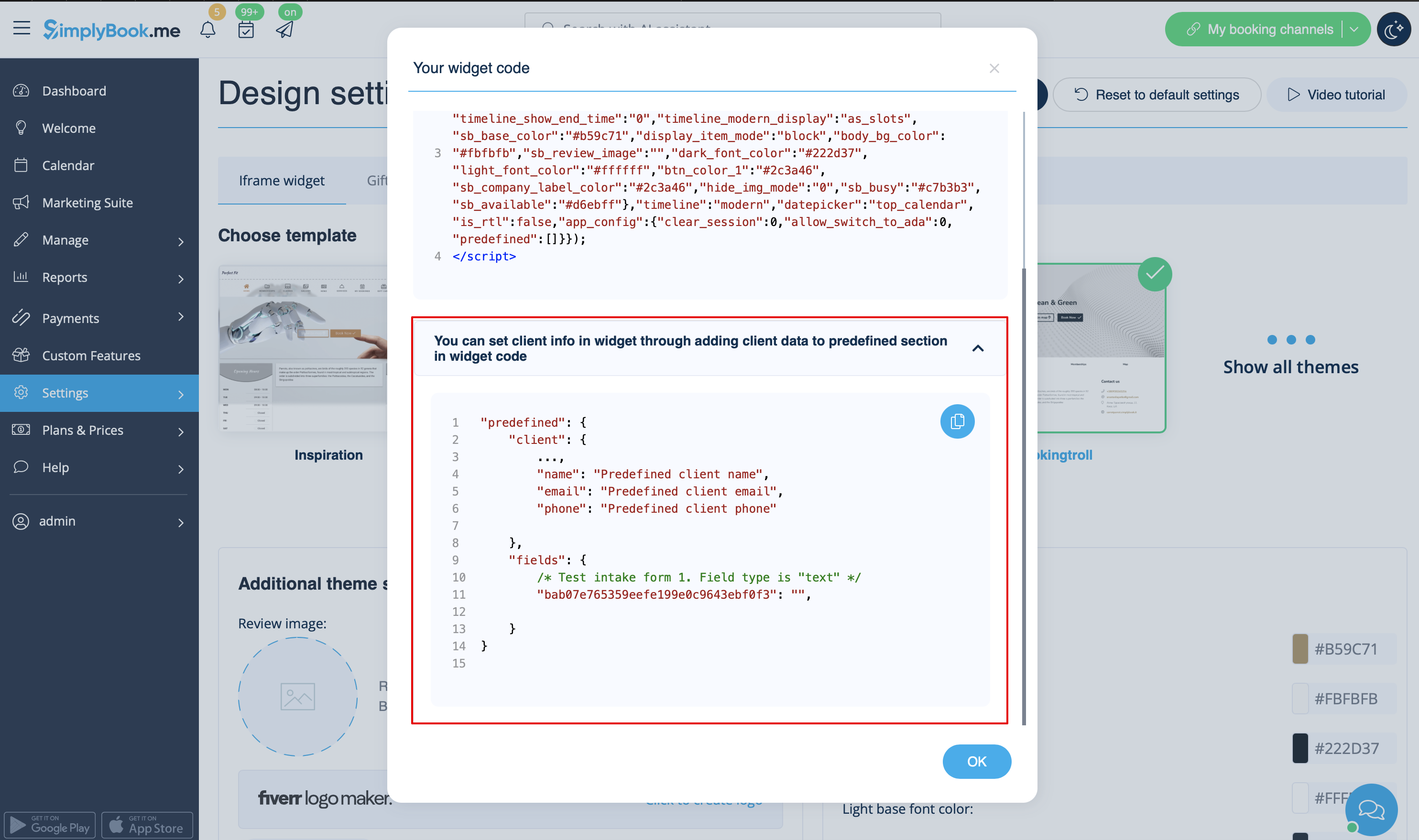


3. Vous obtiendrez le code suivant :

<script src="//simplybook.me/v2/widget/widget.js"></script> <script>var widget = new SimplybookWidget({"widget_type":"iframe","url":"https:\/\/companyname.simplybook.me","theme":"belle","theme_settings":{"sb_base_color":"#FF6969","body_bg_color":"#ffffff","dark_font_color":"#494949","light_font_color":"#ffffff","sb_busy":"#dad2ce","sb_available":"#d3e0f1"},"timeline":"flexible","datepicker":"top_calendar","is_rtl":false,"app_config":{"predefined": {"client": {
"name": "Mary",
"email": "mary@gmail.com",
"phone": "+1234567890"
}} }});</script>