Translations:SBPay.me integration/16/sv: Difference between revisions

From SimplyBook.me
Created page with "=== Återbetalningar === Det kan hända att du av någon anledning behöver återbetala pengarna till din kund, och nu är det möjligt att enkelt hantera sådana fall med SBPay.me PRO-integration. :1. När du har aktiverat SBPay.me-integrationen i ditt [https://simplybook.me/ SimplyBook.me-konto] kan du helt enkelt navigera till <span style="background-color:#d4f8e5; padding:5px; border-radius:5px;">Rapporter</span> -> <span style="background-color:#d4f8e5; padding:5..."
(No difference)

Revision as of 12:44, 19 May 2025

Information about message (contribute)
This message has no documentation. If you know where or how this message is used, you can help other translators by adding documentation to this message.
Message definition (SBPay.me integration)
It may happen that you need to return the money back to your customer due to some reason and now it is possible to easily manage such cases with SBPay.me PRO integration.
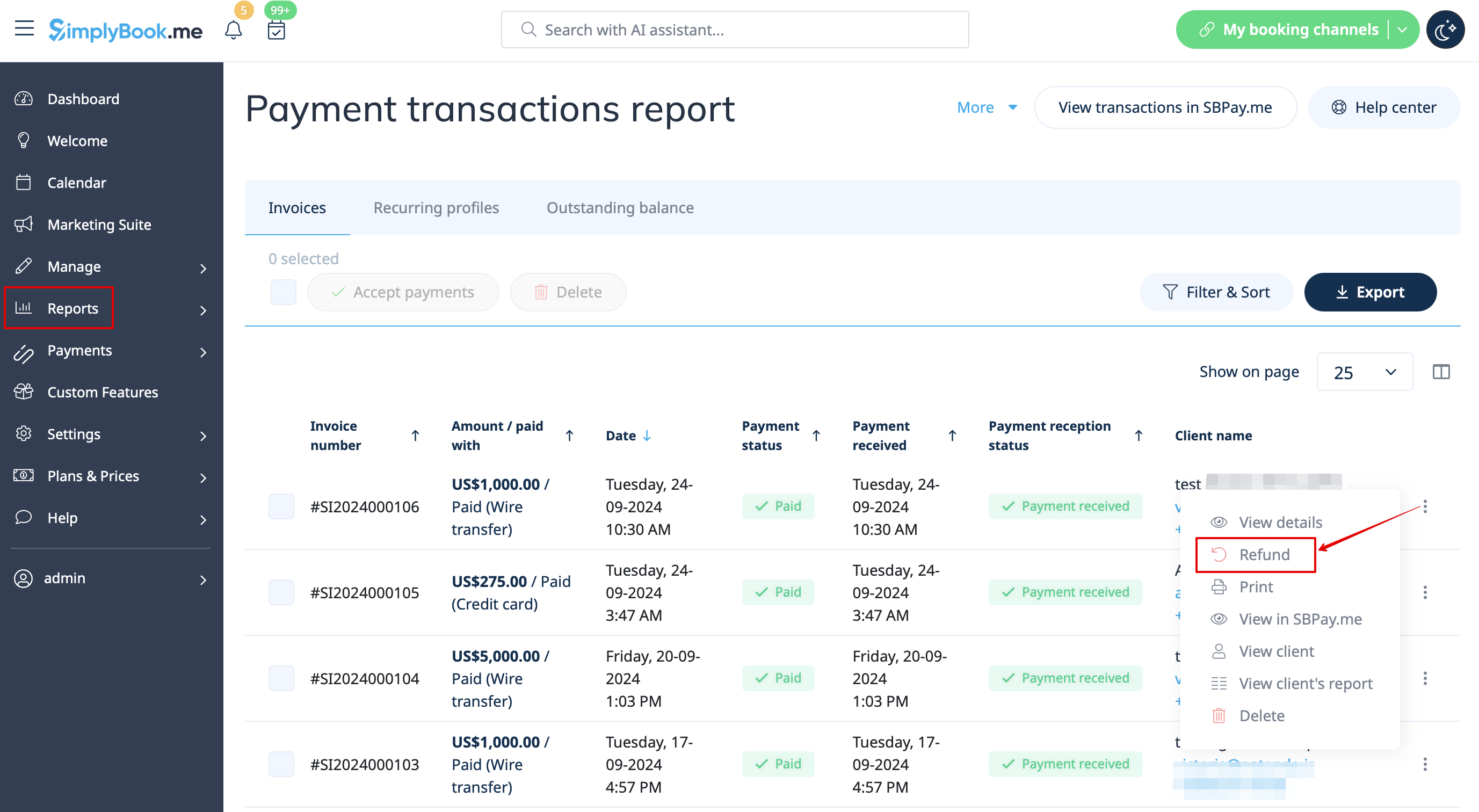
:1. After you activate SBPay.me integration in your [https://simplybook.me/en SimplyBook.me] account you can simply navigate to <span style="background-color:#d4f8e5; padding:5px; border-radius:5px;">Reports</span> -> <span style="background-color:#d4f8e5; padding:5px; border-radius:5px;">Payment transactions</span> -> find the necessary invoice -> click on <span style="background-color:#d4f8e5; padding:5px; border-radius:5px;">Actions</span> and select <span style="background-color:#d4f8e5; padding:5px; border-radius:5px;">Refund</span> from the drop down menu. Confirm the action and the refund will be automatically made to the corresponding client's account.
[[File:Refund from report path redesigned.png|1200px|center|link=https://help.simplybook.me/images/7/71/Refund_from_report_path_redesigned.png]]
<br><br>
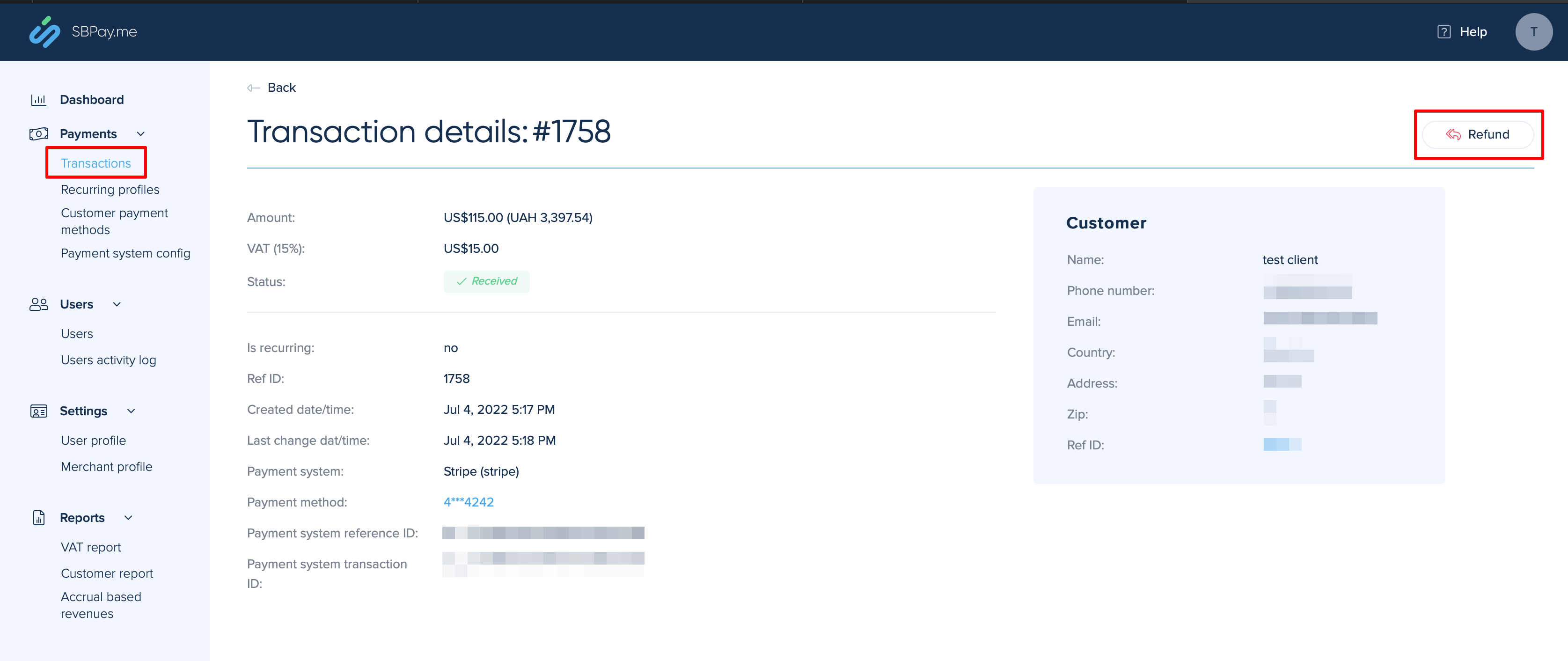
:2. Or you can go directly to the <span style="background-color:#d4f8e5; padding:5px; border-radius:5px;">SBPay.me interface</span> -> <span style="background-color:#d4f8e5; padding:5px; border-radius:5px;">Transactions</span> -> open the necessary record and select <span style="background-color:#d4f8e5; padding:5px; border-radius:5px;">Refund</span>.
[[File:Refund on sbpayme side.png|1200px|center|link=https://help.simplybook.me/images/8/86/Refund_on_sbpayme_side.png]]
<br><br>
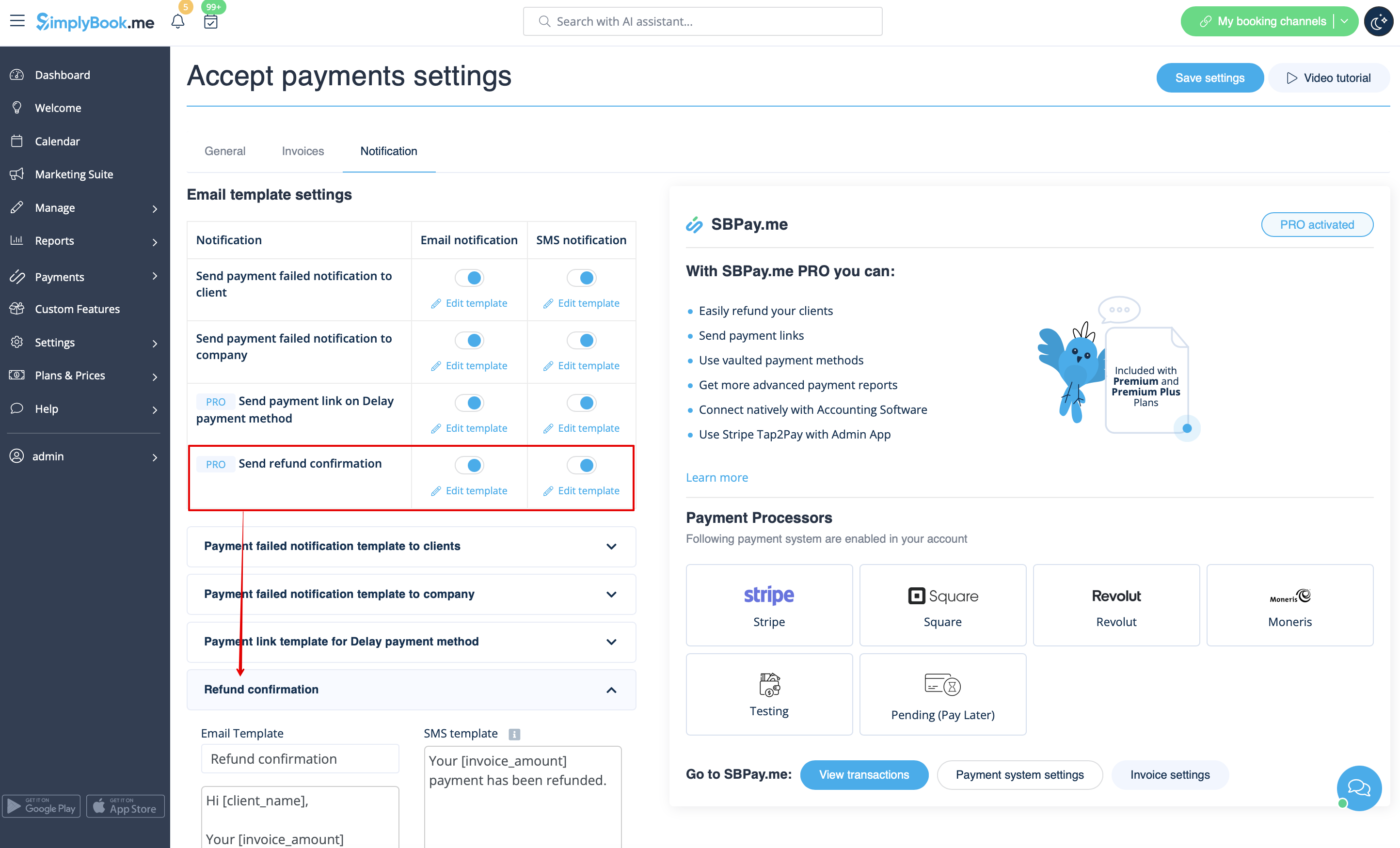
:3. In the <span style="background-color:#cdeffc; padding:5px; border-radius:5px;">[[Special:MyLanguage/Accept payments custom feature|Accept payments]]</span> custom feature settings you can also enable <span style="background-color:#d4f8e5; padding:5px; border-radius:5px;">Send refund confirmation</span> option and adjust the templates to automatically notify your clients via email and/or sms about the refunds.
[[File:Send refund confirmation redesigned.png|1200px|center|link=https://help.simplybook.me/images/a/a9/Send_refund_confirmation_redesigned.png]]
<br><br>

Återbetalningar

Det kan hända att du av någon anledning behöver återbetala pengarna till din kund, och nu är det möjligt att enkelt hantera sådana fall med SBPay.me PRO-integration.

1. När du har aktiverat SBPay.me-integrationen i ditt SimplyBook.me-konto kan du helt enkelt navigera till Rapporter -> Betalningstransaktioner -> hitta den nödvändiga fakturan -> klicka på Åtgärder och välj Återbetalning i rullgardinsmenyn. Bekräfta åtgärden så kommer återbetalningen automatiskt att göras till motsvarande kunds konto.


2. Eller så kan du gå direkt till SBPay.me-gränssnittet -> Transaktioner -> öppna den nödvändiga posten och välj Återbetalning.


3. I inställningarna för den anpassade funktionen Acceptera betalningar kan du också aktivera alternativet Skicka bekräftelse på återbetalning och justera mallarna så att dina kunder automatiskt får ett e-postmeddelande och/eller sms om återbetalningarna.