Translations:Display Remaining Spaces/1/da: Difference between revisions

From SimplyBook.me
Created page with "left<br><br>Vis, hvor mange pladser der er tilbage, når du accepterer flere kunder pr. tidsrum, f.eks. til klasser og begivenheder. Du kan også vælge at vise det samlede antal pladser samt antallet af ledige pladser. <br><br> <br><br> '''Bemærk!''' *Denne funktion er ikke kompatibel med Begræns bookinger; *Fungerer kun for følgende Special:MyLanguage/How_to_change_the_way_time_slot..."
(No difference)

Revision as of 14:48, 19 May 2025

Information about message (contribute)
This message has no documentation. If you know where or how this message is used, you can help other translators by adding documentation to this message.
Message definition (Display Remaining Spaces)
[[File:Seats left icon.png|left]]<br><br>Show how many spaces are left when you accept multiple clients per slot, such as for classes and events. You can also choose to show the total number of spaces as well as the number of spaces left. 
<br><br>
<br><br>
'''Please note!'''
*This feature is not compatible with [[Special:MyLanguage/Limit_Bookings_custom_feature|Limit Bookings]];
*Works for the following [[Special:MyLanguage/How_to_change_the_way_time_slots_are_shown#Calendar_Layouts|calendar layouts]] only: slots weekly, modern, weekly and daily classes, modern provider.
*The time blocked by [[Special:MyLanguage/Calendar_Sync_custom_feature|Calendar sync]] does not influence the number of timeslots.
*If you enable this feature together with [[Special:MyLanguage/Any Employee Selector custom feature|Any Employee]] and [[Special:MyLanguage/Appointment at Fixed Time custom feature|Appointment at fixed time]](with the interval less than service duration) the number of spaces may not be shown correctly when several providers are attached to the same service. 
<br><br>
:Video tutorial available <p><youtube>Dn0tNJhOToE</youtube></p>
<br><br>
;How to use
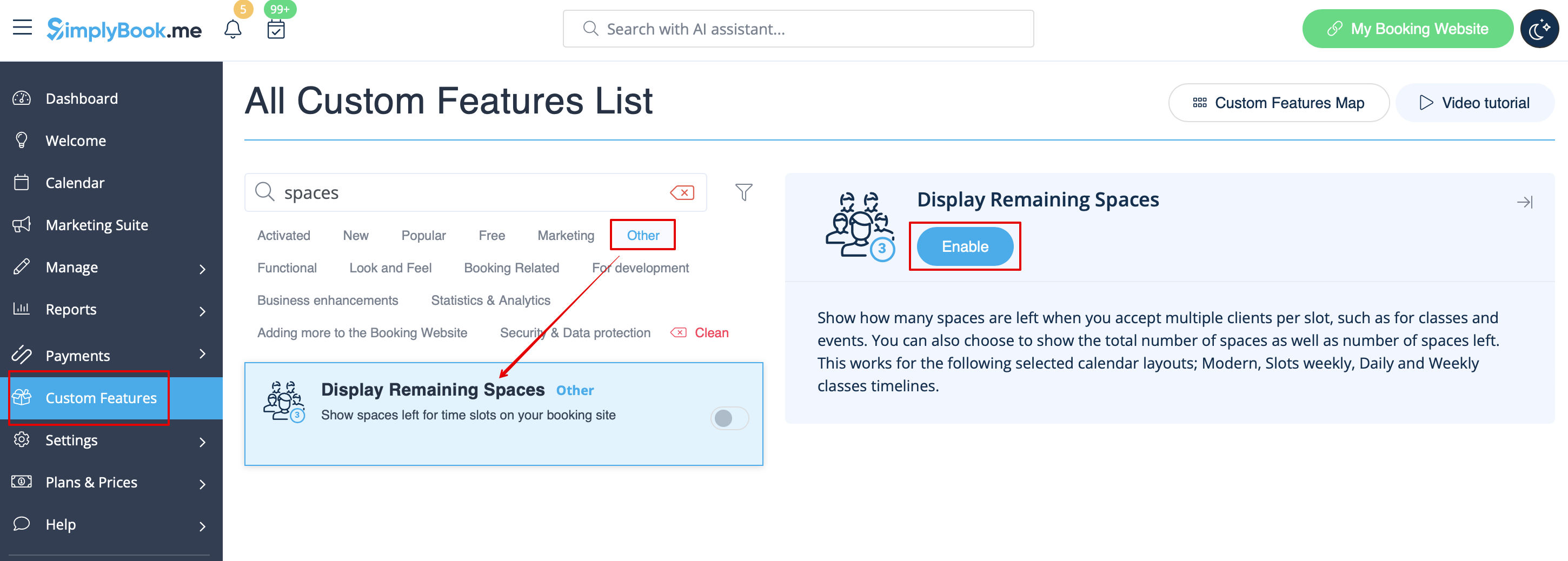
:1. Enable Display Remaining Spaces in your Custom Features section.
[[File:Display remaining spaces enable path redesigned.png|1200px|border|center|link=https://help.simplybook.me/images/0/0c/Display_remaining_spaces_enable_path_redesigned.png]]
<br><br>
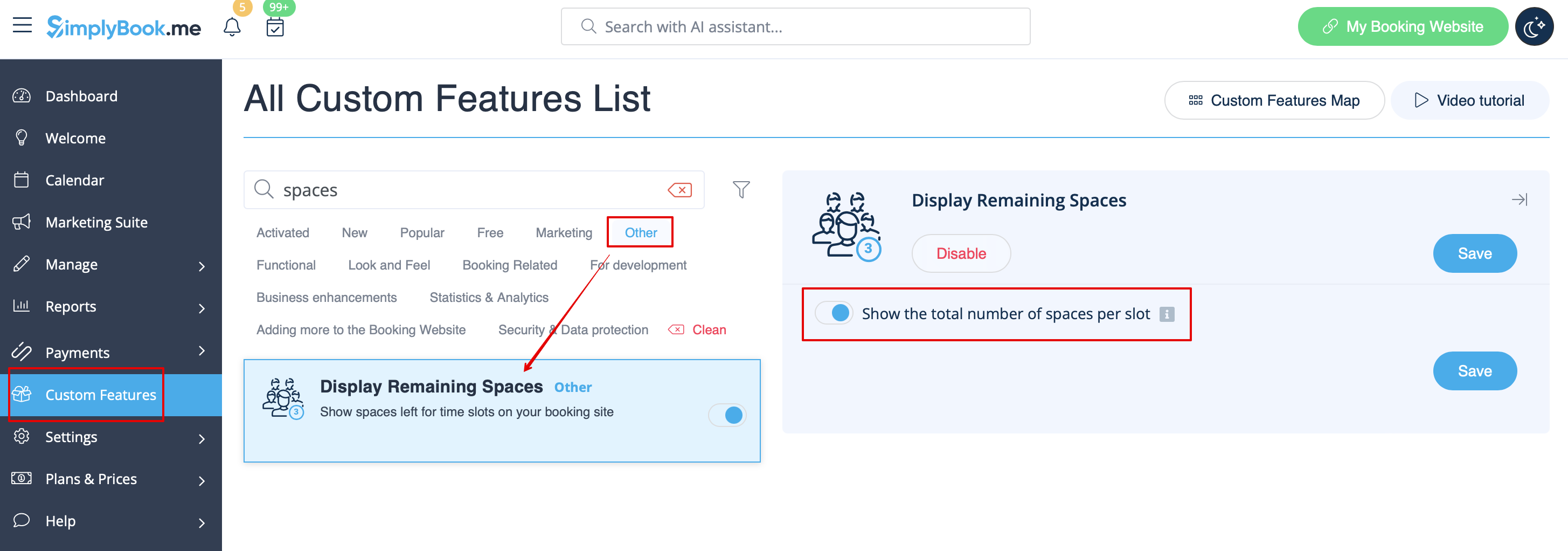
:2. (optional) Enable the corresponding option to display the total number of spaces along with the remaining ones.
[[File:Display remaining spaces setting redesigned.png|1200px|border|center|link=https://help.simplybook.me/images/b/bd/Display_remaining_spaces_setting_redesigned.png]]
<br><br>
:3. As the result the clients will be able to see the number of the spaces left per each timeslot(and total if "Show the total number of spaces per slot" is enabled).
[[File:Display slots left client side.png|1200px|border|center]]
<br><br>
<br><br>


Vis, hvor mange pladser der er tilbage, når du accepterer flere kunder pr. tidsrum, f.eks. til klasser og begivenheder. Du kan også vælge at vise det samlede antal pladser samt antallet af ledige pladser.


Bemærk!

  • Denne funktion er ikke kompatibel med Begræns bookinger;
  • Fungerer kun for følgende kalenderlayouts: ugentlige tidsrum, moderne, ugentlige og daglige klasser, moderne udbyder.
  • Den tid, der er blokeret af kalendersynkronisering, har ingen indflydelse på antallet af tidsrum.


Video-vejledning tilgængelig


Sådan bruges det
1. Aktivér Vis resterende pladser i afsnittet Brugerdefinerede funktioner.


2. (valgfrit) Aktivér den tilsvarende indstilling for at vise det samlede antal pladser sammen med de resterende.


3. Som resultat vil klienterne kunne se antallet af resterende pladser pr. tidsinterval (og det samlede antal, hvis "Vis det samlede antal pladser pr. slot" er aktiveret).