Translations:External Booking Validator custom feature/4/uk: Difference between revisions

From SimplyBook.me
Created page with ":1. Увімкніть спеціальну функцію <span style="background-color:#d4f8e5; padding:5px; border-radius:5px;">«Зовнішній валідатор бронювання</span> » на сторінці <span style="background-color:#d4f8e5; padding:5px; border-radius:5px;">«Спеціальні функції»</span> в розділі <span style="background-color:#d4f8e5; padding:5px; border-radius:5px;">«Інше</span> ». File:External book..."
 
(No difference)

Latest revision as of 14:48, 19 May 2025

Information about message (contribute)
This message has no documentation. If you know where or how this message is used, you can help other translators by adding documentation to this message.
Message definition (External Booking Validator custom feature)
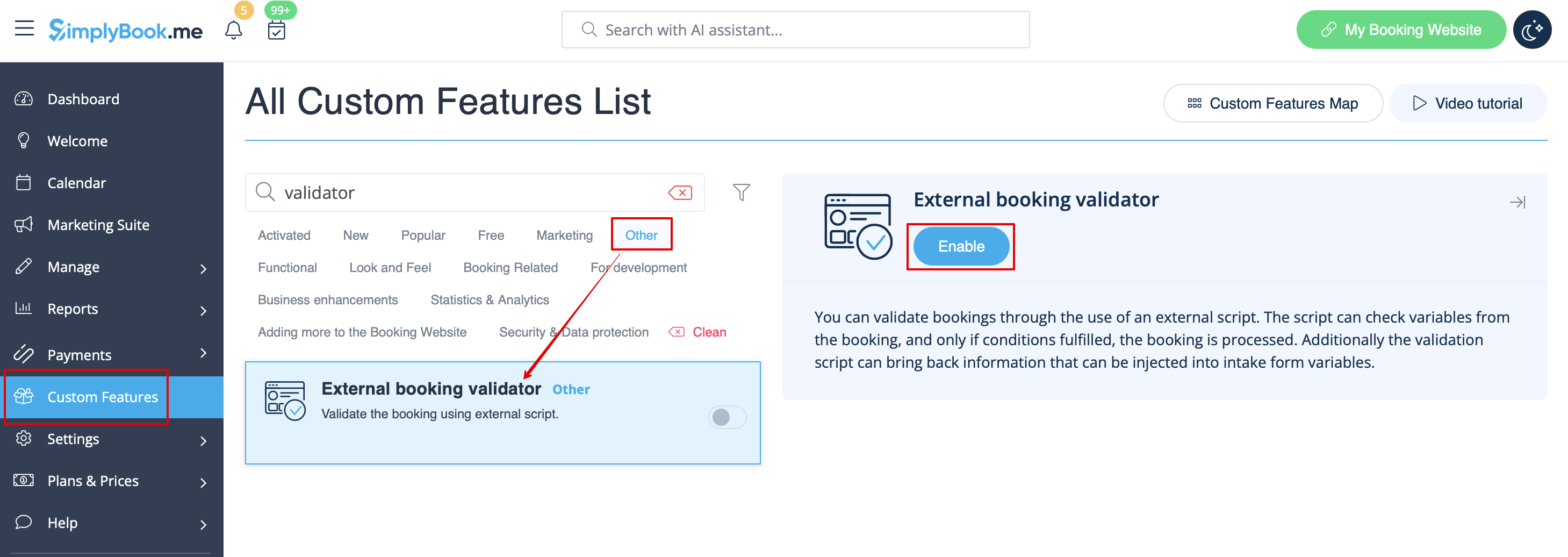
:1. Enable <span style="background-color:#d4f8e5; padding:5px; border-radius:5px;">External Booking Validator</span> custom feature on your <span style="background-color:#d4f8e5; padding:5px; border-radius:5px;">Custom Features</span> page, <span style="background-color:#d4f8e5; padding:5px; border-radius:5px;">Other</span> section.
[[File:External booking validator enable path redesigned.png|1200px|border|center|link=https://help.simplybook.me/images/a/ac/External_booking_validator_enable_path_redesigned.png]]
<br><br>
:2. Create your own validation script with your own desired conditions.<br>
:For example, you may require certain client answers to one or several <span style="background-color:#cdeffc; padding:5px; border-radius:5px;">[[Special:MyLanguage/Intake_Forms_custom_feature|intake forms]]</span> for the booking to be submitted to your system.
<br><br>
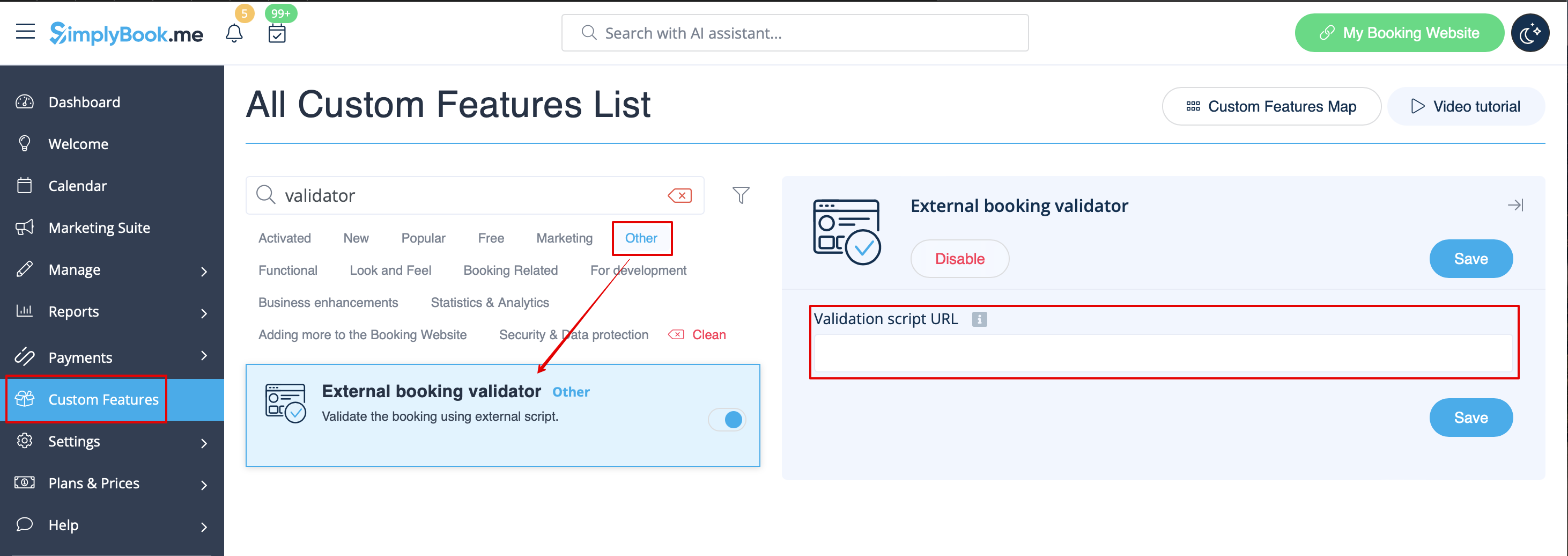
:3. Insert your script to this feature <span style="background-color:#d4f8e5; padding:5px; border-radius:5px;">settings</span> on the <span style="background-color:#d4f8e5; padding:5px; border-radius:5px;">Custom Features</span> page and save.
[[File:External booking validator settings path redesigned.png|1200px|border|center|link=https://help.simplybook.me/images/3/34/External_booking_validator_settings_path_redesigned.png]]
<br><br>
:Script example is available <span style="background-color:#cdeffc; padding:5px; border-radius:5px;">[https://github.com/vetalsimplybook/simplybook-external-validator here].</span>
<br><br><br><br>
1. Увімкніть спеціальну функцію «Зовнішній валідатор бронювання » на сторінці «Спеціальні функції» в розділі «Інше ».


2. Створіть власний скрипт валідації з бажаними умовами.
Наприклад, ви можете вимагати від клієнта певні відповіді на одну або кілька анкет для того, щоб бронювання було відправлено до вашої системи.


3. Вставте свій скрипт у налаштування цієї функції на сторінці «Налаштування» та збережіть.


Приклад скрипту доступний тут.