Translations:Membership custom feature/10/uk: Difference between revisions

From SimplyBook.me
Created page with ":6. (опціонально) Є кілька варіантів видачі на вибір: :- ви можете встановити <span style="background-color:#d4f8e5; padding:5px; border-radius:5px;">дату початку</span> членства (за замовчуванням встановлюється поточна дата); :- ви можете створити <span style="background-color:#d4f8e5; padding:5px; border-radius:5px;">рахунок-фак..."
 
(No difference)

Latest revision as of 15:28, 19 May 2025

Information about message (contribute)
This message has no documentation. If you know where or how this message is used, you can help other translators by adding documentation to this message.
Message definition (Membership custom feature)
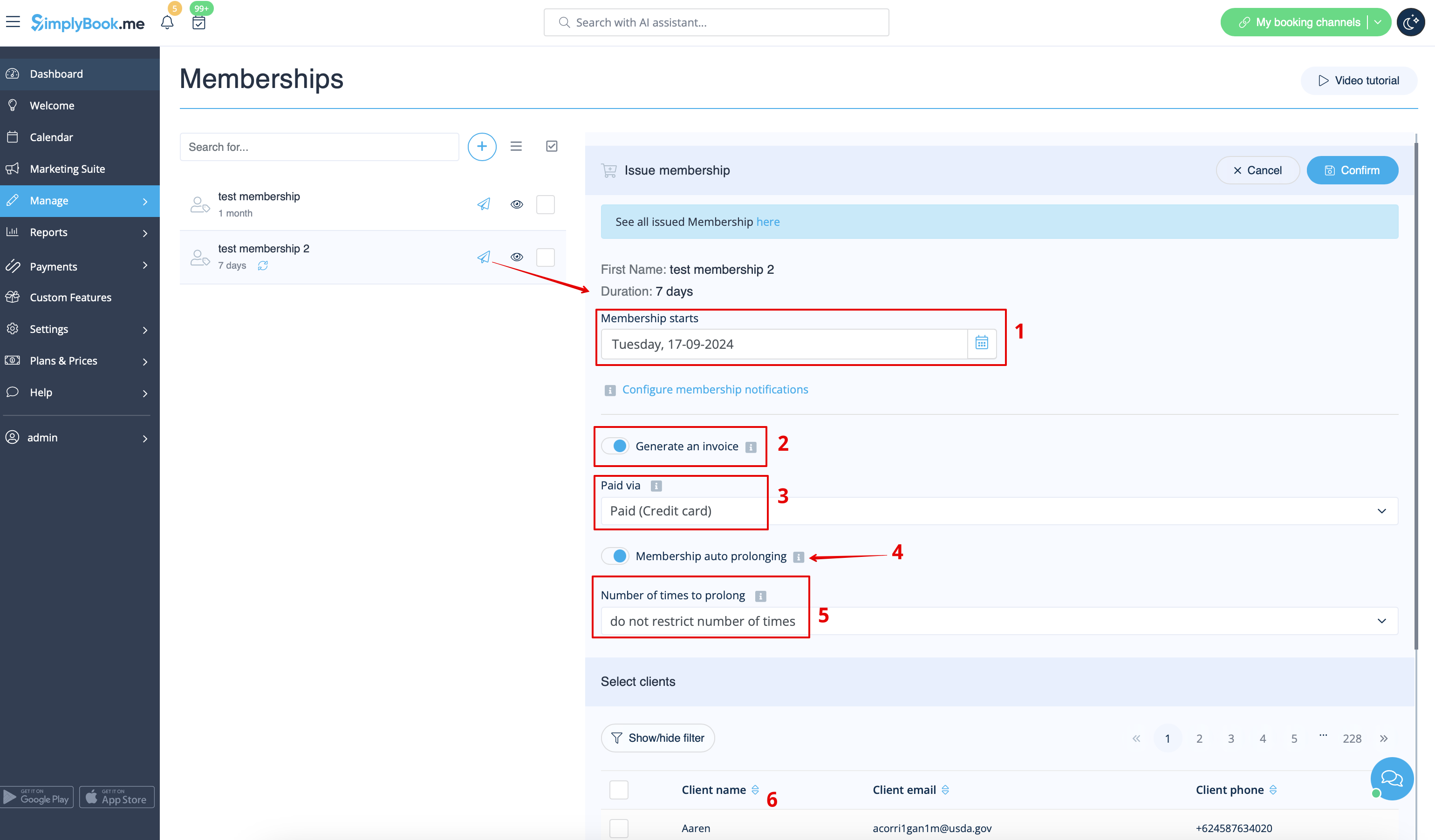
:6. (optional) There are several issuing options to choose from:
:- you can set membership <span style="background-color:#d4f8e5; padding:5px; border-radius:5px;">start date</span>(current date is set by default);
:- you can generate an <span style="background-color:#d4f8e5; padding:5px; border-radius:5px;">invoice</span> if you need it for accounting purposes;
:- you can issue membership without an invoice;
:- if you select issuing with the invoice and the membership is recurring it is possible to set manual or automatic <span style="background-color:#d4f8e5; padding:5px; border-radius:5px;">recurring mode</span> and set the number of times to repeat for the automatic one,
:so that the new invoice will be generated each time the membership is prolonged if auto-prolonging is enabled.  
:Otherwise, an offer will be created in Reports//Payment transactions and the membership will be prolonged when you approve it or you can prolong it manually in Reports//Payment transactions//Recurring profiles.;
:<span style="background-color:#ffe9e9; padding:5px; border-radius:5px;">'''Please note!''' There will be no charges made by us in relation to your clients' accounts, this option only prolongs the clients' memberships for the new periods.</span><br>
:<span style="background-color:#ffe9e9; padding:5px; border-radius:5px;">If you need to charge your clients please do it on your payment processor side.</span><br>
:- as well you can choose several clients at once to issue the membership to.
[[File:Issue membership with invoice steps redesigned.png|1200px|border|center|link=https://help.simplybook.me/images/3/3a/Issue_membership_with_invoice_steps_redesigned.png]]
<br><br>
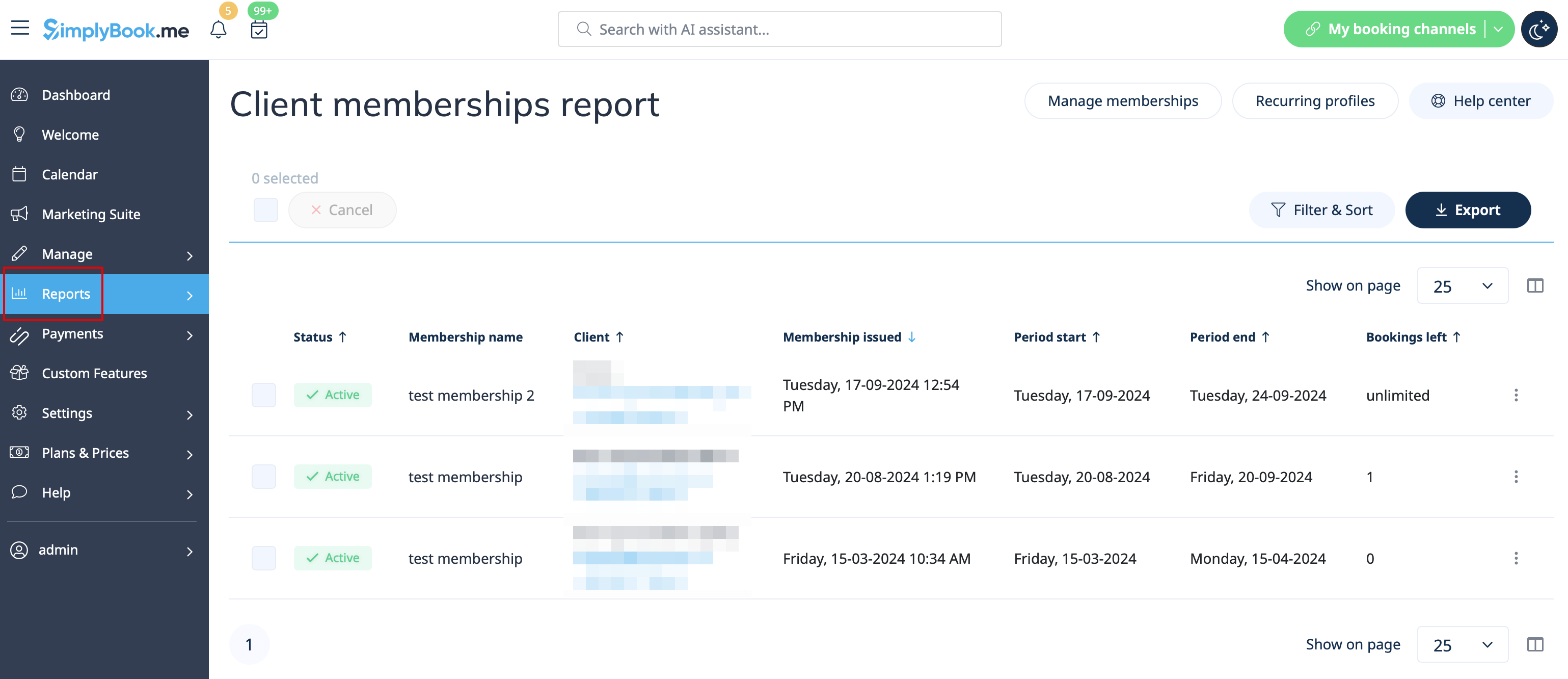
:7. When the memberships are purchased or issued there are several places to check the information related:
:- <span style="background-color:#d4f8e5; padding:5px; border-radius:5px;">Reports</span> -> <span style="background-color:#d4f8e5; padding:5px; border-radius:5px;">Membership payments</span> - contains the information of each membership period present in the system(each recurring period will be displayed as a separate row).<br>
:You can cancel the specific client's membership here if necessary.
[[File:Client memberships report redesigned.png|1200px|border|center|link=https://help.simplybook.me/images/1/14/Client_memberships_report_redesigned.png]]
<br><br>
6. (опціонально) Є кілька варіантів видачі на вибір:
- ви можете встановити дату початку членства (за замовчуванням встановлюється поточна дата);
- ви можете створити рахунок-фактуру, якщо він необхідний для бухгалтерського обліку;
- ви можете видати членство без рахунку-фактури;
- якщо ви вибрали видачу з рахунком-фактурою, а членство є періодичним, можна встановити ручний або автоматичний режим повторення та кількість повторень для автоматичного режиму,
, щоб новий рахунок-фактура створювався кожного разу, коли членство продовжується, якщо ввімкнено автоматичне продовження.
В іншому випадку пропозиція буде створена в розділі «Звіти//Платіжні операції», і членство буде продовжено після вашого затвердження, або ви можете продовжити його вручну в розділі «Звіти//Платіжні операції//Повторювані профілі».
Зверніть увагу! Ми не стягуємо жодних платежів з рахунків ваших клієнтів, ця опція лише продовжує членство клієнтів на новий період.
Якщо вам потрібно стягувати плату з клієнтів, зробіть це у вашій платіжній системі.
- ви також можете вибрати декількох клієнтів одночасно, для яких буде видано членство.


7. Після придбання або видачі членства є кілька місць, де можна перевірити відповідну інформацію:
- Звіти -> Платежі за членство - містить інформацію про кожен період членства, присутній в системі (кожен період повторної оплати буде відображатися окремим рядком).
За необхідності тут можна скасувати членство конкретного клієнта.