Translations:Online Video Meetings Custom Feature/10/uk: Difference between revisions

From SimplyBook.me
Created page with ":1. Увімкніть спеціальну функцію <span style="background-color:#d4f8e5; padding:5px; border-radius:5px;">«Онлайн-зустрічі»</span> у <span style="background-color:#d4f8e5; padding:5px; border-radius:5px;">своєму обліковому записі SimplyBook.me.</span> 1200px|center|link=https://help.simplybook.me/images/a/a1/Online_meetings_enable_path_redesigned.png <br><b..."
 
(No difference)

Latest revision as of 15:29, 19 May 2025

Information about message (contribute)
This message has no documentation. If you know where or how this message is used, you can help other translators by adding documentation to this message.
Message definition (Online Video Meetings Custom Feature)
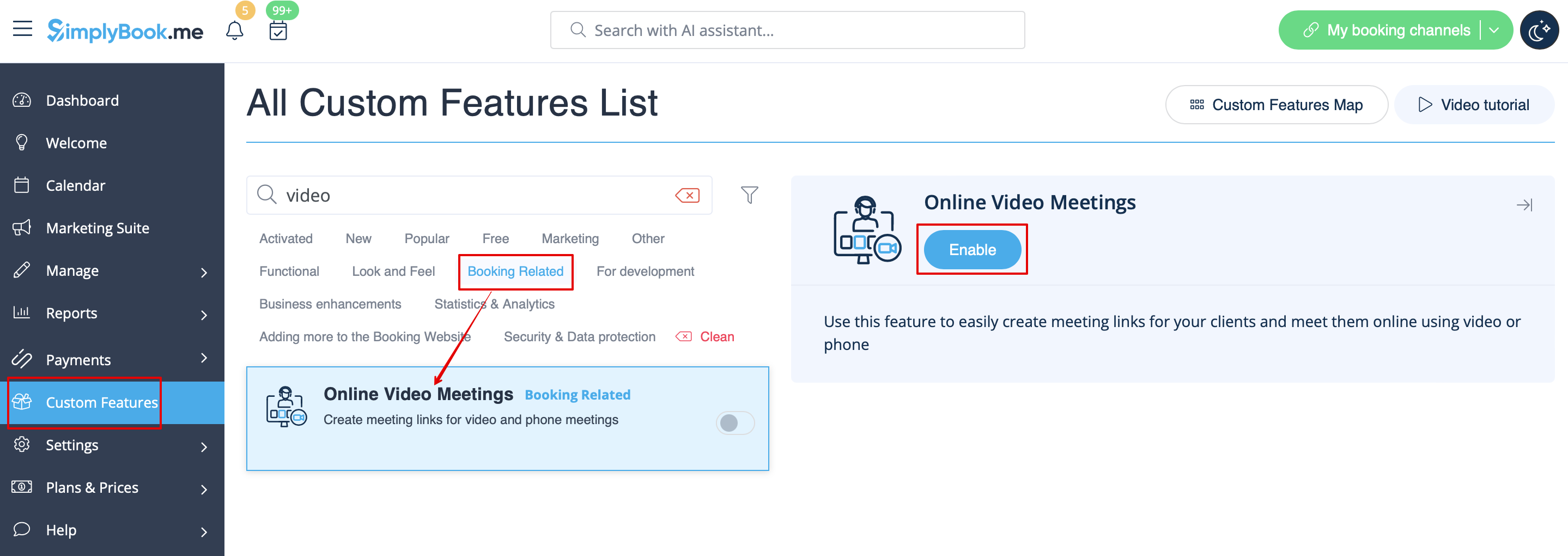
:1. Enable <span style="background-color:#d4f8e5; padding:5px; border-radius:5px;">Online meetings</span> custom feature in <span style="background-color:#d4f8e5; padding:5px; border-radius:5px;">your SimplyBook.me account.</span>
[[File:Online meetings enable path redesigned.png|1200px|center|link=https://help.simplybook.me/images/a/a1/Online_meetings_enable_path_redesigned.png]]
<br><br>
:2. Login to <span style="background-color:#cdeffc; padding:5px; border-radius:5px;">[https://portal.azure.com/ Microsoft Azure portal]</span>  and your <span style="background-color:#cdeffc; padding:5px; border-radius:5px;">[https://teams.microsoft.com/ Microsoft Teams account]</span> with the user that is a member of your organization in MS Azure.
:(Or create the accounts there)
:<span style="background-color:#ffe9e9; padding:5px; border-radius:5px;">'''Please note!''' It is not possible to connect personal/private Microsoft Teams account to the system, it should be related to an organization via Microsoft Azure.</span>
1. Увімкніть спеціальну функцію «Онлайн-зустрічі» у своєму обліковому записі SimplyBook.me.


2. Увійдіть у портал Microsoft Azure та свій обліковий запис Microsoft Teams, використовуючи обліковий запис користувача, який є членом вашої організації в MS Azure.
(Або створіть облікові записи там)
Зверніть увагу! Неможливо підключити особистий/приватний обліковий запис Microsoft Teams до системи, він повинен бути пов'язаний з організацією через Microsoft Azure.