From SimplyBook.me
No edit summary |
Marked this version for translation |
||
| (4 intermediate revisions by the same user not shown) | |||
| Line 1: | Line 1: | ||
<languages/> | |||
<translate> | |||
<!--T:1--> | |||
{{#seo: | {{#seo: | ||
|title=Password Security Settings custom feature - SimplyBook.me | |title=Password Security Settings custom feature - SimplyBook.me | ||
|description=Enhance account security with password settings customization. Protect client and business data. Activate this feature now! | |||
|titlemode=append | |titlemode=append | ||
|keywords=faq, frequently asked questions, booking software, appointment system questions, appointments online, calendar software, booking system, booking calendar, scheduling software, online appointment scheduling, online scheduling, plugins, custom features, additional functionality, account access, secure password, secure account access, password requirements, make syetem secure, make system more secure | |keywords=faq, frequently asked questions, booking software, appointment system questions, appointments online, calendar software, booking system, booking calendar, scheduling software, online appointment scheduling, online scheduling, plugins, custom features, additional functionality, account access, secure password, secure account access, password requirements, make syetem secure, make system more secure | ||
}} | }} | ||
</translate> | |||
<translate> | |||
<!--T:2--> | |||
<br> | <br> | ||
[[File:Strict password icon.png | left]] | [[File:Strict password icon.png | left]] | ||
<!--T:3--> | |||
The Password security settings Custom Feature allows to define password requirements for system users and clients. This can further harden the system for possible intrusion. Just in few steps you can make your system more secure! | The Password security settings Custom Feature allows to define password requirements for system users and clients. This can further harden the system for possible intrusion. Just in few steps you can make your system more secure! | ||
<br><br><br> | <br><br><br> | ||
| Line 15: | Line 23: | ||
<br><br> | <br><br> | ||
;How to use | ;How to use | ||
:1. Enable Password Security Settings option on | :1. Enable Password Security Settings option on your Custom Features page. | ||
[[File:Password security settings enable path | [[File:Password security settings enable path redesigned.png|1200px | center|link=https://help.simplybook.me/images/a/ad/Password_security_settings_enable_path_redesigned.png]] | ||
<br><br> | <br><br> | ||
:2. | :2. Go to its settings on the right side of the page. | ||
[[File:Password security settings settings | [[File:Password security settings settings options redesigned.png|1200px | center|link=https://help.simplybook.me/images/d/dd/Password_security_settings_settings_options_redesigned.png]] | ||
<br><br> | <br><br> | ||
</translate> | |||
<translate> | |||
<!--T:4--> | |||
:3. Now you can set requirements for password for your system users in the left-side block. | :3. Now you can set requirements for password for your system users in the left-side block. | ||
[[File:User password settings | [[File:User password settings redesigned.png|1200px| center|link=https://help.simplybook.me/images/0/08/User_password_settings_redesigned.png]] | ||
<br><br> | <br><br> | ||
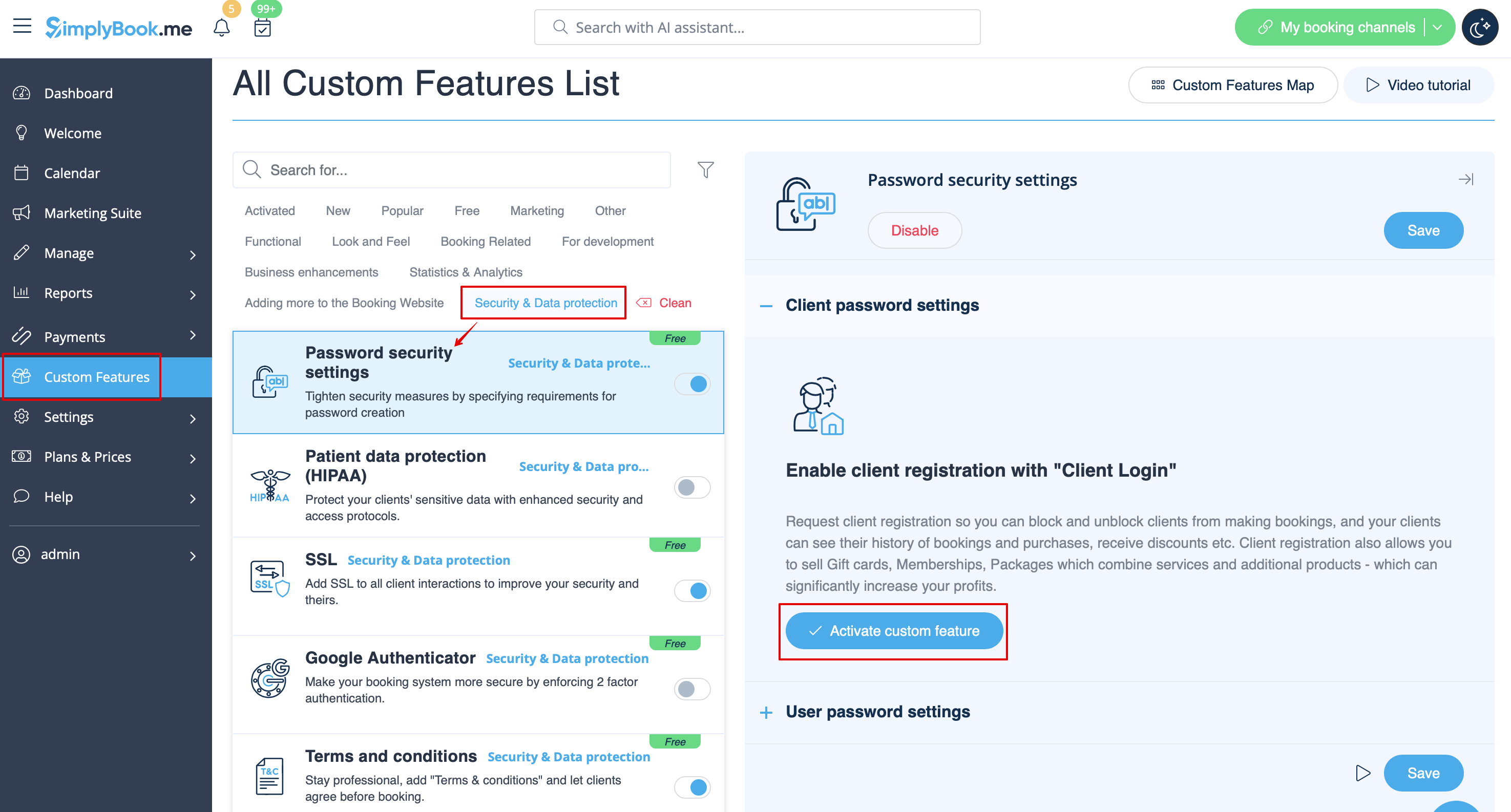
:4. (is skipped if you are already using [[Custom_Features#Client_Login | Client Login Custom Feature]]) If you wish your clients to be able to log in securely please enable Client Login option there. | :4. (is skipped if you are already using [[Custom_Features#Client_Login | Client Login Custom Feature]]) If you wish your clients to be able to log in securely please enable [[Custom_Features#Client_Login | Client Login]] option there. | ||
[[File:Enable client login | [[File:Enable client login fro password security redesigned.png|1200px | center|link=https://help.simplybook.me/images/a/a5/Enable_client_login_fro_password_security_redesigned.png]] | ||
<br><br> | <br><br> | ||
:5. Set up password requirements for your clients in the right-side block and save settings. | :5. Set up password requirements for your clients in the right-side block and save settings. | ||
[[File:Client password settings | [[File:Client password settings redesigned.png|1200px| center|link=https://help.simplybook.me/images/e/ef/Client_password_settings_redesigned.png]] | ||
<br><br> | <br><br> | ||
</translate> | |||
Latest revision as of 15:29, 19 May 2025

The Password security settings Custom Feature allows to define password requirements for system users and clients. This can further harden the system for possible intrusion. Just in few steps you can make your system more secure!
Free custom feature!
- How to use
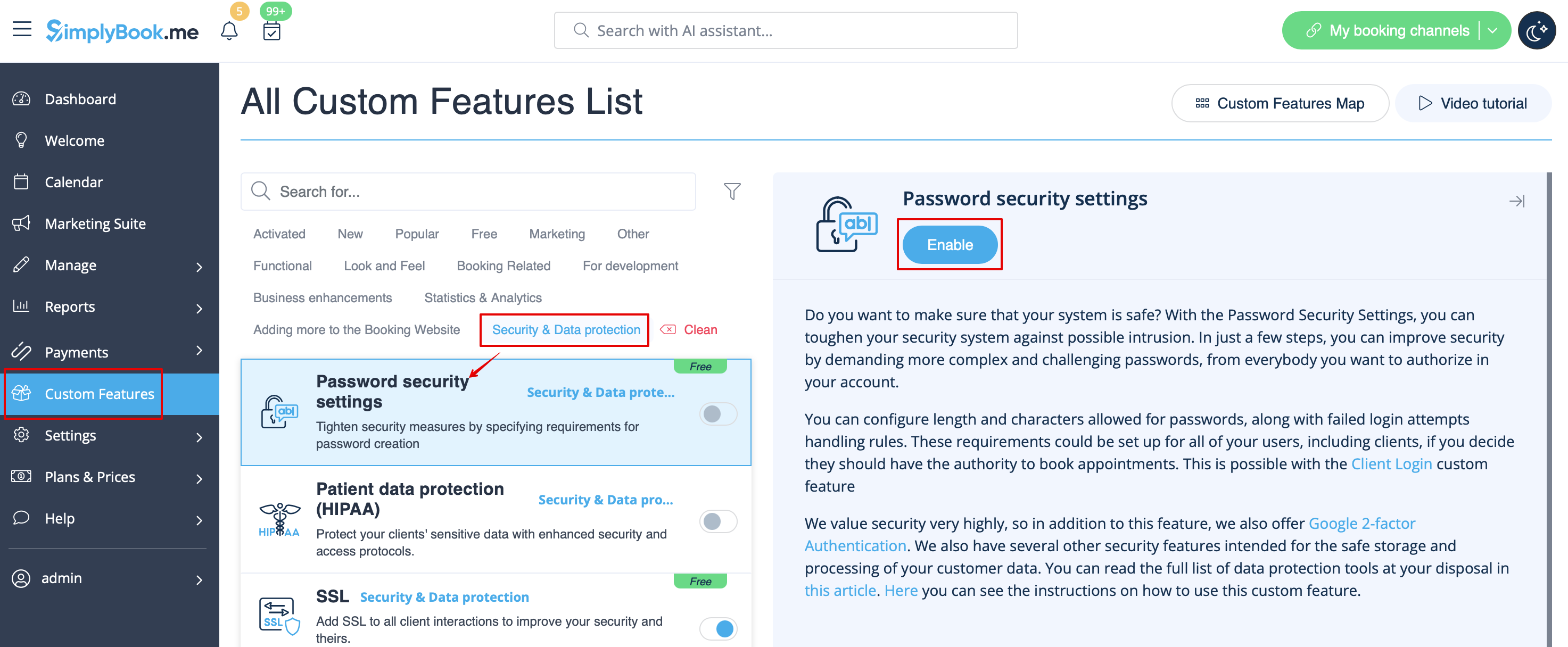
- 1. Enable Password Security Settings option on your Custom Features page.
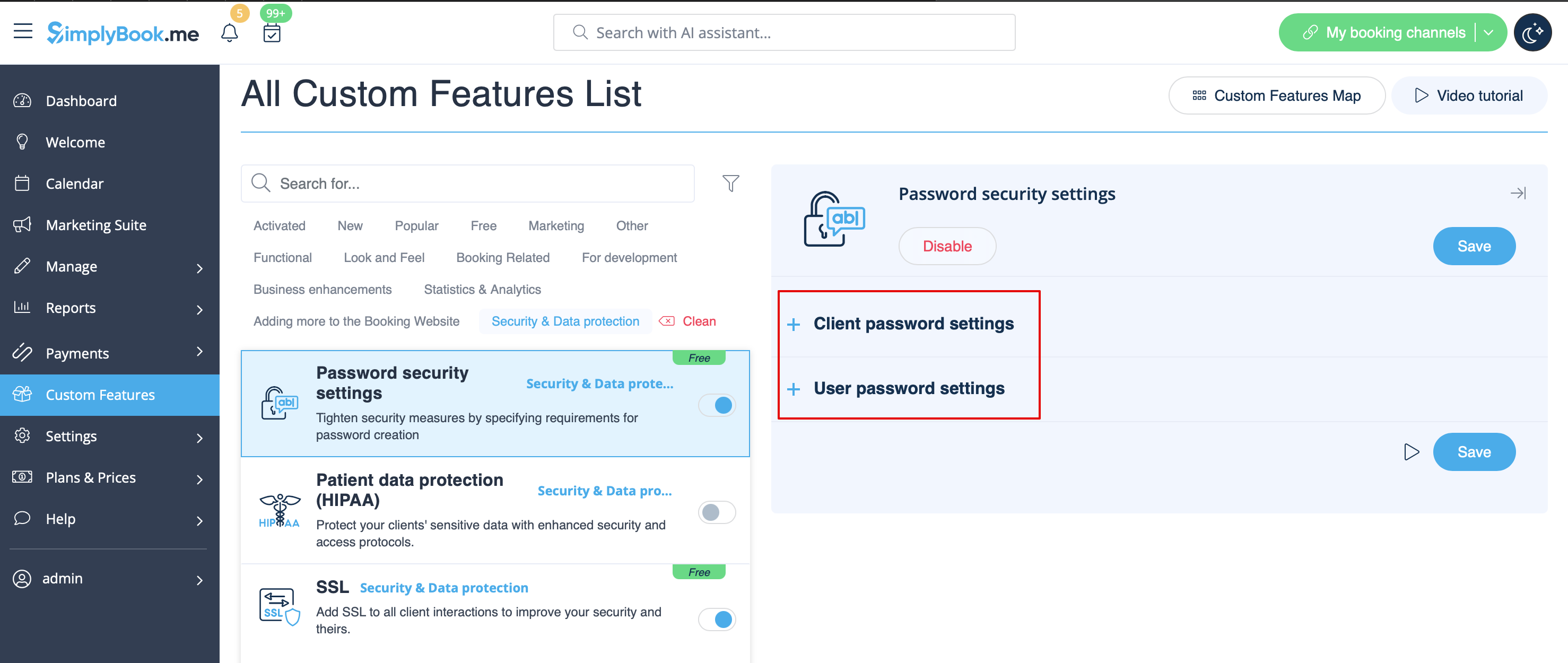
- 2. Go to its settings on the right side of the page.
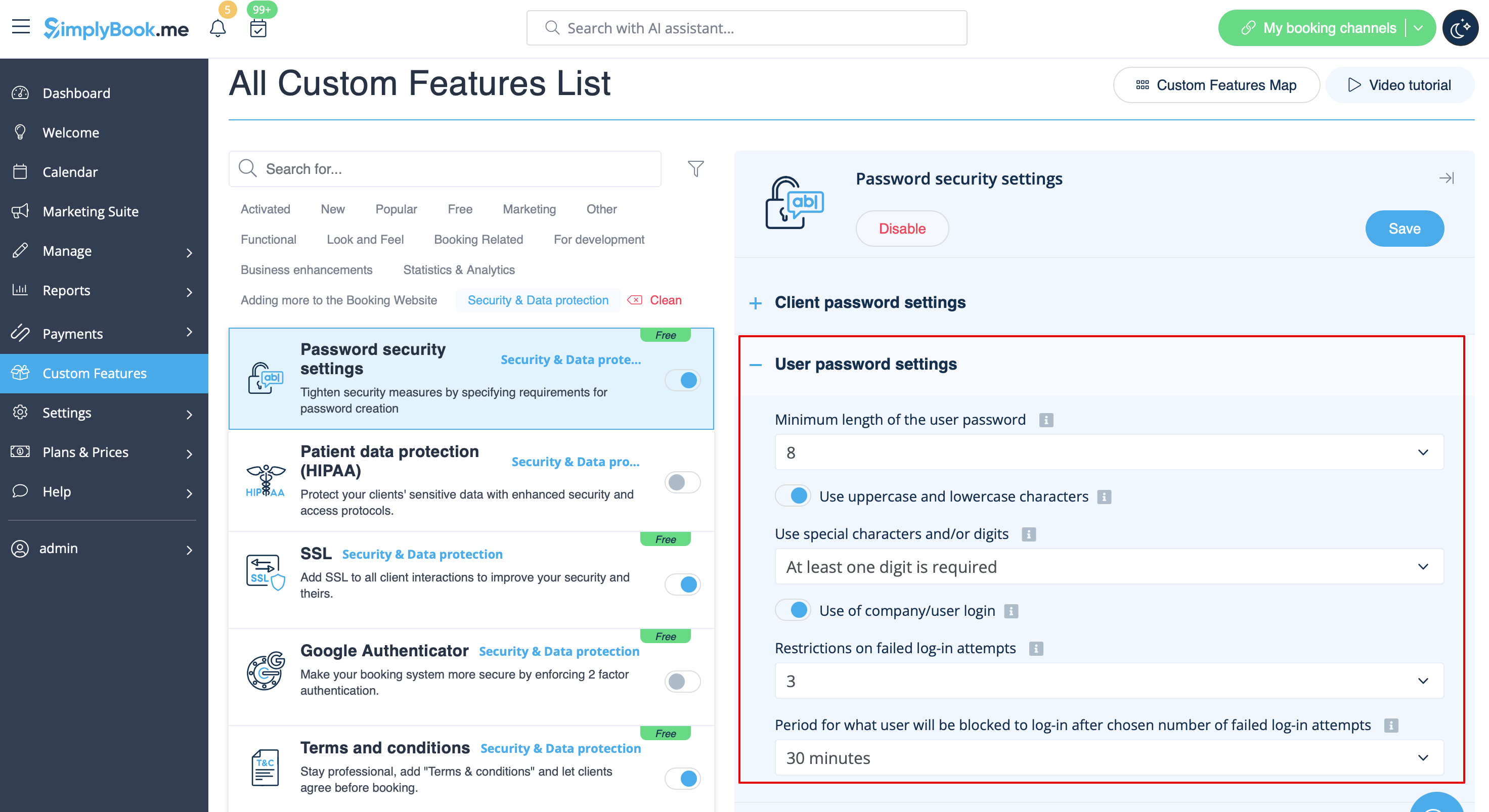
- 3. Now you can set requirements for password for your system users in the left-side block.
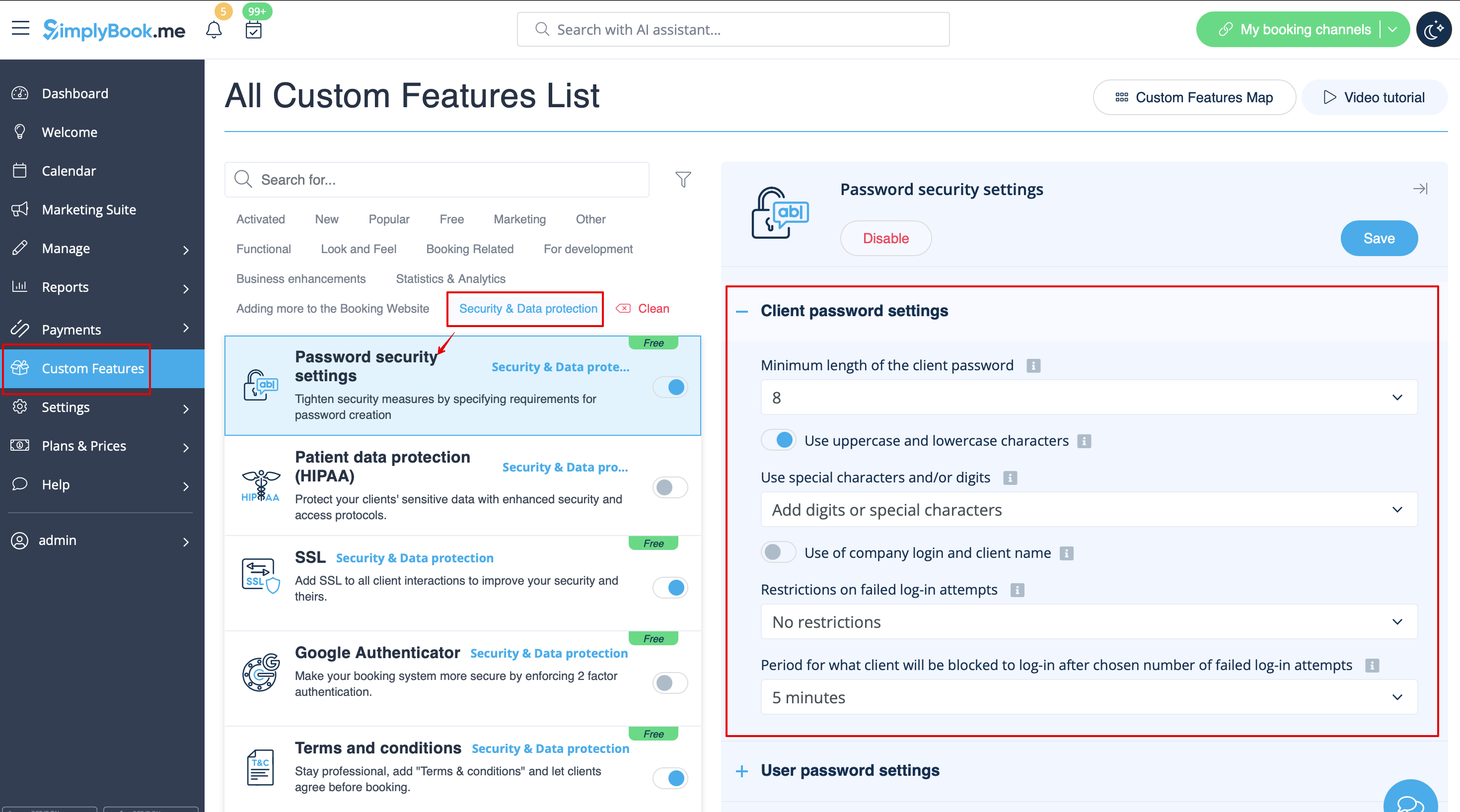
- 4. (is skipped if you are already using Client Login Custom Feature) If you wish your clients to be able to log in securely please enable Client Login option there.
- 5. Set up password requirements for your clients in the right-side block and save settings.