Translations:Online Video Meetings Custom Feature/17/uk: Difference between revisions

From SimplyBook.me
Created page with "= Як працює процес зустрічі = :1. Після того, як все налаштовано і клієнт забронював послугу/клас, пов'язаний з онлайн-зустрічами, як клієнт, так і постачальник (або компанія, залежно від ваших налаштувань) отримають посилання на зустріч.<br> :Або з електронних пові..."
 
(No difference)

Latest revision as of 15:29, 19 May 2025

Information about message (contribute)
This message has no documentation. If you know where or how this message is used, you can help other translators by adding documentation to this message.
Message definition (Online Video Meetings Custom Feature)
=How the meeting process works=
:1. After everything is set up and the client books the online meetings related service/class both the client and the provider (or company, depending on your settings) will get the links to the meeting.<br>
:Either from email notifications if you have added the corresponding variables to the templates.<br>
[[File:Meeting link in emails.png|border|center]]
<br><br>
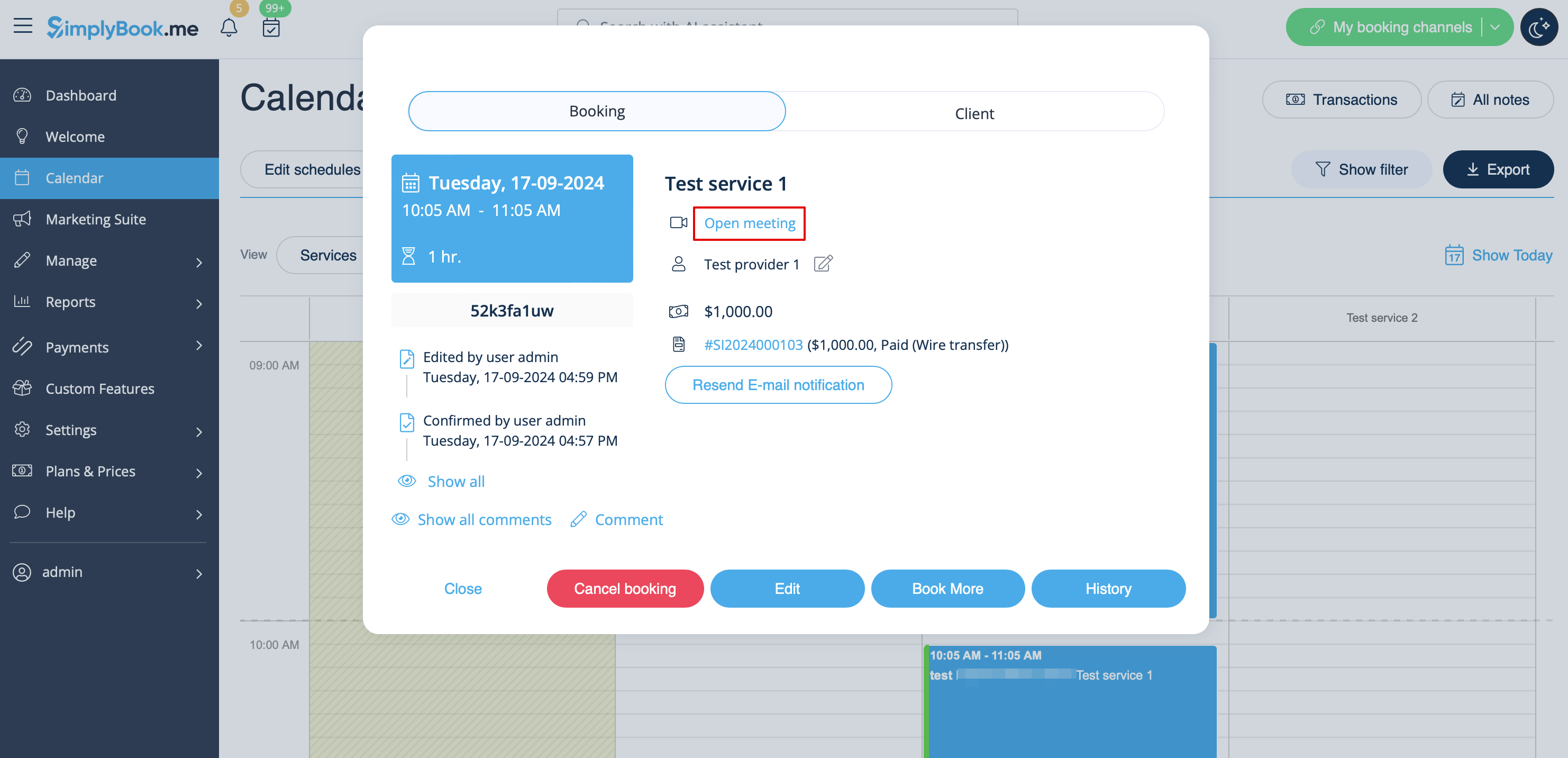
:Or the provider can get to the meeting page right from the booking on Calendar while the client from "My bookings" tab of the booking site.
[[File:Meeting link in admin calendar redesigned.png|1200px|border|center|link=https://help.simplybook.me/images/a/a6/Meeting_link_in_admin_calendar_redesigned.png]]
<br><br>
[[File:Meeting link on my bookings page.png|border|center]]
<br><br>
:2. By default the meeting starts automatically for the both sides when the booked time comes.
[[File:Client waiting for meeting.png|border|center]]
<br><br>
:3. As well the provider can manually start the meeting if necessary using the corresponding button.
[[File:Provider waiting for meeting.png|border|center]]
<br><br>
:4. After this the redirect to Zoom or Microsoft Teams(depending on your settings) software takes place and all the participants can join.
:(It is not mandatory for the customers to have MS Teams account. To join they will only need to fill in their name after opening the meeting url in their browser)
[[File:Teams page.png|border|center]]
<br><br><br><br>

Як працює процес зустрічі

1. Після того, як все налаштовано і клієнт забронював послугу/клас, пов'язаний з онлайн-зустрічами, як клієнт, так і постачальник (або компанія, залежно від ваших налаштувань) отримають посилання на зустріч.
Або з електронних повідомлень, якщо ви додали відповідні змінні до шаблонів.


Або постачальник може перейти на сторінку зустрічі прямо з календаря, а клієнт — з вкладки «Мої бронювання» на сайті бронювання.


2. За замовчуванням зустріч починається автоматично для обох сторін, коли настає заброньований час.


3. Також постачальник може вручну розпочати зустріч, якщо це необхідно, за допомогою відповідної кнопки.


4. Після цього відбувається перенаправлення до програмного забезпечення Zoom або Microsoft Teams (залежно від ваших налаштувань), і всі учасники можуть приєднатися.
(Клієнтам не обов'язково мати обліковий запис MS Teams. Щоб приєднатися, їм потрібно лише ввести своє ім'я після відкриття URL-адреси зустрічі в браузері)