Translations:Online Video Meetings Custom Feature/10/da: Difference between revisions

From SimplyBook.me
Created page with ":1. Aktivér den tilpassede funktion <span style="background-color:#d4f8e5; padding:5px; border-radius:5px;">Online møder</span> i <span style="background-color:#d4f8e5; padding:5px; border-radius:5px;">din SimplyBook.me-konto.</span> 1200px|center|link=https://help.simplybook.me/images/a/a1/Online_meetings_enable_path_redesigned.png <br><br> :2. Log ind på <span style="background-color:#cdeffc; padding:5px; border-ra..."
 
(No difference)

Latest revision as of 15:31, 19 May 2025

Information about message (contribute)
This message has no documentation. If you know where or how this message is used, you can help other translators by adding documentation to this message.
Message definition (Online Video Meetings Custom Feature)
:1. Enable <span style="background-color:#d4f8e5; padding:5px; border-radius:5px;">Online meetings</span> custom feature in <span style="background-color:#d4f8e5; padding:5px; border-radius:5px;">your SimplyBook.me account.</span>
[[File:Online meetings enable path redesigned.png|1200px|center|link=https://help.simplybook.me/images/a/a1/Online_meetings_enable_path_redesigned.png]]
<br><br>
:2. Login to <span style="background-color:#cdeffc; padding:5px; border-radius:5px;">[https://portal.azure.com/ Microsoft Azure portal]</span>  and your <span style="background-color:#cdeffc; padding:5px; border-radius:5px;">[https://teams.microsoft.com/ Microsoft Teams account]</span> with the user that is a member of your organization in MS Azure.
:(Or create the accounts there)
:<span style="background-color:#ffe9e9; padding:5px; border-radius:5px;">'''Please note!''' It is not possible to connect personal/private Microsoft Teams account to the system, it should be related to an organization via Microsoft Azure.</span>
1. Aktivér den tilpassede funktion Online møder i din SimplyBook.me-konto.
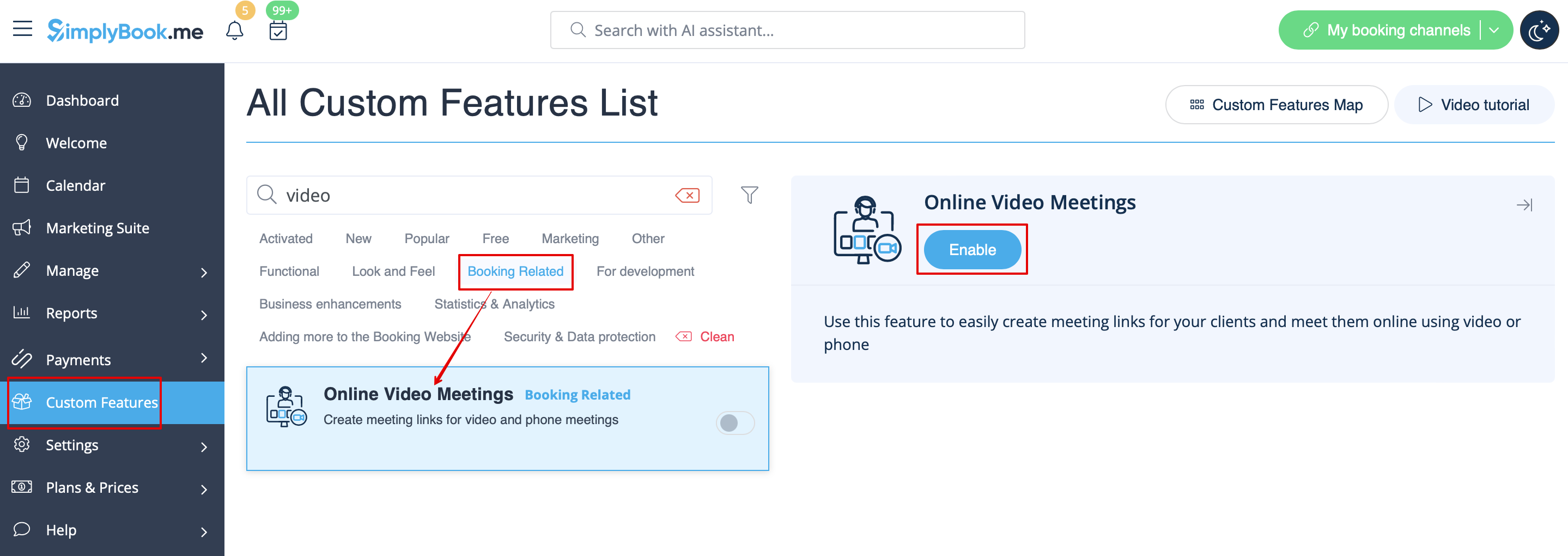


2. Log ind på Microsoft Azure-portalen og din Microsoft Teams-konto med den bruger, der er medlem af din organisation i MS Azure.
(Eller opret konti der)
Bemærk! Det er ikke muligt at forbinde en personlig/privat Microsoft Teams-konto til systemet. Den skal være knyttet til en organisation via Microsoft Azure.