Translations:Kiosk custom feature/2/sv: Difference between revisions

From SimplyBook.me
Created page with "<br><br> <span style="background-color:#ffe9e9; padding:5px; border-radius:5px;">'''Observera!''' Denna funktion är inte kompatibel med de anpassade funktionerna <span style="background-color:#cdeffc; padding:5px; border-radius:5px;">Ta mig tillbaka hem,</span> <span style="background-color:#cdeffc; padding:5px; border-radius:5px;">Telegram-meddelanden<..."
 
(No difference)

Latest revision as of 15:32, 19 May 2025

Information about message (contribute)
This message has no documentation. If you know where or how this message is used, you can help other translators by adding documentation to this message.
Message definition (Kiosk custom feature)
<br><br>
<span style="background-color:#ffe9e9; padding:5px; border-radius:5px;">'''Please note!''' This feature is not compatible with <span style="background-color:#cdeffc; padding:5px; border-radius:5px;">[[Special:MyLanguage/Custom_Features#Take_Me_Back_Home |Take me Back Home]],</span> <span style="background-color:#cdeffc; padding:5px; border-radius:5px;">[[Special:MyLanguage/Telegram_Notifications_custom_feature|Telegram Notifications]]</span> and <span style="background-color:#cdeffc; padding:5px; border-radius:5px;">[[Special:MyLanguage/Online_Video_Meetings_Custom_Feature|Online Video Meetings]]</span> custom features.</span>
<br><br>
;How to use
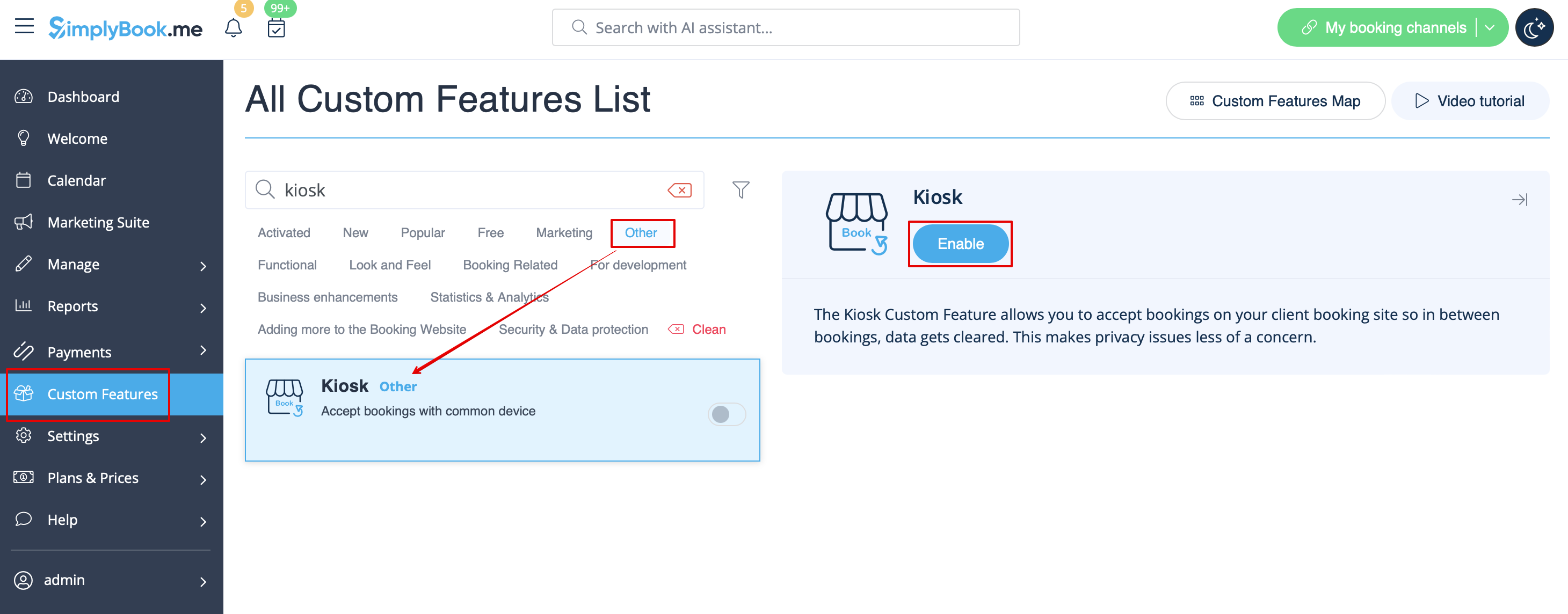
:1. Enable this feature on your <span style="background-color:#d4f8e5; padding:5px; border-radius:5px;">Custom features</span> page, <span style="background-color:#d4f8e5; padding:5px; border-radius:5px;">Other</span> section.
[[File:Kiosk enable path redesigned.png|1200px |border|center|link=https://help.simplybook.me/images/a/a4/Kiosk_enable_path_redesigned.png]]
<br><br>
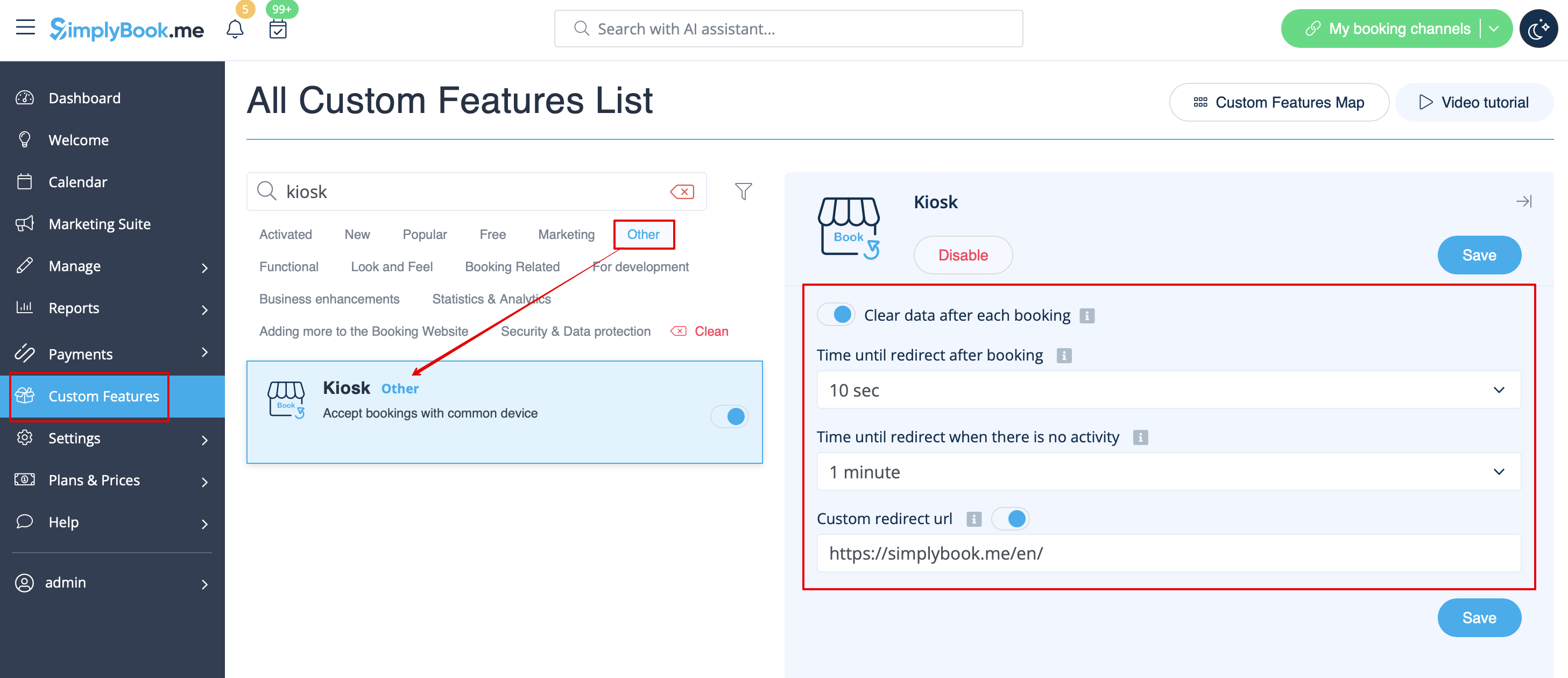
:2. Select if you wish to clear client data with each new booking, set redirect time for after booking completion and in case of inactivity on the booking site on the settings side of the page. You can also add your own url for the custom redirect if needed.
[[File:Kiosk settings redesigned.png|1200px|border|center|link=https://help.simplybook.me/images/1/12/Kiosk_settings_redesigned.png]]
<br><br>
Save your preferences and you are done!
<br><br>


Observera! Denna funktion är inte kompatibel med de anpassade funktionerna Ta mig tillbaka hem, Telegram-meddelanden och Onlinevideomöten.

Hur man använder
1. Aktivera denna funktion på sidan Anpassade funktioner, avsnittet Övrigt.


2. Välj om du vill rensa kunddata vid varje ny bokning, ställa in omdirigeringstid efter att bokningen har slutförts och vid inaktivitet på bokningssidan på inställningssidan. Du kan också lägga till din egen URL för den anpassade omdirigeringen om det behövs.

Spara dina inställningar och du är klar!