Translations:Loyalty System custom feature/4/nl: Difference between revisions

From SimplyBook.me
Created page with " ;Hoe gebruik je het loyaliteitssysteem? 1. Om <span style="background-color:#d4f8e5; padding:5px; border-radius:5px;">het loyaliteitssysteem</span> in te schakelen, ga je naar je pagina <span style="background-color:#d4f8e5; padding:5px; border-radius:5px;">Aangepaste functies</span>, selecteer je het gedeelte <span style="background-color:#d4f8e5; padding:5px; border-radius:5px;">Bedrijfsverbeteringen</span> en klik je op <span style="background-color:#d4f8e5; padding:..."
 
(No difference)

Latest revision as of 15:35, 19 May 2025

Information about message (contribute)
This message has no documentation. If you know where or how this message is used, you can help other translators by adding documentation to this message.
Message definition (Loyalty System custom feature)
;How to use
1. To enable <span style="background-color:#d4f8e5; padding:5px; border-radius:5px;">Loyalty System</span> please navigate to your <span style="background-color:#d4f8e5; padding:5px; border-radius:5px;">Custom Features</span> page, select <span style="background-color:#d4f8e5; padding:5px; border-radius:5px;">Business enhancements</span> section and click on <span style="background-color:#d4f8e5; padding:5px; border-radius:5px;">Enable</span> or use <span style="background-color:#d4f8e5; padding:5px; border-radius:5px;">the switcher</span> near the respective feature.
[[File:Loyalty system enable path redesigned.png|1200px|center|link=https://help.simplybook.me/images/1/10/Loyalty_system_enable_path_redesigned.png]]
<br><br>
2. After it is enabled you can edit the related notifications templates right away, on the right side of the page. Please use the suggested variables if needed.
Two notifications types are available: for automated points addition and manual client balance update.<br>
Hoe gebruik je het loyaliteitssysteem? 1. Om het loyaliteitssysteem in te schakelen, ga je naar je pagina Aangepaste functies, selecteer je het gedeelte Bedrijfsverbeteringen en klik je op Inschakelen of gebruik je de schakelaar naast de betreffende functie.
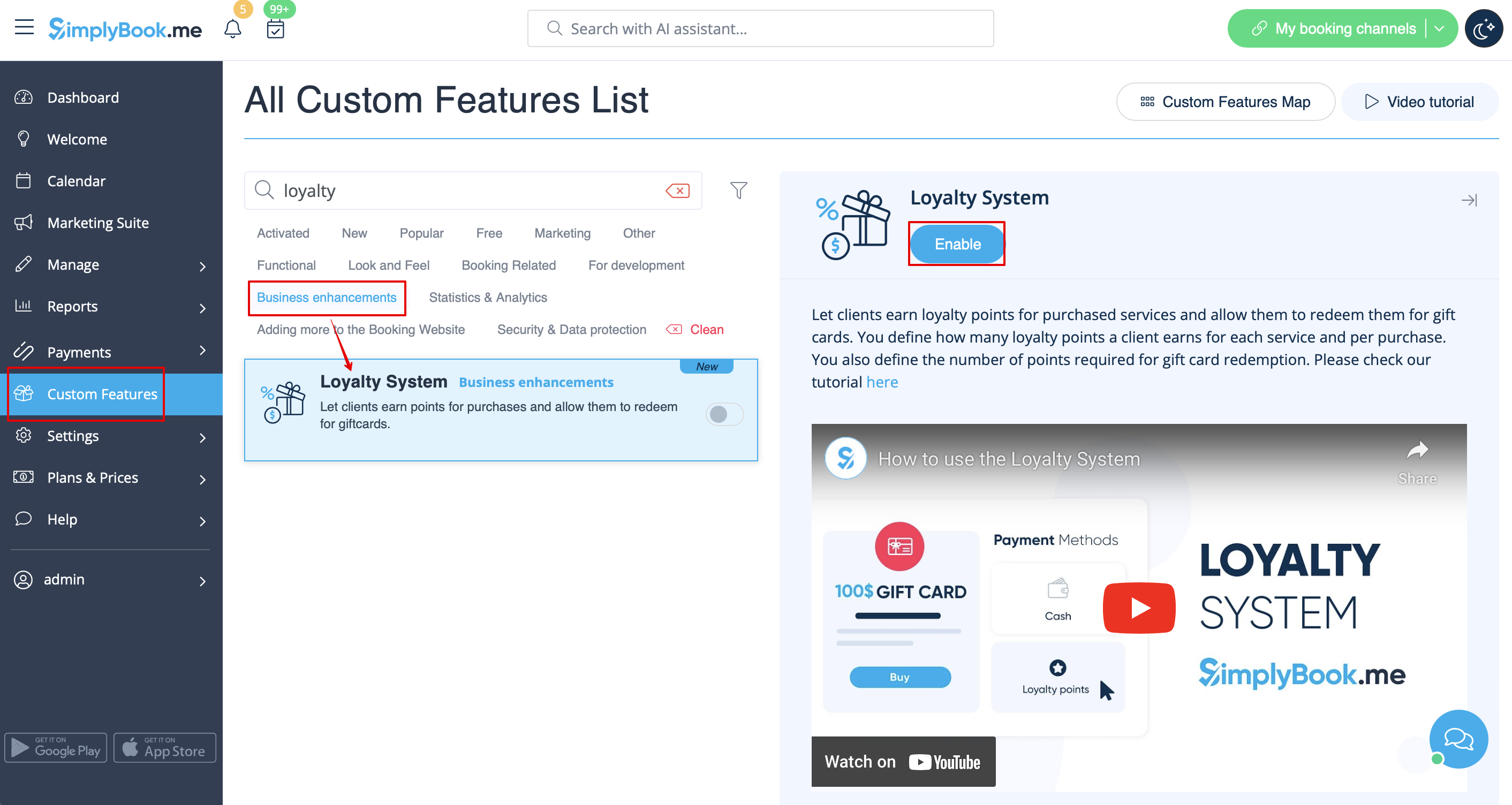


2. Nadat het is ingeschakeld, kun je de bijbehorende meldingssjablonen direct aan de rechterkant van de pagina bewerken. Gebruik indien nodig de voorgestelde variabelen. Er zijn twee soorten meldingen beschikbaar: voor het automatisch toevoegen van punten en voor het handmatig bijwerken van het saldo van klanten.