From SimplyBook.me
No edit summary |
Marked this version for translation |
||
| (One intermediate revision by the same user not shown) | |||
| Line 1: | Line 1: | ||
<languages/> | |||
<translate> | |||
<!--T:1--> | |||
{{#seo: | {{#seo: | ||
|title=Custom Features - SimplyBook.me | |title=Custom Features - SimplyBook.me | ||
| Line 5: | Line 8: | ||
|keywords=faq, frequently asked questions, booking software, appointment system questions, appointments online, calendar software, booking system, booking calendar, scheduling software, online appointment scheduling, online scheduling, plugins, custom features, additional functionality, smtp, own smtp server, send emails from own address, send emails from own email, send notifications | |keywords=faq, frequently asked questions, booking software, appointment system questions, appointments online, calendar software, booking system, booking calendar, scheduling software, online appointment scheduling, online scheduling, plugins, custom features, additional functionality, smtp, own smtp server, send emails from own address, send emails from own email, send notifications | ||
}} | }} | ||
</translate> | |||
<translate> | |||
<!--T:2--> | |||
<br> | <br> | ||
[[File:Smtp new icon.png|left]] | [[File:Smtp new icon.png|left]] | ||
<!--T:3--> | |||
It allows you to use your own SMTP server so all emails sent from the SimplyBook.me system on your behalf, come from your own email address.<br> | It allows you to use your own SMTP server so all emails sent from the SimplyBook.me system on your behalf, come from your own email address.<br> | ||
<br><br><br> | <br><br><br> | ||
| Line 22: | Line 29: | ||
:3. And add your SMTP server details there. Save settings.<br> | :3. And add your SMTP server details there. Save settings.<br> | ||
<br><br> | <br><br> | ||
</translate> | |||
<translate> | |||
<!--T:4--> | |||
:Remark that if you have a gmail address or g-suite email, you can send up to 1.000 emails per day through that address. | :Remark that if you have a gmail address or g-suite email, you can send up to 1.000 emails per day through that address. | ||
:If you send more than 1.000 notifications/promotions per day, you can look at other smtp services like sendinblue.com, sendgrid.com, mailjet.com, or authsmtp.com.<br><br> | :If you send more than 1.000 notifications/promotions per day, you can look at other smtp services like sendinblue.com, sendgrid.com, mailjet.com, or authsmtp.com.<br><br> | ||
| Line 33: | Line 43: | ||
:2. Please set the IMAP as enabled in order for emails to be properly copied to your sent folder.<br><br> | :2. Please set the IMAP as enabled in order for emails to be properly copied to your sent folder.<br><br> | ||
<br><br><br><br> | <br><br><br><br> | ||
</translate> | |||
Latest revision as of 15:35, 19 May 2025

It allows you to use your own SMTP server so all emails sent from the SimplyBook.me system on your behalf, come from your own email address.
- How to use.
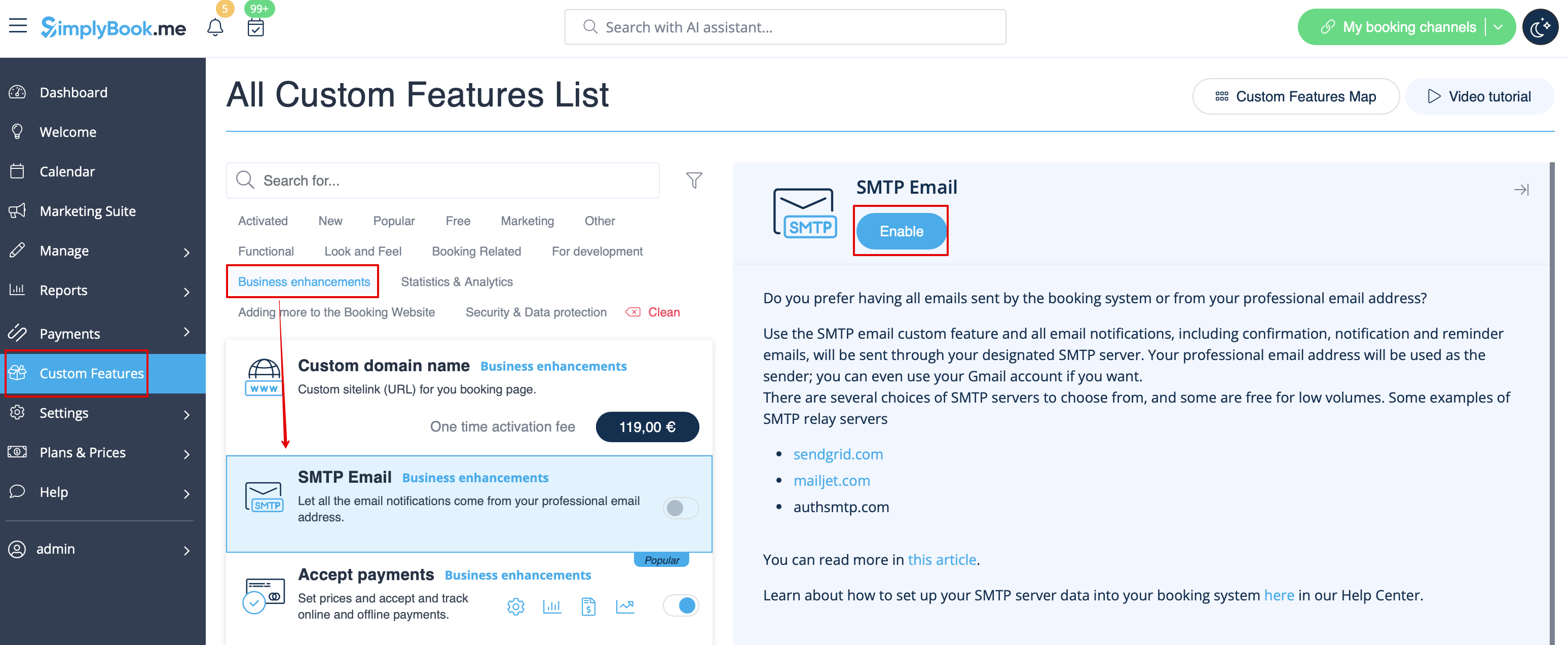
- 1. You can enable this Custom Feature in your Custom Feature section
- 2. Go to its settings on the right.
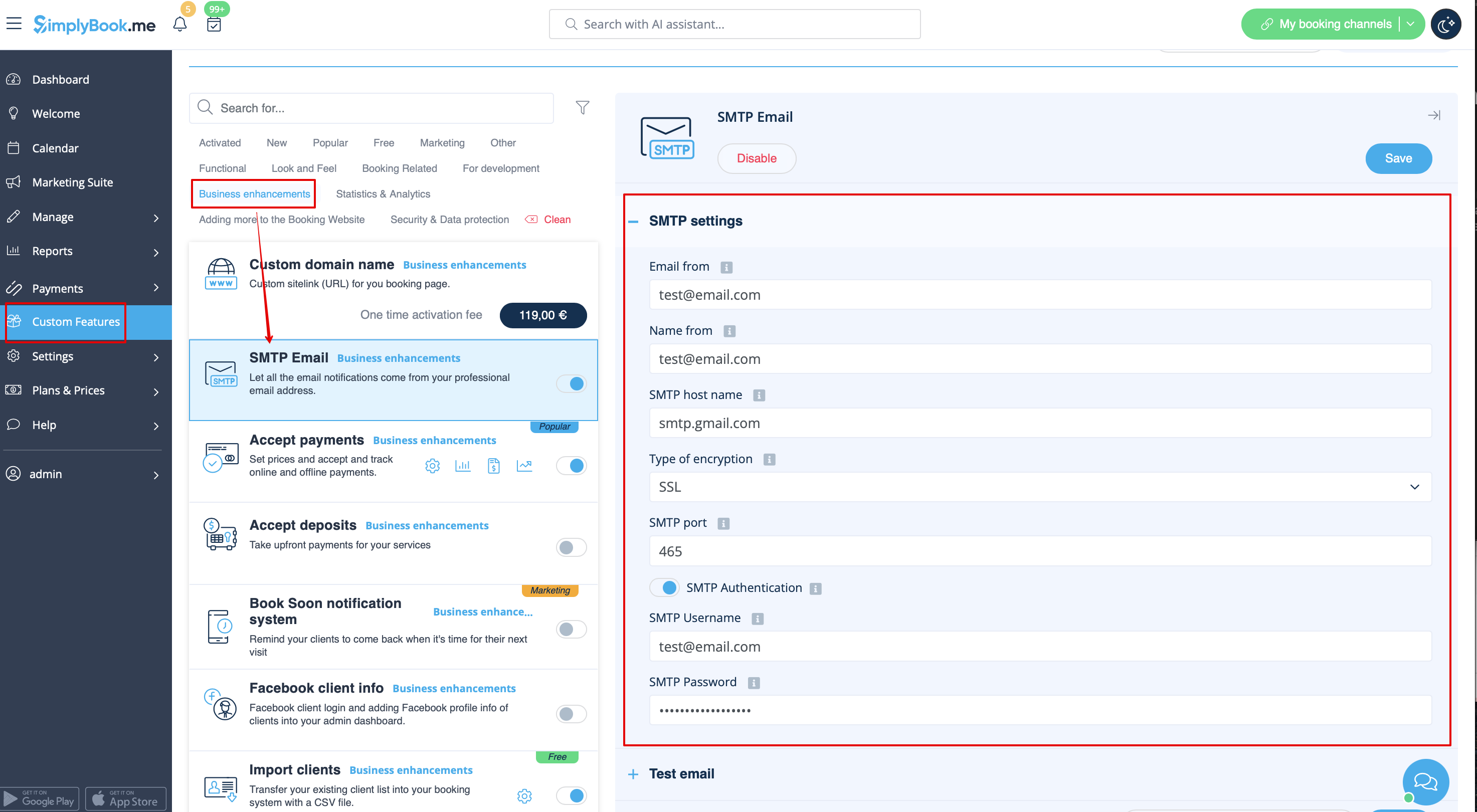
- 3. And add your SMTP server details there. Save settings.
- Remark that if you have a gmail address or g-suite email, you can send up to 1.000 emails per day through that address.
- If you send more than 1.000 notifications/promotions per day, you can look at other smtp services like sendinblue.com, sendgrid.com, mailjet.com, or authsmtp.com.
- Please check video tutorial here.
- For added security, you can setup double authentication for the email that you plan to use.
- Here you can check instructions how to use application password for double-step authentication.
How to store a copy of outgoing emails in your Gmail:
- 1. You need to log into your Gmail or Google Apps email Settings and Click on the Forwarding/IMAP tab and scroll down to the IMAP Access section.
- 2. Please set the IMAP as enabled in order for emails to be properly copied to your sent folder.
