Translations:Medical test custom feature/4/fr: Difference between revisions

From SimplyBook.me
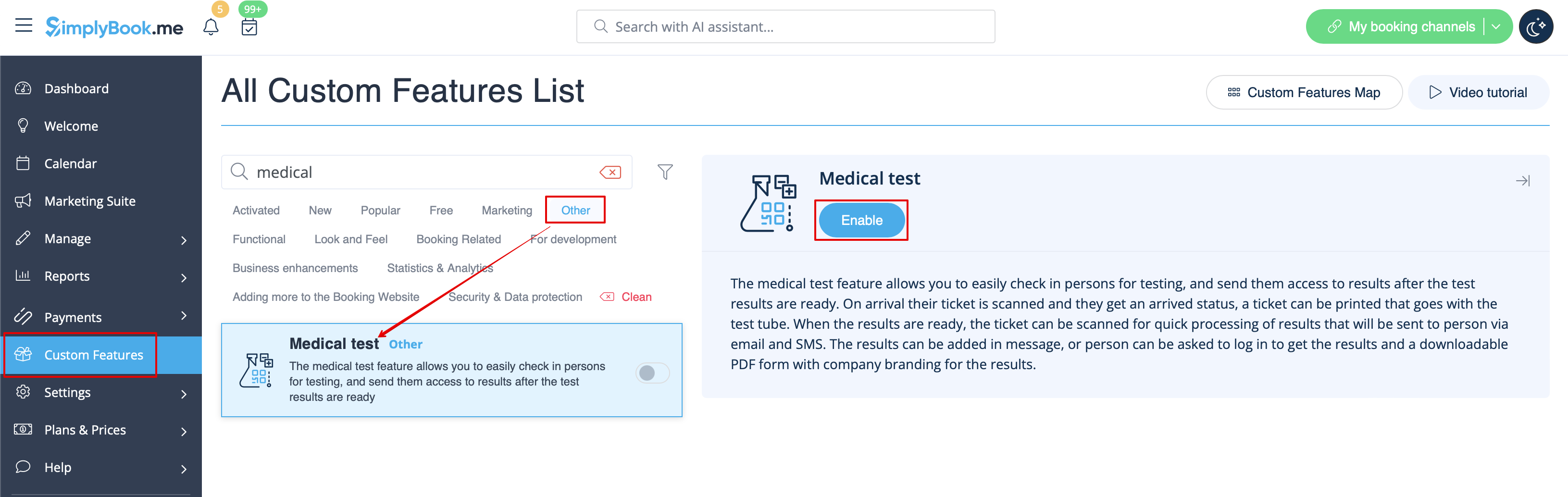
Created page with "comment utiliser l' :1. Activez la fonctionnalité personnalisée « <span style="background-color:#d4f8e5; padding:5px; border-radius:5px;">Test médical</span> » sur votre page « <span style="background-color:#d4f8e5; padding:5px; border-radius:5px;">Fonctionnalités personnalisées</span> », section « <span style="background-color:#d4f8e5; padding:5px; border-radius:5px;">Autres</span> » (ou utilisez la fonction de recherche). File:Medical test enable path red..."
 
(No difference)

Latest revision as of 15:37, 19 May 2025

Information about message (contribute)
This message has no documentation. If you know where or how this message is used, you can help other translators by adding documentation to this message.
Message definition (Medical test custom feature)
;How to use
:1. Enable <span style="background-color:#d4f8e5; padding:5px; border-radius:5px;">Medical test</span> custom feature on your <span style="background-color:#d4f8e5; padding:5px; border-radius:5px;">Custom features</span> page, <span style="background-color:#d4f8e5; padding:5px; border-radius:5px;">Other</span> section(or use search there). 
[[File:Medical test enable path redesigned.png|border|center|1200px|link=https://help.simplybook.me/images/8/8e/Medical_test_enable_path_redesigned.png]]
<br><br>

comment utiliser l'

1. Activez la fonctionnalité personnalisée « Test médical » sur votre page « Fonctionnalités personnalisées », section « Autres » (ou utilisez la fonction de recherche).