Translations:Online Video Meetings Custom Feature/8/de: Difference between revisions

From SimplyBook.me
Created page with "<br><br> *Damit Ihre Dienstleister Zoom-Links in ihren Bestätigungen erhalten, fügen Sie bitte die Variable ''[online_meeting_provider_link]'' zu Ihrer <span style="background-color:#d4f8e5; padding:5px; border-radius:5px;">neuen Buchungsbestätigung für Dienstleister</span> in <span style="background-color:#d4f8e5; padding:5px; border-radius:5px;">den Einstellungen</span> -> <span style="background-color:#d4f8e5; padding:5px; border-radius:5px;">E-Mail- und SMS-Ei..."
(No difference)

Revision as of 15:40, 19 May 2025

Information about message (contribute)
This message has no documentation. If you know where or how this message is used, you can help other translators by adding documentation to this message.
Message definition (Online Video Meetings Custom Feature)
<br><br>
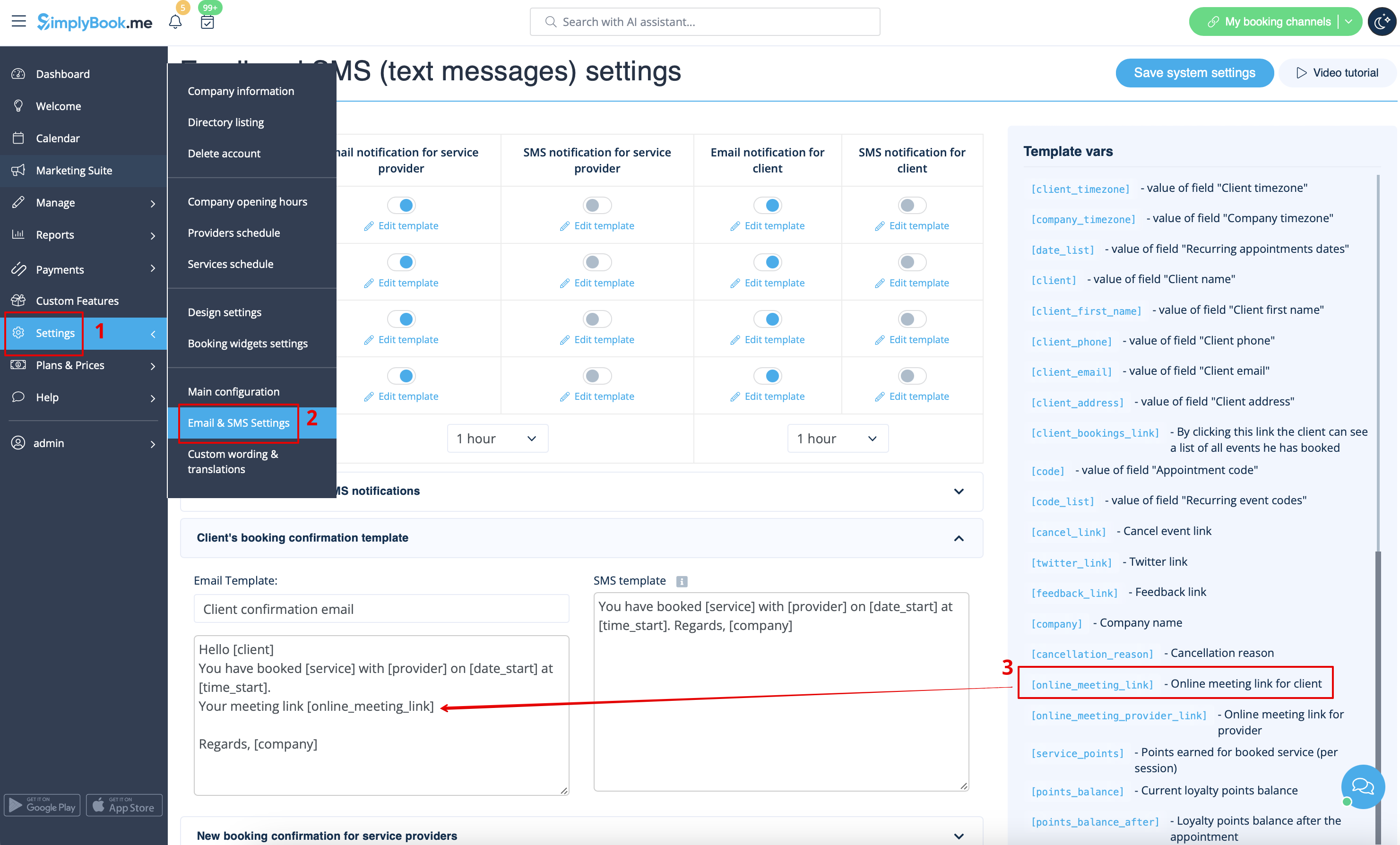
* To let your service providers receive Zoom links in their confirmations please add ''[online_meeting_provider_link]'' variable to your <span style="background-color:#d4f8e5; padding:5px; border-radius:5px;">New booking confirmation for service providers</span> in <span style="background-color:#d4f8e5; padding:5px; border-radius:5px;">Settings</span> -> <span style="background-color:#d4f8e5; padding:5px; border-radius:5px;">Email and sms settings</span> (or <span style="background-color:#d4f8e5; padding:5px; border-radius:5px;">Custom features</span> -> <span style="background-color:#d4f8e5; padding:5px; border-radius:5px;">[[Special:MyLanguage/Flexible Notifications custom feature|Flexible notifications]]</span> -> <span style="background-color:#d4f8e5; padding:5px; border-radius:5px;">Manage</span> if you have customized notifications per service and/or provider).
[[File:Add meeting link to notification redesigned.png|1200px|center|link=https://help.simplybook.me/images/b/ba/Add_meeting_link_to_notification_redesigned.png]]


  • Damit Ihre Dienstleister Zoom-Links in ihren Bestätigungen erhalten, fügen Sie bitte die Variable [online_meeting_provider_link] zu Ihrer neuen Buchungsbestätigung für Dienstleister in den Einstellungen -> E-Mail- und SMS-Einstellungen (oder Benutzerdefinierte Funktionen -> Flexible Benachrichtigungen -> Verwalten, wenn Sie benutzerdefinierte Benachrichtigungen pro Dienst und/oder Dienstleister festgelegt haben) hinzu.