From SimplyBook.me
Created page with "Dans certaines conditions, il peut arriver qu'une période apparaisse comme disponible dans l'interface d'administration de votre entreprise, mais que ces créneaux horaires ne s'affichent pas sur le site web de réservation et ne puissent donc pas être réservés. Il s'agit d'une particularité du système et il n'existe actuellement aucun moyen de modifier son fonctionnement. <br><br>" |
Created page with ";Conditions préalables : :1. <span style="background-color:#cdeffc; padding:5px; border-radius:5px;">Le ou les prestataires</span> sont configurés pour servir plusieurs clients à la fois. 1200px|border|center|link=https://help.simplybook.me/images/b/b0/Many_clients_per_povider_redesigned.png <br><br>" |
||
| Line 6: | Line 6: | ||
Il s'agit d'une particularité du système et il n'existe actuellement aucun moyen de modifier son fonctionnement. | Il s'agit d'une particularité du système et il n'existe actuellement aucun moyen de modifier son fonctionnement. | ||
<br><br> | <br><br> | ||
;Conditions préalables : | |||
; | :1. <span style="background-color:#cdeffc; padding:5px; border-radius:5px;">[[Adding_services,_providers_and_availability(new_interface)#How_to_add_a_provider|Le ou les prestataires]]</span> sont configurés pour servir plusieurs clients à la fois. | ||
:1. <span style="background-color:#cdeffc; padding:5px; border-radius:5px;">[[Adding_services,_providers_and_availability(new_interface)#How_to_add_a_provider| | |||
[[File:Many clients per povider redesigned.png|1200px|border|center|link=https://help.simplybook.me/images/b/b0/Many_clients_per_povider_redesigned.png]] | [[File:Many clients per povider redesigned.png|1200px|border|center|link=https://help.simplybook.me/images/b/b0/Many_clients_per_povider_redesigned.png]] | ||
<br><br | <br><br><div lang="en" dir="ltr" class="mw-content-ltr"> | ||
:2. <span style="background-color:#cdeffc; padding:5px; border-radius:5px;">[[Need_to_change_interval_(timeframe)|Timeframe]]</span> period selected in the system is less than <span style="background-color:#cdeffc; padding:5px; border-radius:5px;">[[Adding_services,_providers_and_availability(new_interface)#How_to_set_service_duration|service duration]].</span> | :2. <span style="background-color:#cdeffc; padding:5px; border-radius:5px;">[[Need_to_change_interval_(timeframe)|Timeframe]]</span> period selected in the system is less than <span style="background-color:#cdeffc; padding:5px; border-radius:5px;">[[Adding_services,_providers_and_availability(new_interface)#How_to_set_service_duration|service duration]].</span> | ||
:For example, you have selected <span style="background-color:#d4f8e5; padding:5px; border-radius:5px;">10mins</span> timeframe and set <span style="background-color:#d4f8e5; padding:5px; border-radius:5px;">30mins</span> service duration. | :For example, you have selected <span style="background-color:#d4f8e5; padding:5px; border-radius:5px;">10mins</span> timeframe and set <span style="background-color:#d4f8e5; padding:5px; border-radius:5px;">30mins</span> service duration. | ||
Revision as of 08:59, 18 June 2025
Dans certaines conditions, il peut arriver qu'une période apparaisse comme disponible dans l'interface d'administration de votre entreprise, mais que ces créneaux horaires ne s'affichent pas sur le site web de réservation et ne puissent donc pas être réservés.
Il s'agit d'une particularité du système et il n'existe actuellement aucun moyen de modifier son fonctionnement.
- Conditions préalables
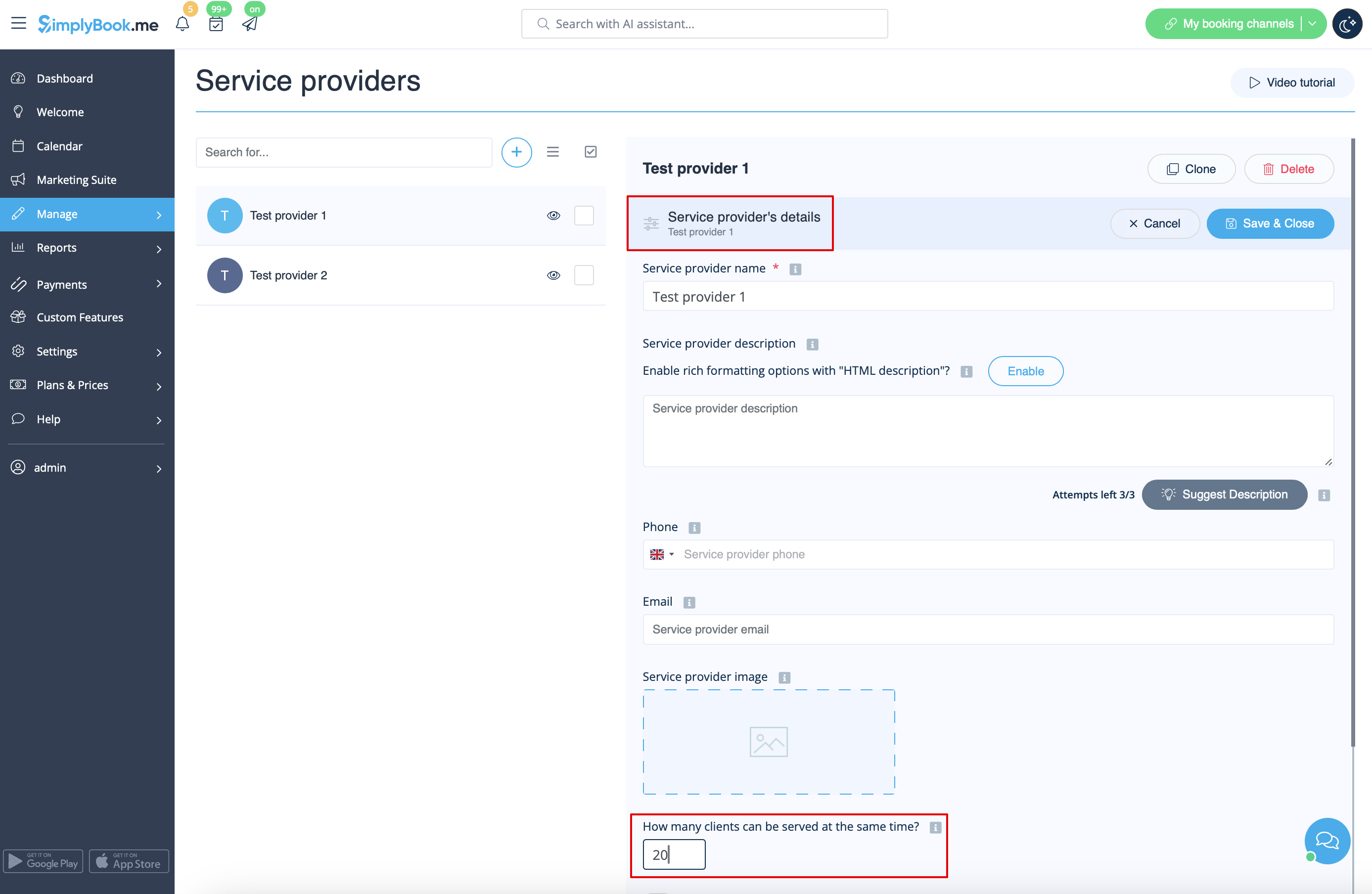
- 1. Le ou les prestataires sont configurés pour servir plusieurs clients à la fois.
- 2. Timeframe period selected in the system is less than service duration.
- For example, you have selected 10mins timeframe and set 30mins service duration.
- (If these two periods are equal this case cannot happen).
- Case example
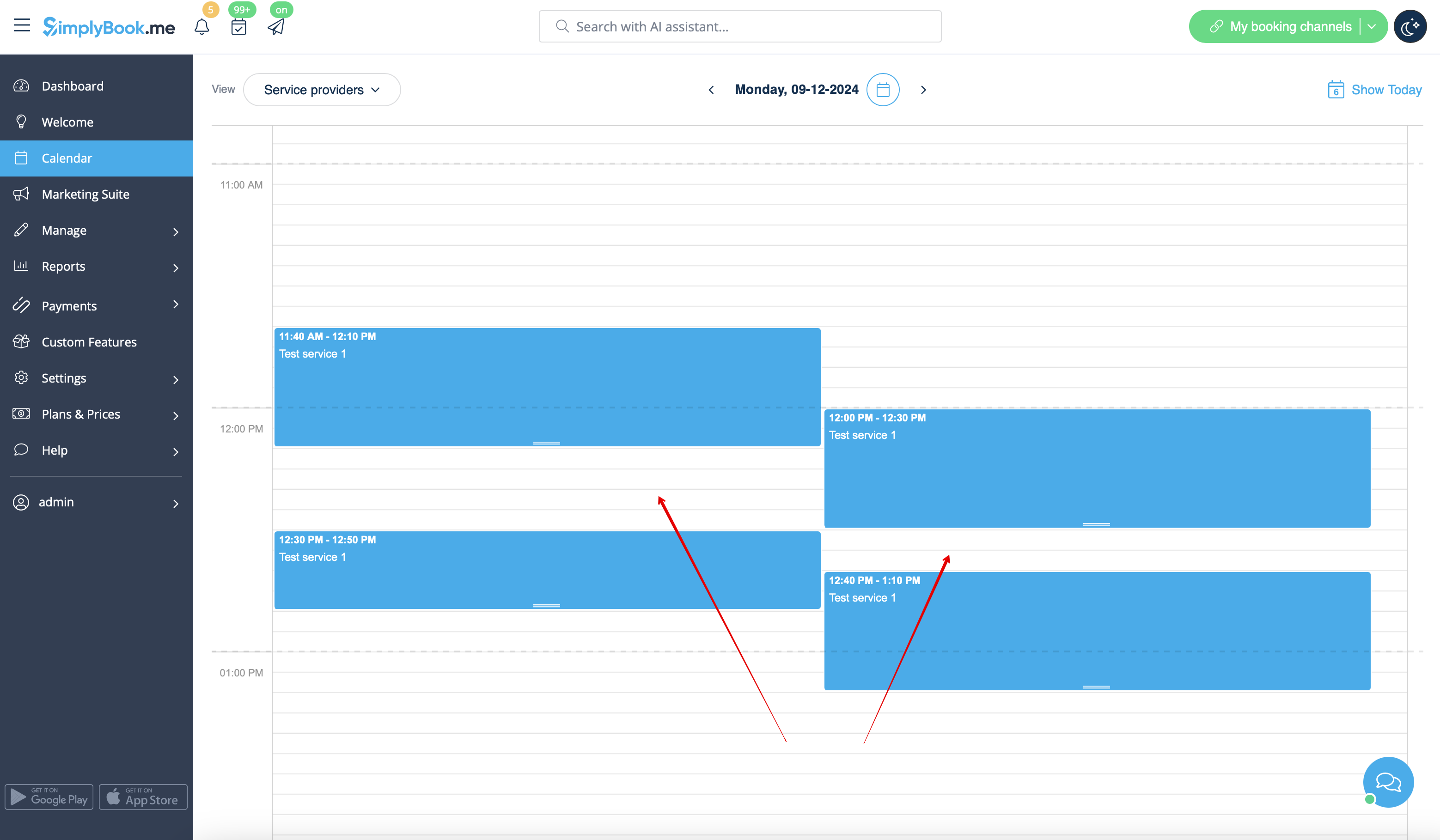
- Slots are booked at 12:00-12:30 and 12:40-13:10
- Slots are booked at 11:40-12:10 and 12:30-12:50
- So it may seem that the period 12:10 - 12:40 is free, but in reality it is represented by two independent timeslots: 12:10-12:30 and 12:30-12:40 so 30mins service cannot be booked there.
- How to avoid the risk of such cases
- 1. Try to have service duration equal to timeframe if possible
- 2. Use modern calendar layout for the booking website and Appointment at fixed time custom feature to restrict the timeslots shifting and avoid possible gaps in-between.

