Created page with "= Billeder = <br><br> Du kan tilføje billeder til dine tjenester, udbydere, kategorier og steder osv. i <span style="background-color:#d4f8e5; padding:5px; border-radius:5px;">Administrer</span> -> <span style="background-color:#d4f8e5; padding:5px; border-radius:5px;">Tjenester/Tjenesteudbydere</span> -> <span style="background-color:#d4f8e5; padding:5px; border-radius:5px;">Tjenesteoplysninger</span> eller <span style="background-color:#d4f8e5; padding:5px; bord..." Tags: Mobile edit Mobile web edit |
No edit summary Tags: Mobile edit Mobile web edit |
||
| (2 intermediate revisions by the same user not shown) | |||
| Line 10: | Line 10: | ||
<span style="background-color:#d4f8e5; padding:5px; border-radius:5px;"> | <span style="background-color:#d4f8e5; padding:5px; border-radius:5px;"> | ||
Indstillinger | Indstillinger | ||
</span> | </span> -> <span style="background-color:#d4f8e5; padding:5px; border-radius:5px;"> | ||
<span style="background-color:#d4f8e5; padding:5px; border-radius:5px;"> | |||
Designindstillinger | Designindstillinger | ||
</span> | </span> -> <span style="background-color:#d4f8e5; padding:5px; border-radius:5px;"> | ||
<span style="background-color:#d4f8e5; padding:5px; border-radius:5px;"> | |||
Yderligere temaindstillinger | Yderligere temaindstillinger | ||
</span> | </span> | ||
| Line 40: | Line 36: | ||
= Om sektion = | |||
<br><br> | <br><br> | ||
I <span style="background-color:#d4f8e5; padding:5px; border-radius:5px;">Indstillinger</span> -> <span style="background-color:#d4f8e5; padding:5px; border-radius:5px;">Designindstillinger</span> -> <span style="background-color:#d4f8e5; padding:5px; border-radius:5px;">Startside</span> kan du tilføje en virksomhedsbeskrivelse og andre vigtige oplysninger, som du ønsker at vise på din startside.<br/> | |||
[[File:Home page content path redesigned.png|1200px|center|link=https://help.simplybook.me/images/a/a4/Home_page_content_path_redesigned.png]] | [[File:Home page content path redesigned.png|1200px|center|link=https://help.simplybook.me/images/a/a4/Home_page_content_path_redesigned.png]] | ||
<br><br> | <br><br> | ||
= Kontaktpersoner = | |||
<br><br> | <br><br> | ||
Har du brug for at vise dine kunder nogle kontaktoplysninger? Tilføj dem under <span style="background-color:#d4f8e5; padding:5px; border-radius:5px;">Indstillinger</span> -> <span style="background-color:#d4f8e5; padding:5px; border-radius:5px;">Virksomhedsoplysninger</span><br> | |||
[[File:Company information path redesigned.png|1200px|center|link=https://help.simplybook.me/images/d/da/Company_information_path_redesigned.png]] | [[File:Company information path redesigned.png|1200px|center|link=https://help.simplybook.me/images/d/da/Company_information_path_redesigned.png]].[[File:Company information path redesigned.png|1200px|center|link=https://help.simplybook.me/images/d/da/Company_information_path_redesigned.png]] | ||
<br><br> | <br><br> | ||
Du kan tilføje følgende oplysninger der: | |||
* | * E-mailadresse | ||
* | * Telefonnummer | ||
* | * Hjemmesideadresse | ||
* WhatsApp | * WhatsApp-telefon | ||
* Facebook | * Facebook-profil url | ||
* X.com (Twitter) | * X.com (Twitter)-sidelink | ||
* Instagram | * Instagram-side url | ||
* LinkedIn | * LinkedIn-side | ||
<br><br> | <br><br> | ||
Et eksempel på, hvordan klientsiden ser ud. | |||
[[File:Contact us client side new.png|1200px|center|link=https://help.simplybook.me/images/4/44/Contact_us_client_side_new.png]] | [[File:Contact us client side new.png|1200px|center|link=https://help.simplybook.me/images/4/44/Contact_us_client_side_new.png]] | ||
<br><br> | <br><br> | ||
Kunderne vil f.eks. kunne klikke på WhatsApp-nummeret og blive omdirigeret til WhatsApp messenger for nemt at kunne kontakte dig der. | |||
<br><br><br><br> | <br><br><br><br> | ||
= Galleri = | |||
<br><br> | <br><br> | ||
Gør din bookingside mere attraktiv ved at vise billeder af dine tjenester med den brugerdefinerede funktion <span style="background-color:#cdeffc; padding:5px; border-radius:5px;">[[Custom_Features#Photo_Gallery| Fotogalleri]]</span>. | |||
For at aktivere den skal du gå til <span style="background-color:#d4f8e5; padding:5px; border-radius:5px;">Brugerdefinerede funktioner</span> -> <span style="background-color:#d4f8e5; padding:5px; border-radius:5px;">Tilføj mere til bookingwebstedet</span> -> <span style="background-color:#cdeffc; padding:5px; border-radius:5px;">[[Custom_Features#Photo_Gallery| Fotogalleri]]</span> -> <span style="background-color:#d4f8e5; padding:5px; border-radius:5px;">Aktivér</span> | |||
[[File:Photo gallery enable path redesigned.png|1200px | border|center|link=https://help.simplybook.me/images/7/79/Photo_gallery_enable_path_redesigned.png]] | [[File:Photo gallery enable path redesigned.png|1200px | border|center|link=https://help.simplybook.me/images/7/79/Photo_gallery_enable_path_redesigned.png]] | ||
<br><br> | <br><br> | ||
= Nyheder = | |||
<br><br> | <br><br> | ||
Denne mulighed gør det muligt at tilføje friske nyheder til dit bookingwebsted. | |||
For at aktivere det skal du gå til <span style="background-color:#d4f8e5; padding:5px; border-radius:5px;">Brugerdefinerede funktioner</span> -> <span style="background-color:#d4f8e5; padding:5px; border-radius:5px;">Tilføj mere til bookingwebstedet</span> -> <span style="background-color:#cdeffc; padding:5px; border-radius:5px;">[[Custom_Features#News| Nyheder ]]</span> -> <span style="background-color:#d4f8e5; padding:5px; border-radius:5px;">Aktivér</span> | |||
[[File:News enable path redesigned.png|1200px| border|center|link=https://help.simplybook.me/images/5/5c/News_enable_path_redesigned.png]] | [[File:News enable path redesigned.png|1200px| border|center|link=https://help.simplybook.me/images/5/5c/News_enable_path_redesigned.png]] | ||
<br><br> | <br><br> | ||
Når det er aktiveret i <span style="background-color:#d4f8e5; padding:5px; border-radius:5px;">Brugerdefinerede funktioner</span> -> <span style="background-color:#d4f8e5; padding:5px; border-radius:5px;">Nyheder</span> -> <span style="background-color:#d4f8e5; padding:5px; border-radius:5px;">Indstillinger</span>, kan du oprette nyhedsindlæg, og de vises i den separate fane på dit bookingwebsted. | |||
[[File:Create new news post redesigned.png|1200px | border|center|link=https://help.simplybook.me/images/2/2c/Create_new_news_post_redesigned.png]] | [[File:Create new news post redesigned.png|1200px | border|center|link=https://help.simplybook.me/images/2/2c/Create_new_news_post_redesigned.png]].[[File:Create new news post redesigned.png|1200px | border|center|link=https://help.simplybook.me/images/2/2c/Create_new_news_post_redesigned.png]] | ||
<br><br> | <br><br> | ||
= Vilkår og betingelser = | |||
<br><br> | <br><br> | ||
Skal din virksomhed være skudsikker? Du kan tilføje dine egne <span style="background-color:#cdeffc; padding:5px; border-radius:5px;">[[Custom_Features#Terms_and_Conditions| vilkår]]</span> og betingelser ved at aktivere den tilsvarende brugerdefinerede funktion i <span style="background-color:#d4f8e5; padding:5px; border-radius:5px;">Brugerdefinerede funktioner</span> -> <span style="background-color:#d4f8e5; padding:5px; border-radius:5px;">Sikkerhed og databeskyttelse</span> og tilføje teksten til dine vilkår og betingelser i dens indstillinger. | |||
[[File:T & C enable path redesigned.png|1200px| border|center|link=https://help.simplybook.me/images/2/21/T_%26_C_enable_path_redesigned.png]] | T[[File:T & C enable path redesigned.png|1200px| border|center|link=https://help.simplybook.me/images/2/21/T_%26_C_enable_path_redesigned.png]] | ||
<br><br> | <br><br> | ||
= Politik for afbestilling = | |||
<br><br> | <br><br> | ||
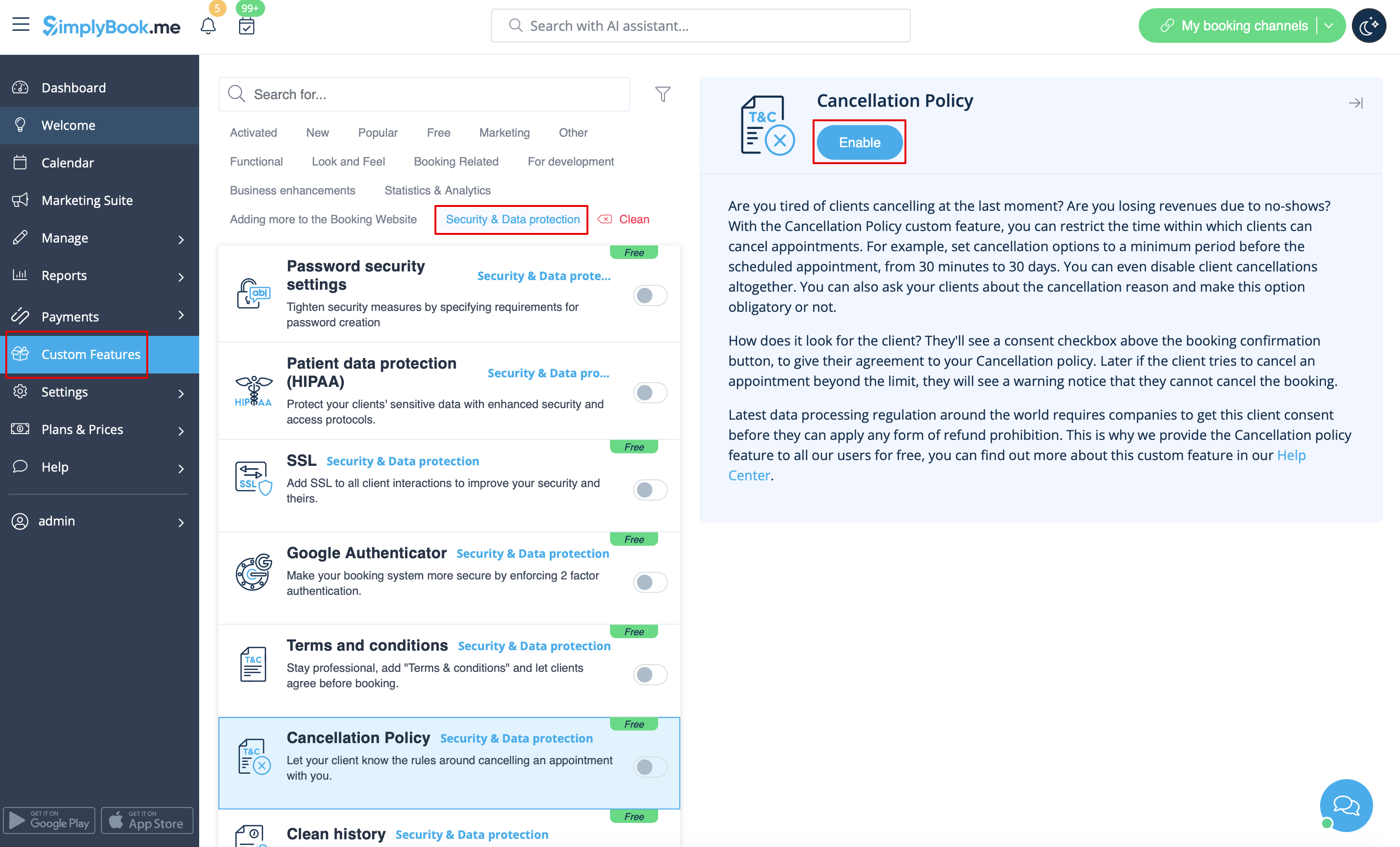
Har du brug for at begrænse den periode, hvor bookinger kan annulleres af kunder? Gå til <span style="background-color:#d4f8e5; padding:5px; border-radius:5px;">Brugerdefinerede funktioner</span> -> <span style="background-color:#d4f8e5; padding:5px; border-radius:5px;">Databeskyttelse</span> -> <span style="background-color:#cdeffc; padding:5px; border-radius:5px;">[[Custom_Features#Cancellation_Policy| Afbestillingspolitik]]</span> -> <span style="background-color:#d4f8e5; padding:5px; border-radius:5px;">Aktiver</span>, og indstil den til dine behov. | |||
[[File:Cancellation policy enable path redesigned.png|1200px|border| center|link=https://help.simplybook.me/images/e/ec/Cancellation_policy_enable_path_redesigned.png]] | [[File:Cancellation policy enable path redesigned.png|1200px|border| center|link=https://help.simplybook.me/images/e/ec/Cancellation_policy_enable_path_redesigned.png]] | ||
<br><br> | <br><br> | ||
= Html-formatering til beskrivelsesfelter = | |||
<br><br> | <br><br> | ||
Denne funktion gør det muligt at gøre beskrivelser mere iøjnefaldende ved hjælp af HTML-formatering. | |||
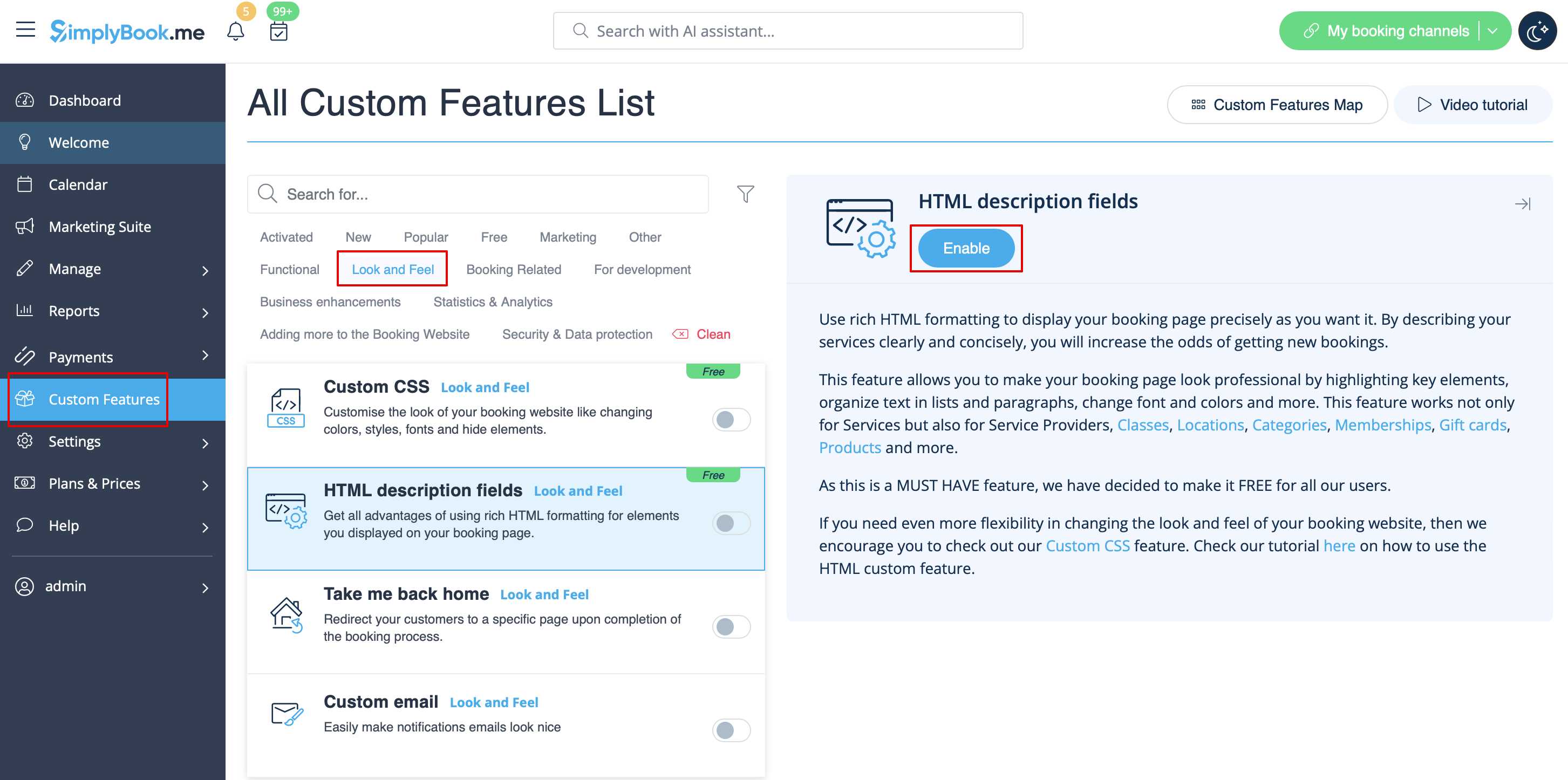
Gå til <span style="background-color:#d4f8e5; padding:5px; border-radius:5px;">Brugerdefinerede funktioner</span> -> <span style="background-color:#d4f8e5; padding:5px; border-radius:5px;">Look and Feel</span> -> <span style="background-color:#cdeffc; padding:5px; border-radius:5px;">[[Custom_Features#HTML_Description_Field_for_Events| HTML-beskrivelsesfelter]]</span> -> <span style="background-color:#d4f8e5; padding:5px; border-radius:5px;">Aktivér</span> og rediger beskrivelser for tjenester, udbydere, steder og kategorier i det tilsvarende <span style="background-color:#d4f8e5; padding:5px; border-radius:5px;">Administrer-afsnit</span>. | |||
[[File:Html description enable path redesigned.png|1200px| border|center|link=https://help.simplybook.me/images/1/1f/Html_description_enable_path_redesigned.png]] | Html[[File:Html description enable path redesigned.png|1200px| border|center|link=https://help.simplybook.me/images/1/1f/Html_description_enable_path_redesigned.png]] | ||
<br><br> | <br><br> | ||
Latest revision as of 13:48, 23 June 2025
Logo og baggrund
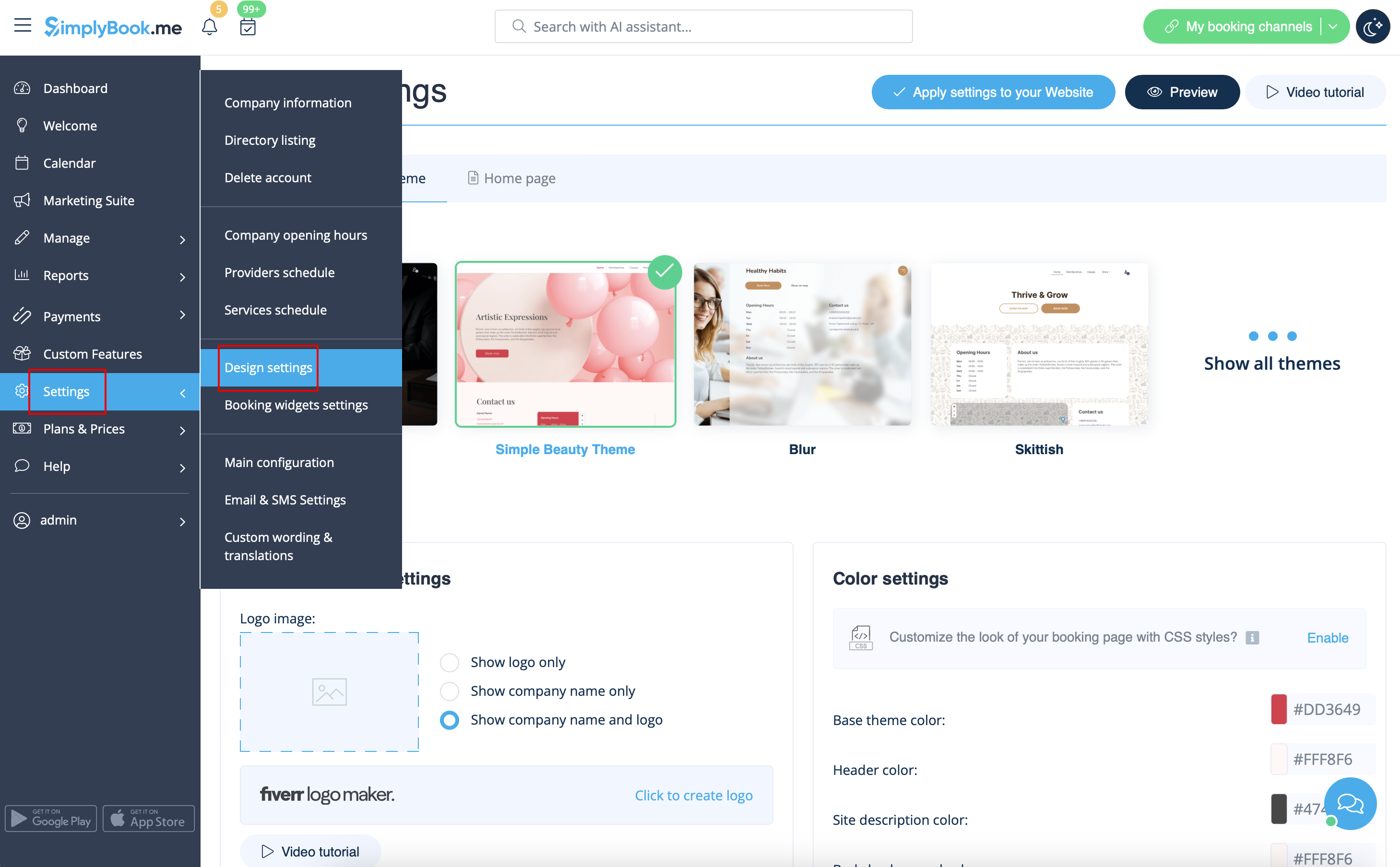
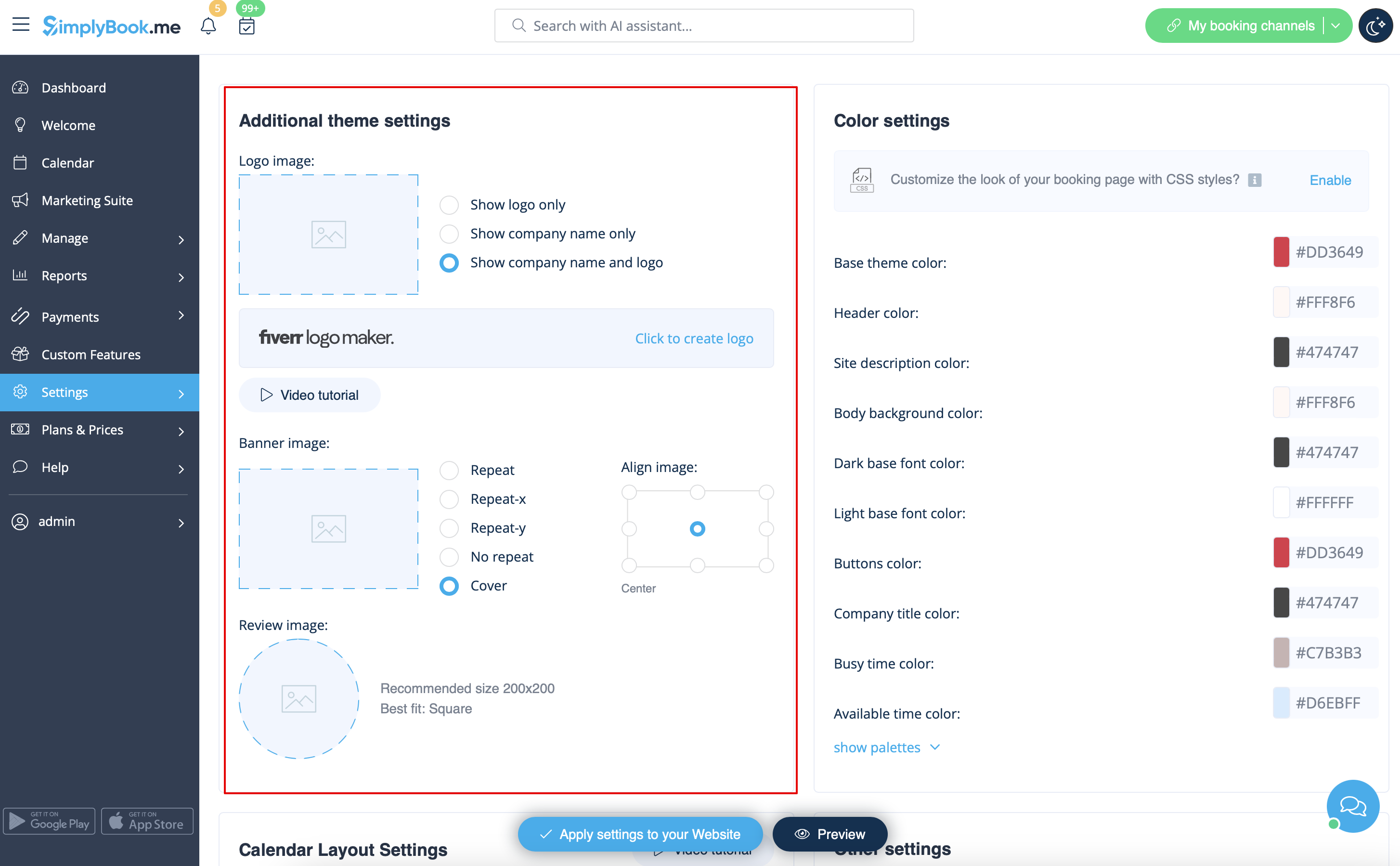
Du kan tilføje dit firmalogo og et flot banner samt et separat logo til siden "Anmeldelser" i
Indstillinger
->
Designindstillinger
->
Yderligere temaindstillinger
.
Billeder
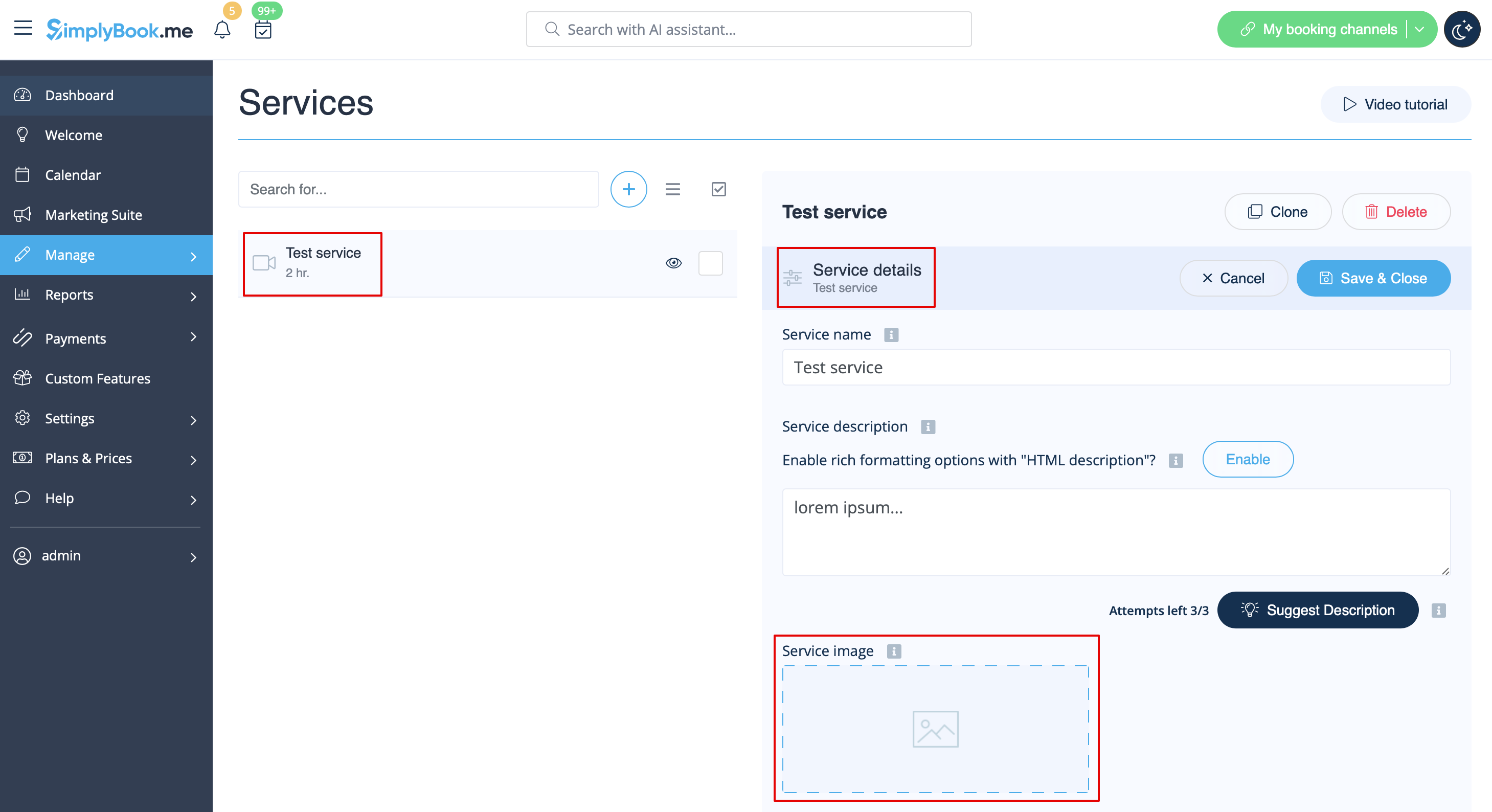
Du kan tilføje billeder til dine tjenester, udbydere, kategorier og steder osv. i Administrer -> Tjenester/Tjenesteudbydere -> Tjenesteoplysninger eller Tjenesteudbyderoplysninger -> klik på fotoikonet i feltet Tjenestebillede eller Tjenesteudbyderbillede, og gennemse billedet.
Beskrivelser
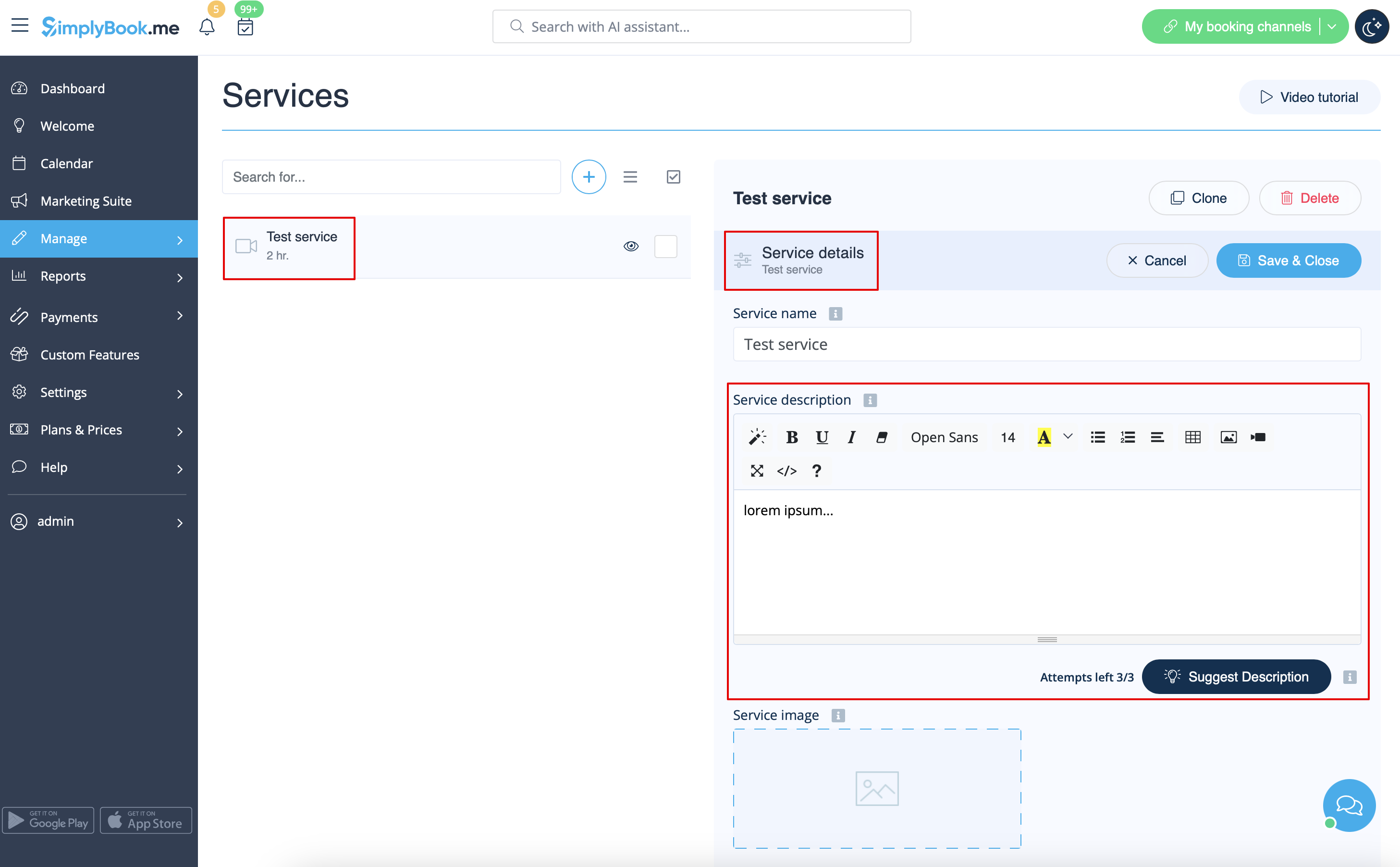
Har du brug for at give flere oplysninger om dine tjenester og/eller medarbejdere?
Du kan indstille dette i Administrer -> Tjenester/Tjenesteudbydere -> Tjenesteoplysninger eller fanen Tjenesteudbyderoplysninger -> Tjenestebeskrivelse eller Tjenesteudbyderbeskrivelse
description
Om sektion
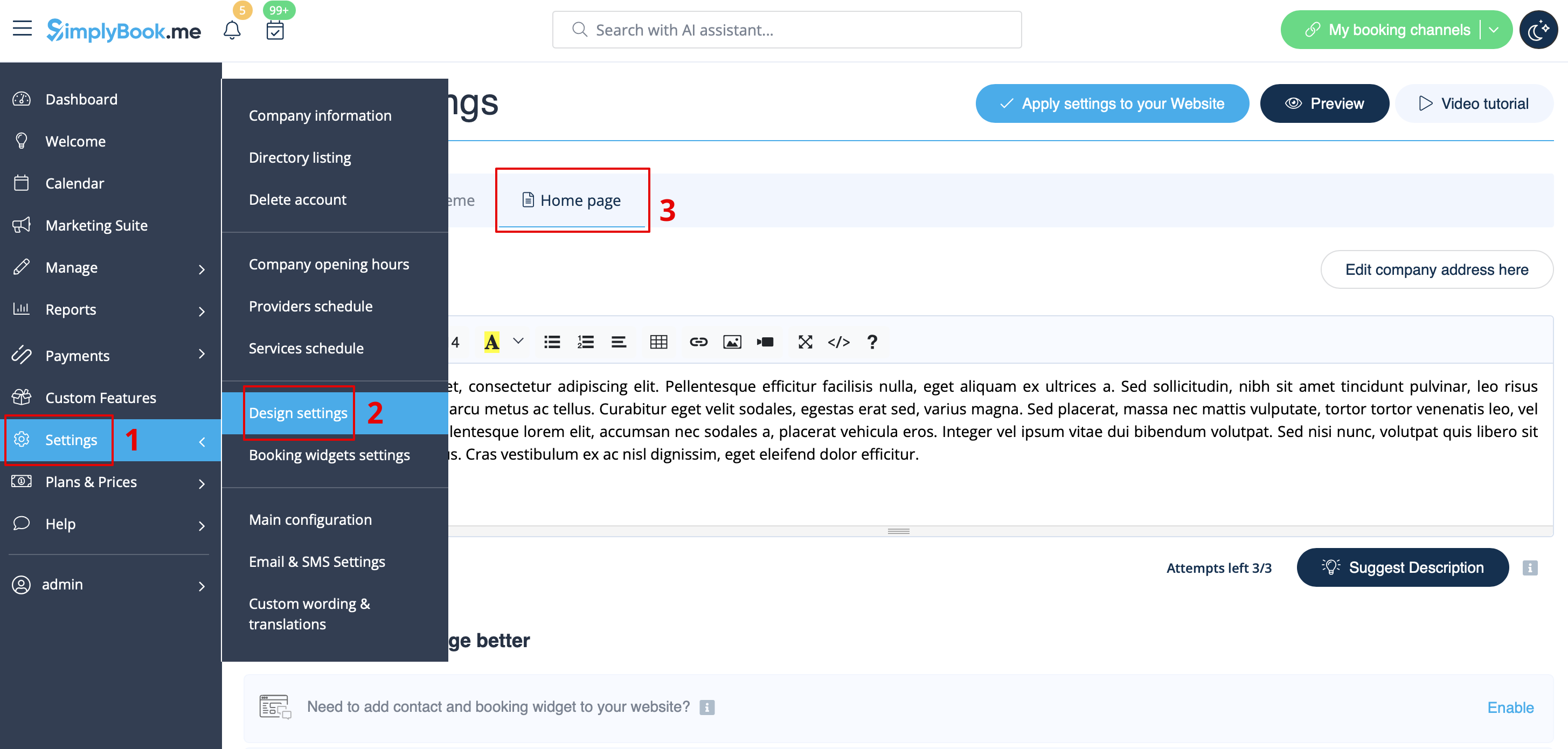
I Indstillinger -> Designindstillinger -> Startside kan du tilføje en virksomhedsbeskrivelse og andre vigtige oplysninger, som du ønsker at vise på din startside.
Kontaktpersoner
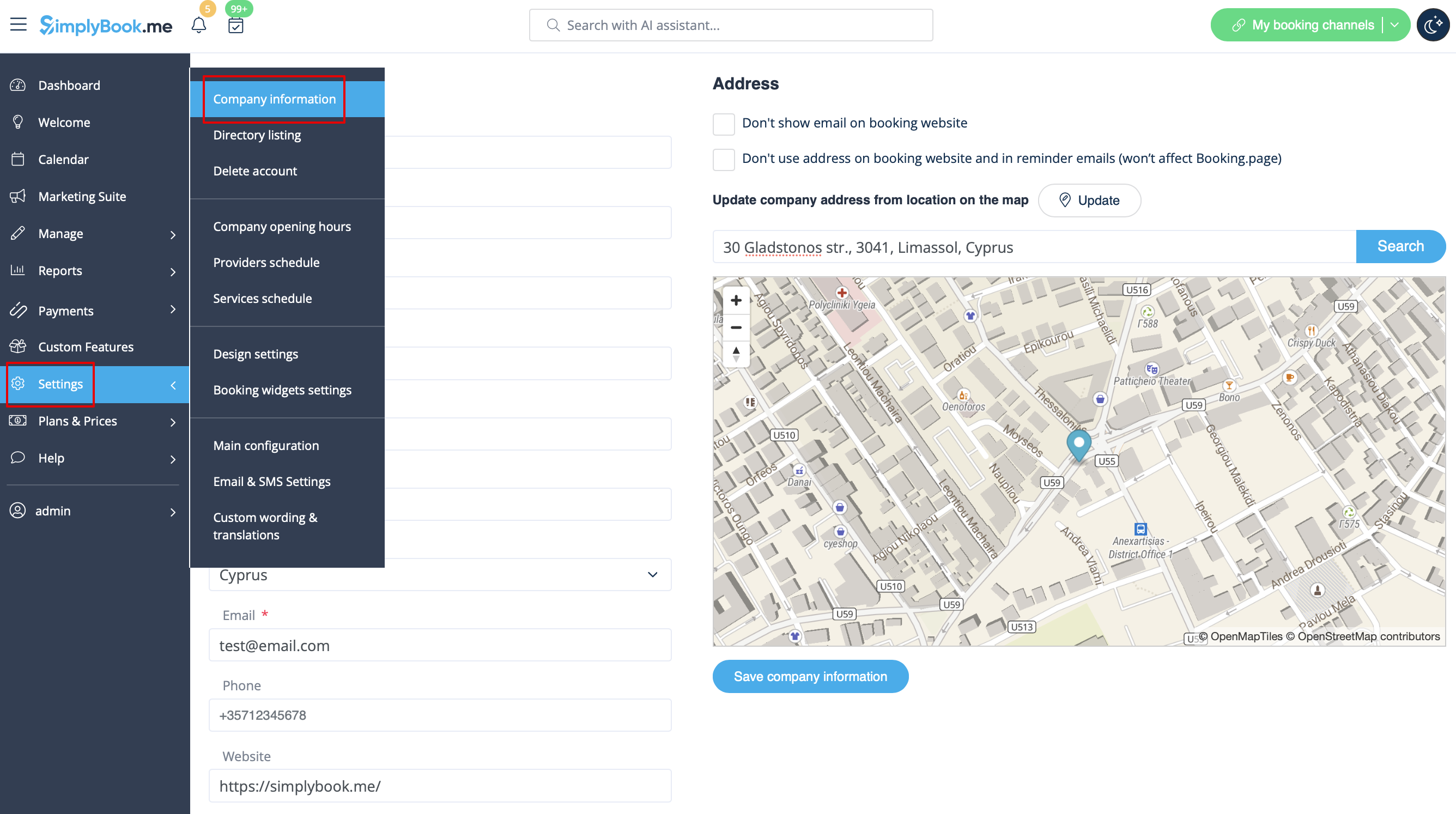
Har du brug for at vise dine kunder nogle kontaktoplysninger? Tilføj dem under Indstillinger -> Virksomhedsoplysninger
.
Du kan tilføje følgende oplysninger der:
- E-mailadresse
- Telefonnummer
- Hjemmesideadresse
- WhatsApp-telefon
- Facebook-profil url
- X.com (Twitter)-sidelink
- Instagram-side url
- LinkedIn-side
Et eksempel på, hvordan klientsiden ser ud.
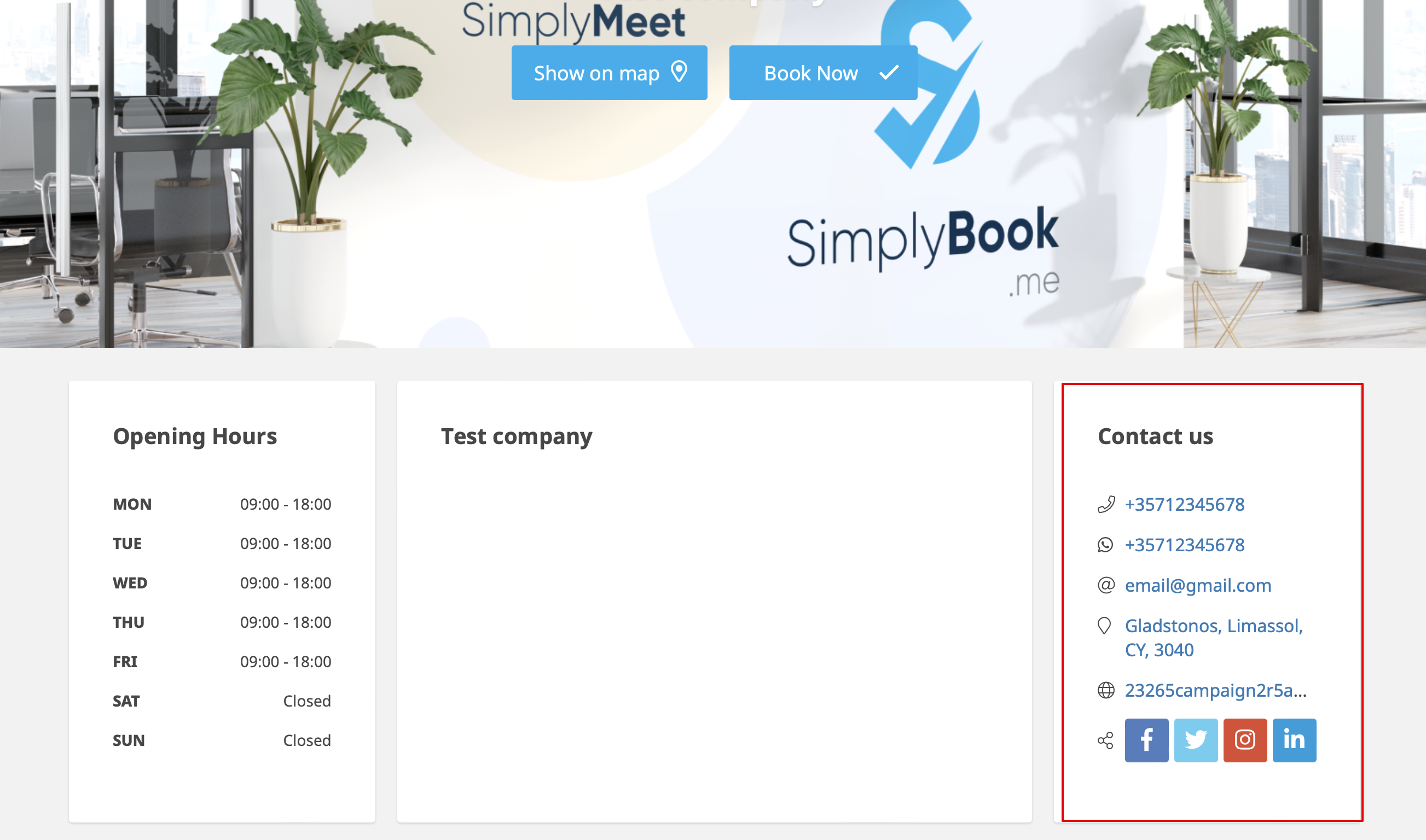
Kunderne vil f.eks. kunne klikke på WhatsApp-nummeret og blive omdirigeret til WhatsApp messenger for nemt at kunne kontakte dig der.
Galleri
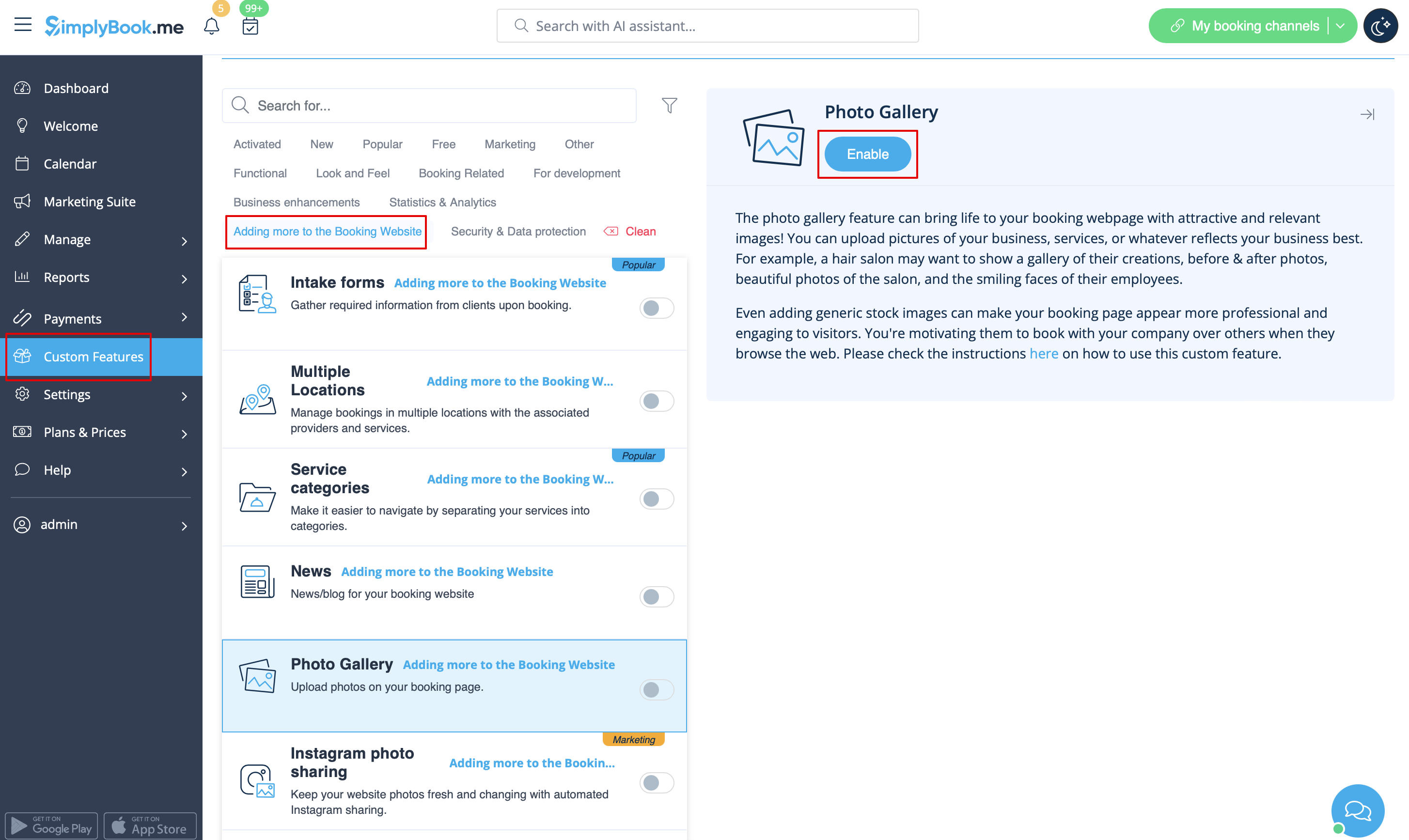
Gør din bookingside mere attraktiv ved at vise billeder af dine tjenester med den brugerdefinerede funktion Fotogalleri.
For at aktivere den skal du gå til Brugerdefinerede funktioner -> Tilføj mere til bookingwebstedet -> Fotogalleri -> Aktivér
Nyheder
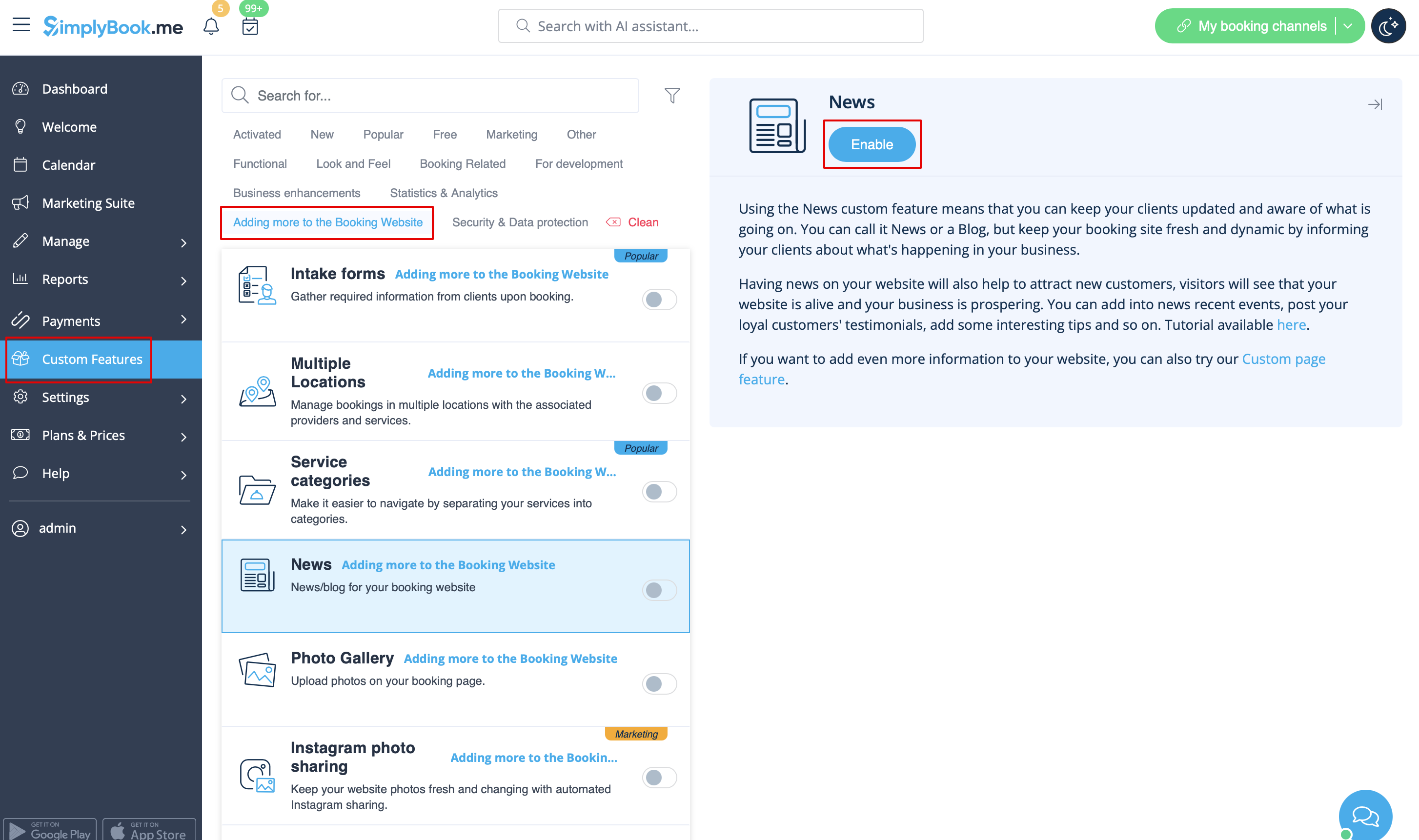
Denne mulighed gør det muligt at tilføje friske nyheder til dit bookingwebsted.
For at aktivere det skal du gå til Brugerdefinerede funktioner -> Tilføj mere til bookingwebstedet -> Nyheder -> Aktivér
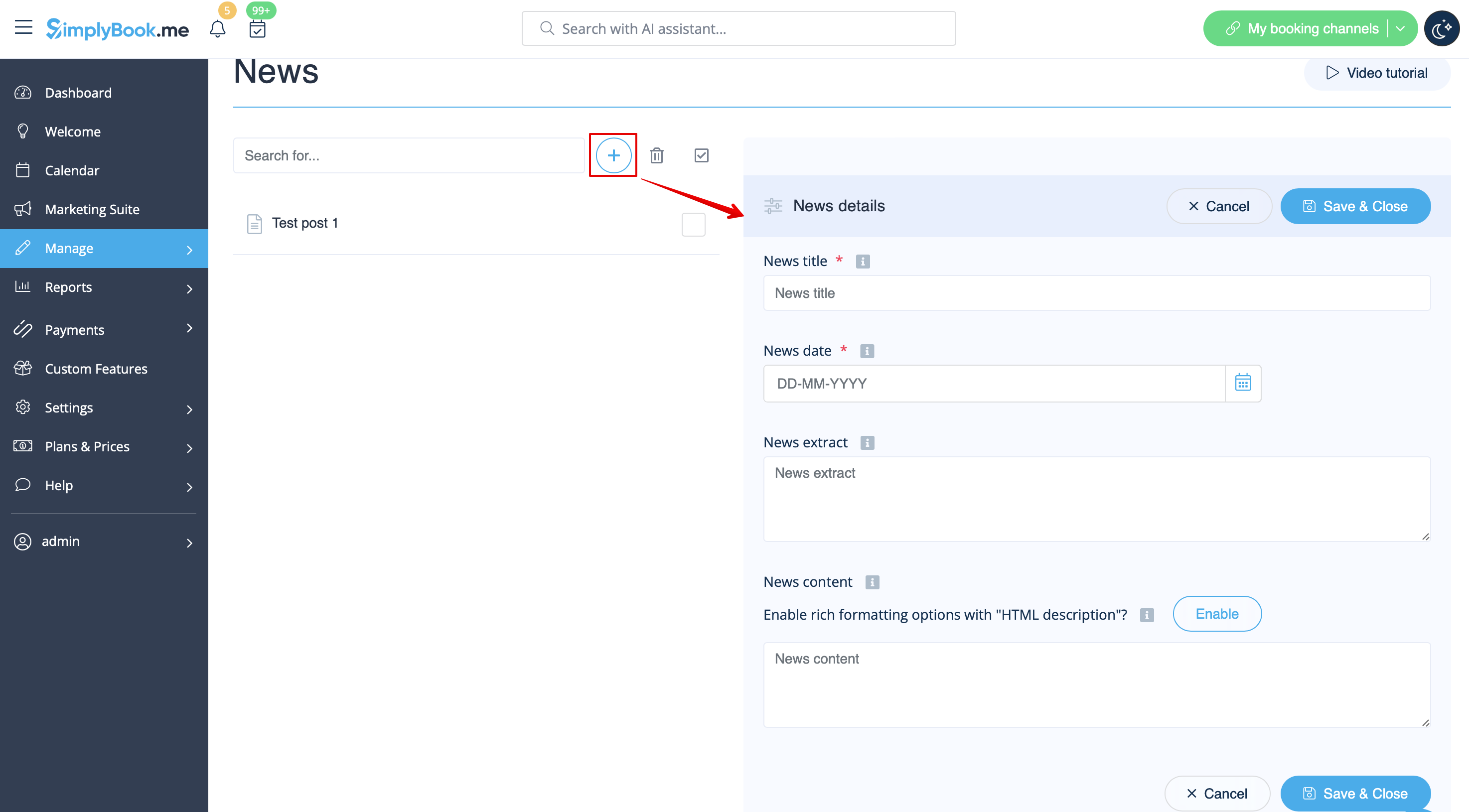
Når det er aktiveret i Brugerdefinerede funktioner -> Nyheder -> Indstillinger, kan du oprette nyhedsindlæg, og de vises i den separate fane på dit bookingwebsted.
.
Vilkår og betingelser
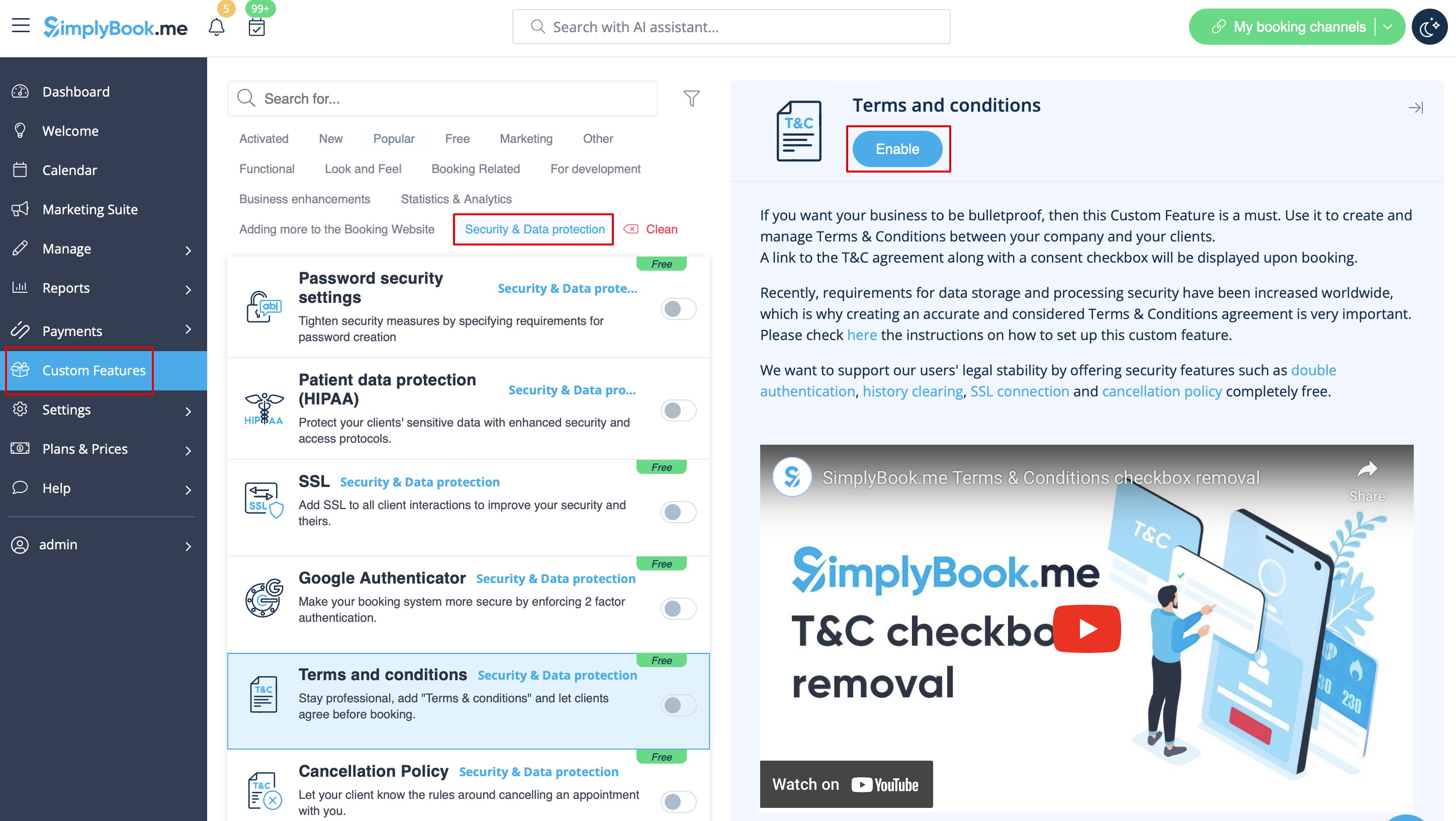
Skal din virksomhed være skudsikker? Du kan tilføje dine egne vilkår og betingelser ved at aktivere den tilsvarende brugerdefinerede funktion i Brugerdefinerede funktioner -> Sikkerhed og databeskyttelse og tilføje teksten til dine vilkår og betingelser i dens indstillinger.
T
Politik for afbestilling
Har du brug for at begrænse den periode, hvor bookinger kan annulleres af kunder? Gå til Brugerdefinerede funktioner -> Databeskyttelse -> Afbestillingspolitik -> Aktiver, og indstil den til dine behov.
Html-formatering til beskrivelsesfelter
Denne funktion gør det muligt at gøre beskrivelser mere iøjnefaldende ved hjælp af HTML-formatering.
Gå til Brugerdefinerede funktioner -> Look and Feel -> HTML-beskrivelsesfelter -> Aktivér og rediger beskrivelser for tjenester, udbydere, steder og kategorier i det tilsvarende Administrer-afsnit.
Html