Translations:Online Video Meetings via Zoom/10/nl: Difference between revisions

From SimplyBook.me
Created page with "<br><br> ;Hoe''integratie'' '''' verwijderen''Vanuit Simplybook.me'' *Ga naar de pagina <span style="background-color:#d4f8e5; padding:5px; border-radius:5px;">Aangepaste functies</span> in uw Simplybook.me-beheerdersinterface en klik op de aangepaste functie Online videovergaderingen om de instellingen ervan te openen.<br> *Zoek in de functie-instellingen Zoom en klik op <span style="background-color:#d4f8e5; padding:5px; border-radius:5px;">Afmelden.</span><br> *Daarna..."
 
(No difference)

Latest revision as of 08:07, 1 July 2025

Information about message (contribute)
This message has no documentation. If you know where or how this message is used, you can help other translators by adding documentation to this message.
Message definition (Online Video Meetings via Zoom)
<br><br>
;How to remove integration
''From the Simplybook.me side''
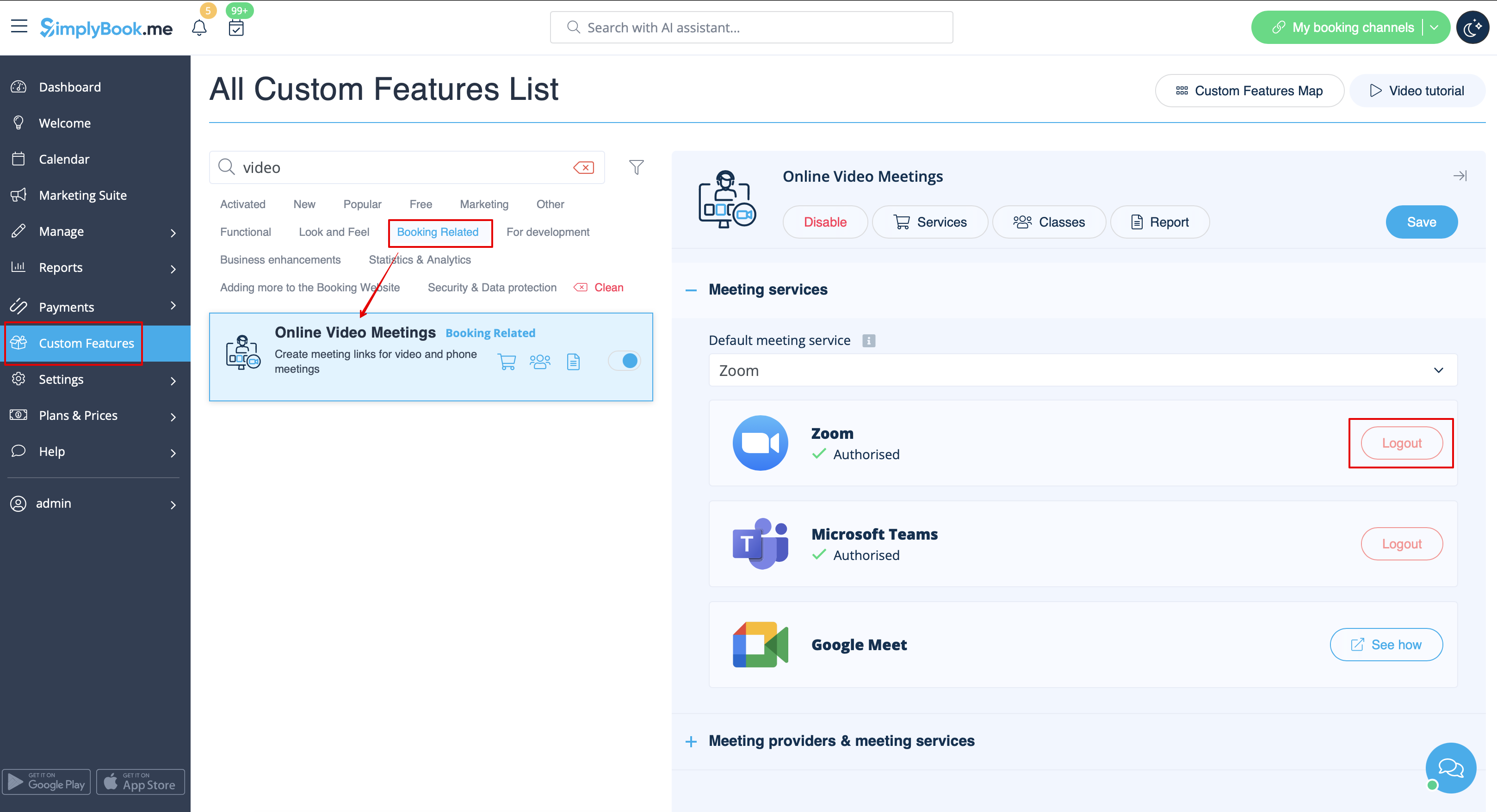
* Navigate to the <span style="background-color:#d4f8e5; padding:5px; border-radius:5px;">Custom Features</span> page within your Simplybook.me admin interface and click on Online video meetings custom feature to open its settings.<br>
* In the feature settings locate Zoom and click <span style="background-color:#d4f8e5; padding:5px; border-radius:5px;">Logout.</span><br>
* After that Zoom integration will be removed from your Simplybook.me account.
[[File:Zoom disconnect path redesigned.png|1200px|center|link=https://help.simplybook.me/images/5/5a/Zoom_disconnect_path_redesigned.png]]
<br><br>
''From the Zoom side''<br>
<span style="background-color:#ffe9e9; padding:5px; border-radius:5px;">'''Please note!'''  If you did not check the box “Allow this app to use my shared access permissions” OR you want to switch connected Zoom account to another one - there will be no option to do that from Simplybook.me side due to technical restrictions.</span><br> 
<span style="background-color:#ffe9e9; padding:5px; border-radius:5px;">In order to do that you will need to disconnect Simplybook.me directly from Zoom and after that you will be able to connect new account on the Simplybook.me side.</span>


Hoeintegratie

' verwijderenVanuit Simplybook.me

  • Ga naar de pagina Aangepaste functies in uw Simplybook.me-beheerdersinterface en klik op de aangepaste functie Online videovergaderingen om de instellingen ervan te openen.
  • Zoek in de functie-instellingen Zoom en klik op Afmelden.
  • Daarna wordt de Zoom-integratie verwijderd uit uw Simplybook.me-account.


Vanuit Zoom
Let op! Als u het vakje 'Deze app toestemming geven voor mijn gedeelde toegangsrechten' niet hebt aangevinkt OF als u het gekoppelde Zoom-account wilt wijzigen, is dit vanwege technische beperkingen niet mogelijk vanuit Simplybook.me.
Om dit te doen, moet u Simplybook.me rechtstreeks loskoppelen van Zoom. Daarna kunt u een nieuw account koppelen aan Simplybook.me.