From SimplyBook.me
Importing a new version from external source Tags: Mobile edit Mobile web edit |
Importing a new version from external source |
||
| Line 1: | Line 1: | ||
==[[ | ==[[Special:MyLanguage/Group Bookings custom feature|Group bookings]]== | ||
Has special templates for the following types: | Has special templates for the following types: | ||
* Booking confirmation notification to client(Email and SMS templates) | * Booking confirmation notification to client(Email and SMS templates) | ||
| Line 6: | Line 6: | ||
* Booking reminder notification to provider(Email and SMS templates) | * Booking reminder notification to provider(Email and SMS templates) | ||
They will be automatically applied when this custom feature is enabled and the client books an appointment selecting several participants on the service step of the booking process. | They will be automatically applied when this custom feature is enabled and the client books an appointment selecting several participants on the service step of the booking process. | ||
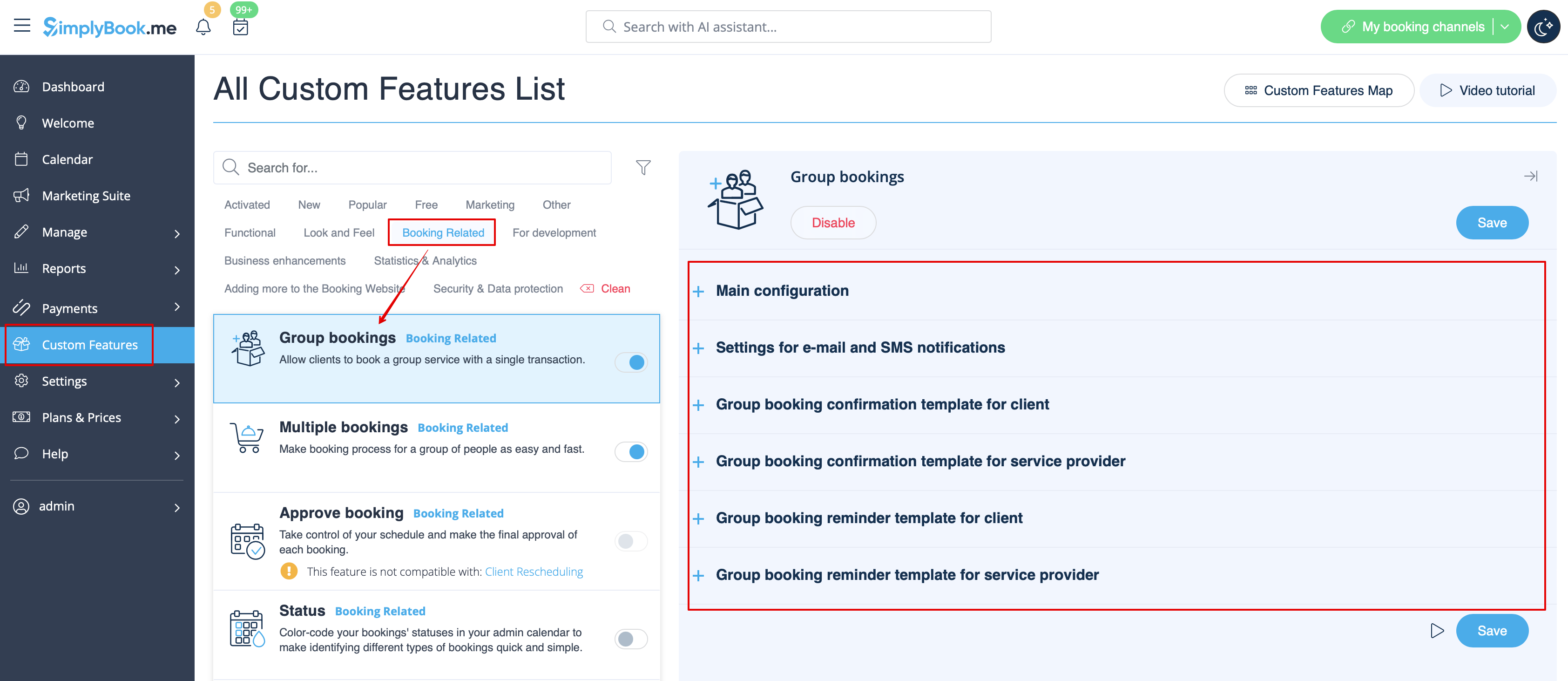
All the templates can be adjusted in <span style="background-color:#d4f8e5; padding:5px; border-radius:5px;">Custom features</span> -> [[ | All the templates can be adjusted in <span style="background-color:#d4f8e5; padding:5px; border-radius:5px;">Custom features</span> -> [[Special:MyLanguage/Group Bookings custom feature|Group bookings]] -> on the <span style="background-color:#d4f8e5; padding:5px; border-radius:5px;">right side</span> of the page. | ||
[[File:Group bookings notifications path.png|1200px|border|center|link=https://help.simplybook.me/images/6/66/Group_bookings_notifications_path.png]] | [[File:Group bookings notifications path.png|1200px|border|center|link=https://help.simplybook.me/images/6/66/Group_bookings_notifications_path.png]] | ||
<br><br> | <br><br> | ||
:''[[ | :''[[Special:MyLanguage/Group Bookings custom feature|Read more]] about his custom feature use.'' | ||
-------- | -------- | ||
Latest revision as of 13:08, 13 August 2025
Group bookings
Has special templates for the following types:
- Booking confirmation notification to client(Email and SMS templates)
- Booking reminder notification to client(Email and SMS templates)
- Booking confirmation notification to provider(Email and SMS templates)
- Booking reminder notification to provider(Email and SMS templates)
They will be automatically applied when this custom feature is enabled and the client books an appointment selecting several participants on the service step of the booking process. All the templates can be adjusted in Custom features -> Group bookings -> on the right side of the page.
- Read more about his custom feature use.
