No edit summary |
|||
| (4 intermediate revisions by the same user not shown) | |||
| Line 1: | Line 1: | ||
<languages/> | |||
<translate> | |||
<!--T:1--> | |||
{{#seo: | {{#seo: | ||
|title=Setting up providers in SimplyBook.me Appointment scheduler | |title=Setting up providers in SimplyBook.me Appointment scheduler | ||
|description=Add team members and assign roles securely. Manage user access to fit your needs. Click here for the full guide! | |||
|titlemode=append | |titlemode=append | ||
|keywords=faq, frequently asked questions, booking software, appointment system questions, appointments online, calendar software, booking system, system users, system users | |keywords=faq, frequently asked questions, booking software, appointment system questions, appointments online, calendar software, booking system, system users, system users | ||
}} | }} | ||
</translate> | |||
<translate> | |||
<!--T:2--> | |||
__FORCETOC__ | __FORCETOC__ | ||
<br><br> | <br><br> | ||
==How to create new system user== | ==How to create new system user== | ||
<!--T:3--> | |||
You can create a separate user for the person who needs to access your admin page in <span style="background-color:#d4f8e5; padding:5px; border-radius:5px;">Manage</span> -> <span style="background-color:#d4f8e5; padding:5px; border-radius:5px;">Users</span> page and assign the corresponding rights to that user. <br> | You can create a separate user for the person who needs to access your admin page in <span style="background-color:#d4f8e5; padding:5px; border-radius:5px;">Manage</span> -> <span style="background-color:#d4f8e5; padding:5px; border-radius:5px;">Users</span> page and assign the corresponding rights to that user. <br> | ||
See the list of available user roles below. | See the list of available user roles below. | ||
| Line 25: | Line 33: | ||
Or you can manually send login and password to your users along with the link to your admin page after saving the user. | Or you can manually send login and password to your users along with the link to your admin page after saving the user. | ||
==User Roles== | </translate> | ||
<translate> | |||
==User Roles== <!--T:4--> | |||
<!--T:5--> | |||
<br><br> | <br><br> | ||
;'''Admin''' | ;'''Admin''' | ||
If you created the system for your company at SimplyBook.me then you have <span style="background-color:#d4f8e5; padding:5px; border-radius:5px;">admin</span> rights by default. This means the highest access level among all users and you can create other administrators with the same access level. | If you created the system for your company at SimplyBook.me then you have <span style="background-color:#d4f8e5; padding:5px; border-radius:5px;">admin</span> rights by default. This means the highest access level among all users and you can create other administrators with the same access level. | ||
<!--T:6--> | |||
<span style="background-color:#ffe9e9; padding:5px; border-radius:5px;">'''Please note!''' To protect your system from mistakes, we do not allow to delete the default administrator so if he/she should no longer have admin rights, you need to change his/her email and password to limit the access. The second and further admins can be removed.</span> | <span style="background-color:#ffe9e9; padding:5px; border-radius:5px;">'''Please note!''' To protect your system from mistakes, we do not allow to delete the default administrator so if he/she should no longer have admin rights, you need to change his/her email and password to limit the access. The second and further admins can be removed.</span> | ||
<br><br> | <br><br> | ||
| Line 38: | Line 50: | ||
The <span style="background-color:#d4f8e5; padding:5px; border-radius:5px;">Senior employee</span> level allows the users to see the workload of others but they can only make changes to settings that relate to providers. These users do not have access to company configuration settings. Senior employee users are not tied to specific service provider/s. They have full access to all service providers added to the system, allowing them to view, add, edit, change schedules, and delete providers. | The <span style="background-color:#d4f8e5; padding:5px; border-radius:5px;">Senior employee</span> level allows the users to see the workload of others but they can only make changes to settings that relate to providers. These users do not have access to company configuration settings. Senior employee users are not tied to specific service provider/s. They have full access to all service providers added to the system, allowing them to view, add, edit, change schedules, and delete providers. | ||
<br><br> | <br><br> | ||
</translate> | |||
<translate> | |||
<!--T:7--> | |||
This is a list of functions they cannot access: | This is a list of functions they cannot access: | ||
*Dashboard | *Dashboard | ||
| Line 53: | Line 68: | ||
''(for more details see table below)'' | ''(for more details see table below)'' | ||
<br><br> | <br><br> | ||
</translate> | |||
<translate> | |||
<!--T:8--> | |||
;'''Junior Employee''' | ;'''Junior Employee''' | ||
In cases, company has many employees with roles primarily focused on their own tasks, the Junior employee user can be created. This user level grants employees the ability to view their own workload and make modifications to their own schedule and bookings. When creating a Junior employee, the option to select the associated service provider/s is available. Notably, it is possible to connect more than 1 service provider to a Junior employee user, enhancing flexibility and control across various setup scenarios. | In cases, company has many employees with roles primarily focused on their own tasks, the Junior employee user can be created. This user level grants employees the ability to view their own workload and make modifications to their own schedule and bookings. When creating a Junior employee, the option to select the associated service provider/s is available. Notably, it is possible to connect more than 1 service provider to a Junior employee user, enhancing flexibility and control across various setup scenarios. | ||
| Line 64: | Line 82: | ||
<nowiki>*</nowiki>''On the enterprise level it is possible to hide client contact details from Junior Employees, as well as prohibit editing and cancelling bookings, statuses updates.'' | <nowiki>*</nowiki>''On the enterprise level it is possible to hide client contact details from Junior Employees, as well as prohibit editing and cancelling bookings, statuses updates.'' | ||
<br><br> | <br><br> | ||
</translate> | |||
<translate> | |||
<!--T:9--> | |||
<span style="background-color:#ffe9e9; padding:5px; border-radius:5px;">'''Please note!''' If a <span style="background-color:#d4f8e5; padding:5px; border-radius:5px;">Junior employee</span> user is not assigned to any service provider then his level of access will be automatically downgraded to <span style="background-color:#d4f8e5; padding:5px; border-radius:5px;">Viewer</span> level.</span> | <span style="background-color:#ffe9e9; padding:5px; border-radius:5px;">'''Please note!''' If a <span style="background-color:#d4f8e5; padding:5px; border-radius:5px;">Junior employee</span> user is not assigned to any service provider then his level of access will be automatically downgraded to <span style="background-color:#d4f8e5; padding:5px; border-radius:5px;">Viewer</span> level.</span> | ||
<br><br> | <br><br> | ||
</translate> | |||
<translate> | |||
<!--T:10--> | |||
;'''Viewer''' | ;'''Viewer''' | ||
In some cases you may want to allow someone to see what is going on with company bookings but not be able to make any changes. This user should be set as <span style="background-color:#d4f8e5; padding:5px; border-radius:5px;">Viewer.</span> <span style="background-color:#d4f8e5; padding:5px; border-radius:5px;">Viewers</span> can not change anything, and they can not add any bookings.<br> | In some cases you may want to allow someone to see what is going on with company bookings but not be able to make any changes. This user should be set as <span style="background-color:#d4f8e5; padding:5px; border-radius:5px;">Viewer.</span> <span style="background-color:#d4f8e5; padding:5px; border-radius:5px;">Viewers</span> can not change anything, and they can not add any bookings.<br> | ||
| Line 74: | Line 98: | ||
<nowiki>*</nowiki>''On the enterprise level it is possible to hide client contact details from Viewers.'' | <nowiki>*</nowiki>''On the enterprise level it is possible to hide client contact details from Viewers.'' | ||
<br><br> | <br><br> | ||
</translate> | |||
<translate> | |||
<!--T:11--> | |||
;'''Operator POS''' | ;'''Operator POS''' | ||
This level was created mainly for managing <span style="background-color:#cdeffc; padding:5px; border-radius:5px;">[[Point_of_Sale_custom_feature|POS interface]]</span> and sell services, <span style="background-color:#cdeffc; padding:5px; border-radius:5px;">[[Classes_custom_feature|classes]],</span> <span style="background-color:#cdeffc; padding:5px; border-radius:5px;">[[Packages_custom_feature|packages]],</span> <span style="background-color:#cdeffc; padding:5px; border-radius:5px;">[[Membership_custom_feature|memberships]],</span> <span style="background-color:#cdeffc; padding:5px; border-radius:5px;">[[Products_for_Sale_custom_feature|products]]</span> and <span style="background-color:#cdeffc; padding:5px; border-radius:5px;">[[Service_Add-Ons_custom_feature|add-ons]],</span><br> | This level was created mainly for managing <span style="background-color:#cdeffc; padding:5px; border-radius:5px;">[[Point_of_Sale_custom_feature|POS interface]]</span> and sell services, <span style="background-color:#cdeffc; padding:5px; border-radius:5px;">[[Classes_custom_feature|classes]],</span> <span style="background-color:#cdeffc; padding:5px; border-radius:5px;">[[Packages_custom_feature|packages]],</span> <span style="background-color:#cdeffc; padding:5px; border-radius:5px;">[[Membership_custom_feature|memberships]],</span> <span style="background-color:#cdeffc; padding:5px; border-radius:5px;">[[Products_for_Sale_custom_feature|products]]</span> and <span style="background-color:#cdeffc; padding:5px; border-radius:5px;">[[Service_Add-Ons_custom_feature|add-ons]],</span><br> | ||
but also has access to Calendar, Clients, some reports and view only access to <span style="background-color:#cdeffc; padding:5px; border-radius:5px;">[[Membership_custom_feature|Memberships]],</span> <span style="background-color:#cdeffc; padding:5px; border-radius:5px;">[[Coupons_and_Gift_Cards_custom_feature|Coupons&Gift Cards]],</span> Services/<span style="background-color:#cdeffc; padding:5px; border-radius:5px;">[[Classes_custom_feature|Classes]]</span> and Providers. | but also has access to Calendar, Clients, some reports and view only access to <span style="background-color:#cdeffc; padding:5px; border-radius:5px;">[[Membership_custom_feature|Memberships]],</span> <span style="background-color:#cdeffc; padding:5px; border-radius:5px;">[[Coupons_and_Gift_Cards_custom_feature|Coupons&Gift Cards]],</span> Services/<span style="background-color:#cdeffc; padding:5px; border-radius:5px;">[[Classes_custom_feature|Classes]]</span> and Providers. | ||
<br><br> | <br><br> | ||
</translate> | |||
<translate> | |||
<!--T:12--> | |||
;'''Doorman''' | ;'''Doorman''' | ||
Only has the ability to validate <span style="background-color:#cdeffc; padding:5px; border-radius:5px;">[[Tickets_custom_feature|Tickets]].</span> | Only has the ability to validate <span style="background-color:#cdeffc; padding:5px; border-radius:5px;">[[Tickets_custom_feature|Tickets]].</span> | ||
| Line 86: | Line 116: | ||
<!--T:13--> | |||
<br><br> | <br><br> | ||
</translate> | |||
<translate> | |||
<!--T:14--> | |||
{| style="width:100%; border: 2px solid black; background-color: rgb(255,255,255); border-collapse: collapse;" | {| style="width:100%; border: 2px solid black; background-color: rgb(255,255,255); border-collapse: collapse;" | ||
|- style="background-color: rgb(6,173,239);" | |- style="background-color: rgb(6,173,239);" | ||
| Line 95: | Line 129: | ||
! style="text-align: center; font-weight: bold; border-bottom: 2px solid black; text-transform: uppercase; color: white;" | Junior Employee | ! style="text-align: center; font-weight: bold; border-bottom: 2px solid black; text-transform: uppercase; color: white;" | Junior Employee | ||
! style="text-align: center; font-weight: bold; border-bottom: 2px solid black; text-transform: uppercase; color: white;" | Viewer | ! style="text-align: center; font-weight: bold; border-bottom: 2px solid black; text-transform: uppercase; color: white;" | Viewer | ||
</translate> | |||
<translate> | |||
<!--T:15--> | |||
|- | |- | ||
| colspan="5" style="border-bottom: 1px solid black; border-top: 1px solid black; background-color: rgb(232, 248, 255); font-weight: bold; padding: 10px; padding-left:30px;" | Dashboard | | colspan="5" style="border-bottom: 1px solid black; border-top: 1px solid black; background-color: rgb(232, 248, 255); font-weight: bold; padding: 10px; padding-left:30px;" | Dashboard | ||
| Line 163: | Line 200: | ||
|- | |- | ||
| style="width: 20%;" | | | style="width: 20%;" | | ||
| style="border-bottom: 1px solid black;" | Edit client info from the booking | | style="border-bottom: 1px solid black;" | Edit client info from the booking/Add clients | ||
| style="border-bottom: 1px solid black; text-align: center; height: 60px;" | ✔ <br> | | style="border-bottom: 1px solid black; text-align: center; height: 60px;" | ✔ <br> | ||
| style="border-bottom: 1px solid black; text-align: center; " | ✔<br>in own bookings | | style="border-bottom: 1px solid black; text-align: center; " | ✔<br>in own bookings | ||
| Line 211: | Line 248: | ||
| style="border-bottom: 1px solid black;" | View/Add/Edit/[[Custom_Features#Client_Login|Merge]]*/Delete clients | | style="border-bottom: 1px solid black;" | View/Add/Edit/[[Custom_Features#Client_Login|Merge]]*/Delete clients | ||
| style="border-bottom: 1px solid black; text-align: center; height: 60px;" | ✔ <br> | | style="border-bottom: 1px solid black; text-align: center; height: 60px;" | ✔ <br> | ||
| style="border-bottom: 1px solid black; text-align: center; " | − <br> | | style="border-bottom: 1px solid black; text-align: center; " | − <br>(see Calendar) <br> | ||
| style="border-bottom: 1px solid black; text-align: center;" | − <br> | | style="border-bottom: 1px solid black; text-align: center;" | − <br> | ||
|- | |- | ||
| Line 234: | Line 271: | ||
| style="width: 20%;" | | | style="width: 20%;" | | ||
| style="border-bottom: 1px solid black;" | View/Add/Edit/Delete [[Custom_Features#Service_Add-ons |service add-ons]]* <br> View/Add/Edit/Delete [[Custom_Features#Products_for_Sale |products for sale]]*<br>View/Add/Edit/Delete [[Related_Resources_custom_feature|related resources]]* | | style="border-bottom: 1px solid black;" | View/Add/Edit/Delete [[Custom_Features#Service_Add-ons |service add-ons]]* <br> View/Add/Edit/Delete [[Custom_Features#Products_for_Sale |products for sale]]*<br>View/Add/Edit/Delete [[Related_Resources_custom_feature|related resources]]* | ||
</translate> | |||
<translate> | |||
<!--T:16--> | |||
| style="border-bottom: 1px solid black; text-align: center; height: 60px;" | ✔ <br> | | style="border-bottom: 1px solid black; text-align: center; height: 60px;" | ✔ <br> | ||
| style="border-bottom: 1px solid black; text-align: center; " | − <br> | | style="border-bottom: 1px solid black; text-align: center; " | − <br> | ||
| Line 302: | Line 342: | ||
| style="width: 20%;" | | | style="width: 20%;" | | ||
| style="border-bottom: 1px solid black;" | View/Accept/Delete [[Custom_Features#Accept_Payments |payment transactions]]* <br> View/Approve/Decline [[Approve_Bookings_custom_feature|pending]]* bookings | | style="border-bottom: 1px solid black;" | View/Accept/Delete [[Custom_Features#Accept_Payments |payment transactions]]* <br> View/Approve/Decline [[Approve_Bookings_custom_feature|pending]]* bookings | ||
</translate> | |||
<translate> | |||
<!--T:17--> | |||
| style="border-bottom: 1px solid black; text-align: center; height: 60px;" | ✔ <br> | | style="border-bottom: 1px solid black; text-align: center; height: 60px;" | ✔ <br> | ||
| style="border-bottom: 1px solid black; text-align: center; " | − <br> | | style="border-bottom: 1px solid black; text-align: center; " | − <br> | ||
| Line 379: | Line 422: | ||
|- | |- | ||
| colspan="5" style="border-bottom: 1px solid black; border-top: 1px solid black; background-color: rgb(232, 248, 255); font-weight: bold; padding: 10px; padding-left:30px;" | Custom Features | | colspan="5" style="border-bottom: 1px solid black; border-top: 1px solid black; background-color: rgb(232, 248, 255); font-weight: bold; padding: 10px; padding-left:30px;" | Custom Features | ||
</translate> | |||
<translate> | |||
<!--T:18--> | |||
|- | |- | ||
| style="width: 20%;" | | | style="width: 20%;" | | ||
| Line 448: | Line 494: | ||
| style="width: 20%;" | | | style="width: 20%;" | | ||
| style="border-bottom: 1px solid black;" | Edit[[Custom_Features#Coupons_.26_Gift_Cards | Coupons and Gift Cards]]* notifications settings | | style="border-bottom: 1px solid black;" | Edit[[Custom_Features#Coupons_.26_Gift_Cards | Coupons and Gift Cards]]* notifications settings | ||
</translate> | |||
<translate> | |||
<!--T:19--> | |||
| style="border-bottom: 1px solid black; text-align: center; height: 60px;" | − <br> | | style="border-bottom: 1px solid black; text-align: center; height: 60px;" | − <br> | ||
| style="border-bottom: 1px solid black; text-align: center; " | − <br> | | style="border-bottom: 1px solid black; text-align: center; " | − <br> | ||
| Line 554: | Line 603: | ||
:<nowiki>*</nowiki> - ''corresponding custom feature should be already enabled by admin.'' | :<nowiki>*</nowiki> - ''corresponding custom feature should be already enabled by admin.'' | ||
<br><br> | <br><br> | ||
</translate> | |||
Latest revision as of 08:57, 3 September 2025
How to create new system user
You can create a separate user for the person who needs to access your admin page in Manage -> Users page and assign the corresponding rights to that user.
See the list of available user roles below.
- To create new user please click on + button at the top:
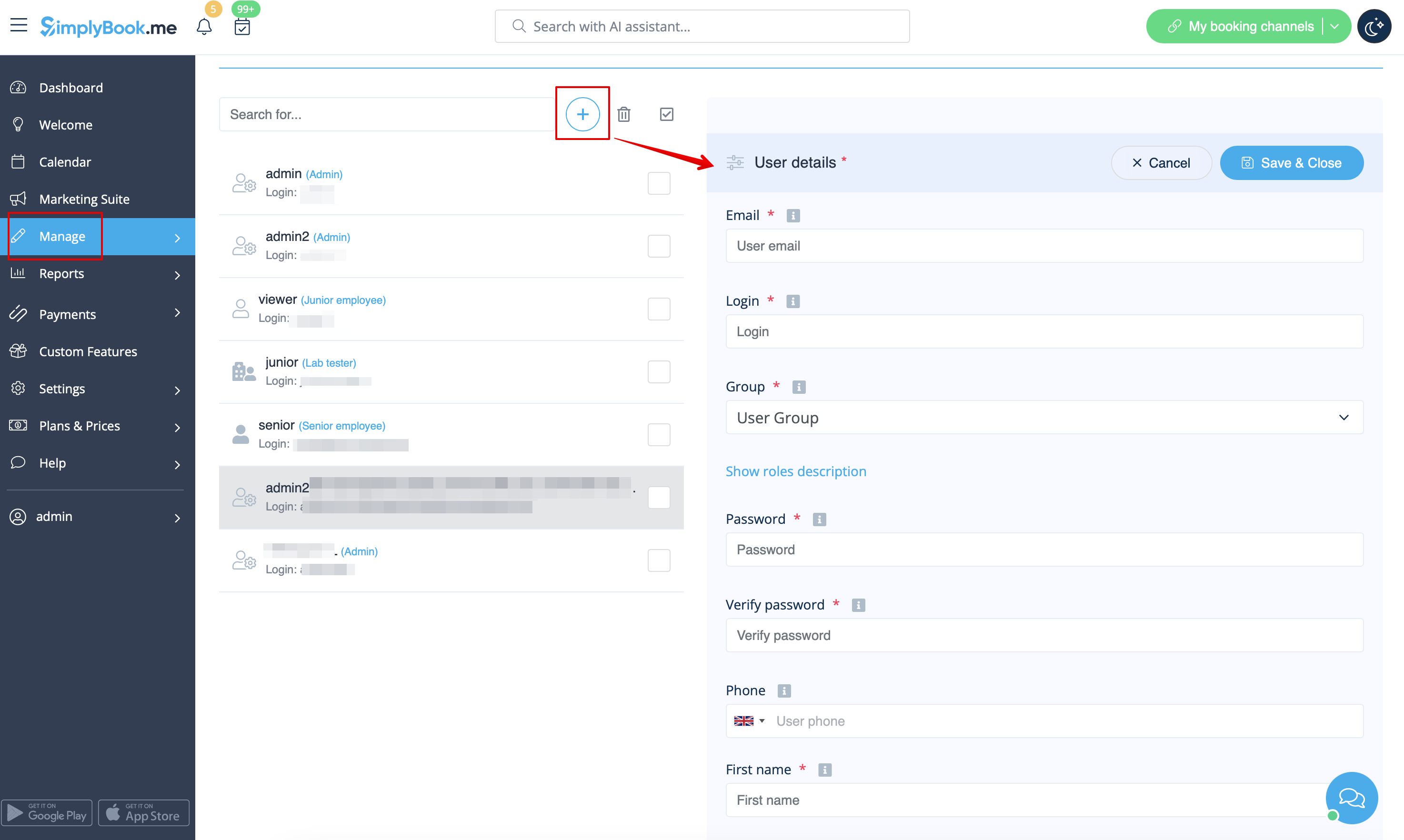
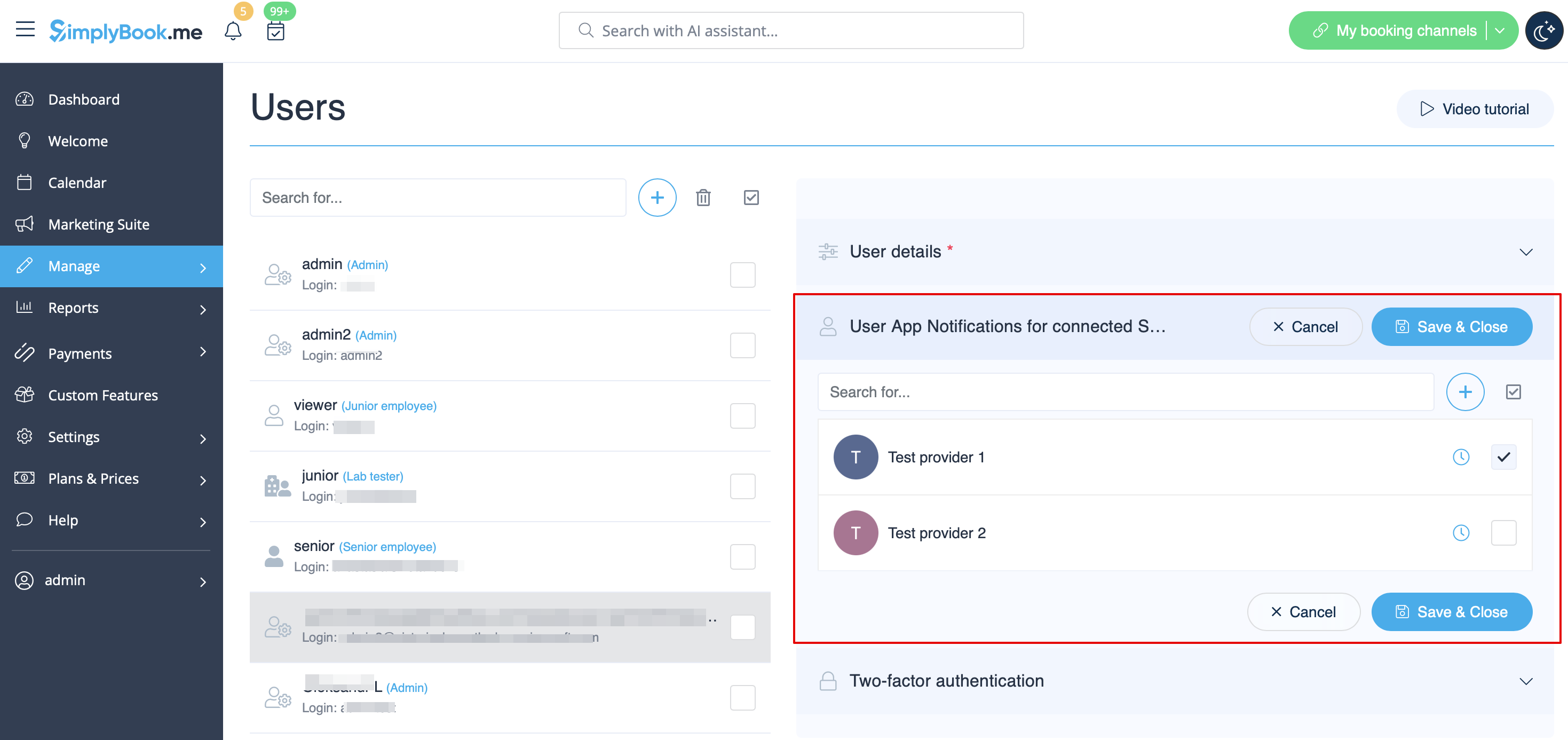
- Fill in login, email address, select user level group, set first password, relate with a provider if necessary, add first and last names, phone number.
- Please note! Login is unique for every user. If you delete some user it will not be possible to reuse the same login for another user.
After this, just enable the switch Send login information to user and save the user record.
The system will automatically send the email with the login credentials according to the template you have set in Settings -> Email and SMS Settings -> New user login notification.
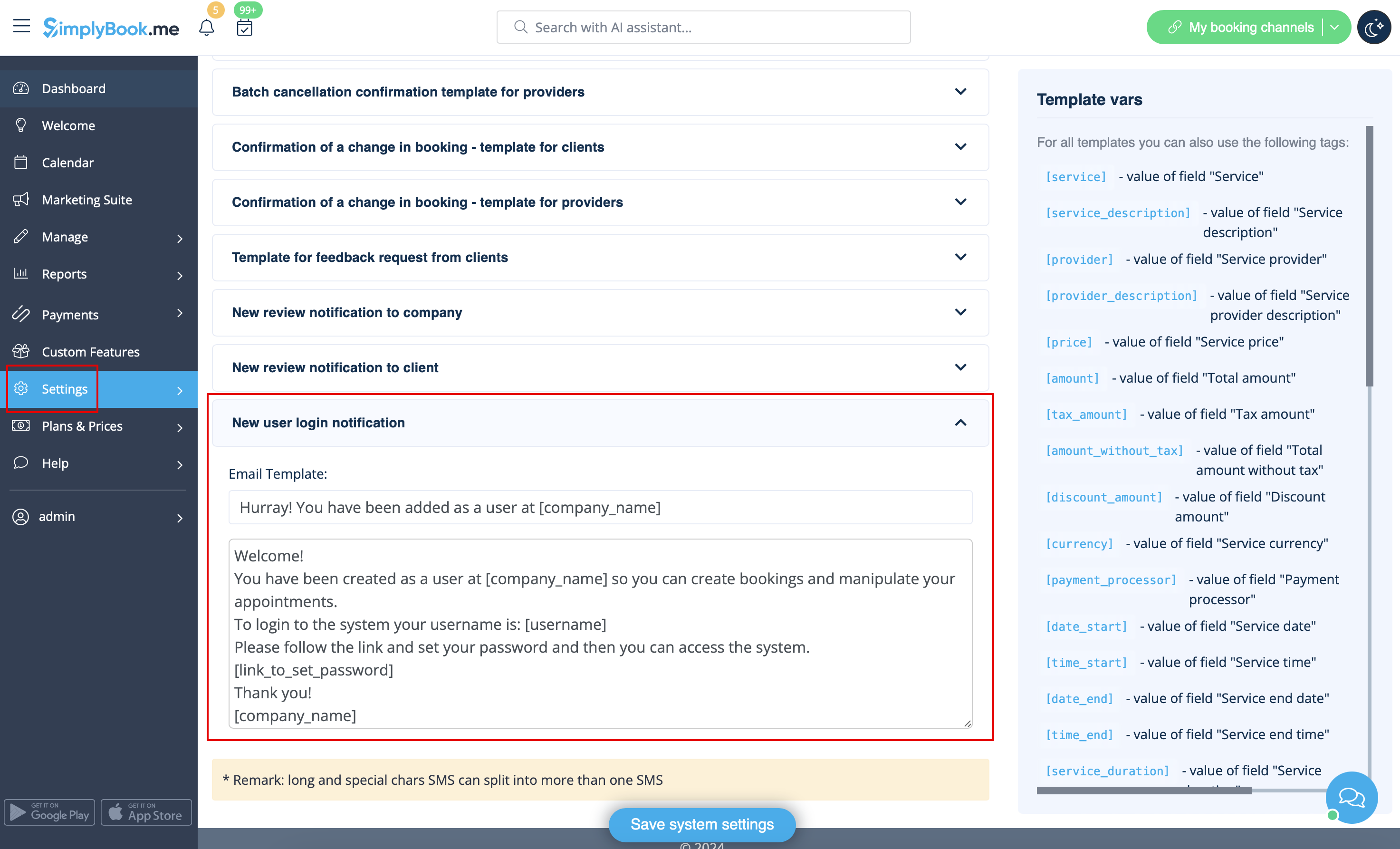
Or you can manually send login and password to your users along with the link to your admin page after saving the user.
User Roles
- Admin
If you created the system for your company at SimplyBook.me then you have admin rights by default. This means the highest access level among all users and you can create other administrators with the same access level.
Please note! To protect your system from mistakes, we do not allow to delete the default administrator so if he/she should no longer have admin rights, you need to change his/her email and password to limit the access. The second and further admins can be removed.
You can relate each user to one or several providers(employees) to allow them to view and/or manage bookings, schedules, etc. depending on their level of access.
- Senior Employee
The Senior employee level allows the users to see the workload of others but they can only make changes to settings that relate to providers. These users do not have access to company configuration settings. Senior employee users are not tied to specific service provider/s. They have full access to all service providers added to the system, allowing them to view, add, edit, change schedules, and delete providers.
This is a list of functions they cannot access:
- Dashboard
- User managing
- Tariffs and payments
- Insights
- Settings
- Company worktime management
- Company basic information and address
- Homepage content management
- Design settings
- Custom CSS
- Marketplace settings
- Widgets generation
(for more details see table below)
- Junior Employee
In cases, company has many employees with roles primarily focused on their own tasks, the Junior employee user can be created. This user level grants employees the ability to view their own workload and make modifications to their own schedule and bookings. When creating a Junior employee, the option to select the associated service provider/s is available. Notably, it is possible to connect more than 1 service provider to a Junior employee user, enhancing flexibility and control across various setup scenarios.
The functionality of selecting multiple service providers for Junior employee is particularly advantageous in situations where a team member requires access to specific providers' schedules or several providers connected to multiple locations.
Junior employee has access to the following functions:
- Calendar (can manage only own bookings and notes)
- Worktime (can change only own schedules)
- Service providers (can see only associated service provider/s)
(for more details see table below)
*On the enterprise level it is possible to hide client contact details from Junior Employees, as well as prohibit editing and cancelling bookings, statuses updates.
Please note! If a Junior employee user is not assigned to any service provider then his level of access will be automatically downgraded to Viewer level.
- Viewer
In some cases you may want to allow someone to see what is going on with company bookings but not be able to make any changes. This user should be set as Viewer. Viewers can not change anything, and they can not add any bookings.
The following functions are available for this access group:
- Calendar (view only)
- Services (view only)
(for more details see table below)
*On the enterprise level it is possible to hide client contact details from Viewers.
- Operator POS
This level was created mainly for managing POS interface and sell services, classes, packages, memberships, products and add-ons,
but also has access to Calendar, Clients, some reports and view only access to Memberships, Coupons&Gift Cards, Services/Classes and Providers.
- Doorman
Only has the ability to validate Tickets.
- Lab tester
This access level was created mainly for work with Medical Test custom feature and validate tickets, print test tube labels, update test result statuses and print results.
| Options list | Senior Employee | Junior Employee | Viewer | |
|---|---|---|---|---|
| Dashboard | ||||
| View charts / Enable custom features | − |
− |
− | |
| Welcome | ||||
| View page / Change own password / Connect Google Authenticator* | ✔ |
✔ |
✔ | |
| Change own email address | − |
− |
− | |
| Create booking from dashboard | ✔ |
✔ |
− | |
| Get personal data report link | ✔ |
✔ |
✔ | |
| Calendar | ||||
| Different view options | ✔ |
✔ |
✔ | |
| Export to Excel/PDF | ✔ |
− |
− | |
| View & Manage bookings View & Manage calendar notes |
✔ |
own only |
view only | |
| Access Transactions* Access Pending bookings* |
✔ |
− |
− | |
| Edit booking comments | ✔ |
✔ in own bookings |
− | |
| Edit client info from the booking/Add clients | ✔ |
✔ in own bookings |
view only | |
| Add/Edit SOAPnotes* | with correct key |
with correct key own only |
with correct key view only | |
| Update booking statuses* | ✔ |
own only |
− | |
| Edit Intake forms* in the bookings Edit products for sale* in the bookings Edit service add-ons* in the bookings |
✔ |
own only |
view only | |
| Marketing Suite | ||||
| View page & Enable custom features | − |
− |
− | |
| Manage | ||||
| View/Add/Edit/Change schedule/Delete services | ✔ |
− |
− | |
| View/Add/Edit/Change schedule/Delete providers | ✔ |
own and existing only |
− | |
| View/Add/Edit/Merge*/Delete clients | ✔ |
− (see Calendar) |
− | |
| View/Add/Edit/Delete users | − |
− |
− | |
| View/Add/Edit/Change schedule/Delete classes* | ✔ |
− |
− | |
| View/Add/Edit/Delete packages* View/Add/Edit/Delete memberships* View/Add/Edit/Delete coupons and gift cards* |
✔ |
− |
− | |
| View/Add/Edit/Delete service add-ons* View/Add/Edit/Delete products for sale* View/Add/Edit/Delete related resources* |
✔ |
− |
− | |
| View/Add/Edit/Delete intake forms* View/Add/Edit/Delete client fields* |
✔ |
− |
− | |
| View/Add/Edit/Delete news* View/Add/Edit/Delete custom pages* |
− |
− |
− | |
| View/Add/Edit/Delete statuses* | ✔ |
− |
− | |
| View/Add/Edit/Delete flexible notifications* View/Add/Edit/Delete book soon reminders* |
✔ |
− |
− | |
| View/Add/Edit/Delete calendar notes types | ✔ |
view only |
view only | |
| View/Update calendar sync* | ✔ |
own only |
− | |
| Connect own tool for online video meetings* | ✔ |
✔ |
− | |
| View/Add/Edit/Delete taxes* | − |
− |
− | |
| Reports | ||||
| View sales* report | − |
− |
− | |
| View/Export/Send email/Mass cancel in booking details report | ✔ |
− |
− | |
| View/Accept/Delete payment transactions* View/Approve/Decline pending* bookings |
✔ |
− |
− | |
| View sales & tax report* | ✔ |
− |
− | |
| View/Export online video meetings* report | ✔ |
− |
− | |
| View/Export/Send email from client report | ✔ |
− |
− | |
| View/Export classes* bookings | ✔ |
− |
− | |
| View/Export membership payments* View/Export issued packages* View/Export issued coupons* |
✔ |
− |
− | |
| View/Export/Print tickets* report | ✔ |
− |
− | |
| View calendar notes report | ✔ |
view only |
view only | |
| View/Export SMS report View/Export/Reply to contact messages* |
✔ |
− |
− | |
| View/Export/Delete reviews & add/edit answers | ✔ |
− |
− | |
| View/Export client app* reports | ✔ |
− |
− | |
| View vaccination* report | ✔ |
− |
− | |
| View personal data reports | own only |
own only |
own only | |
| Custom Features | ||||
| View page/Enable/Disable custom features | − |
− |
− | |
| Edit Accept payments* settings | − |
− |
− | |
| Change Intake forms* export settings | − |
− |
− | |
| Set color for provider with Provider color coding* | ✔ |
− |
− | |
| Set bookings limits for services* | ✔ |
− |
− | |
| View/Add/Edit/Delete service categories* | ✔ |
− |
− | |
| View/Add/Edit/Delete locations* | ✔ |
view the list only | − | |
| Edit Daily report* settings Edit Google Adwords&Analytics* settings |
− |
− |
− | |
| Add/delete images in Photo gallery* Connect account in Instagram gallery* |
− |
− |
− | |
| Edit SMTP* settings Edit SMS Gateway* settings |
− |
− |
− | |
| Edit Terms and Conditions* Edit Cancellation policy* settings |
− |
− |
− | |
| Edit Coupons and Gift Cards* notifications settings | − |
− |
− | |
| Edit Appointment at fixed time* settings | ✔ |
− |
− | |
| Edit Custom Domain* settings | − |
− |
− | |
| Edit API* settings | − |
− |
− | |
| Edit Multiple bookings* settings Edit Group bookings* settings |
− |
− |
− | |
| Edit Clean history* settings | − |
− |
− | |
| Edit Client login* settings Edit Strict password* settings* |
− |
− |
− | |
| Edit Any employee settings* | − | − |
− | |
| Edit Google translate settings* | − |
− |
− | |
| Edit HIPAA* settings Edit Google authenticator* settings |
− |
− |
− | |
| Settings | ||||
| Company information Directory listing Delete account |
− |
− |
− | |
| Company opening hours | − |
− |
− | |
| Providers schedule | ✔ |
own only |
− | |
| Services schedule Classes* schedule |
✔ |
− |
− | |
| Design settings Booking widgets settings Custom CSS* |
− |
− |
− | |
| Main configuration Email & SMS settings Custom wording & translations |
− |
− |
− | |
| Plans&Prices | ||||
| View & Buy subscriptions View & Buy additional items See payment history |
− |
− |
− | |
- * - corresponding custom feature should be already enabled by admin.
