No edit summary |
|||
| (5 intermediate revisions by the same user not shown) | |||
| Line 1: | Line 1: | ||
<languages/> | |||
<translate> | |||
<!--T:1--> | |||
{{#seo: | {{#seo: | ||
|title=Widgets for your own website - SimplyBook.me | |title=Widgets for your own website - SimplyBook.me | ||
|description=Add SimplyBook.me widgets to your website for direct client bookings. Customize them to fit your brand. Learn more here! | |||
|titlemode=append | |titlemode=append | ||
|keywords=faq, frequently asked questions, booking software, appointment system questions, appointments online, calendar software, booking system, booking calendar, scheduling software, online appointment scheduling, online scheduling, widget, widgets, integration, website integration, website widgets, widgets for website | |keywords=faq, frequently asked questions, booking software, appointment system questions, appointments online, calendar software, booking system, booking calendar, scheduling software, online appointment scheduling, online scheduling, widget, widgets, integration, website integration, website widgets, widgets for website | ||
}} | }}</translate> | ||
<translate> | |||
:Why you should use our Widgets | <!--T:2--> | ||
:Why you should use our Widgets <p><youtube>ngAxW1uTOk4</youtube></p> | |||
<br><br> | <br><br> | ||
:Video tutorial available | :Video tutorial available <p><youtube>8mi4MCmE_qg</youtube></p> | ||
<br><br> | <br><br> | ||
<!--T:3--> | |||
__FORCETOC__ | __FORCETOC__ | ||
</translate> | |||
<translate> | |||
<!--T:4--> | |||
=iFrame Widget= | =iFrame Widget= | ||
<br><br> | <br><br> | ||
| Line 25: | Line 34: | ||
<span style="background-color:#ffe9e9; padding:5px; border-radius:5px;">'''Please note!''' Different website builders/platforms may have various ways to add HTML code, you should check first whether your website supports inserting HTML JavaScript code.</span> | <span style="background-color:#ffe9e9; padding:5px; border-radius:5px;">'''Please note!''' Different website builders/platforms may have various ways to add HTML code, you should check first whether your website supports inserting HTML JavaScript code.</span> | ||
:'''Here are tutorials for several popular website builders:''' | :'''Here are tutorials for several popular website builders:''' | ||
:::*[ | :::*[[Special:MyLanguage/WordPress_integration |Wordpress]] | ||
:::*[ | :::*[[Special:MyLanguage/Shopify |Shopify]] | ||
:::*[ | :::*[[Special:MyLanguage/Joomla_integration |Joomla]] | ||
:::*[ | :::*[[Special:MyLanguage/Squarespace |Squarespace]] | ||
:::*[[Special:MyLanguage/Weebly |Weebly]] | |||
:::*[ | :::*[[Special:MyLanguage/Go_Daddy |Go Daddy]] | ||
:::*[ | :::*[[Special:MyLanguage/SITE123_integration |SITE123]] | ||
:::*[ | |||
<!--T:5--> | |||
;[https://simplydemowidgets.mozello.com/ Check how widgets can look like on your website] | ;[https://simplydemowidgets.mozello.com/ Check how widgets can look like on your website] | ||
<br><br> | <br><br></translate> | ||
<translate> | |||
<!--T:6--> | |||
==Widgets with predefined service, provider,category or location== | ==Widgets with predefined service, provider,category or location== | ||
<br> | <br> | ||
This feature allows you to generate iframe code specifically for service, provider, [[ | <!--T:7--> | ||
This feature allows you to generate iframe code specifically for service, provider, [[Special:MyLanguage/Service_Categories_custom_feature |category]] or [[Special:MyLanguage/Multiple_Locations_custom_feature |location]] you have. For example, if you have 2 services A and B and you choose service A as predefined, the widget will open on that service, skipping the step of choosing the service. This feature may be useful if you need to display only certain services on a specific page on your website. The steps to generate the code are the same as above, only in the settings of the widget, choose the item you need to predefine. | |||
<!--T:8--> | |||
[[File:Widget predefined values redesigned.png|1200px| center|link=https://help.simplybook.me/images/e/ed/Widget_predefined_values_redesigned.png]] | [[File:Widget predefined values redesigned.png|1200px| center|link=https://help.simplybook.me/images/e/ed/Widget_predefined_values_redesigned.png]] | ||
<br><br> | <br><br></translate> | ||
<translate> | |||
<!--T:9--> | |||
==Widgets with predefined client details== | ==Widgets with predefined client details== | ||
<br> | <br> | ||
| Line 49: | Line 64: | ||
:1. Just select the widget type you need in <span style="background-color:#d4f8e5; padding:5px; border-radius:5px;">Settings</span> -> <span style="background-color:#d4f8e5; padding:5px; border-radius:5px;">Booking widgets settings</span>, set the design and click on <span style="background-color:#d4f8e5; padding:5px; border-radius:5px;">Get widget code.</span> | :1. Just select the widget type you need in <span style="background-color:#d4f8e5; padding:5px; border-radius:5px;">Settings</span> -> <span style="background-color:#d4f8e5; padding:5px; border-radius:5px;">Booking widgets settings</span>, set the design and click on <span style="background-color:#d4f8e5; padding:5px; border-radius:5px;">Get widget code.</span> | ||
[[File:Booking widget path redesigned.png|1200px | center|link=https://help.simplybook.me/images/6/68/Booking_widget_path_redesigned.png]] | [[File:Booking widget path redesigned.png|1200px | center|link=https://help.simplybook.me/images/6/68/Booking_widget_path_redesigned.png]] | ||
<br><br> | <br><br></translate> | ||
<translate> | |||
<!--T:10--> | |||
:2. You will see a pop-up window with the code, click on the bottom part to get client code details. | :2. You will see a pop-up window with the code, click on the bottom part to get client code details. | ||
:Please copy the main code, add bottom part to it(to predefined section) and replace <span style="background-color:#d4f8e5; padding:5px; border-radius:5px;">Predefined client name</span>, <span style="background-color:#d4f8e5; padding:5px; border-radius:5px;">Predefined client email</span>, <span style="background-color:#d4f8e5; padding:5px; border-radius:5px;">Predefined client phone</span> with the necessary client details. | :Please copy the main code, add bottom part to it(to predefined section) and replace <span style="background-color:#d4f8e5; padding:5px; border-radius:5px;">Predefined client name</span>, <span style="background-color:#d4f8e5; padding:5px; border-radius:5px;">Predefined client email</span>, <span style="background-color:#d4f8e5; padding:5px; border-radius:5px;">Predefined client phone</span> with the necessary client details. | ||
| Line 62: | Line 79: | ||
}} | }} | ||
}});</script></code> | }});</script></code> | ||
<br><br> | <br><br></translate> | ||
<translate> | |||
<!--T:11--> | |||
:4. As a result the details of this client will be pre-filled in the widget and there will be no need for client to provide them. | :4. As a result the details of this client will be pre-filled in the widget and there will be no need for client to provide them. | ||
[[File:Predefined client result view.png | center]] | [[File:Predefined client result view.png | center]] | ||
<br><br> | <br><br></translate> | ||
==Widgets for [[Client_Login_custom_feature|Client Login]], [[Packages_custom_feature|Packages]], [[Membership_custom_feature|Memberships]], [[Coupons_and_Gift_Cards_custom_feature|Gift Cards]]== | <translate> | ||
<!--T:12--> | |||
==Widgets for [[Special:MyLanguage/Client_Login_custom_feature|Client Login]], [[Special:MyLanguage/Packages_custom_feature|Packages]], [[Special:MyLanguage/Membership_custom_feature|Memberships]], [[Special:MyLanguage/Coupons_and_Gift_Cards_custom_feature|Gift Cards]]== | |||
<br><br> | <br><br> | ||
<span style="background-color:#ffe9e9; padding:5px; border-radius:5px;">'''Please note!''' It currently works with iFrame widgets only and does not work with booking button and contact button widgets.</span><br> | <span style="background-color:#ffe9e9; padding:5px; border-radius:5px;">'''Please note!''' It currently works with iFrame widgets only and does not work with booking button and contact button widgets.</span><br> | ||
| Line 72: | Line 93: | ||
If you are using one or several of these features it may be necessary to add a widget that will allow your clients to use the option on your website.<br> | If you are using one or several of these features it may be necessary to add a widget that will allow your clients to use the option on your website.<br> | ||
It can be done in a simple way by adding of the corresponding <span style="background-color:#d4f8e5; padding:5px; border-radius:5px;">"navigate"</span> element to the widget code: | It can be done in a simple way by adding of the corresponding <span style="background-color:#d4f8e5; padding:5px; border-radius:5px;">"navigate"</span> element to the widget code: | ||
*<span style="background-color:#cdeffc; padding:5px; border-radius:5px;">[[Client_Login_custom_feature|Client Login]]</span> - <span style="background-color:#fef3de; padding:5px; border-radius:5px;">"navigate":"client/sign-in"</span> | *<span style="background-color:#cdeffc; padding:5px; border-radius:5px;">[[Special:MyLanguage/Client_Login_custom_feature|Client Login]]</span> - <span style="background-color:#fef3de; padding:5px; border-radius:5px;">"navigate":"client/sign-in"</span> | ||
*<span style="background-color:#cdeffc; padding:5px; border-radius:5px;">[[Packages_custom_feature|Packages]]</span> - <span style="background-color:#fef3de; padding:5px; border-radius:5px;">"navigate":"packages"</span> | *<span style="background-color:#cdeffc; padding:5px; border-radius:5px;">[[Special:MyLanguage/Packages_custom_feature|Packages]]</span> - <span style="background-color:#fef3de; padding:5px; border-radius:5px;">"navigate":"packages"</span> | ||
*<span style="background-color:#cdeffc; padding:5px; border-radius:5px;">[[Membership_custom_feature|Memberships]]</span> - <span style="background-color:#fef3de; padding:5px; border-radius:5px;">"navigate":"membership"</span> | *<span style="background-color:#cdeffc; padding:5px; border-radius:5px;">[[Special:MyLanguage/Membership_custom_feature|Memberships]]</span> - <span style="background-color:#fef3de; padding:5px; border-radius:5px;">"navigate":"membership"</span> | ||
*<span style="background-color:#cdeffc; padding:5px; border-radius:5px;">[[Coupons_and_Gift_Cards_custom_feature|Gift Cards]]</span> - <span style="background-color:#fef3de; padding:5px; border-radius:5px;">"navigate":"gift-card"</span> | *<span style="background-color:#cdeffc; padding:5px; border-radius:5px;">[[Special:MyLanguage/Coupons_and_Gift_Cards_custom_feature|Gift Cards]]</span> - <span style="background-color:#fef3de; padding:5px; border-radius:5px;">"navigate":"gift-card"</span> | ||
<br><br> | <br><br></translate> | ||
<span style="background-color:#cdeffc; padding:5px; border-radius:5px;">[[Coupons_and_Gift_Cards_custom_feature|Gift Cards]]</span> widget code example:<br><br> | <translate> | ||
<!--T:13--> | |||
<span style="background-color:#cdeffc; padding:5px; border-radius:5px;">[[Special:MyLanguage/Coupons_and_Gift_Cards_custom_feature|Gift Cards]]</span> widget code example:<br><br> | |||
</translate> | |||
<code><script src="//simplybook.it/v2/widget/widget.js"></script> | <code><script src="//simplybook.it/v2/widget/widget.js"></script> | ||
<script>var widget = new SimplybookWidget({"widget_type":"iframe","url":"https:\/\/demo.simplybook.it",'''"navigate":"gift-card",'''"theme":"default","theme_settings":{"timeline_show_end_time":"0","timeline_modern_display":"as_slots","sb_base_color":"#0cadef","display_item_mode":"block","booking_nav_bg_color":"#80d0f2","body_bg_color":"#f7f7f7","dark_font_color":"#494949","light_font_color":"#ffffff","btn_color_1":"#5e7da7","sb_company_label_color":"#ffffff","hide_img_mode":"0","show_sidebar":"1","sb_busy":"#dad2ce","sb_available":"#0cadef"},"timeline":"modern","datepicker":"inline_datepicker","is_rtl":false,"app_config":{"predefined":[]}});</script></code> | <script>var widget = new SimplybookWidget({"widget_type":"iframe","url":"https:\/\/demo.simplybook.it",'''"navigate":"gift-card",'''"theme":"default","theme_settings":{"timeline_show_end_time":"0","timeline_modern_display":"as_slots","sb_base_color":"#0cadef","display_item_mode":"block","booking_nav_bg_color":"#80d0f2","body_bg_color":"#f7f7f7","dark_font_color":"#494949","light_font_color":"#ffffff","btn_color_1":"#5e7da7","sb_company_label_color":"#ffffff","hide_img_mode":"0","show_sidebar":"1","sb_busy":"#dad2ce","sb_available":"#0cadef"},"timeline":"modern","datepicker":"inline_datepicker","is_rtl":false,"app_config":{"predefined":[]}});</script></code> | ||
<br><br> | <br><br> | ||
<translate> | |||
<!--T:14--> | |||
=Booking Button Widget= | =Booking Button Widget= | ||
<br><br> | <br><br> | ||
| Line 87: | Line 112: | ||
[[File:Booking widget path redesigned.png|1200px | center|link=https://help.simplybook.me/images/6/68/Booking_widget_path_redesigned.png]] | [[File:Booking widget path redesigned.png|1200px | center|link=https://help.simplybook.me/images/6/68/Booking_widget_path_redesigned.png]] | ||
<br><br> | <br><br> | ||
</translate> | |||
<translate> | |||
<!--T:15--> | |||
[[File:Booking button widget path redesigned.png|1200px | center|link=https://help.simplybook.me/images/b/b3/Booking_button_widget_path_redesigned.png]] | [[File:Booking button widget path redesigned.png|1200px | center|link=https://help.simplybook.me/images/b/b3/Booking_button_widget_path_redesigned.png]] | ||
<br><br> | <br><br> | ||
| Line 93: | Line 121: | ||
[[File:Get booking button widget code redesigned.png|1200px | center|link=https://help.simplybook.me/images/5/54/Get_booking_button_widget_code_redesigned.png]] | [[File:Get booking button widget code redesigned.png|1200px | center|link=https://help.simplybook.me/images/5/54/Get_booking_button_widget_code_redesigned.png]] | ||
<br><br> | <br><br> | ||
</translate> | |||
<translate> | |||
<!--T:16--> | |||
:2. Insert it to the HTML code <body> of your website (or any other place in your website platform designed for inserting HTML JavaScript iFrame code).<br> | :2. Insert it to the HTML code <body> of your website (or any other place in your website platform designed for inserting HTML JavaScript iFrame code).<br> | ||
<span style="background-color:#ffe9e9; padding:5px; border-radius:5px;">'''Please note!''' Different website builders/platforms may have various ways to add HTML code, you should check first whether your website supports inserting HTML JavaScript code.</span> | <span style="background-color:#ffe9e9; padding:5px; border-radius:5px;">'''Please note!''' Different website builders/platforms may have various ways to add HTML code, you should check first whether your website supports inserting HTML JavaScript code.</span> | ||
:'''Here are tutorials for several popular website builders:''' | :'''Here are tutorials for several popular website builders:''' | ||
:::*[ | :::*[[Special:MyLanguage/WordPress_integration |Wordpress]] | ||
:::*[ | :::*[[Special:MyLanguage/Shopify |Shopify]] | ||
:::*[ | :::*[[Special:MyLanguage/Joomla_integration |Joomla]] | ||
:::*[ | :::*[[Special:MyLanguage/Squarespace |Squarespace]] | ||
:::*[[Special:MyLanguage/Weebly |Weebly]] | |||
:::*[ | :::*[[Special:MyLanguage/Go_Daddy |Go Daddy]] | ||
:::*[ | :::*[[Special:MyLanguage/SITE123_integration |SITE123]] | ||
:::*[ | |||
<!--T:17--> | |||
;[https://simplydemowidgets.mozello.com/ Check how widgets can look like on your website] | ;[https://simplydemowidgets.mozello.com/ Check how widgets can look like on your website] | ||
</translate> | |||
<translate> | |||
<!--T:18--> | |||
;Widgets with predefined service, provider, category or location. | ;Widgets with predefined service, provider, category or location. | ||
This feature allows you to generate iframe code specifically for service, provider, [[ | This feature allows you to generate iframe code specifically for service, provider, [[Special:MyLanguage/Service_Categories_custom_feature |category]] or [[Special:MyLanguage/Multiple_Locations_custom_feature|location]] you have. For example, if you have 2 services A and B and you choose service A as predefined, the widget will open on that service, skipping the step of choosing the service. This feature may be useful if you need to display only certain services on a specific page on your website. The steps to generate the code are the same as above, only in the settings of the widget, choose the item you need to predefine. | ||
<br><br> | <br><br> | ||
</translate> | |||
<translate> | |||
<!--T:19--> | |||
=Booking and Contact Button Widget= | =Booking and Contact Button Widget= | ||
<br><br> | <br><br> | ||
:1. Enable <span style="background-color:#cdeffc; padding:5px; border-radius:5px;">[[ | :1. Enable <span style="background-color:#cdeffc; padding:5px; border-radius:5px;">[[Special:MyLanguage/Contact_Widget_custom_feature |Contact Widget]]</span> in <span style="background-color:#d4f8e5; padding:5px; border-radius:5px;">Custom Features</span> -> <span style="background-color:#d4f8e5; padding:5px; border-radius:5px;">For Development</span>. | ||
[[File:Contact widget enable path redesigned.png|1200px| center|link=https://help.simplybook.me/images/8/8c/Contact_widget_enable_path_redesigned.png]] | [[File:Contact widget enable path redesigned.png|1200px| center|link=https://help.simplybook.me/images/8/8c/Contact_widget_enable_path_redesigned.png]] | ||
<br><br> | <br><br> | ||
| Line 120: | Line 157: | ||
[[File:Contact widget settings path redesigned.png|1200px|border| center|link=https://help.simplybook.me/images/0/09/Contact_widget_settings_path_redesigned.png]] | [[File:Contact widget settings path redesigned.png|1200px|border| center|link=https://help.simplybook.me/images/0/09/Contact_widget_settings_path_redesigned.png]] | ||
<br><br> | <br><br> | ||
</translate> | |||
<translate> | |||
<!--T:20--> | |||
[[File:Contact widget design path redesigned.png|1200px|border|center|link=https://help.simplybook.me/images/7/74/Contact_widget_design_path_redesigned.png]] | [[File:Contact widget design path redesigned.png|1200px|border|center|link=https://help.simplybook.me/images/7/74/Contact_widget_design_path_redesigned.png]] | ||
<br><br> | <br><br> | ||
| Line 127: | Line 167: | ||
<span style="background-color:#ffe9e9; padding:5px; border-radius:5px;">'''Please note!''' Different website builders/platforms may have various ways to add HTML code, you should check first whether your website supports inserting HTML JavaScript code.</span> | <span style="background-color:#ffe9e9; padding:5px; border-radius:5px;">'''Please note!''' Different website builders/platforms may have various ways to add HTML code, you should check first whether your website supports inserting HTML JavaScript code.</span> | ||
:'''Here are tutorials for several popular website builders:''' | :'''Here are tutorials for several popular website builders:''' | ||
:::*[ | :::*[[Special:MyLanguage/WordPress_integration |Wordpress]] | ||
:::*[ | :::*[[Special:MyLanguage/Shopify |Shopify]] | ||
:::*[ | :::*[[Special:MyLanguage/Joomla_integration |Joomla]] | ||
:::*[ | :::*[[Special:MyLanguage/Squarespace |Squarespace]] | ||
:::*[[Special:MyLanguage/Weebly |Weebly]] | |||
:::*[ | :::*[[Special:MyLanguage/Go_Daddy |Go Daddy]] | ||
:::*[ | :::*[[Special:MyLanguage/SITE123_integration |SITE123]] | ||
:::*[ | |||
<!--T:21--> | |||
;[https://simplydemowidgets.mozello.com/ Check how widgets can look like on your website] | ;[https://simplydemowidgets.mozello.com/ Check how widgets can look like on your website] | ||
</translate> | |||
<translate> | |||
<!--T:22--> | |||
=Reviews Widget= | =Reviews Widget= | ||
<br><br> | <br><br> | ||
| Line 143: | Line 186: | ||
Just follow these instructions: | Just follow these instructions: | ||
:1. Please go to <span style="background-color:#d4f8e5; padding:5px; border-radius:5px;">Settings</span> -> <span style="background-color:#d4f8e5; padding:5px; border-radius:5px;">Booking widgets settings</span> -> <span style="background-color:#d4f8e5; padding:5px; border-radius:5px;">Reviews widget.</span> | :1. Please go to <span style="background-color:#d4f8e5; padding:5px; border-radius:5px;">Settings</span> -> <span style="background-color:#d4f8e5; padding:5px; border-radius:5px;">Booking widgets settings</span> -> <span style="background-color:#d4f8e5; padding:5px; border-radius:5px;">Reviews widget.</span> | ||
[[File:Reviews widget path | [[File:Reviews widget path redesigned.png|1200px | center|link=https://help.simplybook.me/images/5/5b/Reviews_widget_path_redesigned.png]] | ||
<br><br> | <br><br> | ||
:2. On the page you will be able to select the theme, set colors, decide on the number of reviews you wish to display and whether you wish your clients to be able to add reviews using the widget. | :2. On the page you will be able to select the theme, set colors, decide on the number of reviews you wish to display and whether you wish your clients to be able to add reviews using the widget. | ||
[[File:Reviews widget | [[File:Reviews widget settings redesigned.png|1200px| center|link=https://help.simplybook.me/images/6/6d/Reviews_widget_settings_redesigned.png]] | ||
<br><br> | <br><br> | ||
:3. And now, when design is set, just click on <span style="background-color:#d4f8e5; padding:5px; border-radius:5px;">Get widget code</span> button, copy the code and insert it to your website to the desired place. | :3. And now, when design is set, just click on <span style="background-color:#d4f8e5; padding:5px; border-radius:5px;">Get widget code</span> button, copy the code and insert it to your website to the desired place. | ||
[[File: | [[File:Get reviews widget code redesigned.png|1200px | center|link=https://help.simplybook.me/images/f/f8/Get_reviews_widget_code_redesigned.png]] | ||
<br> | <br> | ||
Congratulations! Widget is now ready, your reviews will be published and updated on your website! | Congratulations! Widget is now ready, your reviews will be published and updated on your website! | ||
<br><br> | <br><br> | ||
</translate> | |||
Latest revision as of 12:44, 22 September 2025
- Why you should use our Widgets
- Video tutorial available
iFrame Widget
- 1. Take the iFrame code of your booking page in Settings -> Booking widgets settings -> iFrame widget -> Get widget code.

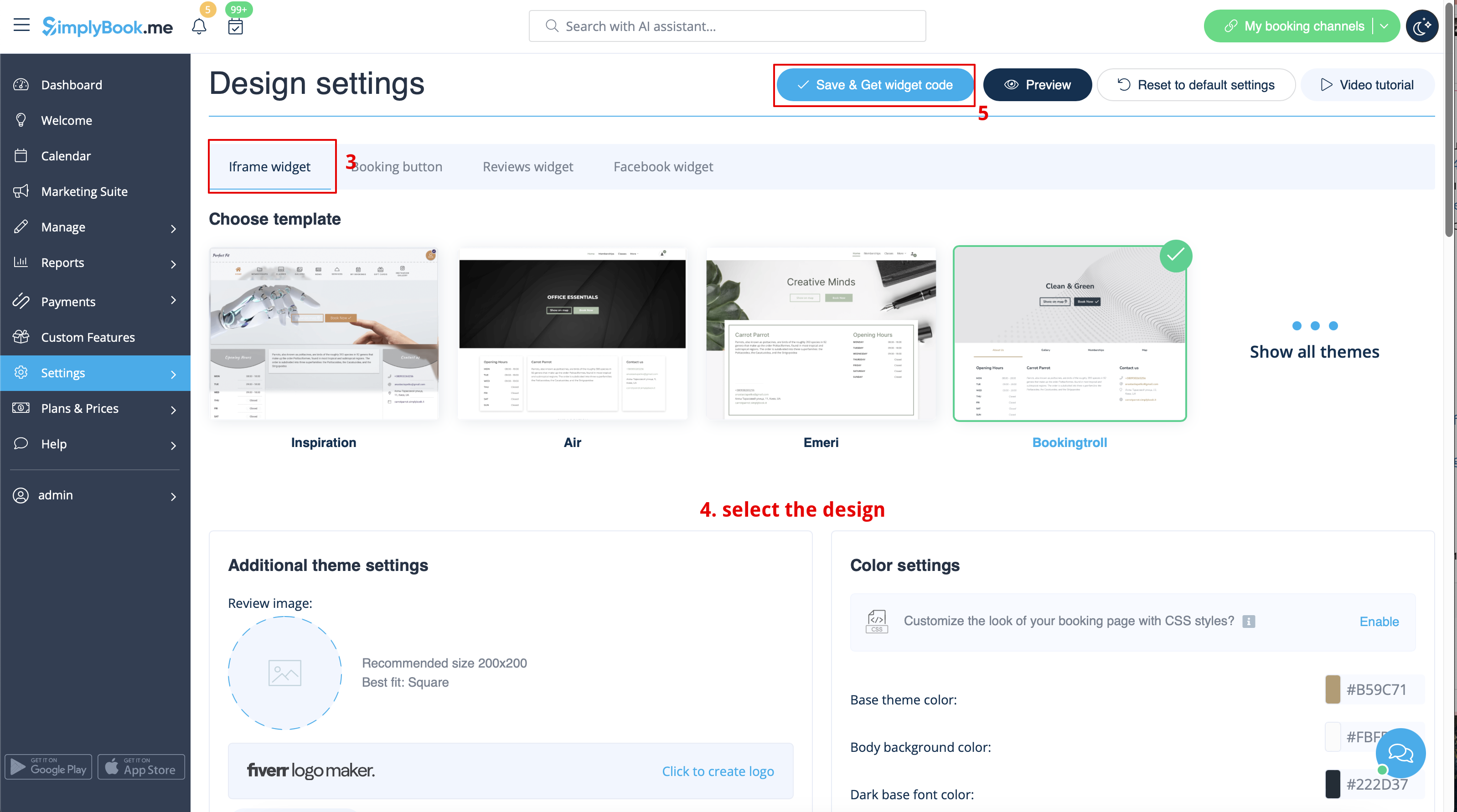

- 2. Insert it to the HTML code <body> of your website (or any other place in your website platform designed for inserting HTML JavaScript iFrame code).
Please note! Different website builders/platforms may have various ways to add HTML code, you should check first whether your website supports inserting HTML JavaScript code.
- Here are tutorials for several popular website builders:
Widgets with predefined service, provider,category or location
This feature allows you to generate iframe code specifically for service, provider, category or location you have. For example, if you have 2 services A and B and you choose service A as predefined, the widget will open on that service, skipping the step of choosing the service. This feature may be useful if you need to display only certain services on a specific page on your website. The steps to generate the code are the same as above, only in the settings of the widget, choose the item you need to predefine.
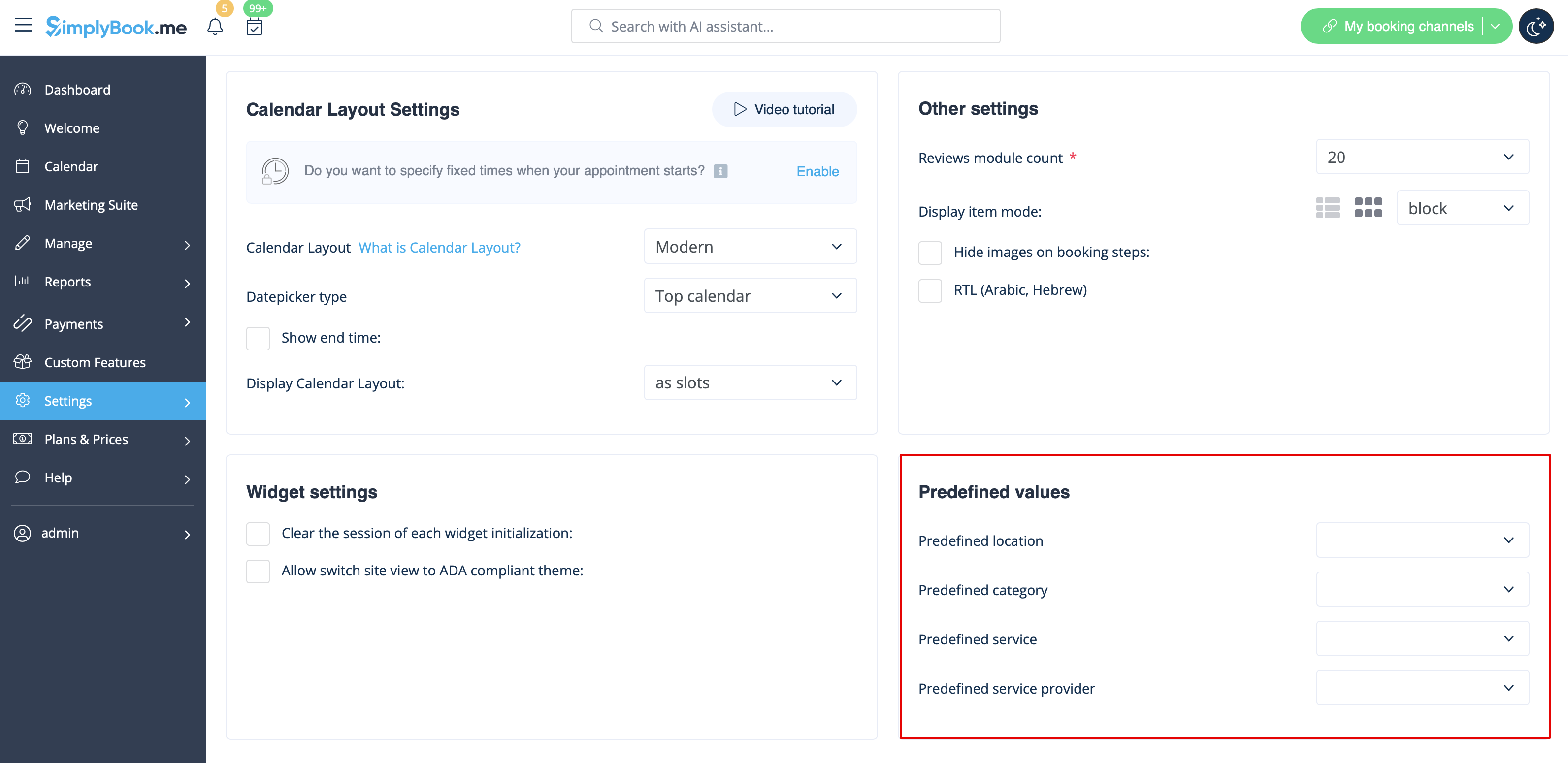
Widgets with predefined client details
Now you can also create a widget for some particular client with his/her details already filled in.
- 1. Just select the widget type you need in Settings -> Booking widgets settings, set the design and click on Get widget code.
- 2. You will see a pop-up window with the code, click on the bottom part to get client code details.
- Please copy the main code, add bottom part to it(to predefined section) and replace Predefined client name, Predefined client email, Predefined client phone with the necessary client details.
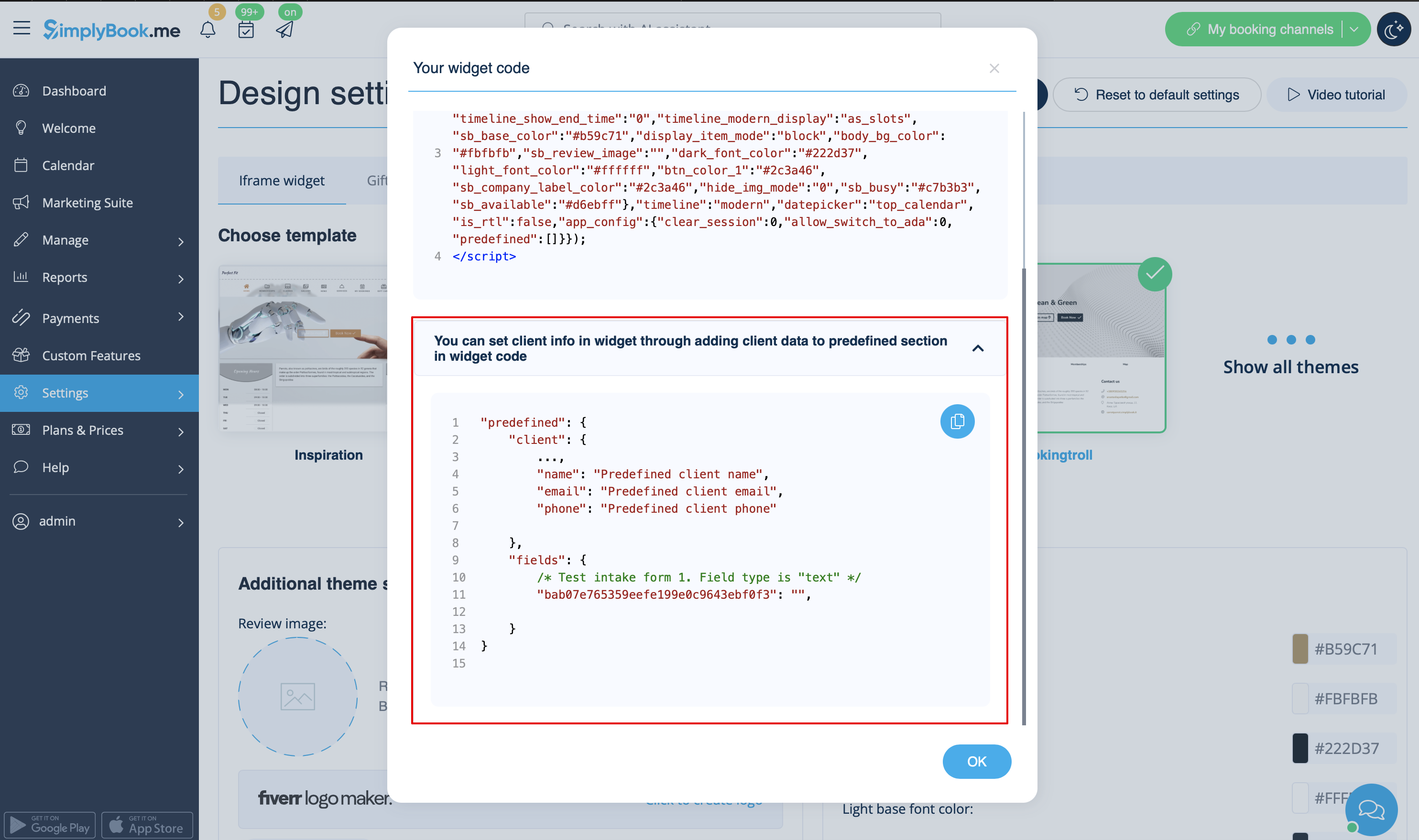
- 3. You will get the code like this:
<script src="//simplybook.me/v2/widget/widget.js"></script>
<script>var widget = new SimplybookWidget({"widget_type":"iframe","url":"https:\/\/companyname.simplybook.me","theme":"belle","theme_settings":{"sb_base_color":"#FF6969","body_bg_color":"#ffffff","dark_font_color":"#494949","light_font_color":"#ffffff","sb_busy":"#dad2ce","sb_available":"#d3e0f1"},"timeline":"flexible","datepicker":"top_calendar","is_rtl":false,"app_config":{"predefined": {"client": {

"name": "Mary",

"email": "mary@gmail.com",

"phone": "+1234567890"

}}
}});</script>
- 4. As a result the details of this client will be pre-filled in the widget and there will be no need for client to provide them.

Widgets for Client Login, Packages, Memberships, Gift Cards
Please note! It currently works with iFrame widgets only and does not work with booking button and contact button widgets.
If you are using one or several of these features it may be necessary to add a widget that will allow your clients to use the option on your website.
It can be done in a simple way by adding of the corresponding "navigate" element to the widget code:
- Client Login - "navigate":"client/sign-in"
- Packages - "navigate":"packages"
- Memberships - "navigate":"membership"
- Gift Cards - "navigate":"gift-card"
Gift Cards widget code example:
<script src="//simplybook.it/v2/widget/widget.js"></script>
<script>var widget = new SimplybookWidget({"widget_type":"iframe","url":"https:\/\/demo.simplybook.it","navigate":"gift-card","theme":"default","theme_settings":{"timeline_show_end_time":"0","timeline_modern_display":"as_slots","sb_base_color":"#0cadef","display_item_mode":"block","booking_nav_bg_color":"#80d0f2","body_bg_color":"#f7f7f7","dark_font_color":"#494949","light_font_color":"#ffffff","btn_color_1":"#5e7da7","sb_company_label_color":"#ffffff","hide_img_mode":"0","show_sidebar":"1","sb_busy":"#dad2ce","sb_available":"#0cadef"},"timeline":"modern","datepicker":"inline_datepicker","is_rtl":false,"app_config":{"predefined":[]}});</script>
Booking Button Widget
- 1. Take the booking button code of your booking page in Settings -> Booking widget settings -> Booking button -> Get widget code.
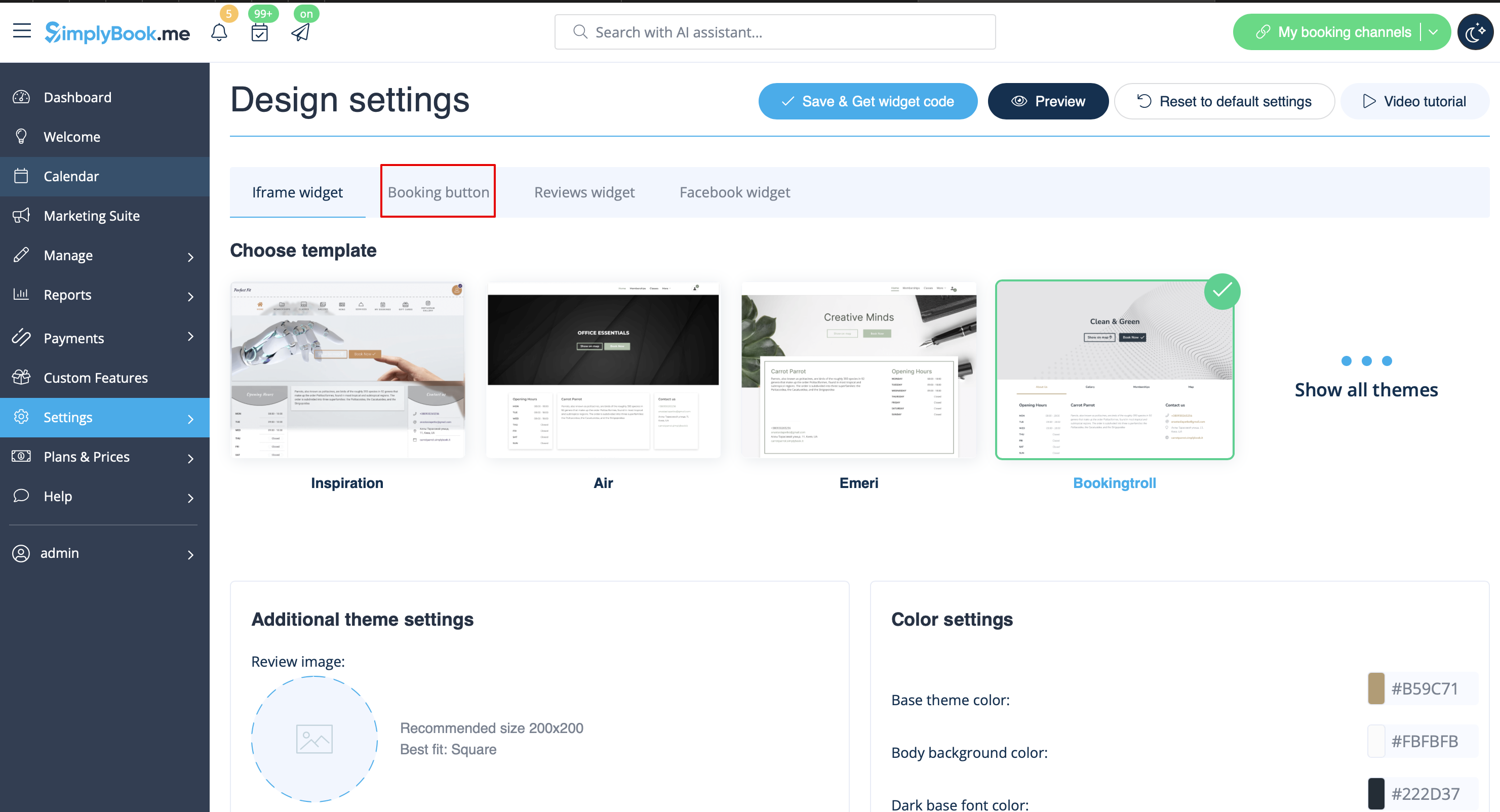
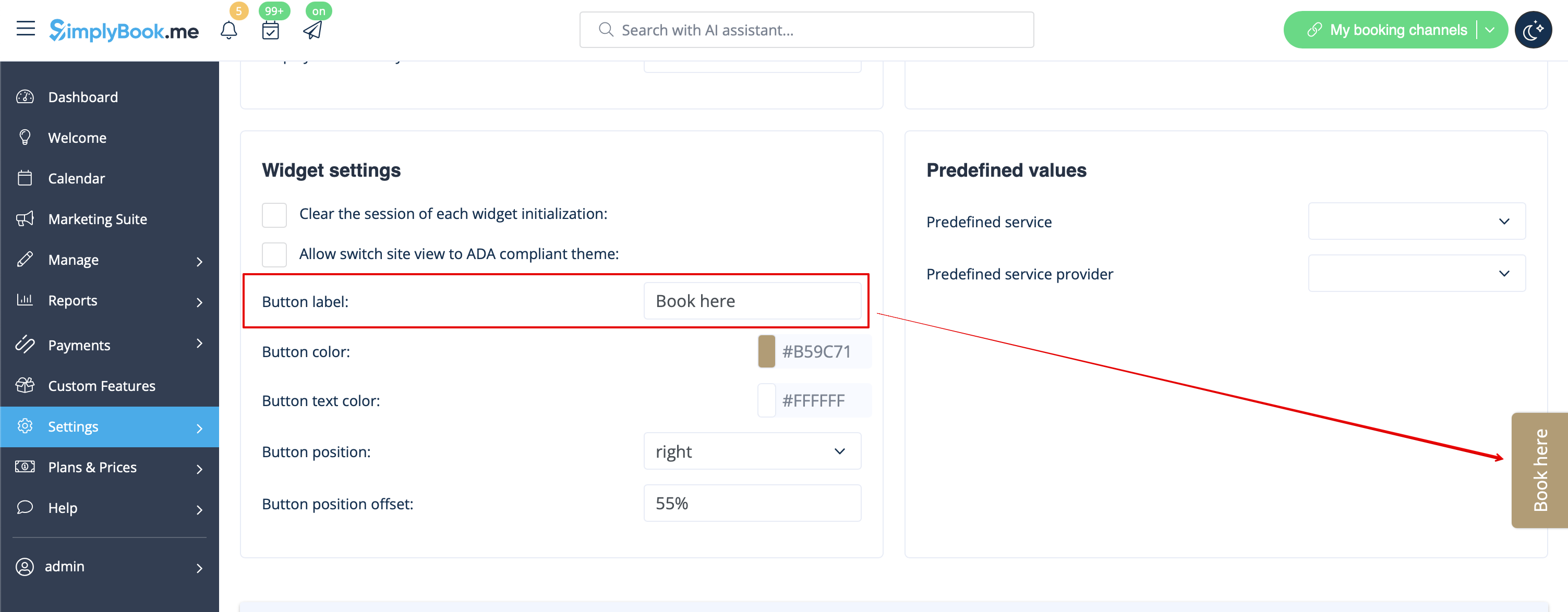
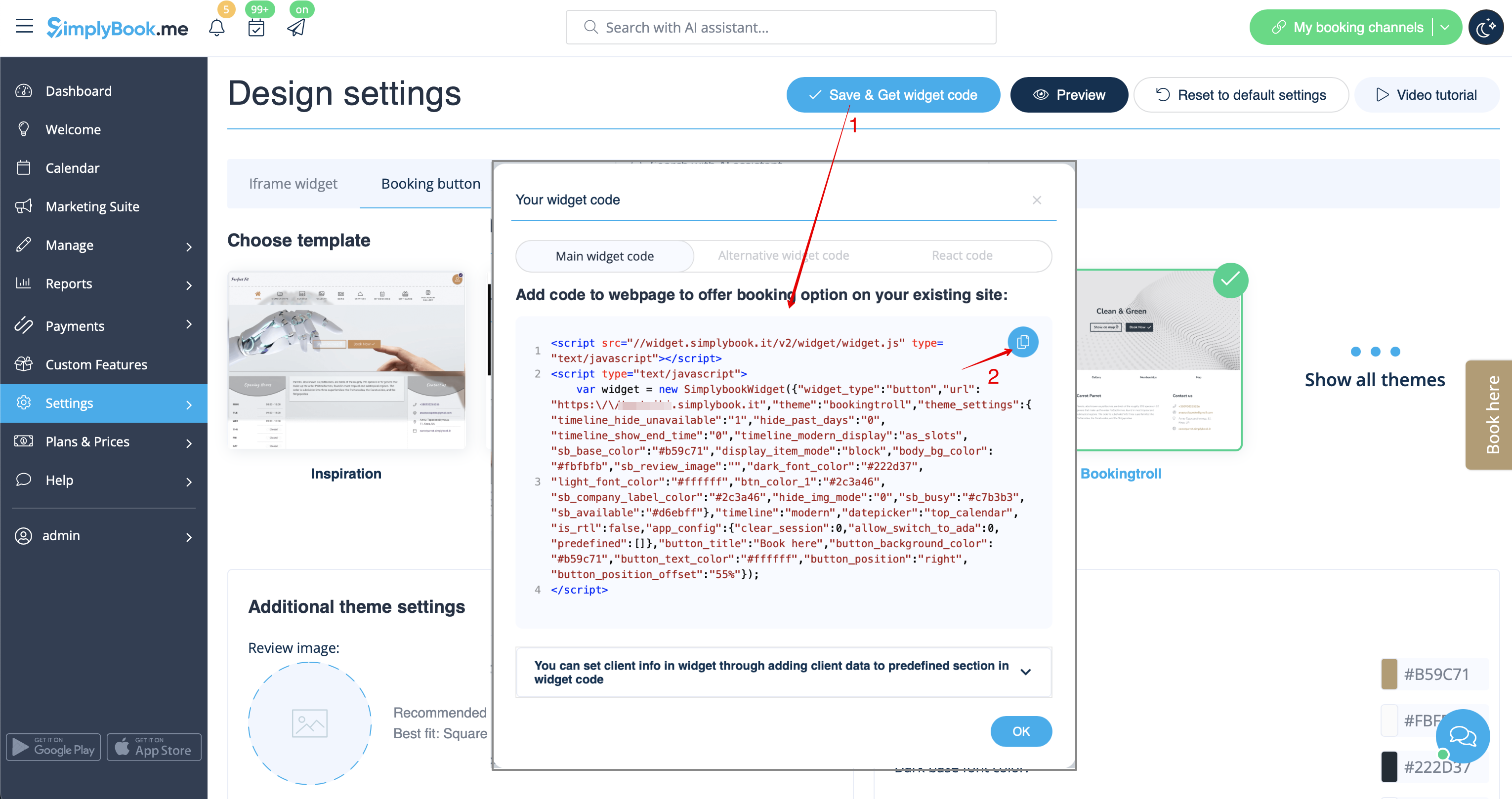
- 2. Insert it to the HTML code <body> of your website (or any other place in your website platform designed for inserting HTML JavaScript iFrame code).
Please note! Different website builders/platforms may have various ways to add HTML code, you should check first whether your website supports inserting HTML JavaScript code.
- Here are tutorials for several popular website builders:
- Widgets with predefined service, provider, category or location.
This feature allows you to generate iframe code specifically for service, provider, category or location you have. For example, if you have 2 services A and B and you choose service A as predefined, the widget will open on that service, skipping the step of choosing the service. This feature may be useful if you need to display only certain services on a specific page on your website. The steps to generate the code are the same as above, only in the settings of the widget, choose the item you need to predefine.
Booking and Contact Button Widget
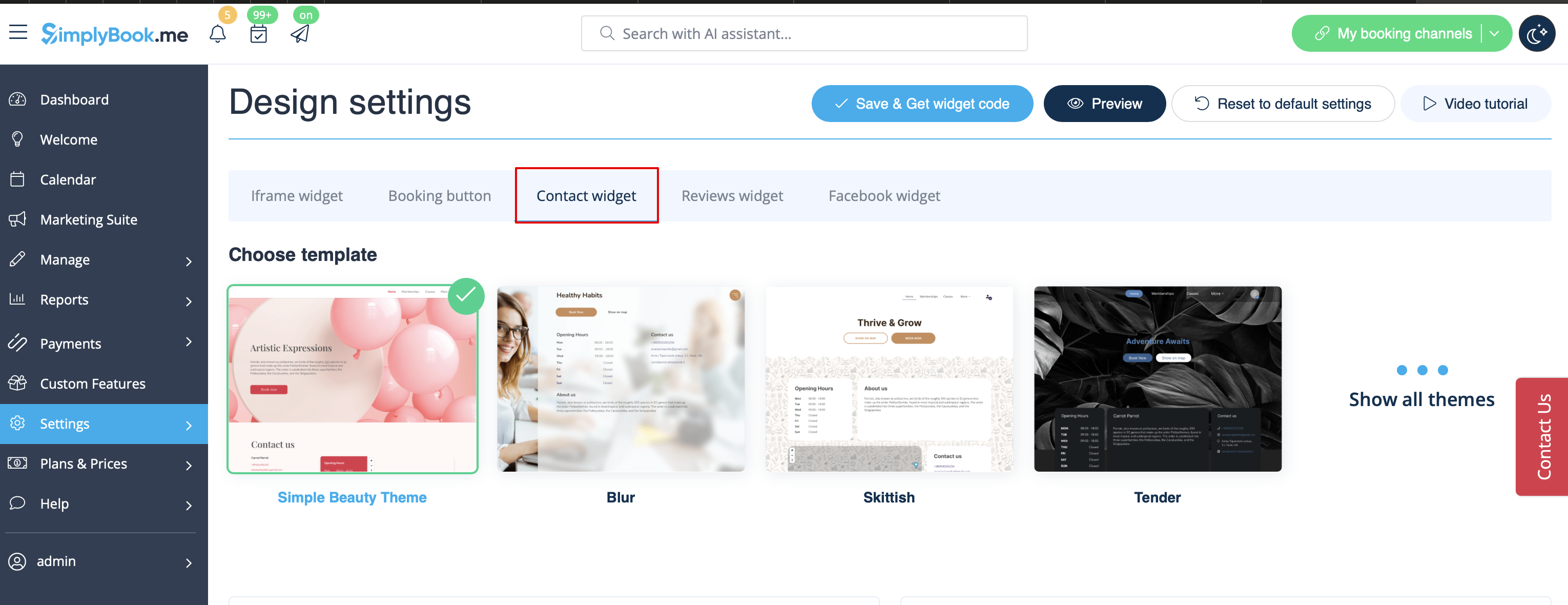
- 1. Enable Contact Widget in Custom Features -> For Development.
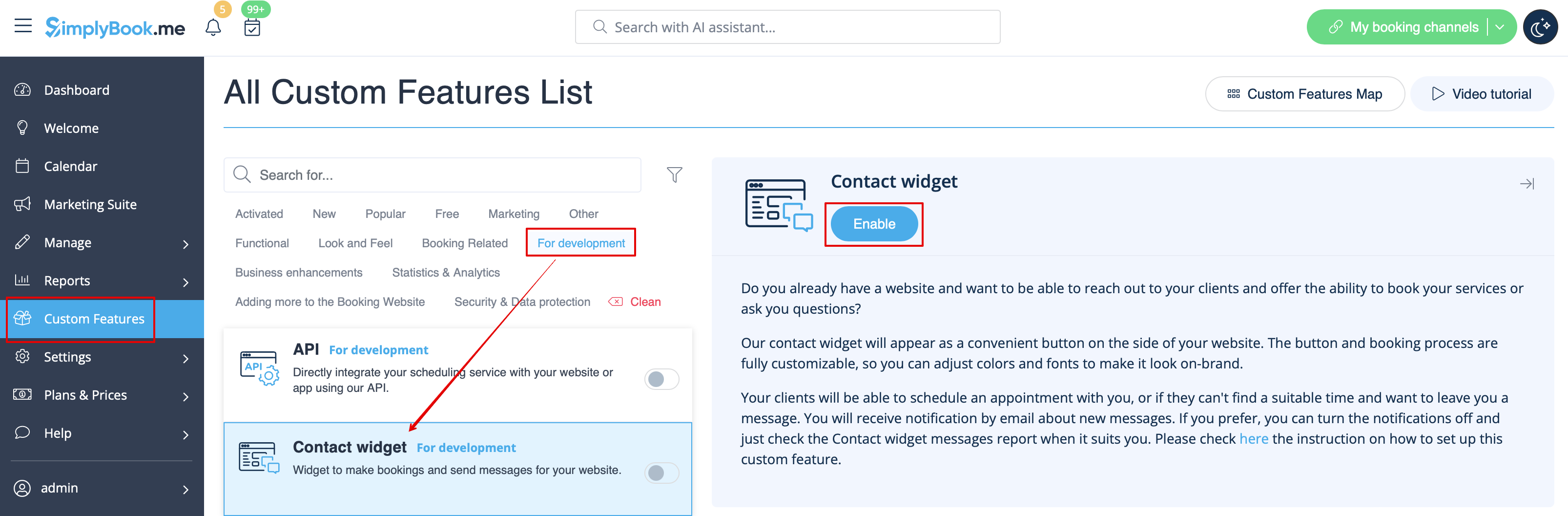
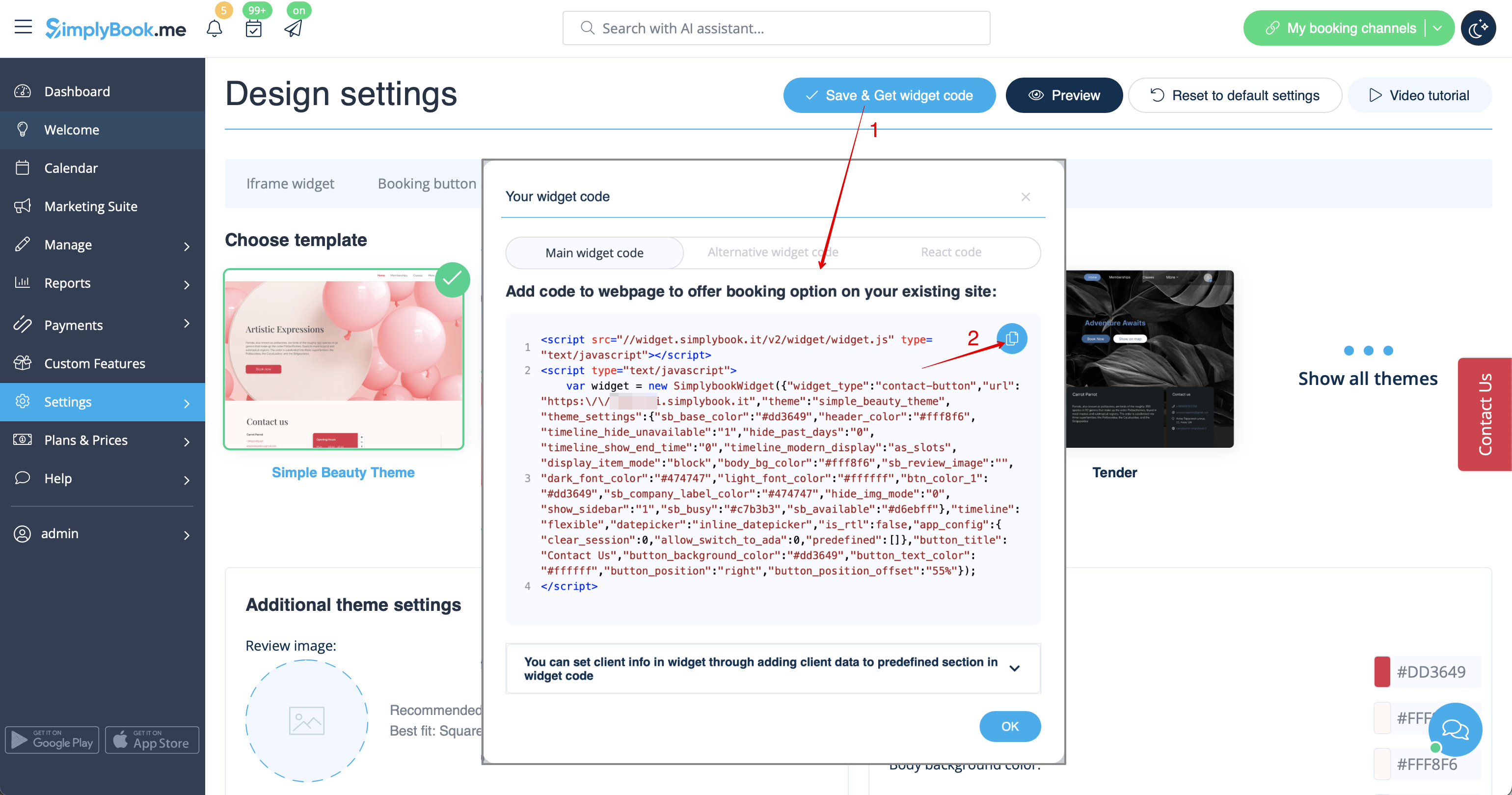
- 2. Take the booking button code of your booking page by navigating to Settings near this custom feature or in Settings in the left-side menu -> Booking widgets settings -> Contact widget -> Get widget code.
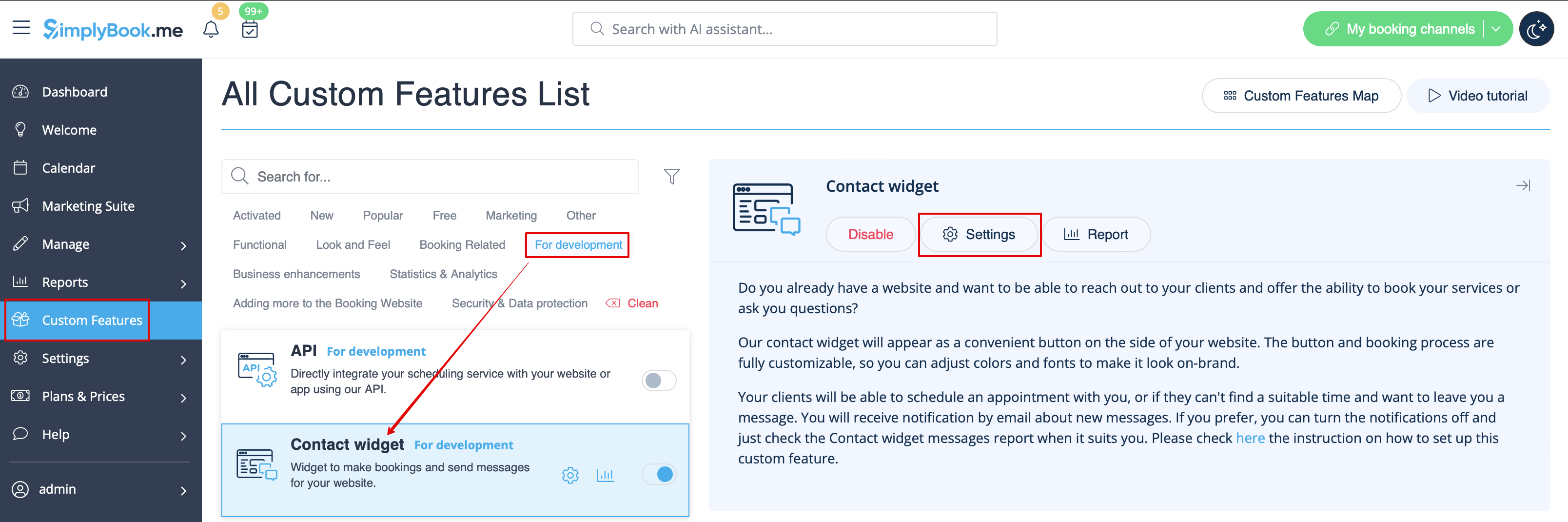
- 3. Insert it to the HTML code <body> of your website (or any other place in your website platform designed for inserting HTML JavaScript iFrame code).
Please note! Different website builders/platforms may have various ways to add HTML code, you should check first whether your website supports inserting HTML JavaScript code.
- Here are tutorials for several popular website builders:
Reviews Widget
Wish to add reviews your clients leave on the booking page to your website?
Just follow these instructions:
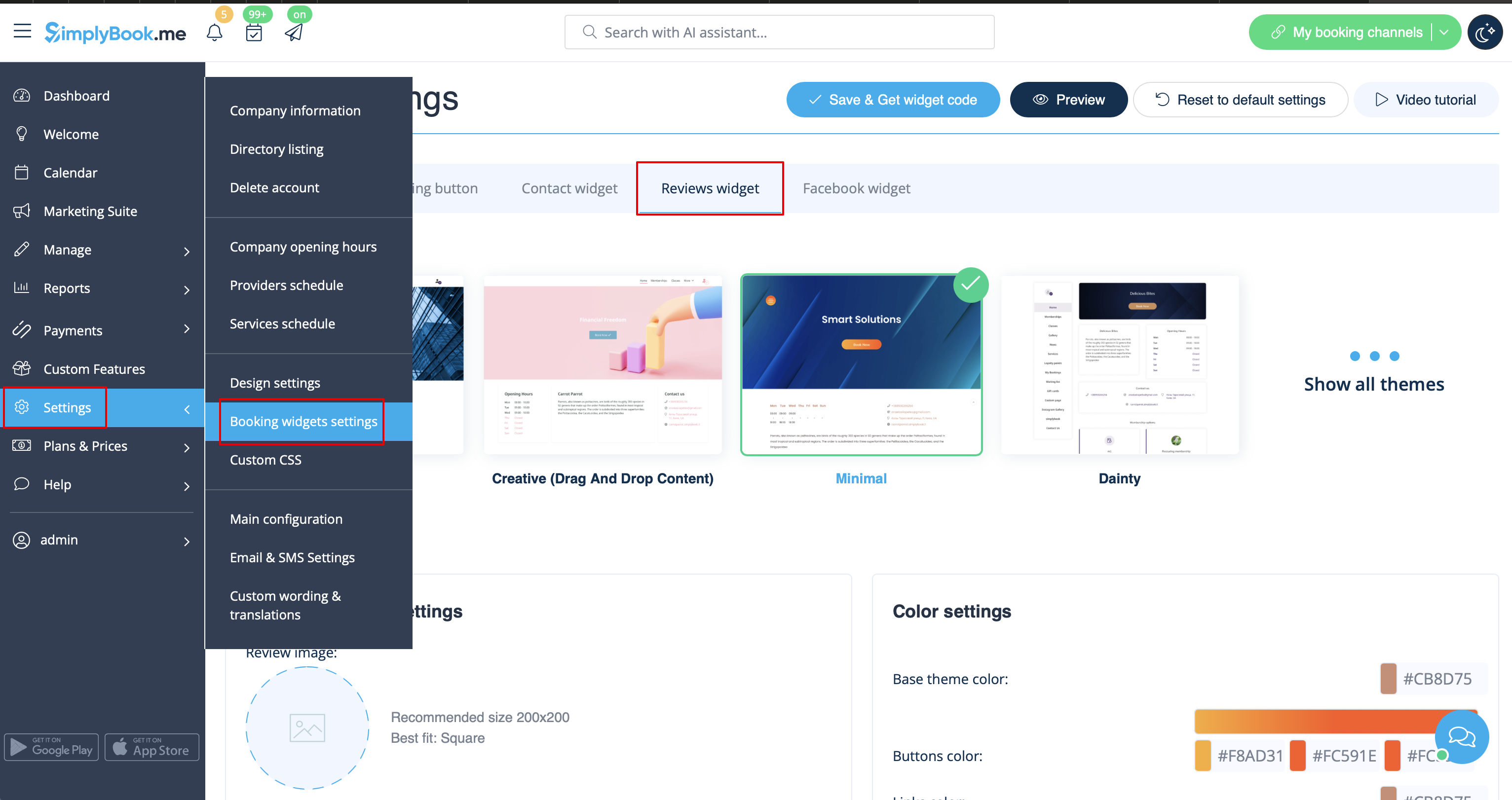
- 1. Please go to Settings -> Booking widgets settings -> Reviews widget.
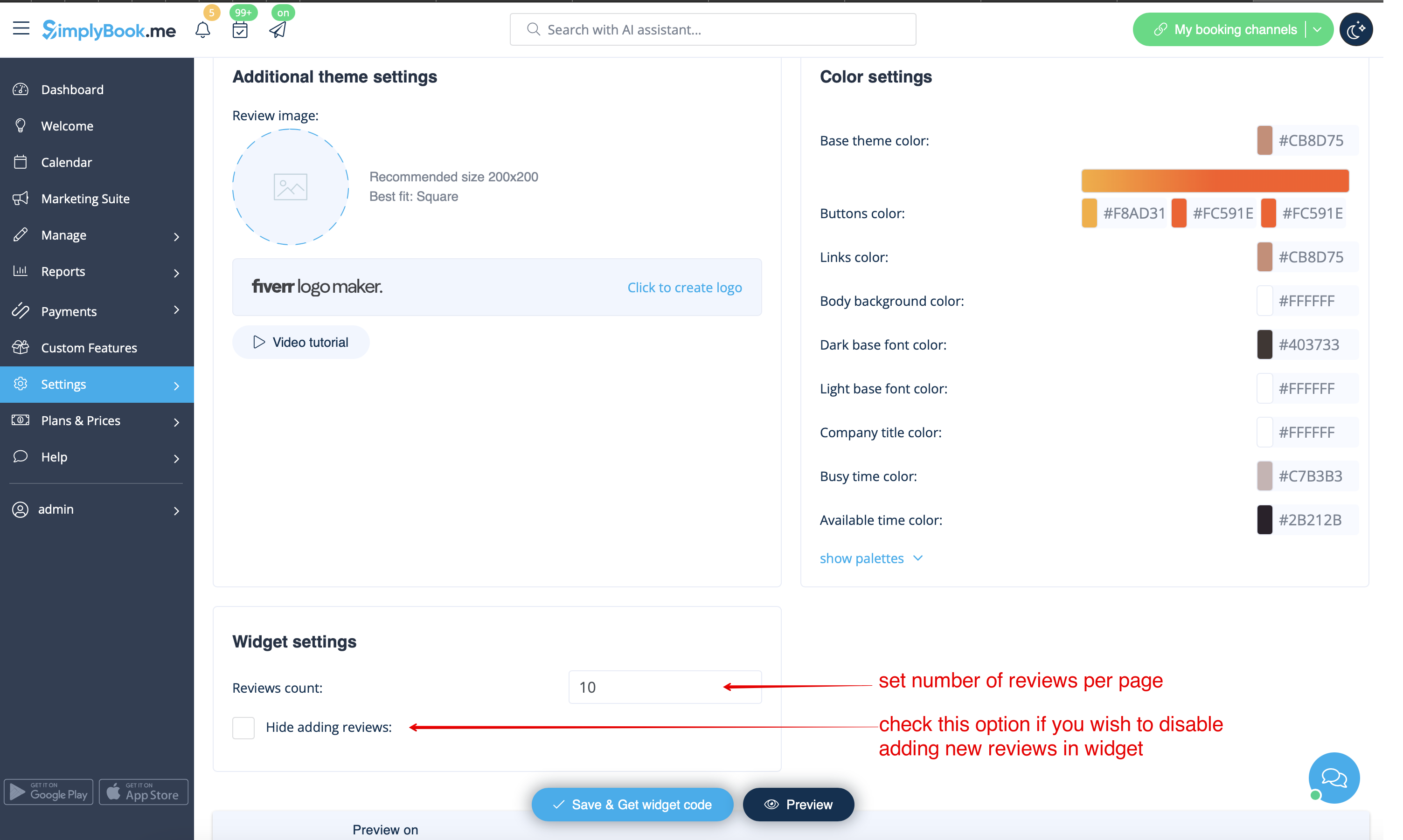
- 2. On the page you will be able to select the theme, set colors, decide on the number of reviews you wish to display and whether you wish your clients to be able to add reviews using the widget.
- 3. And now, when design is set, just click on Get widget code button, copy the code and insert it to your website to the desired place.
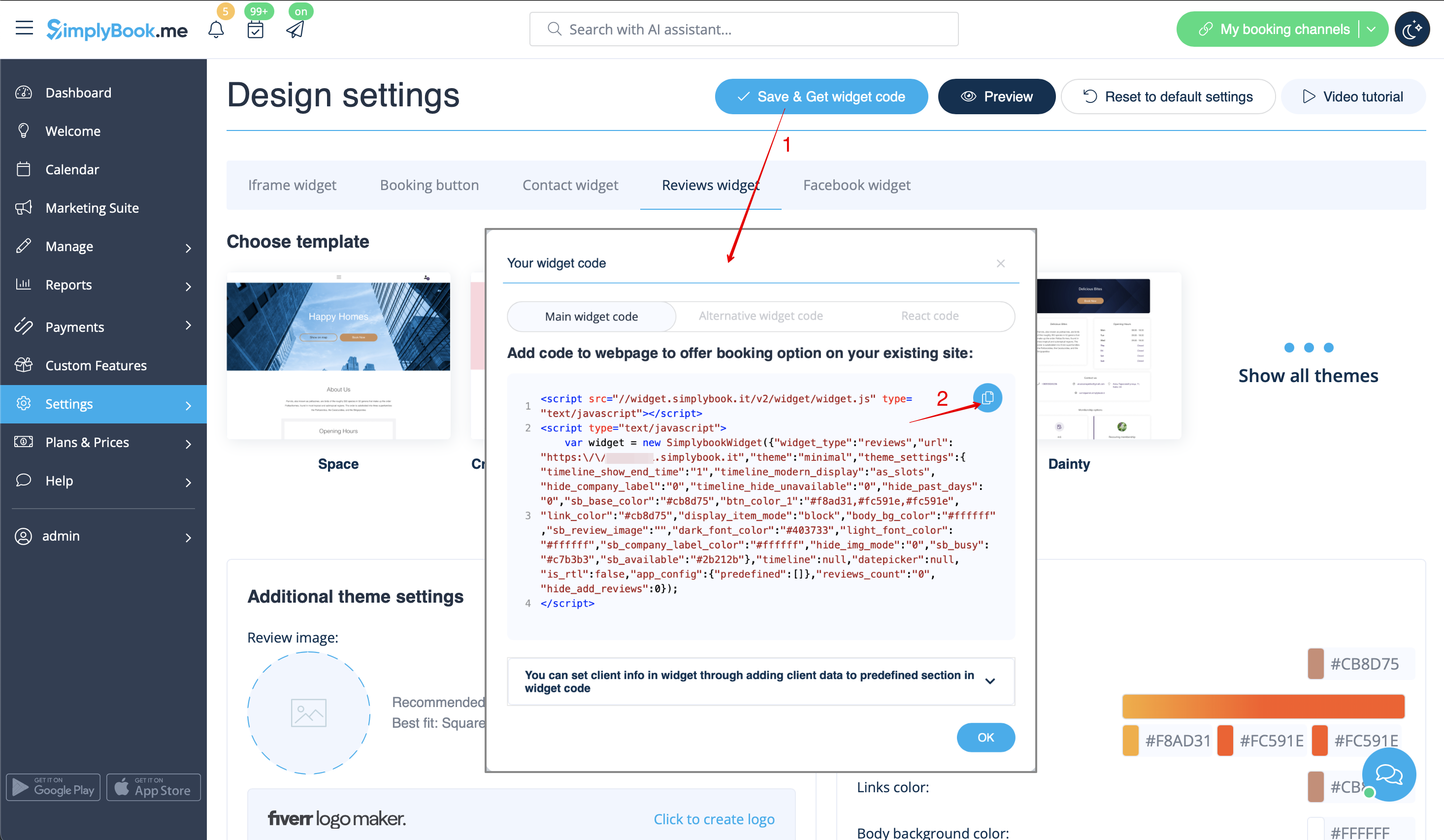
Congratulations! Widget is now ready, your reviews will be published and updated on your website!
