From SimplyBook.me
Importing a new version from external source |
Importing a new version from external source Tags: Mobile edit Mobile web edit |
||
| (One intermediate revision by the same user not shown) | |||
| Line 1: | Line 1: | ||
<div class="mw-collapsible mw-collapsed" data-expandtext="Show" data-collapsetext="Hide" style="width:800px;"> | <div class="mw-collapsible mw-collapsed" data-expandtext="Show" data-collapsetext="Hide" style="width:800px;"> | ||
<span class="qa">[[ | <span class="qa">[[Special:MyLanguage/Classes_custom_feature | Classes]]</span> | ||
<div class="mw-collapsible-content"> | <div class="mw-collapsible-content"> | ||
See extended tutorial about classes online scheduling [[Classes_custom_feature | here]] | See extended tutorial about classes online scheduling [[Special:MyLanguage/Classes_custom_feature | here]] | ||
<br><br> | <br><br> | ||
And video tutorial how to sell membership related classes [[File:Youtube-Logo.png|link=https://vimeo.com/236888588 | And video tutorial how to sell membership related classes [[File:Youtube-Logo.png|link=https://vimeo.com/236888588]] | ||
<br><br> | <br><br> | ||
</div> | </div> | ||
| Line 12: | Line 12: | ||
<span class="qa">[https://www.youtube.com/watch?v=x2LkobIWe34 Reservations for Universities]</span> | <span class="qa">[https://www.youtube.com/watch?v=x2LkobIWe34 Reservations for Universities]</span> | ||
<div class="mw-collapsible-content"><br> | <div class="mw-collapsible-content"><br> | ||
:'''Video tutorial available ''' | :'''Video tutorial available ''' <p><youtube>x2LkobIWe34</youtube></p> | ||
</div> | </div> | ||
</div> | </div> | ||
<br/> | <br/> | ||
<div class="mw-collapsible mw-collapsed" data-expandtext="Show" data-collapsetext="Hide" style="width:800px;"> | <div class="mw-collapsible mw-collapsed" data-expandtext="Show" data-collapsetext="Hide" style="width:800px;"> | ||
<span class="qa">[[Events_(services_on_particular_dates)#Events_only | Events only]]</span> | <span class="qa">[[Special:MyLanguage/Events_(services_on_particular_dates)#Events_only | Events only]]</span> | ||
<div class="mw-collapsible-content"> | <div class="mw-collapsible-content"> | ||
Video available | Video available <p><youtube>Edh3_PJ1ua8</youtube></p> | ||
<br> | <br> | ||
If you plan to have 1 event or several events without regular services you should do the following: | If you plan to have 1 event or several events without regular services you should do the following: | ||
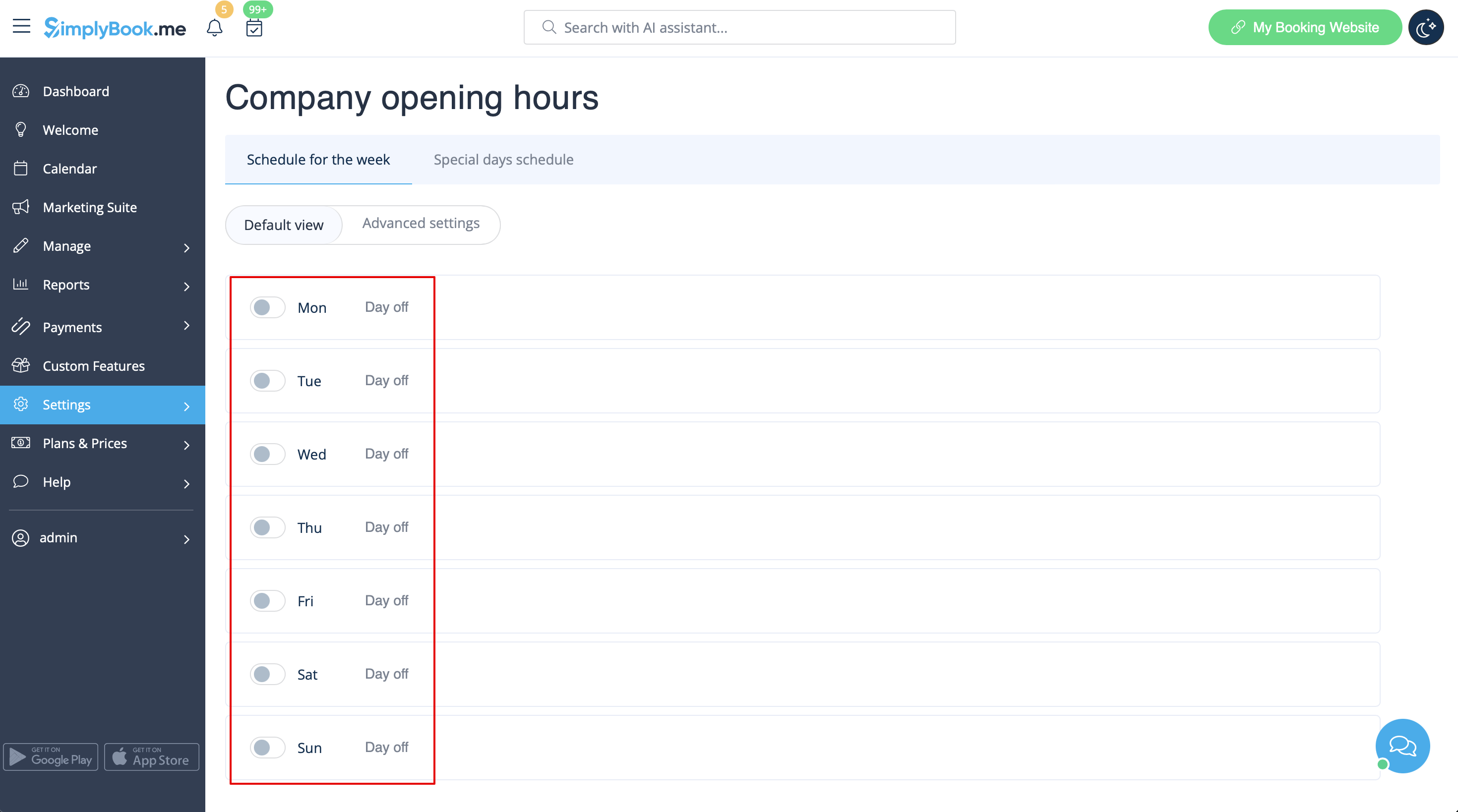
:1. Close all company opening hours in Settings // Company opening hours - put the switchers near weekday names to "off" position.<br> | :1. Close all company opening hours in Settings // Company opening hours - put the switchers near weekday names to "off" position.<br> | ||
[[File:Disable_company_weekly_schedule_redesigned.png|1200px| center|link=https://help.simplybook.me/images/1/12/Disable_company_weekly_schedule_redesigned.png]]<br><br> | [[File:Disable_company_weekly_schedule_redesigned.png|1200px| center|link=https://help.simplybook.me/images/1/12/Disable_company_weekly_schedule_redesigned.png]]<br><br> | ||
:2. Create events you need in Manage // Services // "+". See detailed tutorial about events [[Events_(services_on_particular_dates)| here]]. | :2. Create events you need in Manage // Services // "+". See detailed tutorial about events [[Special:MyLanguage/Events_(services_on_particular_dates)| here]]. | ||
</div> | </div> | ||
</div> | </div> | ||
<br/> | <br/> | ||
Latest revision as of 11:26, 14 October 2025
See extended tutorial about classes online scheduling here
And video tutorial how to sell membership related classes 
- Video tutorial available
Video available
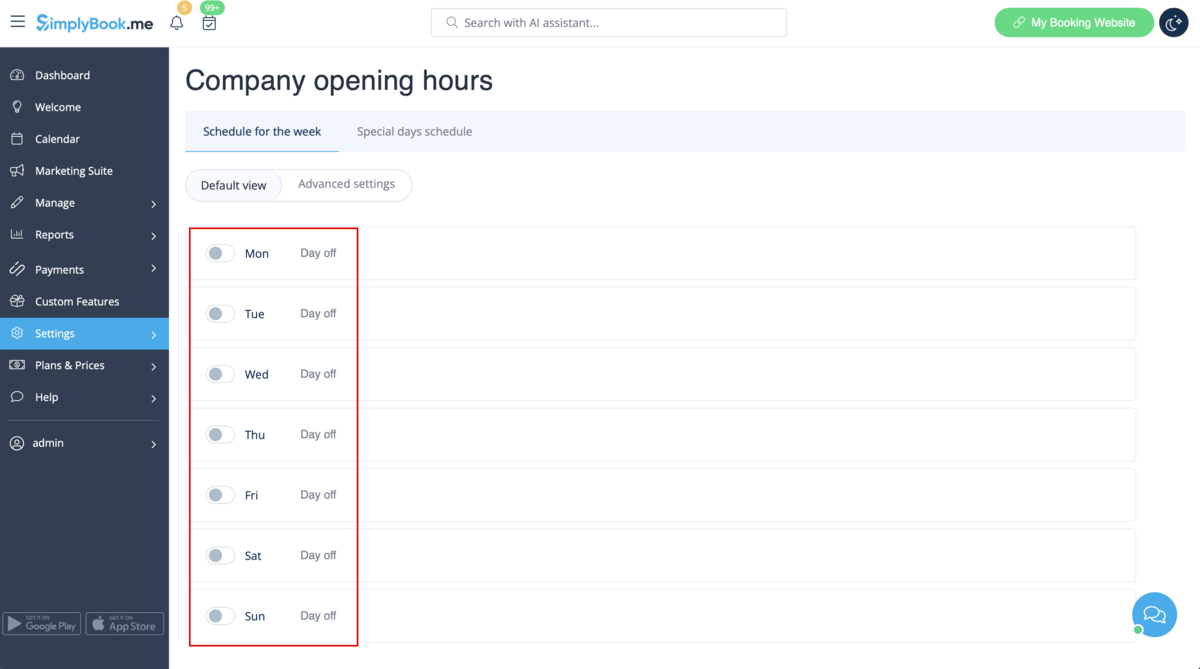
If you plan to have 1 event or several events without regular services you should do the following:
- 1. Close all company opening hours in Settings // Company opening hours - put the switchers near weekday names to "off" position.
- 2. Create events you need in Manage // Services // "+". See detailed tutorial about events here.
