Updating to match new version of source page |
No edit summary Tags: Mobile edit Mobile web edit |
||
| (2 intermediate revisions by 2 users not shown) | |||
| Line 2: | Line 2: | ||
{{#seo: | {{#seo: | ||
|title=Client mobile app - SimplyBook.me | |title=Client mobile app - SimplyBook.me | ||
|description= | |description=Application mobile personnalisée pour les clients. Progressive Web App accessible via le navigateur. Les clients peuvent réserver, consulter leurs rendez-vous et recevoir des notifications push sur mobile. | ||
|titlemode=append | |titlemode=append | ||
|keywords=faq, frequently asked questions, booking software, appointment system questions, appointments online, calendar software, booking system, booking calendar, scheduling software, online appointment scheduling, online scheduling, plugins, custom features, additional functionality, client application, mobile application, client mobile app, client app, client mobile application, add to home screen | |keywords=faq, frequently asked questions, booking software, appointment system questions, appointments online, calendar software, booking system, booking calendar, scheduling software, online appointment scheduling, online scheduling, plugins, custom features, additional functionality, client application, mobile application, client mobile app, client app, client mobile application, add to home screen | ||
| Line 14: | Line 14: | ||
<br><br><br><br> | <br><br><br><br> | ||
:<span style="background-color:#ffe9e9; padding:5px; border-radius:5px;">'''Veuillez noter que... '''</span> | :<span style="background-color:#ffe9e9; padding:5px; border-radius:5px;">'''Veuillez noter que... '''</span> | ||
*Lorsque<span style="background-color:#ffe9e9; padding:5px; border-radius:5px;">vous activez cette fonction, la fonction personnalisée de <span style="background-color:#cdeffc; padding:5px; border-radius:5px;">[[Special:MyLanguage/Client_Login_custom_feature|connexion du client]]</span> sera également activée ;</span> | *Lorsque<span style="background-color:#ffe9e9; padding:5px; border-radius:5px;">vous activez cette fonction, la fonction personnalisée de <span style="background-color:#cdeffc; padding:5px; border-radius:5px;">[[Special:MyLanguage/Client_Login_custom_feature|connexion du client]]</span> sera également activée ;</span> | ||
| Line 21: | Line 20: | ||
<br><br><br><br> | <br><br><br><br> | ||
:'''Tutoriels vidéo disponibles ''' | :'''Tutoriels vidéo disponibles ''' | ||
:*Comment configurer l'application mobile Client | :*Comment configurer l'application mobile Client <p><youtube>_3pW171iAjA</youtube></p> | ||
:*Comment utiliser l'application mobile Client | :*Comment utiliser l'application mobile Client <p><youtube>SElfM29hWOo</youtube></p> | ||
<br><br> | <br><br> | ||
'''Comment l'utiliser''' | '''Comment l'utiliser''' | ||
| Line 55: | Line 54: | ||
[[File:Client app push notifications report redesigned.png|1200px|border|center|link=https://help.simplybook.me/images/c/cc/Client_app_push_notifications_report_redesigned.png]] | [[File:Client app push notifications report redesigned.png|1200px|border|center|link=https://help.simplybook.me/images/c/cc/Client_app_push_notifications_report_redesigned.png]] | ||
<br><br><br><br> | <br><br><br><br> | ||
Latest revision as of 17:07, 30 January 2026

Permettez à vos clients de télécharger votre propre application client personnalisée. Avec l'application sur leur mobile, ils peuvent facilement réserver, reprogrammer, acheter des forfaits, des adhésions et des cartes-cadeaux, ainsi qu'accéder à votre entreprise directement à partir de leur téléphone.
L'application client est disponible pour tous les utilisateurs payants de SimplyBook.me qui utilisent Client Login, et si vous avez un abonnement premium, vous pouvez la personnaliser avec votre propre logo et les couleurs de votre marque. Demandez à vos clients d'aller sur votre site de réservation sur un appareil mobile, et de là, ils seront invités à télécharger l'application sur leur mobile.
C'est aussi simple que cela !
Client Mobile App fonctionne comme une Progressive Web App (PWA), ce qui signifie qu'elle ne peut pas être téléchargée à partir des magasins d'applications traditionnels comme l'App Store ou le Play Market. Au lieu de cela, vos clients peuvent accéder aux fonctionnalités de l'application directement via un navigateur web sur leurs appareils mobiles. Cette approche offre une grande flexibilité, des mises à jour faciles et une compatibilité entre les différents appareils.
- Veuillez noter que...
- Lorsquevous activez cette fonction, la fonction personnalisée de connexion du client sera également activée ;
- Celane fonctionne actuellement qu'avec les classes hebdomadaires, les calendriers modernes et flexibles ;
- Lesfonctionnalités suivantes ne sont actuellement pas présentes dans l'application client : Nouvelles, Galerie de photos, Critiques, Page personnalisée, Google translate, changement de mode de la page principale, affichage de l'heure de fin, masquage des images sur les étapes de réservation, orientation RTL, widget de contact, ajustement des couleurs des créneaux occupés et disponibles.
- Tutoriels vidéo disponibles
- Comment configurer l'application mobile Client
- Comment utiliser l'application mobile Client
Comment l'utiliser
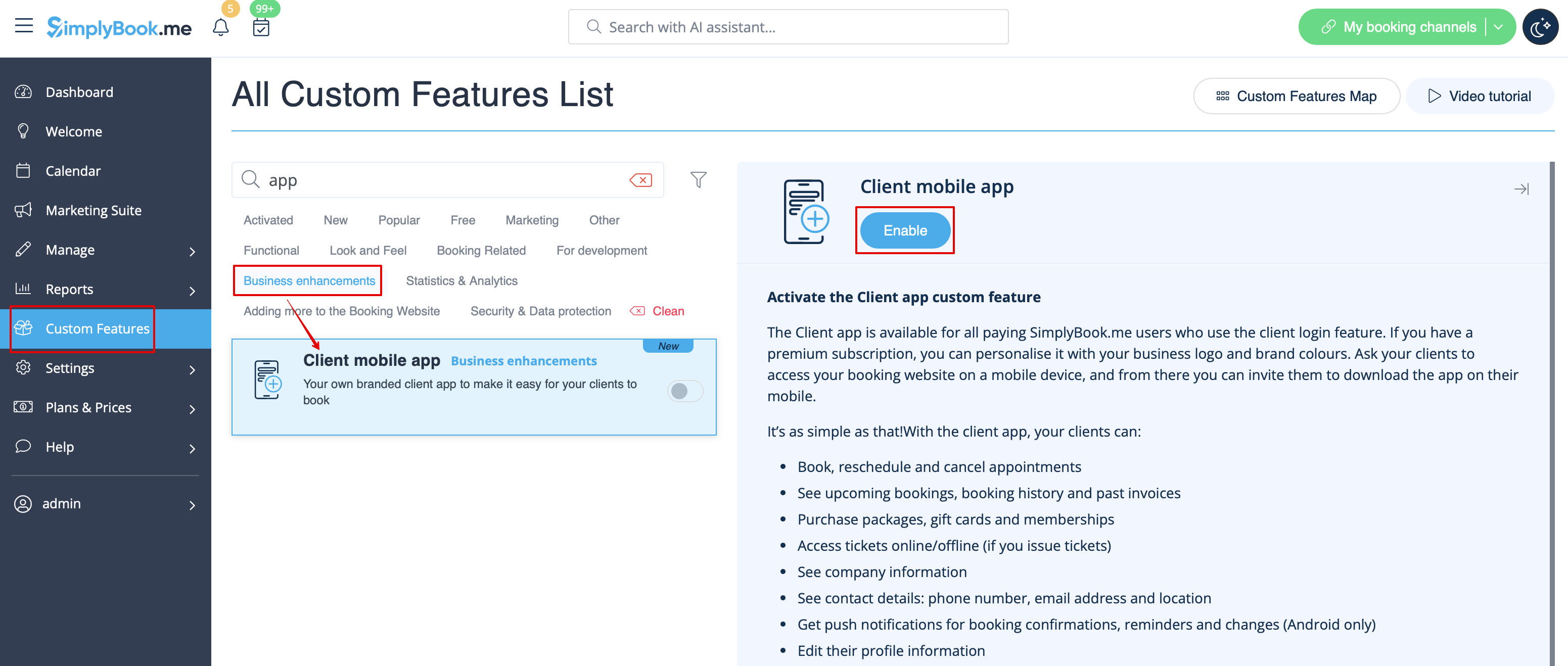
- 1. Activez l'application mobile du client sur votre page Fonctions personnalisées dans la section Améliorations de l'entreprise.
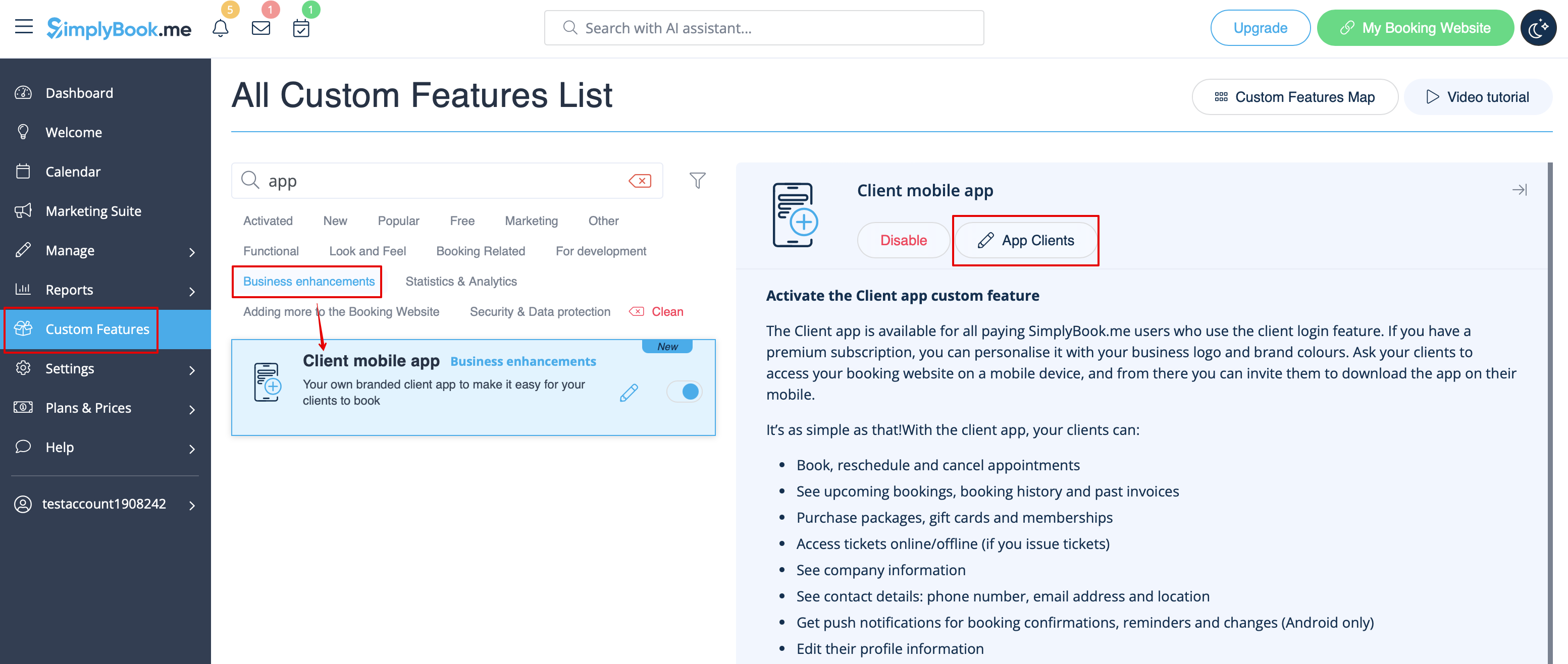
- 2. L'application est prête à être utilisée. Certaines options de rapport sont disponibles.
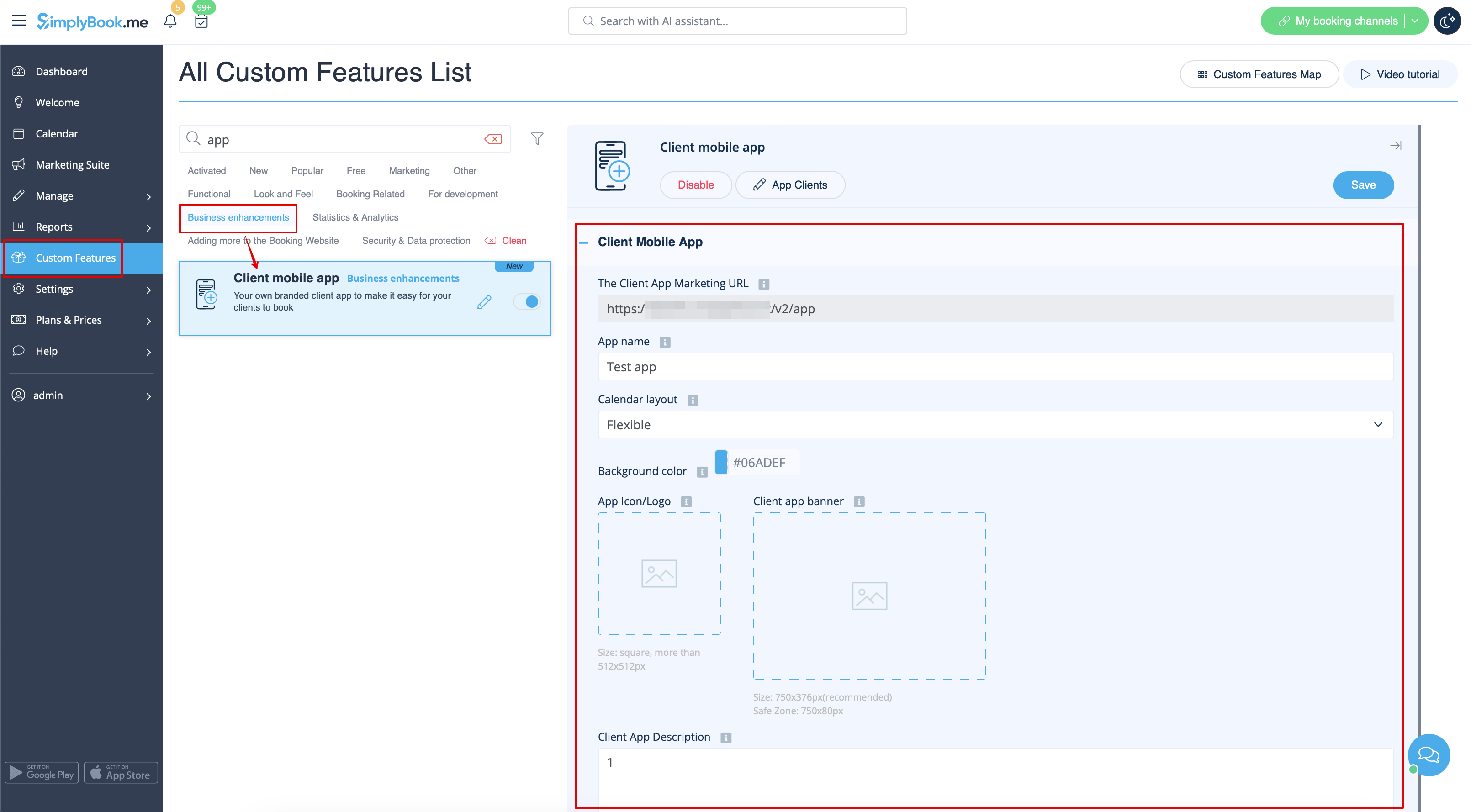
- 3.(disponible uniquement pour les abonnements Premium) Ajoutez votre propre nom d'application, définissez la couleur de la marque, sélectionnez la disposition préférée du calendrier, téléchargez le logo et les images de la bannière.
- Il est important d'utiliser une image carrée pour le logo, les dimensions différentes ne seront pas enregistrées.
- Nous recommandons également d'utiliser des couleurs plus claires et/ou plus sombres pour l'arrière-plan afin d'améliorer l'expérience du client.
- 4. Envoyez l'URL de votre site de réservation (la bannière ne s'affiche pas sur les widgets) à vos clients afin qu'ils puissent installer l'application sur leur téléphone en cliquant sur la bannière correspondante .
- (La bannière d'installation de l'invitation peut ne pas s'afficher dans les navigateurs mobiles intégrés, il est recommandé d'utiliser Chrome à la place).
- Attention ! Les utilisateurs d'appareils IOS devront ouvrir votre site web de réservation dans la version complète de Safari pour obtenir la bannière d'invitation à l'installation, puis utiliser simplement l'option Ajouter à l'écran d'accueil.

- 5. Ils pourront ainsi réserver en ligne, consulter leurs rendez-vous (cette option est disponible même en mode hors ligne), les reprogrammer ou les annuler, acheter des cartes-cadeaux, des abonnements et des forfaits, consulter les factures et mettre à jour leurs propres coordonnées si nécessaire.

Notifications push
- Les utilisateurs peuvent également recevoir des notifications push concernant les nouvelles réservations ou les annulations sur leurs appareils.
- Pour cela, il sera uniquement nécessaire d'activer les notifications dans l'application après l'inscription/la connexion et dans une boîte de dialogue standard du système.
Notifications

- Dans le cas où les notifications sont activées, mais que les messages push ne viennent pas, il est nécessaire de vérifier si les notifications du système Chrome (Android) ou Safari (IOS) sont activées dans les paramètres de l'appareil.

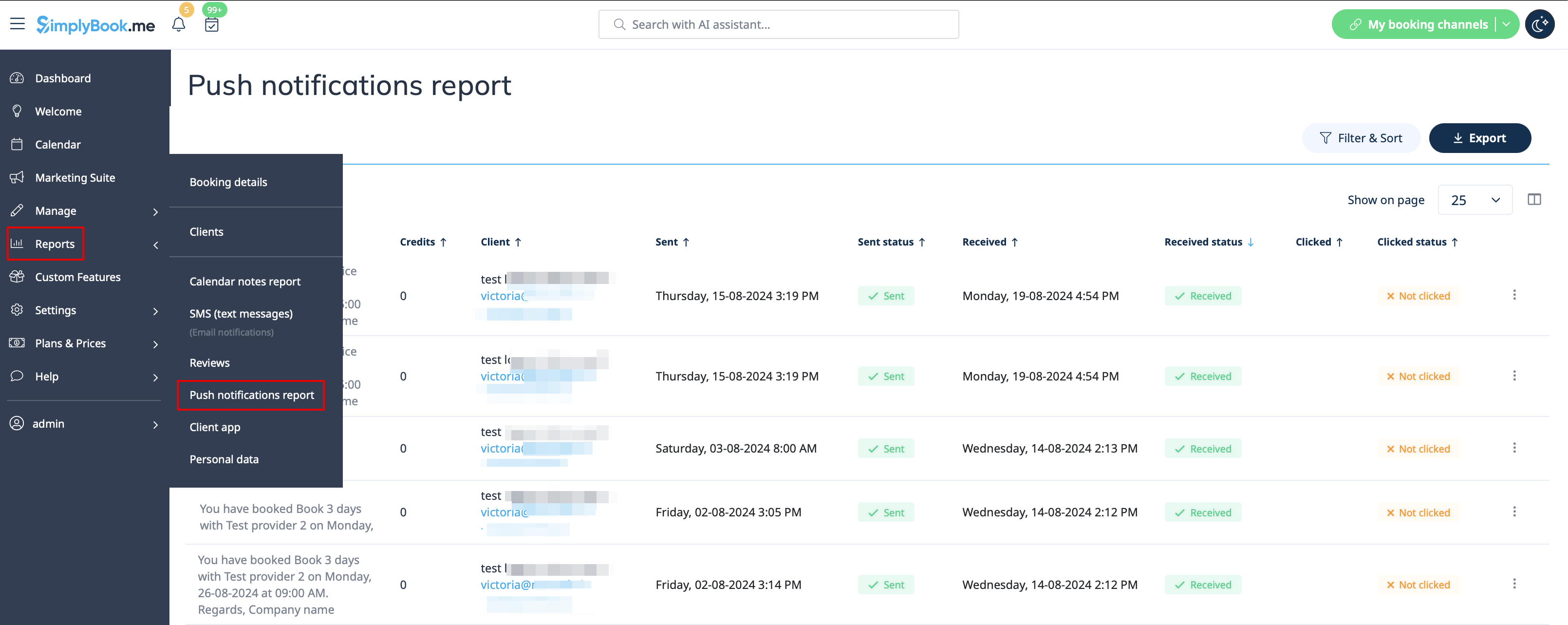
- Depuis le côté administrateur, il est possible de voir toutes les notifications push envoyées aux clients dans Rapports -> Notifications push ainsi que si elles ont été reçues et cliquées par le client.