From SimplyBook.me
No edit summary |
No edit summary |
||
| (One intermediate revision by the same user not shown) | |||
| Line 1: | Line 1: | ||
<languages/> | <languages/> | ||
<translate> | <translate> | ||
<!--T:1--> | |||
{{#seo: | {{#seo: | ||
|title=Additional Bookings - SimplyBook.me | |title=Additional Bookings - SimplyBook.me | ||
|description= | |description=Purchase extra booking capacity beyond plan limits. Scale up for high-demand periods. Buy additional bookings as needed in Plans & Prices section. | ||
|titlemode=append | |titlemode=append | ||
|keywords=faq, frequently asked questions, booking software, appointment system questions, appointments online, calendar software, booking system, booking calendar, scheduling software, online appointment scheduling, online scheduling, setup, setup help, support, help content | |keywords=faq, frequently asked questions, booking software, appointment system questions, appointments online, calendar software, booking system, booking calendar, scheduling software, online appointment scheduling, online scheduling, setup, setup help, support, help content | ||
| Line 10: | Line 11: | ||
<translate> | <translate> | ||
<!--T:2--> | |||
<br><br> | <br><br> | ||
<!--T:3--> | |||
Additional bookings can be purchased in <span style="background-color:#d4f8e5; padding:5px; border-radius:5px;">Plans&Prices</span> -> <span style="background-color:#d4f8e5; padding:5px; border-radius:5px;">Additional items</span>. Unlike bookings included into the subscription, additional bookings do not have expiration date (unless they are purchased together with the subscription as a part of a recurring profile or if it is written in the pack description). If you purchase such additional bookings, they will not expire until you use all of them. | Additional bookings can be purchased in <span style="background-color:#d4f8e5; padding:5px; border-radius:5px;">Plans&Prices</span> -> <span style="background-color:#d4f8e5; padding:5px; border-radius:5px;">Additional items</span>. Unlike bookings included into the subscription, additional bookings do not have expiration date (unless they are purchased together with the subscription as a part of a recurring profile or if it is written in the pack description). If you purchase such additional bookings, they will not expire until you use all of them. | ||
[[File:Additional items path.png |1200px| border| center|link=https://help.simplybook.me/images/c/c9/Additional_items_path.png]] | [[File:Additional items path.png |1200px| border| center|link=https://help.simplybook.me/images/c/c9/Additional_items_path.png]] | ||
| Line 17: | Line 20: | ||
</translate> | </translate> | ||
<translate> | <translate> | ||
<!--T:4--> | |||
:<span style="background-color:#ffe9e9; padding:5px; border-radius:5px;">'''Please note!''' Prices on the screenshot are only the example. Please check the pricing that applies to your account in <span style="background-color:#d4f8e5; padding:5px; border-radius:5px;">Plans&Prices</span> -> <span style="background-color:#d4f8e5; padding:5px; border-radius:5px;">Additional items</span> in your system.</span> | :<span style="background-color:#ffe9e9; padding:5px; border-radius:5px;">'''Please note!''' Prices on the screenshot are only the example. Please check the pricing that applies to your account in <span style="background-color:#d4f8e5; padding:5px; border-radius:5px;">Plans&Prices</span> -> <span style="background-color:#d4f8e5; padding:5px; border-radius:5px;">Additional items</span> in your system.</span> | ||
<br><br> | <br><br> | ||
</translate> | </translate> | ||
Latest revision as of 19:28, 2 February 2026
Additional bookings can be purchased in Plans&Prices -> Additional items. Unlike bookings included into the subscription, additional bookings do not have expiration date (unless they are purchased together with the subscription as a part of a recurring profile or if it is written in the pack description). If you purchase such additional bookings, they will not expire until you use all of them.
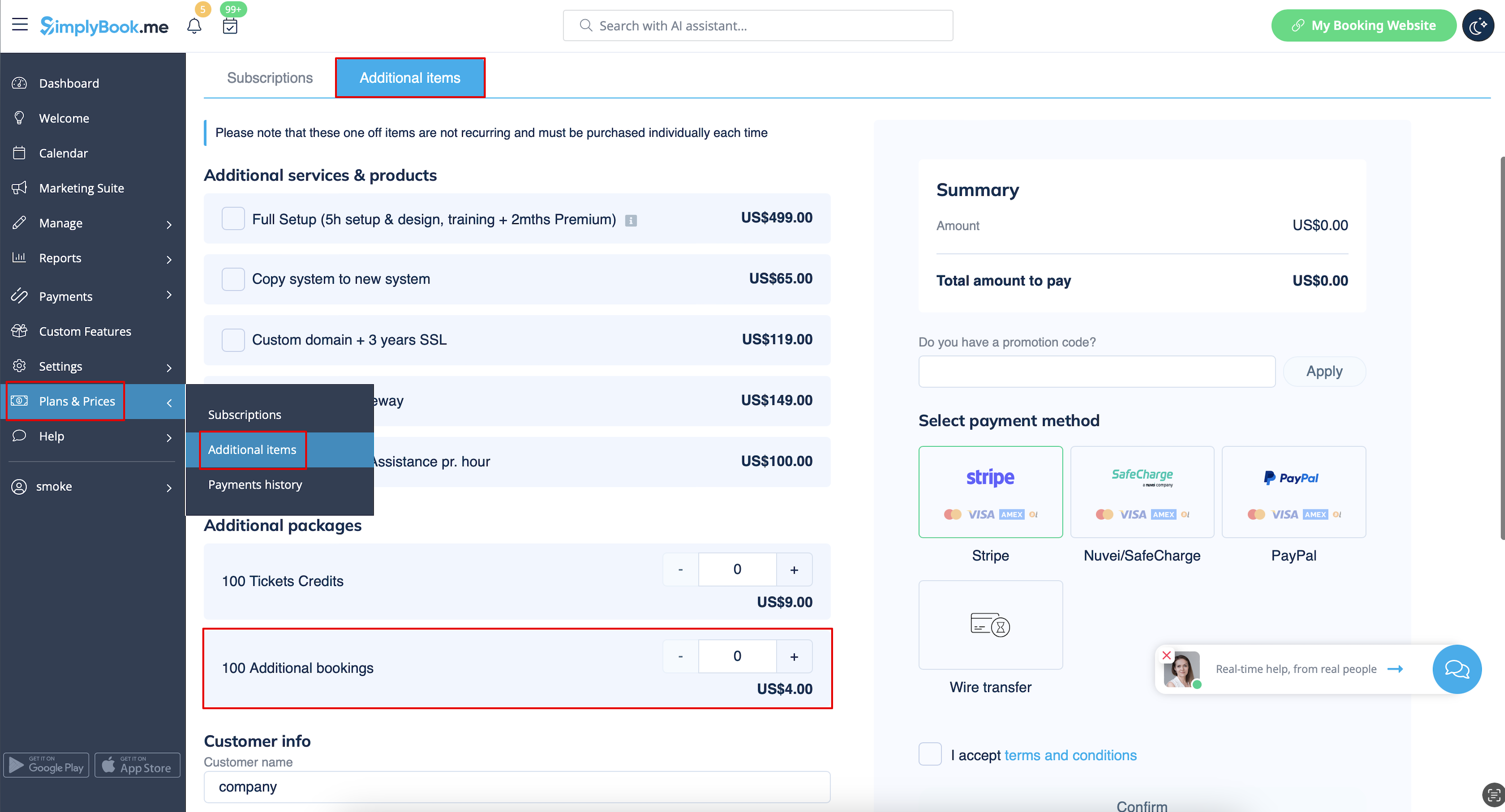
- Please note! Prices on the screenshot are only the example. Please check the pricing that applies to your account in Plans&Prices -> Additional items in your system.
