From SimplyBook.me
Created page with "<br> left" |
No edit summary |
||
| (2 intermediate revisions by 2 users not shown) | |||
| Line 2: | Line 2: | ||
{{#seo: | {{#seo: | ||
|title=Cancellation Policy custom feature - SimplyBook.me | |title=Cancellation Policy custom feature - SimplyBook.me | ||
|description=Définissez des | |description=Définissez des délais d’annulation avant les rendez-vous. Restreignez ou interdisez les annulations dans les X heures. Protégez les revenus contre les annulations de dernière minute. Fonction gratuite... | ||
|titlemode=append | |titlemode=append | ||
|keywords=faq, frequently asked questions, booking software, appointment system questions, appointments online, calendar software, booking system, booking calendar, scheduling software, online appointment scheduling, online scheduling, plugins, custom features, cancellations, prohibit booking cancellation, prohibit appointment cancellation, do not allow cancellations, set cancellation time, cancel booking, cancel appointment | |keywords=faq, frequently asked questions, booking software, appointment system questions, appointments online, calendar software, booking system, booking calendar, scheduling software, online appointment scheduling, online scheduling, plugins, custom features, cancellations, prohibit booking cancellation, prohibit appointment cancellation, do not allow cancellations, set cancellation time, cancel booking, cancel appointment | ||
| Line 11: | Line 11: | ||
[[File:Cancelation policy new icon.png|left]] | [[File:Cancelation policy new icon.png|left]] | ||
Vous pouvez limiter le délai pendant lequel les clients peuvent annuler leurs rendez-vous à l'aide de la fonctionnalité personnalisée « Politique d'annulation ». Il vous suffit de définir le nombre d'heures avant le rendez-vous pendant lequel l'annulation est possible ou d'interdire toute annulation. Si un client tente d'annuler un rendez-vous après le délai imparti, il verra s'afficher un message l'informant que la réservation ne peut pas être annulée. <br><br> | |||
<span style="background-color: #26dd7d; padding:5px; border-radius:5px;">Fonctionnalité personnalisée gratuite !</span> | |||
<span style="background-color: #26dd7d; padding:5px; border-radius:5px;"> | |||
<br><br> | <br><br> | ||
comment utiliser | |||
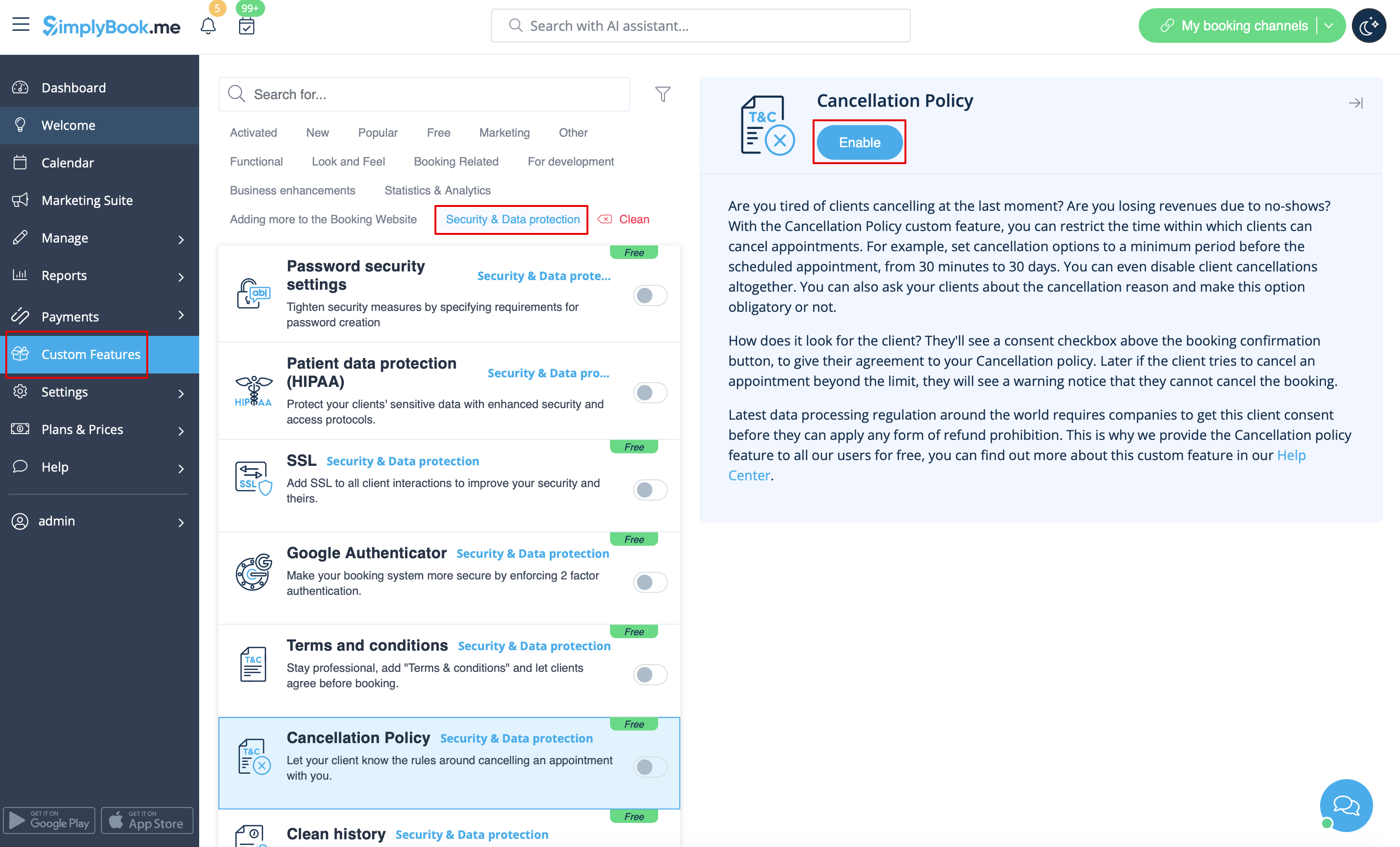
:1. Activez la fonctionnalité « Politique d'annulation » sur votre page « Fonctionnalités personnalisées ». | |||
:1. | |||
[[File:Cancellation policy enable path redesigned.png|1200px| center|link=https://help.simplybook.me/images/e/ec/Cancellation_policy_enable_path_redesigned.png]] | [[File:Cancellation policy enable path redesigned.png|1200px| center|link=https://help.simplybook.me/images/e/ec/Cancellation_policy_enable_path_redesigned.png]] | ||
<br><br> | <br><br> | ||
:2. | :2. Accédez à ses paramètres à droite. | ||
[[File:Cancellation poilicy settings path redesigned.png|1200px | center|link=https://help.simplybook.me/images/f/f9/Cancellation_poilicy_settings_path_redesigned.png]] | [[File:Cancellation poilicy settings path redesigned.png|1200px | center|link=https://help.simplybook.me/images/f/f9/Cancellation_poilicy_settings_path_redesigned.png]] | ||
<br><br> | <br><br> | ||
:3. | :3. Ajoutez votre texte dans le champ correspondant et sélectionnez la période pendant laquelle les réservations peuvent être annulées<br> | ||
:( | :(vous pouvez utiliser des balises HTML pour mettre en forme le texte selon vos besoins). | ||
<br> | <br> | ||
:4. | :4. Vous pouvez également demander à vos clients la raison de l'annulation et rendre cette option obligatoire ou non. | ||
<br><br> | <br><br> | ||
Latest revision as of 16:41, 5 February 2026

Vous pouvez limiter le délai pendant lequel les clients peuvent annuler leurs rendez-vous à l'aide de la fonctionnalité personnalisée « Politique d'annulation ». Il vous suffit de définir le nombre d'heures avant le rendez-vous pendant lequel l'annulation est possible ou d'interdire toute annulation. Si un client tente d'annuler un rendez-vous après le délai imparti, il verra s'afficher un message l'informant que la réservation ne peut pas être annulée.
Fonctionnalité personnalisée gratuite !
comment utiliser
- 1. Activez la fonctionnalité « Politique d'annulation » sur votre page « Fonctionnalités personnalisées ».
- 2. Accédez à ses paramètres à droite.
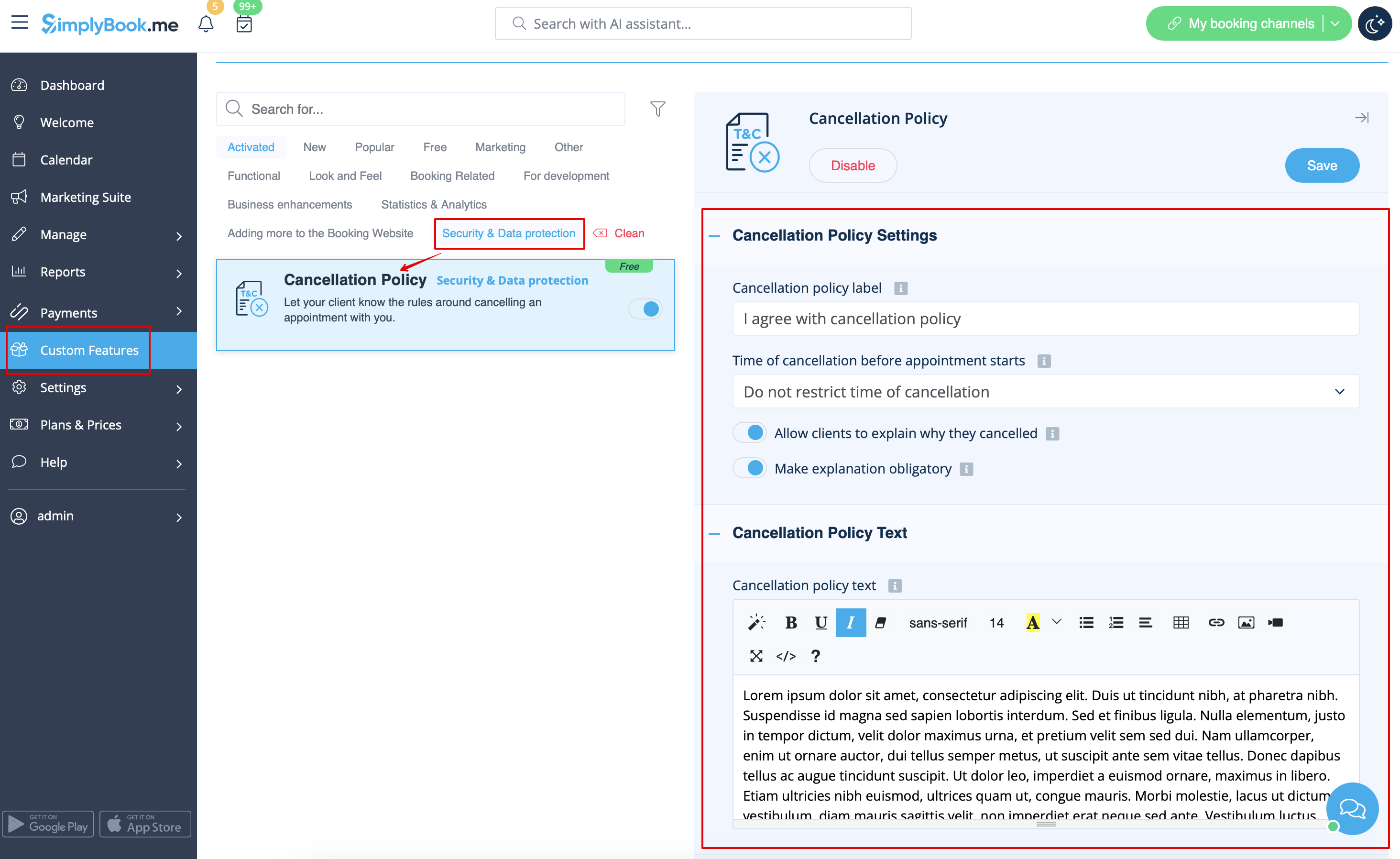
- 3. Ajoutez votre texte dans le champ correspondant et sélectionnez la période pendant laquelle les réservations peuvent être annulées
- (vous pouvez utiliser des balises HTML pour mettre en forme le texte selon vos besoins).
- 4. Vous pouvez également demander à vos clients la raison de l'annulation et rendre cette option obligatoire ou non.
