No edit summary |
No edit summary |
||
| (2 intermediate revisions by 2 users not shown) | |||
| Line 1: | Line 1: | ||
<languages/> | <languages/> | ||
{{#seo: |title=Widgets pour votre propre site web - SimplyBook.me |description= | {{#seo: |title=Widgets pour votre propre site web - SimplyBook.me |description=Intégrez des widgets de réservation sur n’importe quel site web. Générez un code iframe et personnalisez l’apparence. Widgets bouton, popup ou intégrés. Fonctionne avec WordPress, Shopify et Joomla.|titlemode=ajouter |keywords=faq, foire aux questions, logiciel de réservation, questions sur le système de rendez-vous, rendez-vous en ligne, logiciel de calendrier, système de réservation, calendrier de réservation, logiciel de planification, planification de rendez-vous en ligne, planification en ligne, widget, widgets, intégration, intégration de site web, widgets de site web, widgets pour site web }} | ||
| Line 105: | Line 105: | ||
<br><br> | <br><br> | ||
= Widget de réservation et de contact = | = Widget de réservation et de contact = | ||
<br><br> | <br><br> | ||
:1. Activez <span style="background-color:#cdeffc; padding:5px; border-radius:5px;">[[ | :1. Activez <span style="background-color:#cdeffc; padding:5px; border-radius:5px;">[[Special:MyLanguage/Contact_Widget_custom_feature |le widget Contact]]</span> dans <span style="background-color:#d4f8e5; padding:5px; border-radius:5px;">Fonctionnalités personnalisées</span> -> <span style="background-color:#d4f8e5; padding:5px; border-radius:5px;">Pour le développement</span>. | ||
[[File:Contact widget enable path redesigned.png|1200px| center|link=https://help.simplybook.me/images/8/8c/Contact_widget_enable_path_redesigned.png]] | [[File:Contact widget enable path redesigned.png|1200px| center|link=https://help.simplybook.me/images/8/8c/Contact_widget_enable_path_redesigned.png]] | ||
<br><br> | <br><br> | ||
| Line 114: | Line 113: | ||
[[File:Contact widget settings path redesigned.png|1200px|border| center|link=https://help.simplybook.me/images/0/09/Contact_widget_settings_path_redesigned.png]] | [[File:Contact widget settings path redesigned.png|1200px|border| center|link=https://help.simplybook.me/images/0/09/Contact_widget_settings_path_redesigned.png]] | ||
<br><br> | <br><br> | ||
[[File:Contact widget design path redesigned.png|1200px|border|center|link=https://help.simplybook.me/images/7/74/Contact_widget_design_path_redesigned.png]] | [[File:Contact widget design path redesigned.png|1200px|border|center|link=https://help.simplybook.me/images/7/74/Contact_widget_design_path_redesigned.png]] | ||
<br><br> | <br><br> | ||
Latest revision as of 20:08, 9 February 2026
- Pourquoi utiliser nos widgets
- Tutoriel vidéo disponible
widget iFrame
- 1. Copiez le code iFrame de votre page de réservation dans Paramètres -> Paramètres des widgets de réservation -> Widget iFrame -> Obtenir le code du widget.

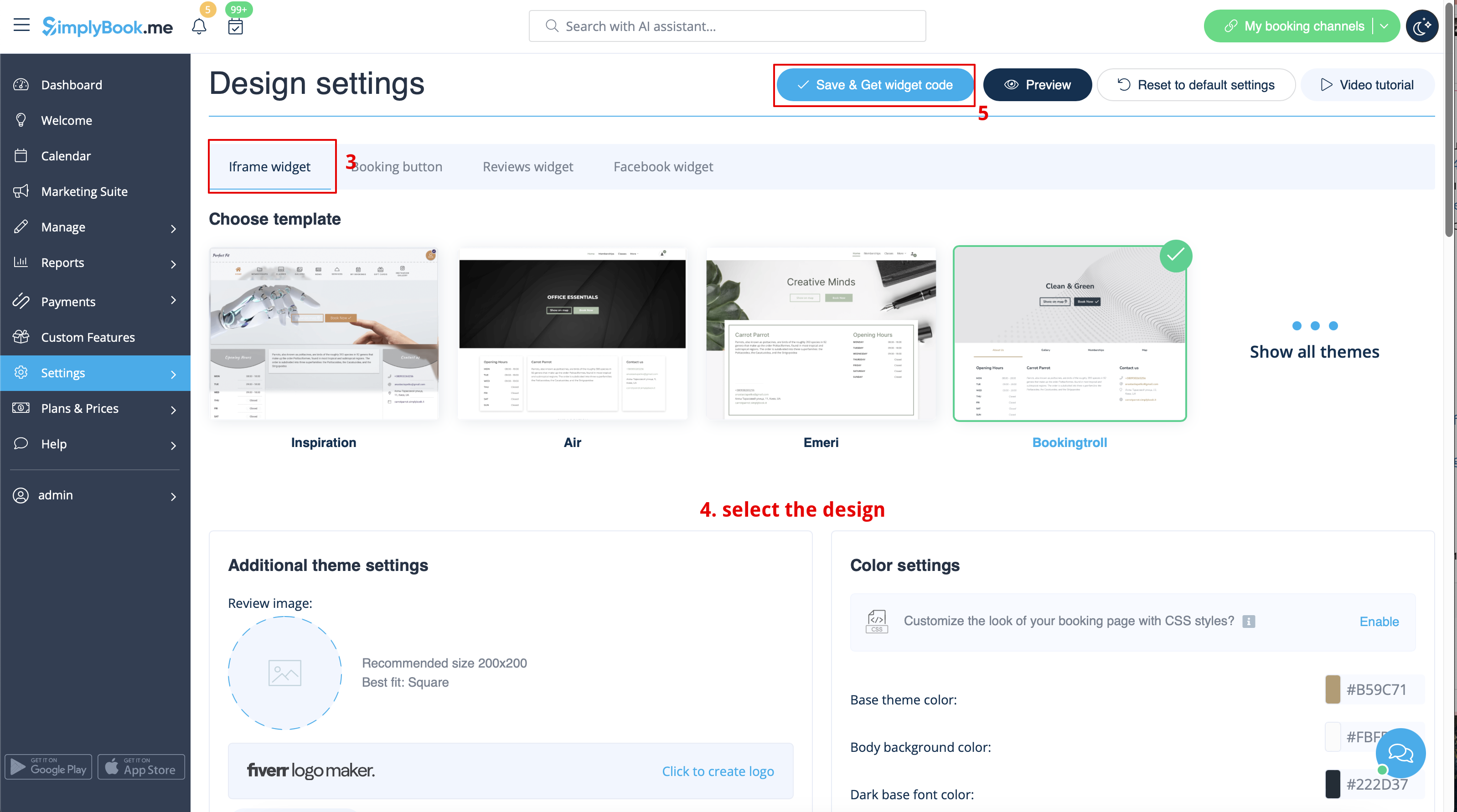

- 2. Insérez-le dans le code HTML <body> de votre site web (ou à tout autre endroit de votre plateforme web conçu pour insérer du code HTML JavaScript iFrame).
Remarque : les différents créateurs/plateformes de sites web peuvent avoir différentes façons d'ajouter du code HTML. Vous devez d'abord vérifier si votre site web prend en charge l'insertion de code HTML JavaScript.
- Voici des tutoriels pour plusieurs créateurs de sites web populaires :
Widgets avec service, fournisseur, catégorie ou emplacement prédéfinis
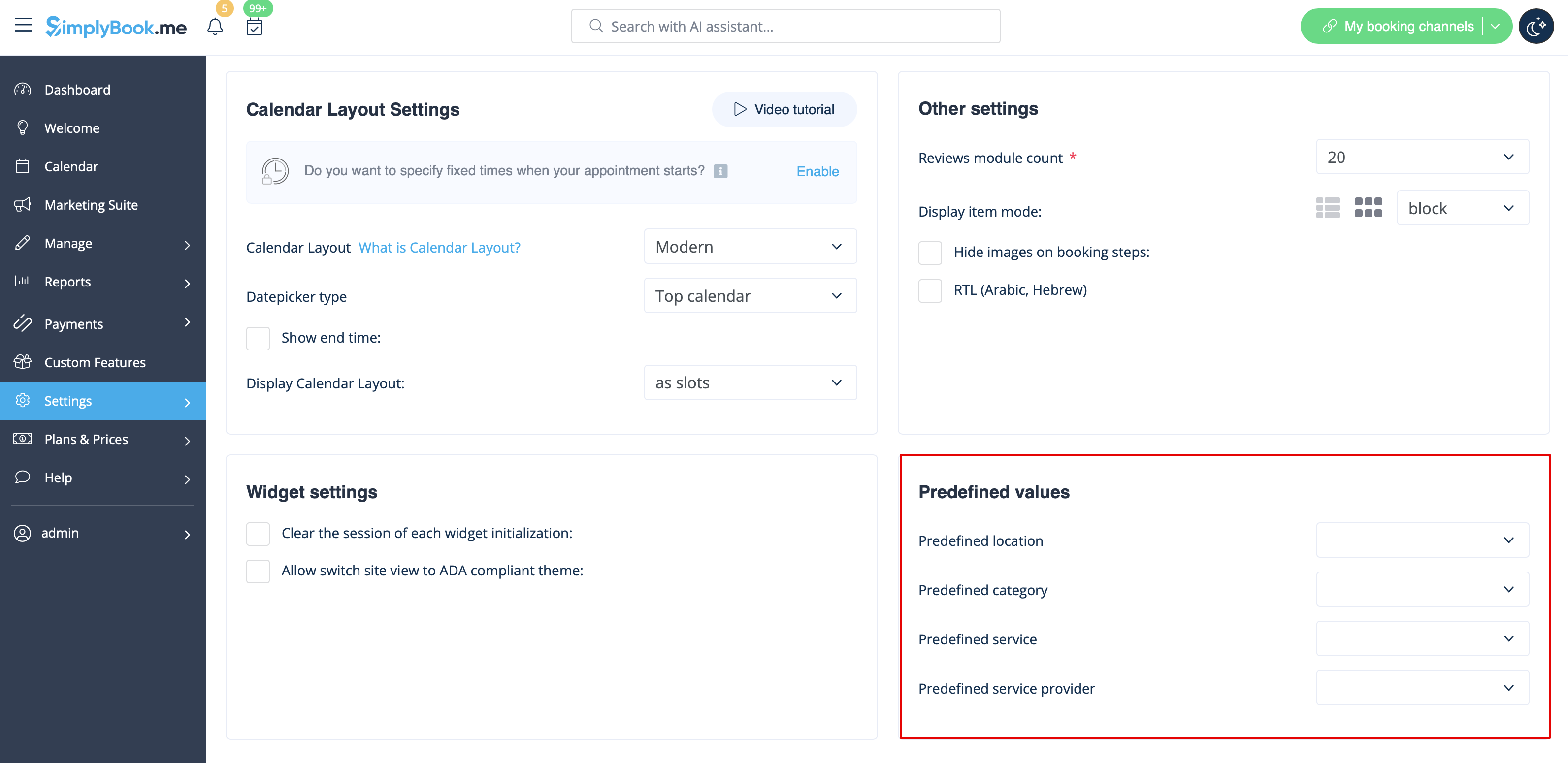
Cette fonctionnalité vous permet de générer un code iframe spécifique pour un service, un fournisseur, une catégorie ou un emplacement. Par exemple, si vous avez deux services A et B et que vous choisissez le service A comme prédéfini, le widget s'ouvrira sur ce service, en ignorant l'étape de sélection du service. Cette fonctionnalité peut être utile si vous souhaitez afficher uniquement certains services sur une page spécifique de votre site web. Les étapes pour générer le code sont les mêmes que ci-dessus, sauf que dans les paramètres du widget, vous devez choisir l'élément que vous souhaitez prédéfinir.
Widgets avec les coordonnées prédéfinies du client
Vous pouvez désormais créer un widget pour un client particulier avec ses coordonnées déjà renseignées.
- 1. Il vous suffit de sélectionner le type de widget dont vous avez besoin dans Paramètres -> Paramètres des widgets de réservation, de définir le design et de cliquer sur Obtenir le code du widget.
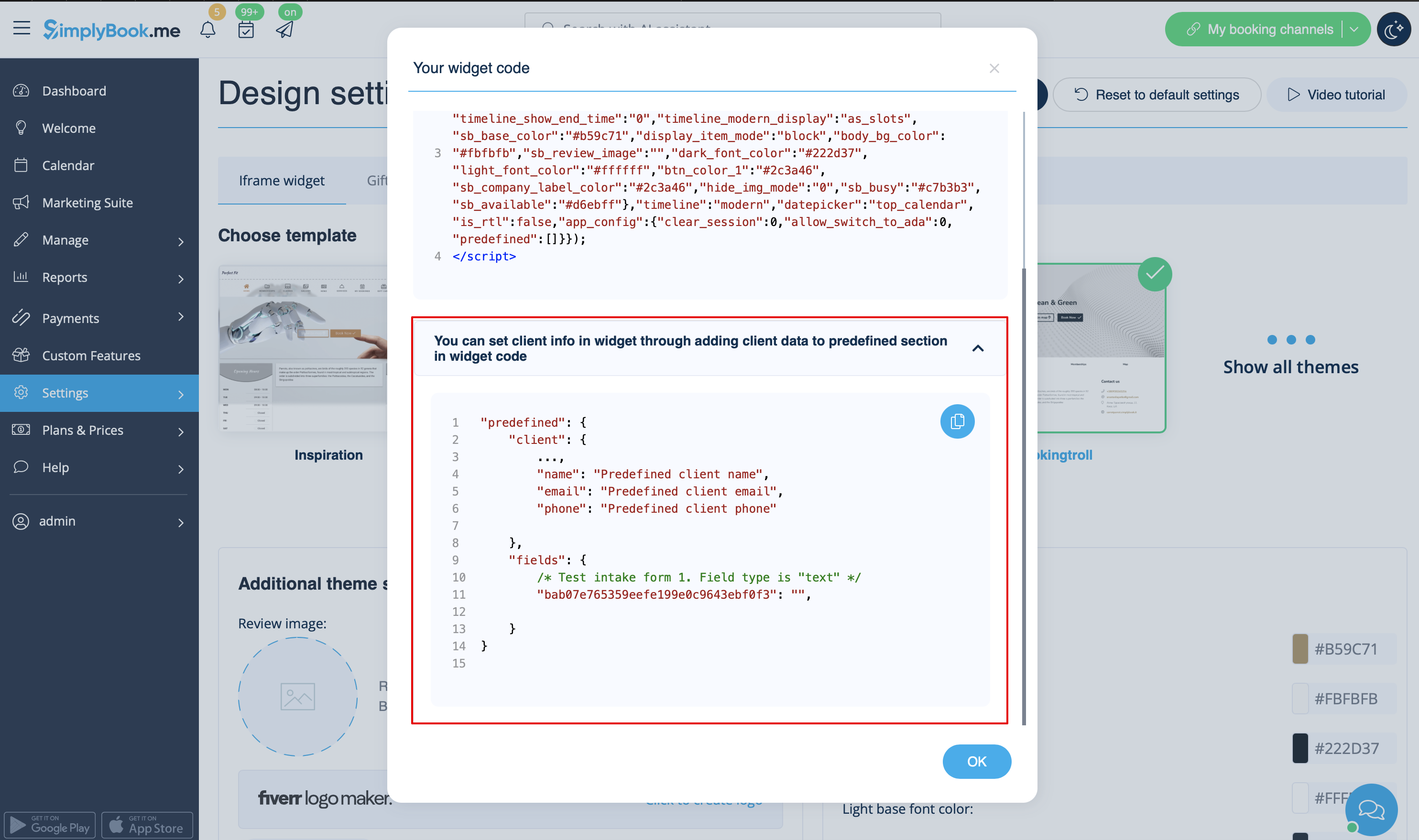
- 2. Une fenêtre contextuelle contenant le code s'affiche. Cliquez sur la partie inférieure pour obtenir les détails du code client.
- Veuillez copier le code principal, ajouter la partie inférieure (à la section prédéfinie) et remplacer le nom du client prédéfini, l'adresse e-mail du client prédéfinie et le numéro de téléphone du client prédéfini par les informations client nécessaires.
- 3. Vous obtiendrez le code suivant :
<script src="//simplybook.me/v2/widget/widget.js"></script>
<script>var widget = new SimplybookWidget({"widget_type":"iframe","url":"https:\/\/companyname.simplybook.me","theme":"belle","theme_settings":{"sb_base_color":"#FF6969","body_bg_color":"#ffffff","dark_font_color":"#494949","light_font_color":"#ffffff","sb_busy":"#dad2ce","sb_available":"#d3e0f1"},"timeline":"flexible","datepicker":"top_calendar","is_rtl":false,"app_config":{"predefined": {"client": {

"name": "Mary",

"email": "mary@gmail.com",

"phone": "+1234567890"

}}
}});</script>
- 4. Ainsi, les informations relatives à ce client seront préremplies dans le widget et le client n'aura pas besoin de les fournir.

Widgets pour la connexion des clients, les forfaits, les abonnements, les cartes-cadeaux
Remarque : cette fonctionnalité ne fonctionne actuellement qu'avec les widgets iFrame et ne fonctionne pas avec les widgets de bouton de réservation et de bouton de contact.
Si vous utilisez une ou plusieurs de ces fonctionnalités, il peut être nécessaire d'ajouter un widget qui permettra à vos clients d'utiliser cette option sur votre site web.
Cela peut être fait de manière simple en ajoutant l'élément « navigate » correspondant au code du widget :
- Connexion client - « navigate » : « client/sign-in »
- Forfaits - « navigate » : « packages »
- Adhésions - « navigate » : « membership »
- Cartes-cadeaux - « navigate » : « gift-card »
Exemple de code du widget Cartes cadeaux:
<script src="//simplybook.it/v2/widget/widget.js"></script>
<script>var widget = new SimplybookWidget({"widget_type":"iframe","url":"https:\/\/demo.simplybook.it","navigate":"gift-card","theme":"default","theme_settings":{"timeline_show_end_time":"0","timeline_modern_display":"as_slots","sb_base_color":"#0cadef","display_item_mode":"block","booking_nav_bg_color":"#80d0f2","body_bg_color":"#f7f7f7","dark_font_color":"#494949","light_font_color":"#ffffff","btn_color_1":"#5e7da7","sb_company_label_color":"#ffffff","hide_img_mode":"0","show_sidebar":"1","sb_busy":"#dad2ce","sb_available":"#0cadef"},"timeline":"modern","datepicker":"inline_datepicker","is_rtl":false,"app_config":{"predefined":[]}});</script>
Widget Bouton de réservation
- 1. Copiez le code du bouton de réservation de votre page de réservation dans Paramètres -> Paramètres du widget de réservation -> Bouton de réservation -> Obtenir le code du widget.
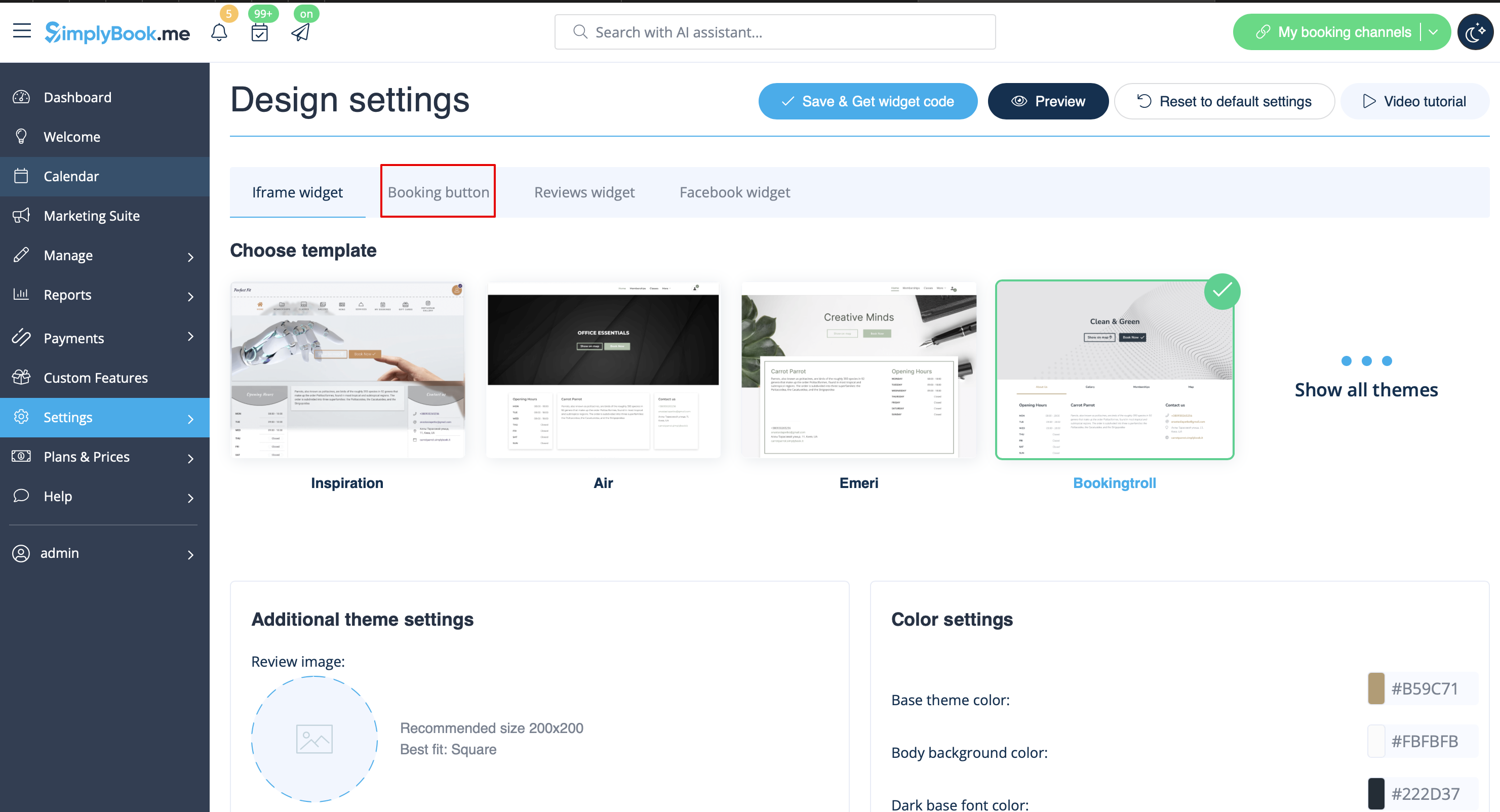
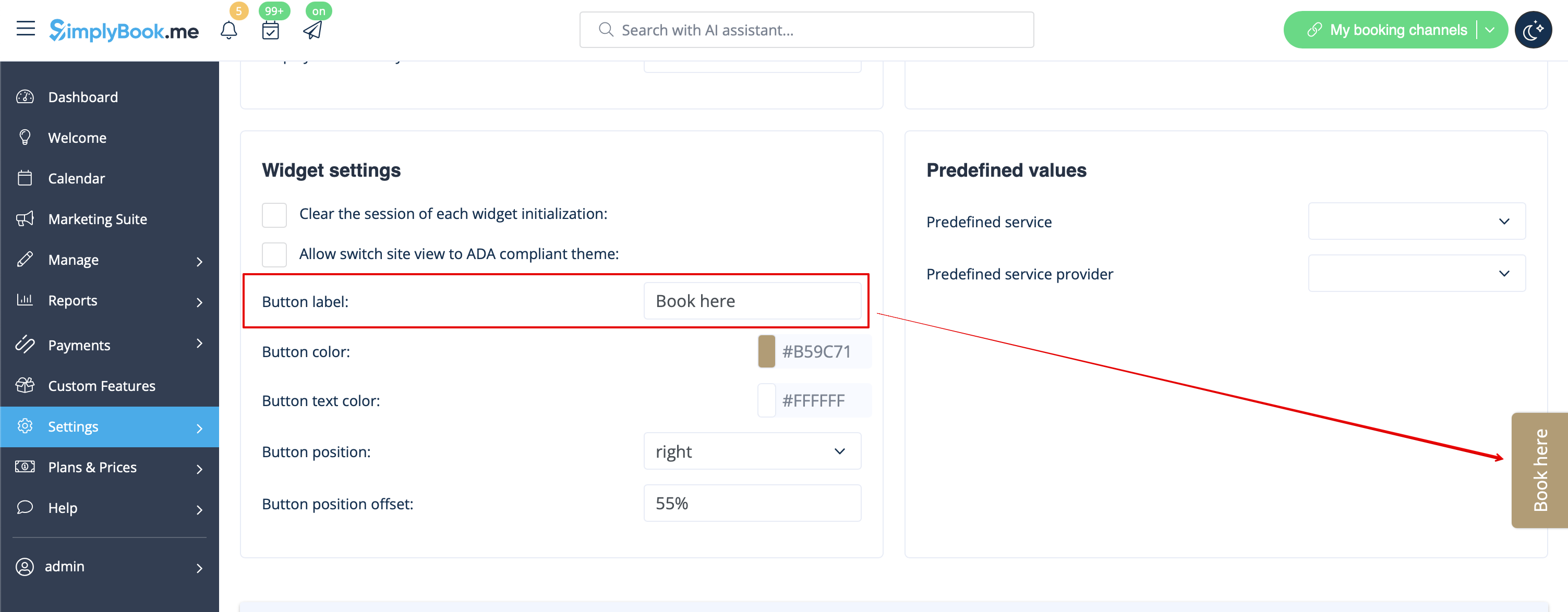
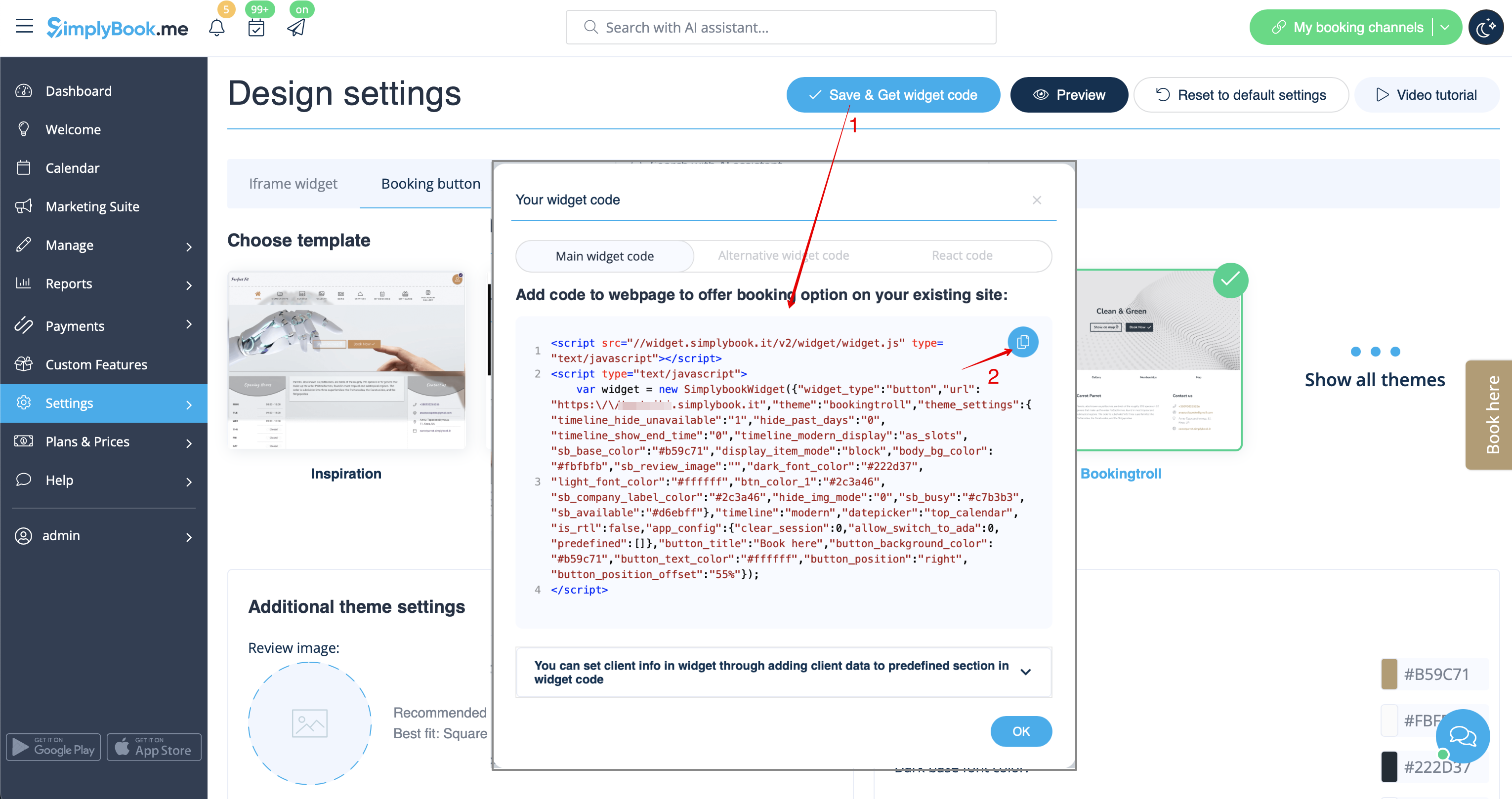
- 2. Insérez-le dans le code HTML <body> de votre site web (ou à tout autre endroit de votre plateforme web conçu pour insérer du code HTML JavaScript iFrame).
Remarque : différents créateurs/plateformes de sites web peuvent avoir différentes façons d'ajouter du code HTML. Vous devez d'abord vérifier si votre site web prend en charge l'insertion de code HTML JavaScript.
- Voici des tutoriels pour plusieurs créateurs de sites web populaires :
- Widgets avec service, fournisseur, catégorie ou emplacement prédéfini.
Cette fonctionnalité vous permet de générer un code iframe spécifique au service, au fournisseur, à la catégorie ou à l'emplacement dont vous disposez. Par exemple, si vous avez deux services A et B et que vous choisissez le service A comme prédéfini, le widget s'ouvrira sur ce service, en ignorant l'étape de sélection du service. Cette fonctionnalité peut être utile si vous souhaitez afficher uniquement certains services sur une page spécifique de votre site web. Les étapes pour générer le code sont les mêmes que ci-dessus, sauf que dans les paramètres du widget, vous devez choisir l'élément que vous souhaitez prédéfinir.
Widget de réservation et de contact
- 1. Activez le widget Contact dans Fonctionnalités personnalisées -> Pour le développement.
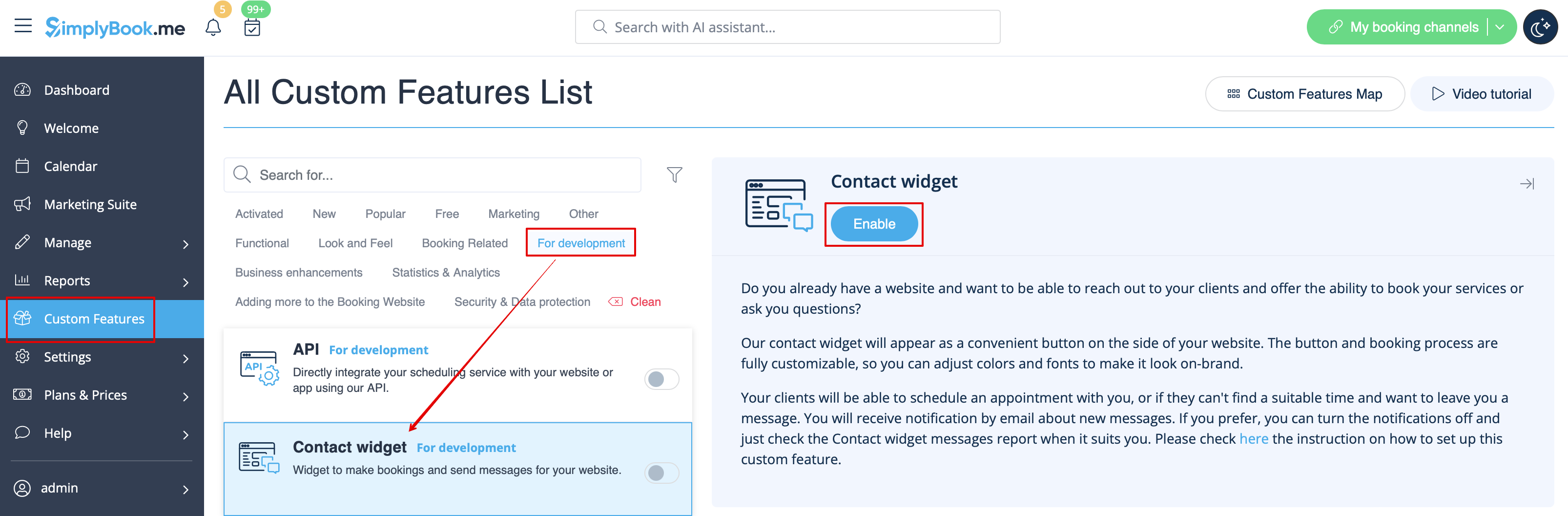
- 2. Copiez le code du bouton de réservation de votre page de réservation en accédant à Paramètres à côté de cette fonctionnalité personnalisée ou dans Paramètres dans le menu de gauche -> Paramètres des widgets de réservation -> Widget Contact -> Obtenir le code du widget.
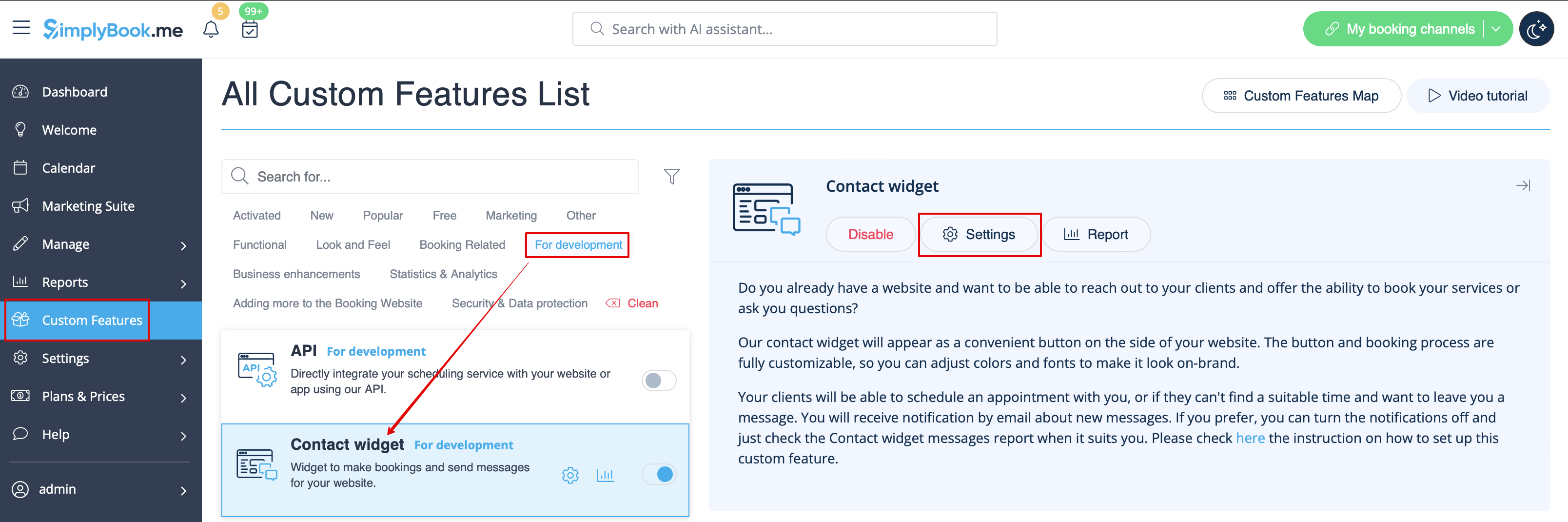
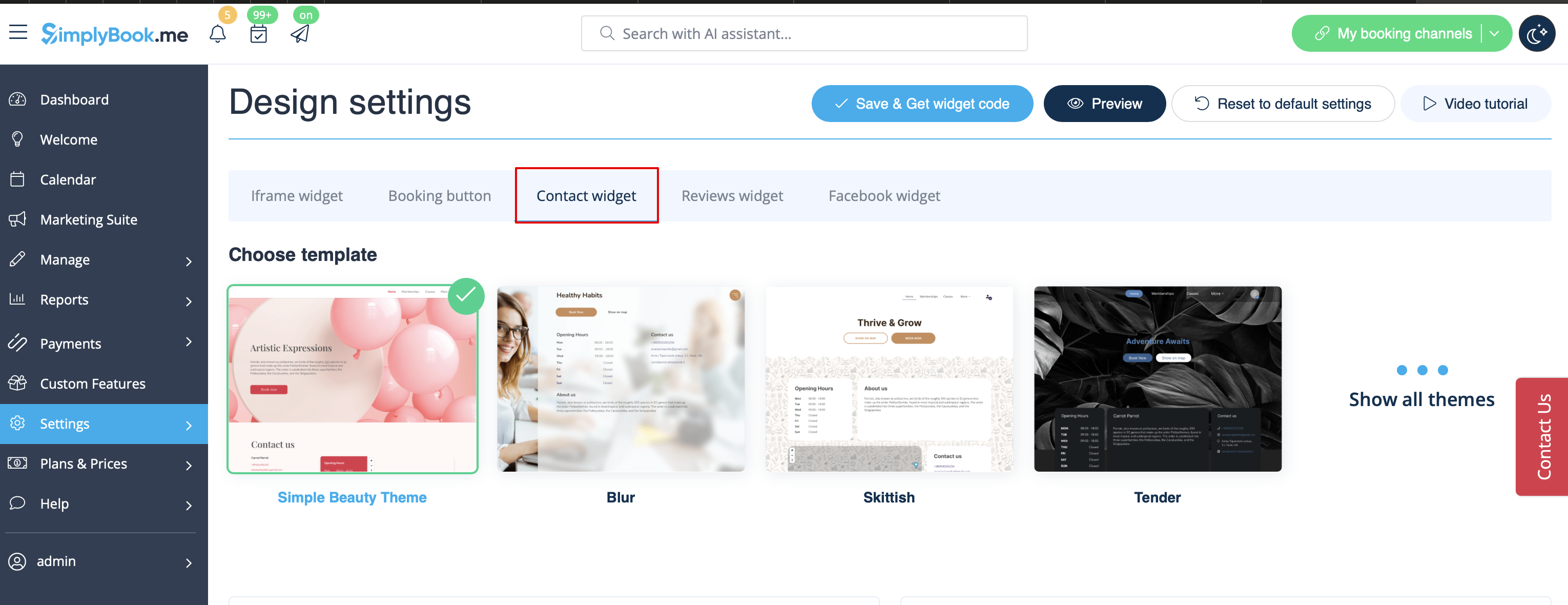
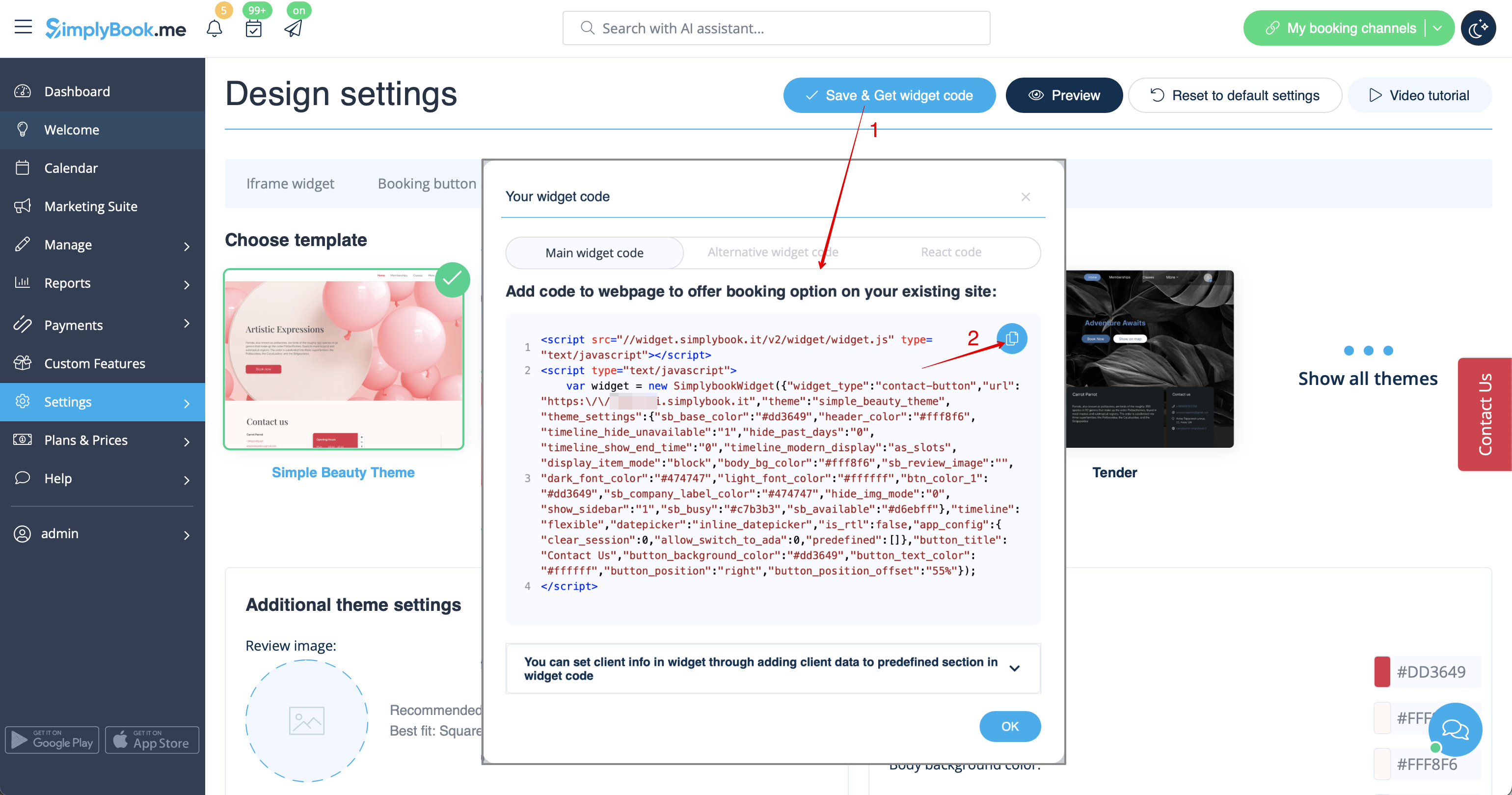
- 3. Insérez-le dans le code HTML <body> de votre site web (ou à tout autre endroit de votre plateforme web conçu pour insérer du code HTML JavaScript iFrame).
Remarque : les différents créateurs/plateformes de sites web peuvent avoir différentes méthodes pour ajouter du code HTML. Vérifiez d'abord si votre site web prend en charge l'insertion de code HTML JavaScript.
- Voici des tutoriels pour plusieurs créateurs de sites web populaires :
Widget d'avis
Vous souhaitez ajouter à votre site web les avis laissés par vos clients sur la page de réservation ?
Il vous suffit de suivre ces instructions :
- 1. Veuillez vous rendre dans Paramètres -> Paramètres des widgets de réservation -> Widget Avis.
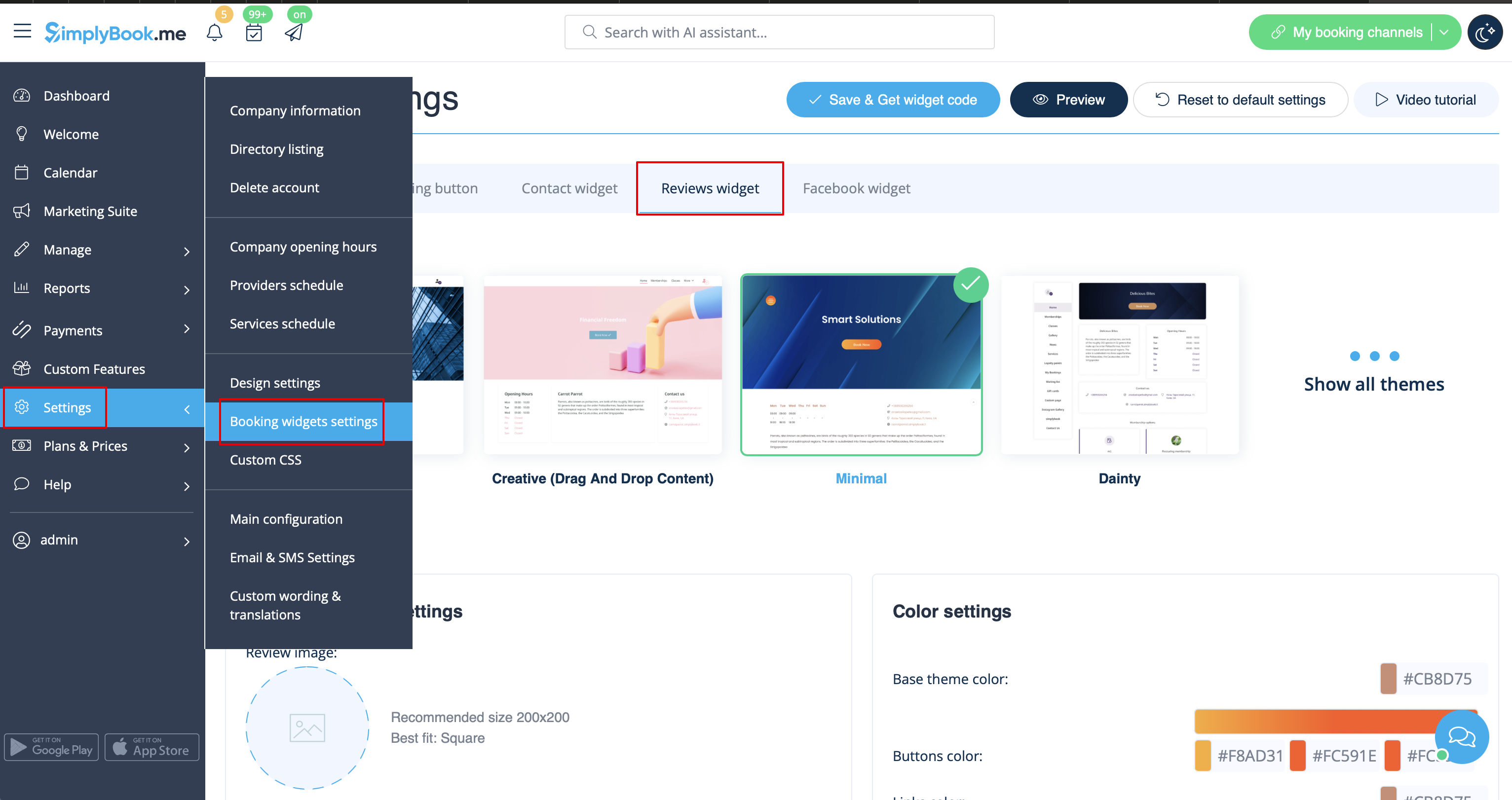
- 2. Sur cette page, vous pourrez sélectionner le thème, définir les couleurs, choisir le nombre d'avis que vous souhaitez afficher et décider si vous souhaitez que vos clients puissent ajouter des avis à l'aide du widget.
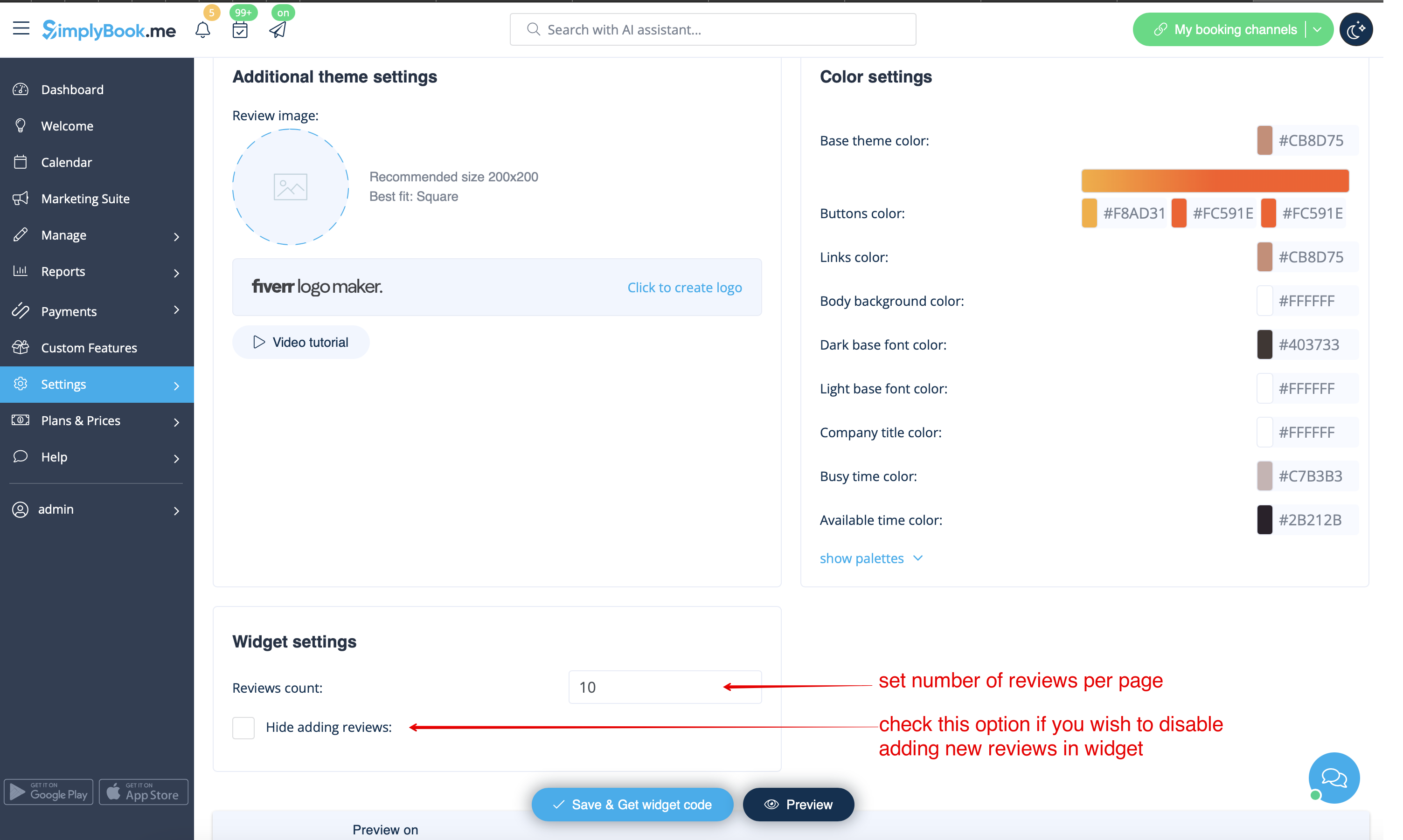
- 3. Une fois le design défini, cliquez simplement sur le bouton Obtenir le code du widget, copiez le code et insérez-le à l'endroit souhaité sur votre site web.
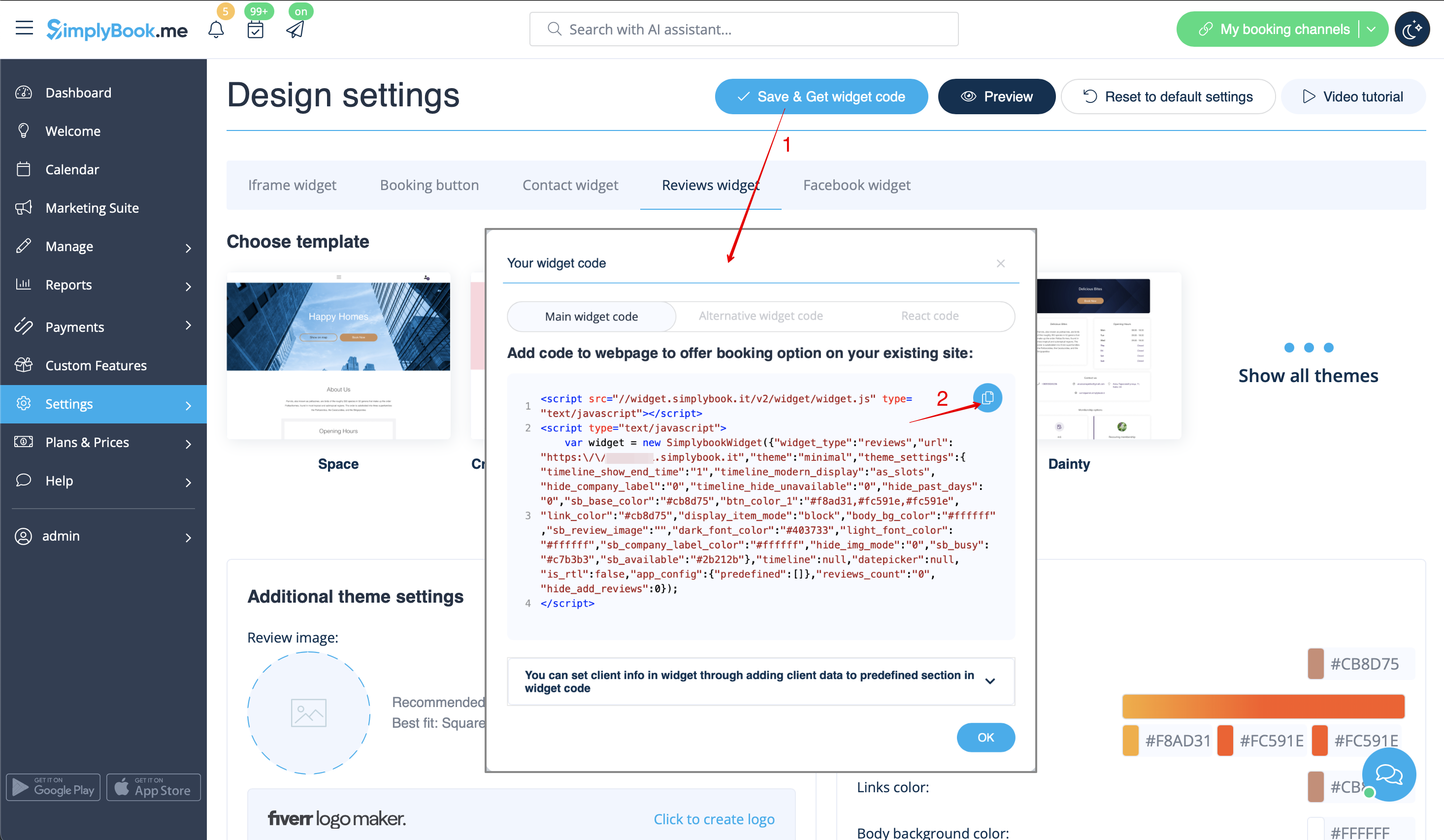
Félicitations ! Le widget est maintenant prêt, vos avis seront publiés et mis à jour sur votre site web !
