Created page with "=SimplyBook.me-Termin wird doppelt im Google-Kalender angezeigt= Dies kann an der Google-Kalendereinstellung liegen, die automatisch Ereignisse aus Ihren E-Mails hinzufügt. Wenn Sie also Bestätigungs-E-Mails mit Buchungsdetails erhalten, fügt Google diese automatisch zu Ihrem Kalender hinzu. Um diese Option zu deaktivieren: Klicken Sie auf das Symbol "Einstellungen" oben rechts im Google-Kalender // "Einstellungen" und entfernen Sie das Häkchen bei der Option „E..." |
No edit summary |
||
| (One intermediate revision by the same user not shown) | |||
| Line 2: | Line 2: | ||
{{#seo: | {{#seo: | ||
|title= Calendar Sync custom feature - SimplyBook.me | |title= Calendar Sync custom feature - SimplyBook.me | ||
|description= | |description=Bidirektionale Synchronisation mit Google und Outlook. Buchungen exportieren, Ereignisse importieren. Doppelbuchungen vermeiden. | ||
|titlemode=append | |titlemode=append | ||
|keywords=faq, frequently asked questions, booking software, appointment system questions, appointments online, calendar software, booking system, booking calendar, scheduling software, online appointment scheduling, online scheduling, plugins, custom features, calendar synchronization, sync with google calendar, sync with outlook calendar, 2-way sync, 2-way synchronization, sync bookings, sync appointments | |keywords=faq, frequently asked questions, booking software, appointment system questions, appointments online, calendar software, booking system, booking calendar, scheduling software, online appointment scheduling, online scheduling, plugins, custom features, calendar synchronization, sync with google calendar, sync with outlook calendar, 2-way sync, 2-way synchronization, sync bookings, sync appointments | ||
Latest revision as of 15:36, 17 February 2026

Die individuelle Funktion "Kalendersynchronisation" wird für die 2-Wege-Synchronisation mit Google- und Outlook-Kalendern verwendet. Sie können Buchungen aus SimplyBook in Google- oder Outlook-Kalender exportieren und auch Zeiten, die von Google/Outlook-Kalender-Ereignissen belegt sind, in Ihrem SimplyBook-Dashboard blockieren.
Bitte beachten Sie
- diese Funktion nur mit Web-Kalendern funktioniert - sie funktioniert möglicherweise nicht mit Microsoft Exchange-Kalendern.
- wenn die benutzerdefinierte Funktion Verbleibende Plätze anzeigen aktiviert ist, hat die durch die Kalendersynchronisierung blockierte Zeit keinen Einfluss auf die Anzahl der angezeigten Zeitfenster.
- Video-Tutorial verfügbar
Wie funktioniert es?
1. Aktivieren Sie die Funktion Kalender Synchronisierung im Abschnitt Individuelle Funktionen.
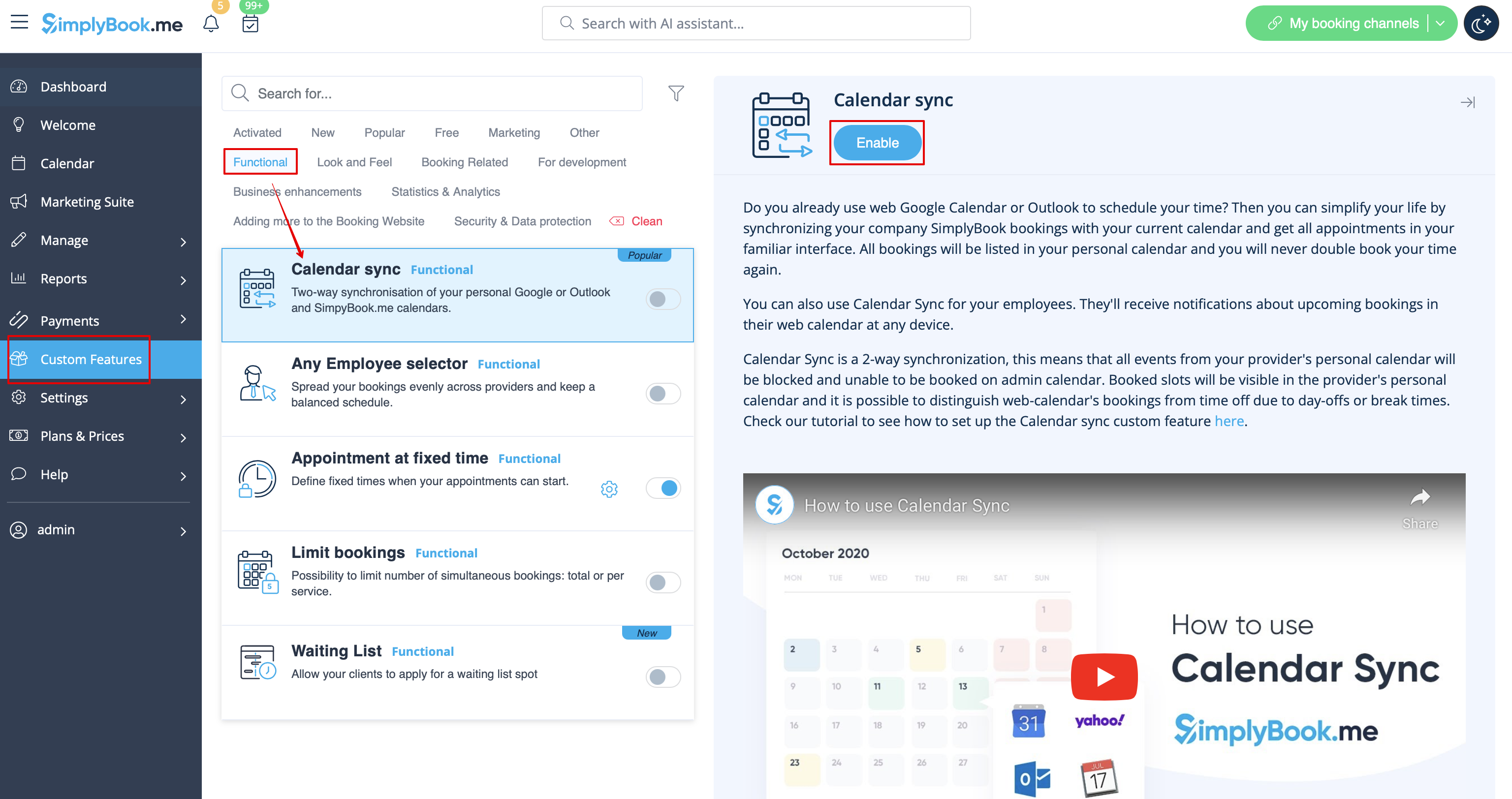
2. Wählen Sie "Einstellungen" neben dieser Option.
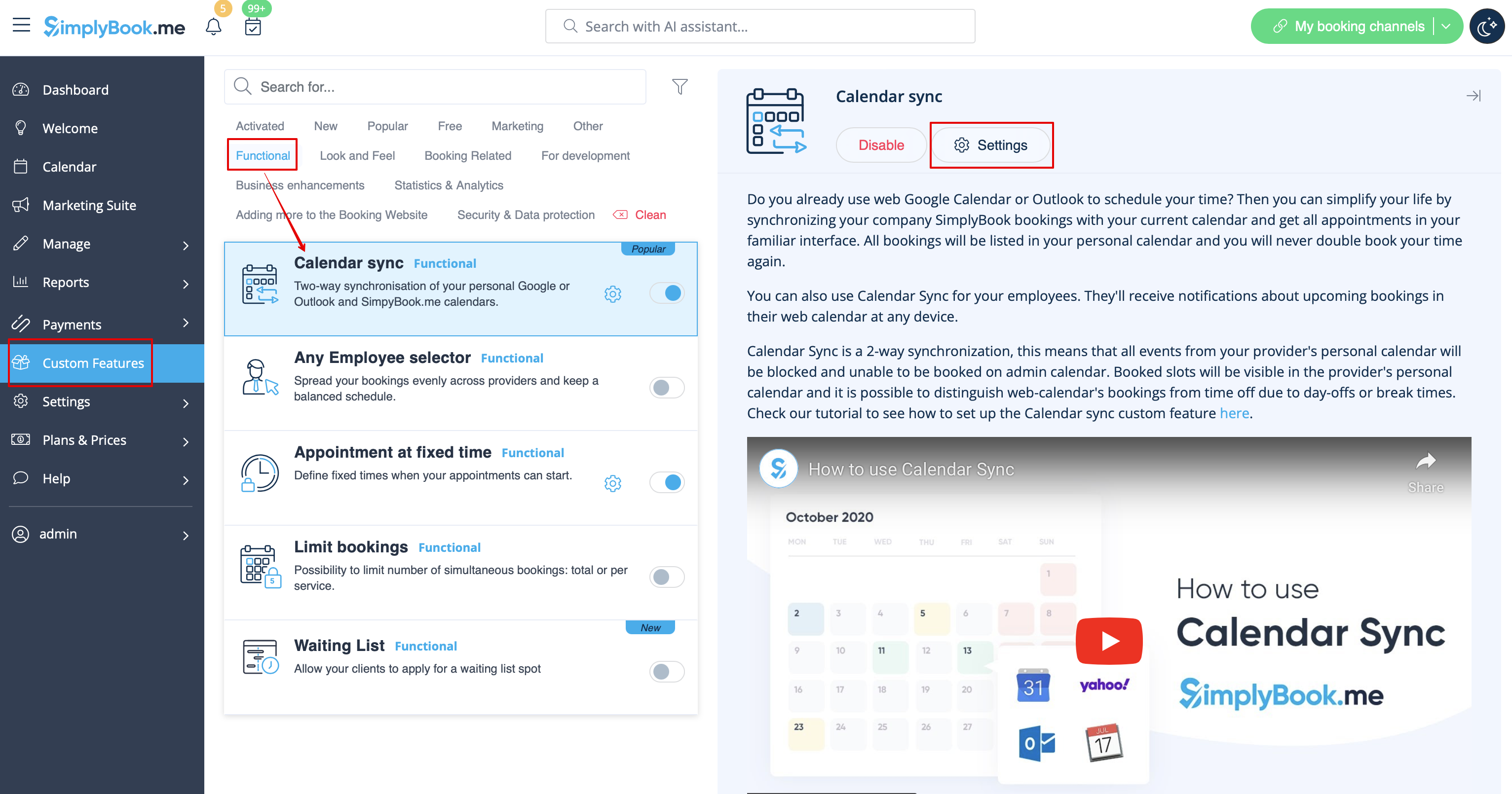
3. Klicken Sie auf "Neuen Kalender verbinden" und verbinden Sie ein Google- oder Outlook-Konto.
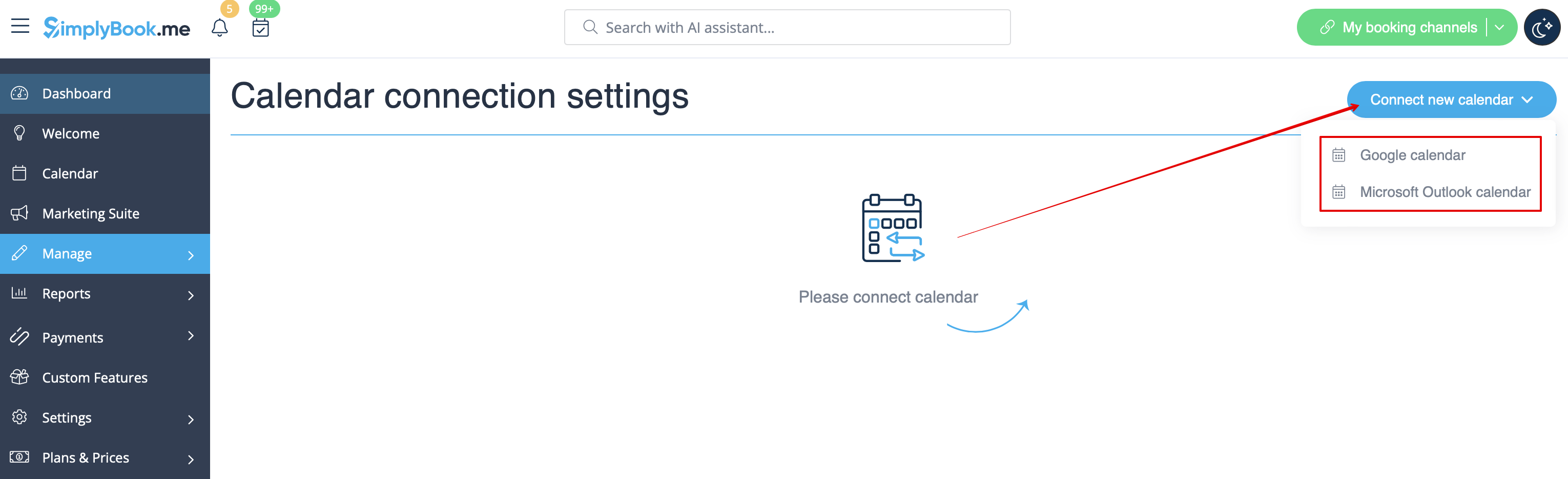
4. Wählen Sie den gewünschten Kalender aus und verbinden Sie die erforderlichen Anbieter mit ihm.
5. Drücken Sie auf "Exportieren", um Ihre alten Buchungen in den Google- oder Outlook-Kalender zu exportieren, damit der Synchronisierungsprozess beginnen kann.
6. Aktivieren Sie das Kästchen "sync busy time", wenn Sie die Zeiten im SimplyBook-Dashboard blockieren möchten, die von Google/Outlook-Kalender-Events belegt sind.
(nur Google-Kalender) Aktivieren Sie "Google Meet Link erstellen", wenn Sie möchten, dass das System Google Meet-Konferenzen für Termine erstellt und Einladungen an Ihre Kunden sendet.
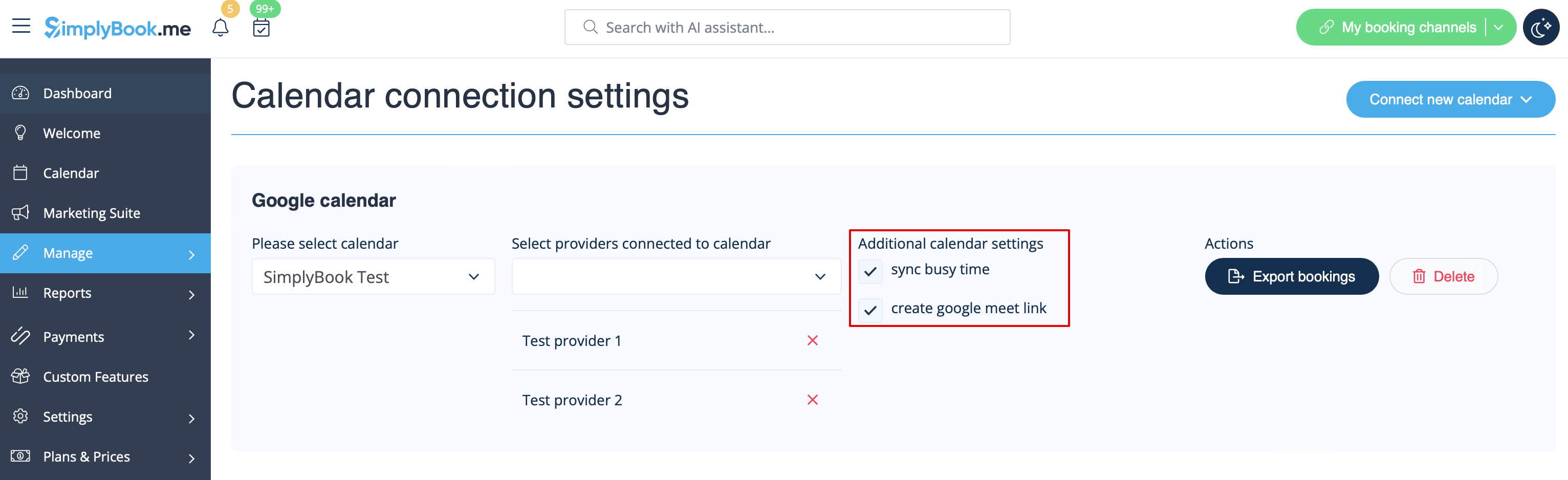
Bitte beachten Sie, dass, wenn "sync busy time" aktiviert ist und Sie Ihren Anbieter so eingestellt haben, dass er mehr als einen Kunden gleichzeitig annimmt, es nicht möglich ist, mehr als eine Buchung vorzunehmen, da die Buchung als "busy time" zu Google/Outlook exportiert wird und diese Zeit für die Buchung blockiert wird.
Wenn Sie mehr als eine Buchung zur gleichen Zeit für Ihren Anbieter akzeptieren müssen, deaktivieren Sie bitte das Kontrollkästchen "sync busy time".
7. Sie können die Google/Outlook-Kalender Ereignisse, die die Zeit in SimplyBook blockieren, nur in der Ansicht "Dienstleister" im Kalender sehen (weil Sie den Kalender mit dem Anbieter verbinden). In der Tages- und Wochenansicht wird nichts angezeigt, da diese Ansichten für alle Anbieter gelten (wenn Sie mehrere Anbieter haben, wäre es unmöglich, alle Google/Outlook-Ereignisse in einem Kalender anzuzeigen).
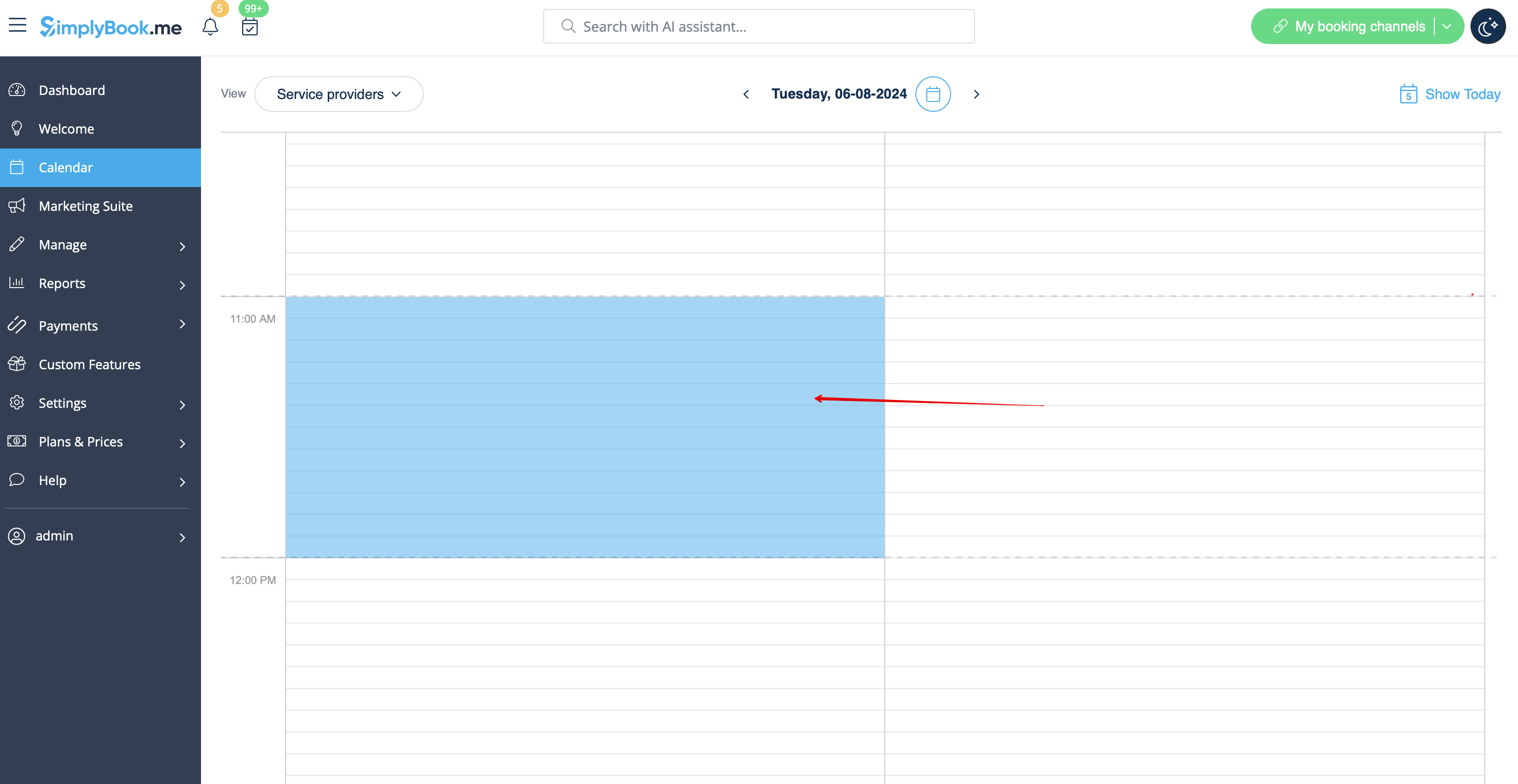
Bitte beachten Sie, dass während des Synchronisierungsprozesses keine Ereignisdetails aus Ihrem externen Kalender importiert werden. Die Ereignisse werden nur durch blaue Blöcke auf der Kalenderseite dargestellt.
Simplybook synchronisiert sich nicht mit dem Google/Outlook-Kalender
Mögliche Gründe:
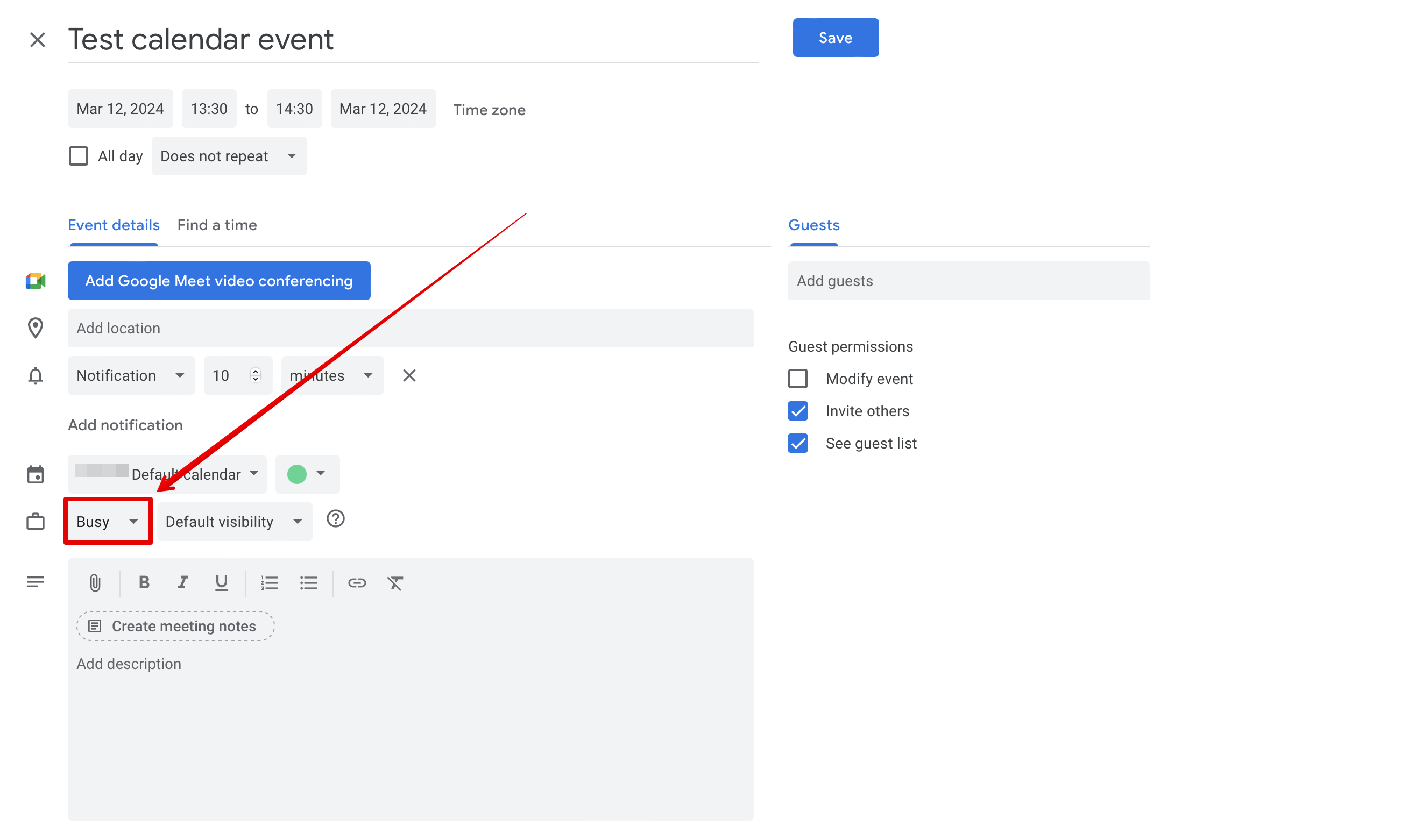
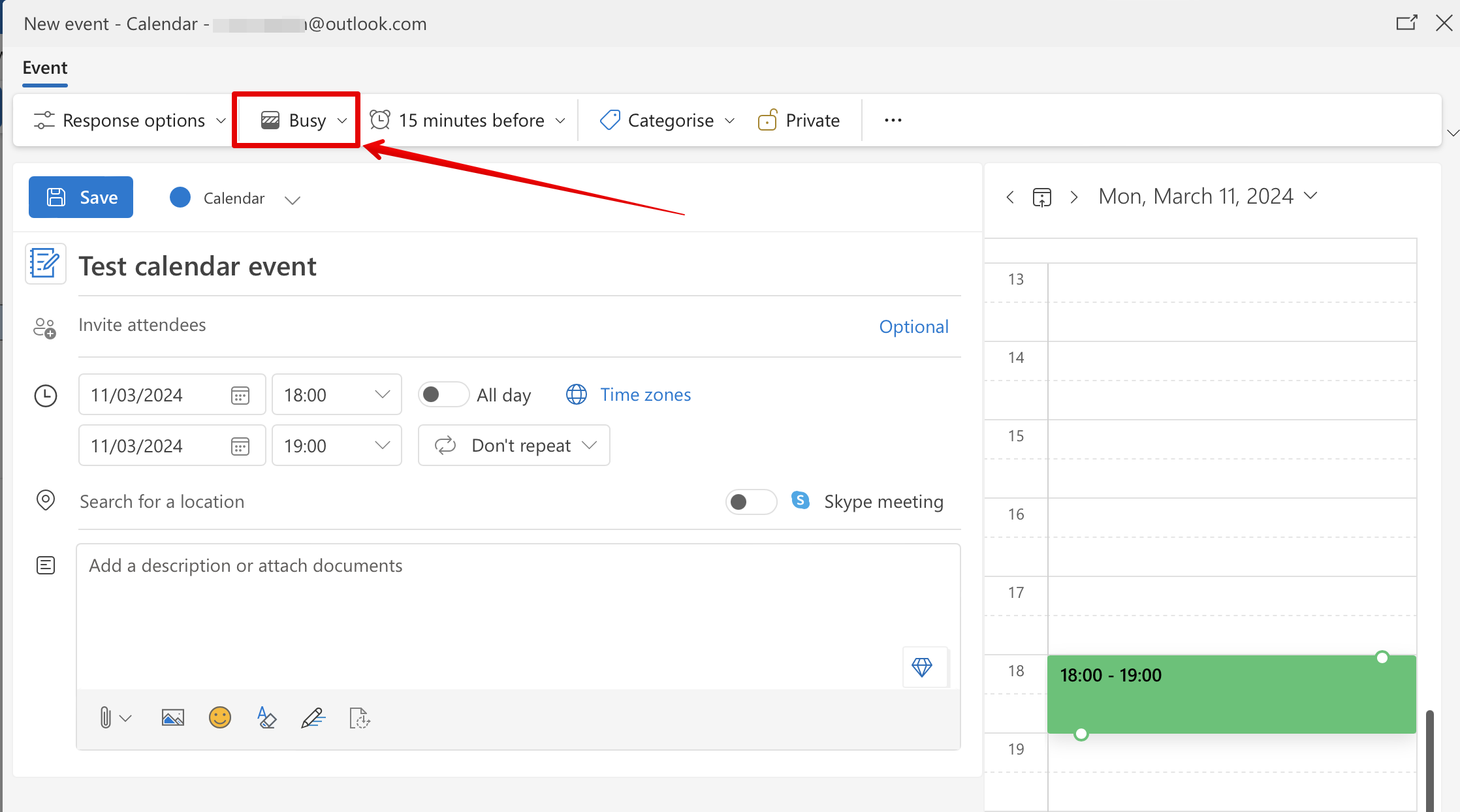
1. Bitte beachten Sie, dass die Synchronisierung bis zu 10 Minuten dauern kann; 2. Wenn Google/Outlook die Kalender-App aktualisiert, drücken Sie erneut auf die Schaltfläche "Exportieren", um zu synchronisieren; 3. der falsche Kalender wurde ausgewählt (unter Individuelle Funktionen//Kalender-Synchronisation//Einstellungen//Bitte wählen Sie einen Kalender aus) oder Sie verwenden einen Microsoft Exchange Server-Kalender; 4. Die Zeitzonen in Ihrem Google/Outlook-Kalender und Ihrem SimplyBook.me-Konto stimmen nicht überein. 5. Google-Kalender-Ereignisse sollten für die 2-Wege-Synchronisation als "belegt" markiert sein, Outlook-Kalender-Ereignisse sollten nicht als "frei" markiert sein, um Zeiten auf der Buchungsseite zu blockieren. Beispiel aus dem Google-Kalender:
Beispiel aus dem Outlook-Kalender:
Der SimplyBook.me-Termin wird zweimal im Google-Kalender aufgeführt
Das kann an der Einstellung des Google-Kalenders liegen, dass Termine automatisch aus Ihren E-Mails hinzugefügt werden. Wenn Sie also Bestätigungs-E-Mails mit Buchungsdetails erhalten, fügt Google diese automatisch zu Ihrem Kalender hinzu. So deaktivieren Sie diese Option: Klicken Sie auf das Symbol "Einstellungen" in der oberen rechten Ecke von Google Kalender//Einstellungen und deaktivieren Sie das Kontrollkästchen neben der Option "Ereignisse aus Google Mail automatisch zu meinem Kalender hinzufügen".
SimplyBook.me-Termin wird doppelt im Google-Kalender angezeigt
Dies kann an der Google-Kalendereinstellung liegen, die automatisch Ereignisse aus Ihren E-Mails hinzufügt. Wenn Sie also Bestätigungs-E-Mails mit Buchungsdetails erhalten, fügt Google diese automatisch zu Ihrem Kalender hinzu.
Um diese Option zu deaktivieren: Klicken Sie auf das Symbol "Einstellungen" oben rechts im Google-Kalender // "Einstellungen" und entfernen Sie das Häkchen bei der Option „Ereignisse aus Gmail automatisch zu meinem Kalender hinzufügen“.
