From SimplyBook.me
Created page with ";Wie man sie benutzt 1. Aktivieren Sie diese Option auf Ihrer Seite Individuelle Funktionen. center <br><br> 2. Und die K..." |
No edit summary Tags: Mobile edit Mobile web edit |
||
| (7 intermediate revisions by 2 users not shown) | |||
| Line 1: | Line 1: | ||
<languages/> | <languages/> | ||
<!--T:4--> | |||
{{#seo: | {{#seo: | ||
|title=Facebook Client Info custom feature - SimplyBook.me | |title=Facebook Client Info custom feature - SimplyBook.me | ||
|description=Facebook-Login für einfache Buchung ermöglichen. Kunden verwenden Facebook-Profil zum Buchen. Kunden-Facebook-Foto im Admin-Dashboard sehen. | |||
|titlemode=append | |titlemode=append | ||
|keywords=faq, frequently asked questions, booking software, appointment system questions, appointments online, calendar software, booking system, booking calendar, scheduling software, online appointment scheduling, online scheduling, plugins, custom features, facebook login, details from facebook, book using facebook profile | |keywords=faq, frequently asked questions, booking software, appointment system questions, appointments online, calendar software, booking system, booking calendar, scheduling software, online appointment scheduling, online scheduling, plugins, custom features, facebook login, details from facebook, book using facebook profile | ||
}} | }} | ||
| Line 24: | Line 27: | ||
;Wie man sie benutzt | ;Wie man sie benutzt | ||
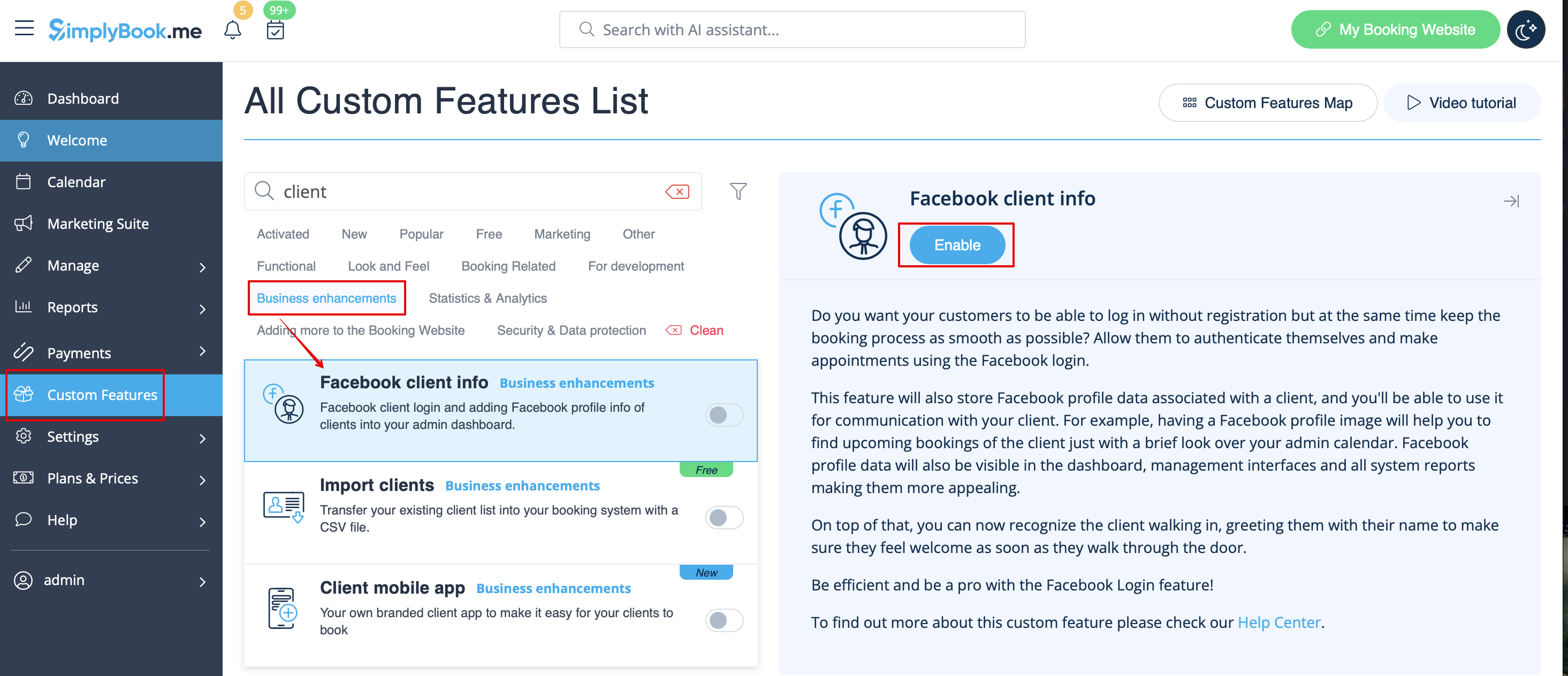
1. Aktivieren Sie diese Option auf Ihrer Seite Individuelle Funktionen. | 1. Aktivieren Sie diese Option auf Ihrer Seite Individuelle Funktionen. | ||
[[File:Facebook client info enable path | [[File:Facebook client info enable path redesigned.png|1200px| center|link=https://help.simplybook.me/images/f/f1/Facebook_client_info_enable_path_redesigned.png]] | ||
<br><br> | <br><br> | ||
2. Und die Kunden können sich mit ihren Facebook-Profilen auf der Buchungsseite anmelden. | 2. Und die Kunden können sich mit ihren Facebook-Profilen auf der Buchungsseite anmelden. | ||
Latest revision as of 17:28, 20 February 2026

Die individuelle Facebook-Kundeninformation Funktion vereinfacht Ihr Leben und das Leben Ihrer Kunden. Sie können sich mit ihrem Facebook-Profil anmelden und Termine vereinbaren. Sie können dadurch auch ihr Facebook-Profilfoto im Dashboard sehen, so dass Sie sie erkennen können, wenn sie durch die Tür kommen. Bitte beachten Sie, dass Dienstleistungen auf seiner/ihrer Timeline sichtbar sein können.
Bitte beachten Sie!
- Diese Funktion ist nicht mit der Funktion Individueller Domain-Name kompatibel.
- Diese Option wird nicht angezeigt, wenn die benutzerdefinierte Funktion Kundenanmeldung aktiviert ist (es gibt separate Optionen für die Anmeldung über soziale Netzwerke).
- Wie man sie benutzt
1. Aktivieren Sie diese Option auf Ihrer Seite Individuelle Funktionen.
2. Und die Kunden können sich mit ihren Facebook-Profilen auf der Buchungsseite anmelden.


